



























New on LowEndTalk? Please Register and read our Community Rules.
All new Registrations are manually reviewed and approved, so a short delay after registration may occur before your account becomes active.
All new Registrations are manually reviewed and approved, so a short delay after registration may occur before your account becomes active.
Dark Theme Config
To activate the default dark theme hit the button as shown below. To switch back to standard "bright" mode hit the same button again.
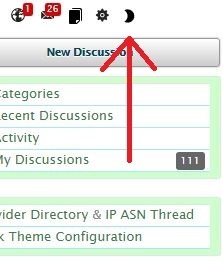 If you modify the standard dark theme using the hex codes below, the same button will apply your custom configuration after hitting "save" at the bottom of this page.



