

























New on LowEndTalk? Please Register and read our Community Rules.
All new Registrations are manually reviewed and approved, so a short delay after registration may occur before your account becomes active.
All new Registrations are manually reviewed and approved, so a short delay after registration may occur before your account becomes active.



Comments
@jimaek we can submit corrections to this URL right?
https://geodebug.globalping.dev/
Submitted a couple, hope this is the right place.
First try to fix the location in the dashboard, and if it's not possible then yes, feel free to submit that form
Lately it seems everyone is launching server monitoring dashboards. We already have a good looking dashboard, and we have probes that could act as agents.
Should we add basic server monitoring stuff to it like CPU, RAM, Disk? Would anyone use it?
Probably not with globalping in my case.
If it could also monitor open ports (e.g. "send an email if TCP/9001 is closed"), then I think so. But I wouldn't do internal stats monitoring for privacy reasons (I run Tor relays and giving access to things like realtime network throughput or CPU usage can assist in deanonymizing users of those relays).
Pushed another change to https://globalpi.ng/
There is now a search/sort function that lets you view public probes by ASN or Country.
Thanks to @oloke for the suggestion.
You can now use Globalping with Uptime Kuma. Just update to the latest version and create a new Globalping monitor.
You can add your API token in the settings!
https://blog.globalping.io/global-monitoring-uptime-kuma-and-globalping/
I see you added MCP.
Recently, like 5 days go, llama.cpp added MCP.
I thought its as easy as get a token, so I can burn my credits.
Turns out, your API dislikes my setup.
I just added https://mcp.globalping.dev/mcp as MCP server.
Gave it my token in the headers, but your API is unhappy with the origin.
Despite me having no origin set in the webinterface and it also says, if you set no origin, all origins will be accepted.
It took me only three years, but my hardware probe is finally online. Had to flash the current firmware to the SD card before it started doing anything but now it is happily blinking away.
Love that little guy.
@Neoon We're looking into it
Globalping has been super useful in troubleshooting routing issues and tuning anycast setups, thanks.
My question is: how can I, as a user, flag probes that have an obviously wrong location? I run into them somewhat regularly. E.g. AS26277 probes in 'Las Vegas' have 1 ms RTT to Singapore, and 164 ms RTT to LA.
Glad you like it! If you own the probe then you can do it in the dashboard otherwise it's best to just email me at [email protected]
There used to be an open issue on the github I believe where @jimaek would review requests for geoip updates. But I can't find it anymore.
I do however see they have this page now: https://geodebug.globalping.dev/
But that page seems more tailored to managing the GeoIP for your own probes, since to my knowledge probe ips are not disclosed on the website.
Perhaps a better solution would be for the geodebug page to show a list of probes under an ASN, or start showing an explicit probe ID in the tests and allow that as a correction input under the geodebug page.
Allowing entering an ASN sounds like a good idea, I'll look into adding it to the existing tool
btw quick question, is everyone aware you can change the probe's location in the dashboard or its not obvious and its a surprise for some?
related to this, IMO if a probe is set to X location, it shouldn't suddenly change because some geo provider changed their records:

in the very unlikely situation where a server is relocated to a different city/country, it should be the user the one responisble for that.
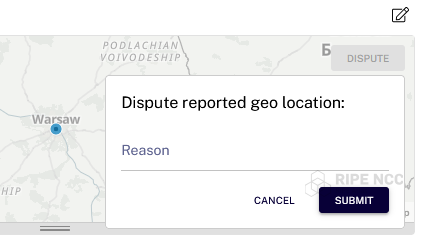
And with this, adding a geolocation dispute would be awesome, just like RIPE does:
That logic is supposed to correct probes in the wrong location after corrections by the geo IP providers. You had set a custom city? If that is so then I think we shouldn't overwrite it. I will open an issue about this
I believe so but not entirely sure. This also usually happens with dual-stack servers and those having mismatching geos. Right now geo seems to be bound to the main probe address instead of the probe itself, which makes it a bit messy.
I had no idea. I thought I had to file a report (which afaik still hasn't been handled). Can it be changed arbitrarily to correct the real location without having to wait on a report being verified?
It might be good to use IPInfo as a way to verify a probe's real location (or other Globalping probes, but IPInfo has an API that makes this easier), or at least to confirm that the self-reported location is not different from its IPInfo location.
Been contributing for quite a while. Adding a new probe from time to time. Although the docker container usage is a bit higher than I'd like.
I have a hardware probe, since I added a docker probe, its shows as offline.
Despite its connected and even the live log works.
Any ideas on this?
@forest it can be changed arbitrary between provided options
@Monocle it should be extremely low. Maybe you checked after you started it? We run updates during that time
@Neoon in the same network? Only 1 probe per IP is allowed so it likely just disconnected. You can verify by checking the logs via ssh. Just shut down the container and it should reconnect automatically
No, It would be nice to actually have some kind of debug message.
Login via ssh using logs@IP or devlogs@IP for more details.
If everything seems fine but it's not online in the dashboard that means it lost adoption status.
It could happen if the IP changed while the probe was offline.
And mcp fix was merged
nice, will try it in a bit.
Yea I forgot that part with SSH into the hw probe, its online again.
Thanks though.
Wondering which provider has the largest network per continent? Wonder no more https://globalping.io/network-providers
We also upgraded the probe network map with grouping and filters https://globalping.io/network
Any possible chance to add login outside github on https://dash.globalping.io/ ?
My github account funnily got flagged (for whatever their reason or maybe my ISP assign me an IP that I was randomly placed around Java Island) and can't login with oauth due the restriction
And my hardware probe already detached/unlinked from my account (found on log)
We do want to do that but realistically it won't happen soon as we're limited in dev resources and currently working on time series data implementation.
Improved VPN detection and email notifications are also coming soon.
PM me and maybe we can find a way to bypass the issue
Latest updates: