

























New on LowEndTalk? Please Register and read our Community Rules.
All new Registrations are manually reviewed and approved, so a short delay after registration may occur before your account becomes active.
All new Registrations are manually reviewed and approved, so a short delay after registration may occur before your account becomes active.



Comments
@willie - There is not a 10GB connection by default, but you can upgrade to it depending on what dedicated root server you have. It's available for the whole DX line, the PX line, the AX60-SSD, AX160-NVMe, AX160-SSD and the EX Skylake line. The pricefor the 10 G dedicated uplink includes a 10 G NIC and is €39.00 + the Flexi-Pack fee of €12.61. The firewall feature on Robot is then not available.
Please see: https://wiki.hetzner.de/index.php/Root_Server_Hardware/en#Miscellaneous
--Katie, Marketing
I see:
"Right now we are focusing on support for Linux as an operating system. If you wish, you may install Windows on your own, and we have seen successful installations done. However, we will not provide any support for Windows."
Any guide or something?
Hi Vancete, No, we don't have any guides. However, you may be able to do a simple Internet search and find other users who have successfully installed Windows on their own and may be willing to help you. (Or perhaps there is an LET user here who can help you out.) --Katie, Marketing
Thanks for answering.
Yes, that's what I'm looking for. I've tried some thing that I found on the net, but didn't achieved it.
In fact, I think there's some bug on your system, like the 90% of the time that I try to mount a Windows ISO and retart my cloud server, it boots directly into the default installation (Ubuntu).
@Vancete -- Good news. We now have a quick guide for Windows on our Hetzner Cloud servers: https://wiki.hetzner.de/index.php/Windows_on_Cloud And here is the guide for our "old" CX vServers: https://wiki.hetzner.de/index.php/VServer_Windows/en --Katie, Marketing
There's also now a list of all the integrations that Hetzner Cloud users have been creating: https://github.com/hetznercloud/awesome-hcloud --Katie, Marketing
after mount windows iso image, i click "powercycle" button under power menu..then open console, but I am only seeing linux login all the time, it does not go into windows installation, do I need to change any boot sequence anywhere? then managed to open console right at the moment, but donot see the windows option to boot at all, what am I missing? wondering.
Since I am not a technician myself, I am not sure. As a member of the marketing team, I do not have access to many of our customer support systems. Could you please write a support request directly via Cloud Console. Thanks for your understanding. --Katie, Marketing
More good news! We've updated our Hetzner Cloud ISO library. Do you need something that isn't on the list...? Post your requests here, and I'll make sure to send them to our Hetzner Cloud team. Thanks! --Katie, Marketing

Can you add recent Gentoo http://mirror.nl.leaseweb.net/gentoo/releases/amd64/autobuilds/20180206T214502Z/install-amd64-minimal-20180206T214502Z.iso
Also, SystemRescueCD is good addition
https://downloads.sourceforge.net/project/systemrescuecd/sysresccd-x86/5.2.0/systemrescuecd-x86-5.2.0.iso?r=https://sourceforge.net/projects/systemrescuecd/files/sysresccd-x86/5.2.0/systemrescuecd-x86-5.2.0.iso/download&ts=1518102082
Thank you
Now you're talking! This might just push me over the edge. I may be the only person on LET who has resisted so far. :-)
Got help to QUICKKKLY click console and keep pressing any key to launch the windows once the button turns green...then completed the install without any issues, now on my way. THANKS FOR BEING HELP THUS FAR IN THIS THREAD.
I see you've got NixOS, which is really cool. How about GuixSD to go along with it? ( https://www.gnu.org/software/guix/ )
Thanks!
Just as a general piece of information for you LET readers: We make a bit of a distinction of whether or not you want to use the ISO image privately or publicly, since a public list is obviously harder to maintain. If there are enough requests for something to be added to the ISO public library, we will add it. However, if you just want something for private use, our Hetzner Cloud team may be able to help you out if you write to them directly at Cloud Console.
@willie - I'll add GuixSD to the wish list.
@angstrom - I had missed your message from a few days ago. I'm glad I may be slowly winning you over.
@balaji_pitchumani - I'm glad you read that you were able to successfully install Windows. Thanks for the feedback about my efforts on LET.
--Katie, Marketing
If I finally sign up, I may try to request an ISO, depending on which ISOs are publicly offered at that time. :-)
@Hetzner_OL Will there be any team accounts in the future?
There is already a feature on Hetzner Cloud for adding team members to projects and assigning them roles/access rights.
Here is how to do find the team members feature:
1) Log in to your account. If it is a new one, you will see a default project there.
Click on the project. If you already have a project and would like to add team members to it, click on it.
2) On the left hand side, you will see a key icon. Click on it.
3) In the new field in the middle of your screen, you will see a menu with a "Members" menu tab. Click on that.
4) Now you can add team members. Enter their email addresses and decide which role/access rights you would like to give these team members.
Your new team members will receive an email, which will ask them to create an account with Hetzner Cloud. The link that they go to will first send them to Hetzner Accounts where they can create and manage their master account information. Once they have an account on Hetzner Accounts, they can access Hetzner Cloud by clicking on an icon in the upper right hand corner of the Hetzner Account interface. When they enter Hetzner Cloud, they should see the project that you have invited them to.
If you have any questions about this feature, write a support ticket via Cloud Console, and our technicians will be happy to help you. --Katie, Marketing
Thank you! Don't know how I missed that.
No worries. It's good for us to know when things are a bit tricky to find. --Katie, Marketing
Good news! Need a temporary power boost for your #HetznerCloud server...? We have changed our "Upgrade" feature to "Rescale". Now you can upgrade CPU/RAM and downgrade it again later!

For detailed questions, for example, how this may affect your invoice, please write to our team via Cloud Console, and my colleagues will be happy to answer your questions. --Katie, Marketing
Is there any way to subscribe to maintenance notifications? The node my cloud server is hosted on had maintenance today, which I only noticed due to an uptime monitor which alerted me.
I found a hidden _status API endpoint which shows all (planned?) maintenance for your cloud servers but unfortunately it's not accessible with a regular API token. Could that endpoint be made public in the future? I wouldn't mind polling that every hour for upcoming maintenance.
@Aleksio For now, you can set up maintenance notifications by going to the user interface Robot. (From your main account on Hetzner Accounts, go to Robot instead of Cloud.) Once you're on Robot, look for "Service" and then "Fault reports".
I believe the notification system for Cloud is being discussed internally. I will update you all here if there are any changes, and I will make sure to pass on your suggestion, Aleksio. --Katie, Marketing
We've now added NixOS to our ISO image library for the Hetzner Cloud! --Katie, Marketing
For any of you LET readers who have been using our cloud API and want to access the console of a server, you can now request direct access using the "Request Console" server action (VNC over WebSocket). Docs at: https://docs.hetzner.cloud/#resources-server-actions-post-16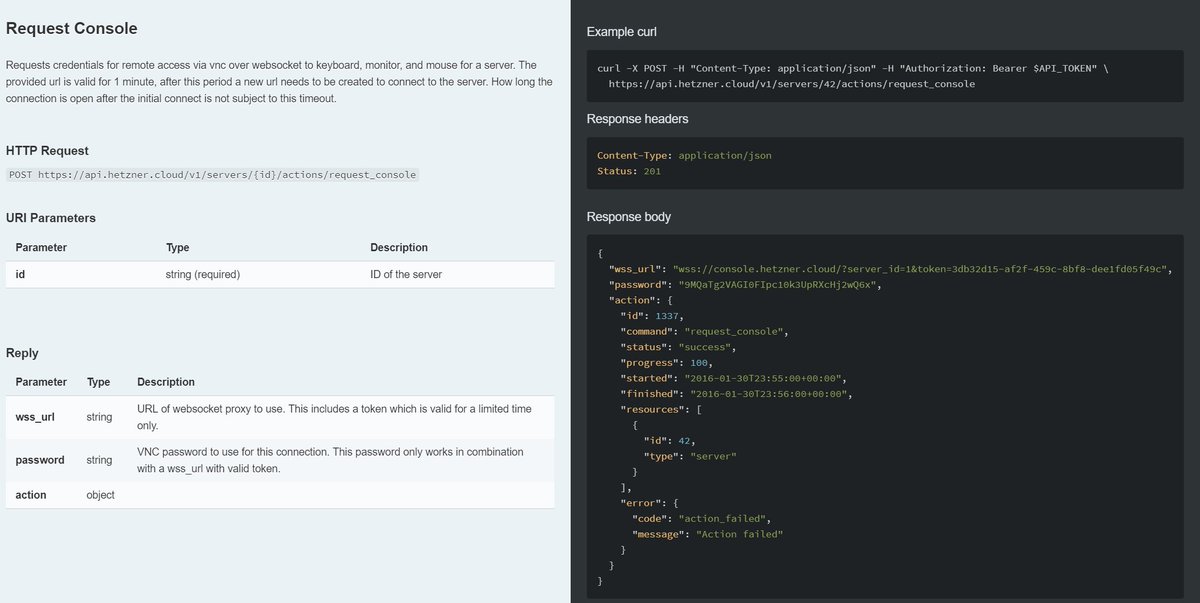
--Katie, Marketing
@Hetzner_OL is it cheaper to resize the server if I don't resize the disk? Or same rates but allows me to downgrade later?
You weren't the only one who didn't know where it was. So we made this:
The price stays the same. It just allows downgrading later. For more information about how any of our features affect pricing, please write a support request directly to our technicians via Cloud Console. --Katie, Marketing
Hey LET readers, We just made it easier to request more Hetzner Cloud resources via our Cloud Consol.
--Katie, Marketing
That was there long ago, like in the Feb 8th screenshot! I hoped you actually meant GuixSD, but no such luck
Do you mean rescaling? I don't see anything else there that looks new, but I may have missed something.
If anyone cares I finally ran a "production" task on a cloud server, a monthly archive compression script that takes about 2.5 hours (100% cpu on all 4 cores) on my i7-3770 dedi. I spun up a 32gb cloud server and ran the same script on the VM's 8 cores and iirc it took about 2 hours, about what I'd expect based on frequency scaling. I wrote it up in a little more detail on hostballs a couple weeks ago and can post it here if anyone cares.
@willie - Before if a customer wanted to go beyond the resource limits, she would have to write out a support request. Before the Limits tool, new customers, especially ones who aren't on LET, didn't know that they could request more limits, and might have gotten a bit frustrated. The Limits tool hopes make it easy for the customers to see that they can request more resources and to make that process go just a little bit more quickly. --Katie, Marketing