




























New on LowEndTalk? Please Register and read our Community Rules.
All new Registrations are manually reviewed and approved, so a short delay after registration may occur before your account becomes active.
All new Registrations are manually reviewed and approved, so a short delay after registration may occur before your account becomes active.



Comments
new month! i shall run all the yabs again.
Amazing! Thanks for the submissions.
The "Best Value" feels a bit played by GreenCloud dominating the section with 3GB RAM VPS for $0.25 monthly ($3/yearly).
I mean, that's some pretty damn good value, and it's a bit odd for you to say that, considering on the first page there are only 5 GreenClouds, then 3 other providers, and the rest being CometVPS
That's fair feedback.
I have to think through how to solve that.
I'm open to all suggestions on how to make the data more useful.
By not rating things as "good" or "bad" on their own. It should just give information about each service so that people can find what they're looking for. It shouldn't assume that people have certain priorities. For example, the emphasis on CPU performance is way too high. If there have to be rankings, they have to be in categories that can be independently sorted (memory, CPU speed, network speed, price, etc.).
The value ratio is good. But, it could be better if value ratio for each region, country, metro. Furthermore, filtering by minimum fio speed (4k,64k,512k,1m), port speed, disk size, geekbench score, price. Also, a collaboration with @whynotlearn will be optimal.
I think the optimal presentation layer is 2D graph canvas with ability to mark selected plans. The Y axis should be core/ram/disk/port speed/bandwidth available, and X axis is price. Tabbed toggle to switch the Y axis.
Next problem is aggregating YABS plan, but that should be doable with core/ram/disk ratio
More than happy to collab. Let me know if anyone wants more details if anyone in general is interested to collaborate.
I do think it's a fair point that the scoring system weighs CPU performance too much right now. We are thinking through the best and most fair approach to improve that.
Excellent suggestions. Working on it.
I'll send you a message.
Just to be clear, are you talking about the Advanced Search (https://serververify.com/advanced-search) or Value Index (https://serververify.com/benchmarks/value-index) for adding the additional filtering options?
Let me break down.
@whynotlearn has different approach. He makes it Geospatial based -> geo/routing/facility. Then, make Airbnb like display
We can include a table showing a score that factors in both the number of reviews and the average rating. This allows sorting by providers with the most reviews and highest scores. The derived score can be calculated by multiplying the average rating by the number of reviews.
https://serververify.com/hosting-providers
I am working on this list now.
.
I am still working out a way to solve for cases like this. I haven't forgotten.
Nice. Any progress?
Here are the latest ServerVerify enhancements we recently released:
Over the next few weeks, we plan to release additional user-facing features, including:
New on ServerVerify: Provider Recommendation Percentage
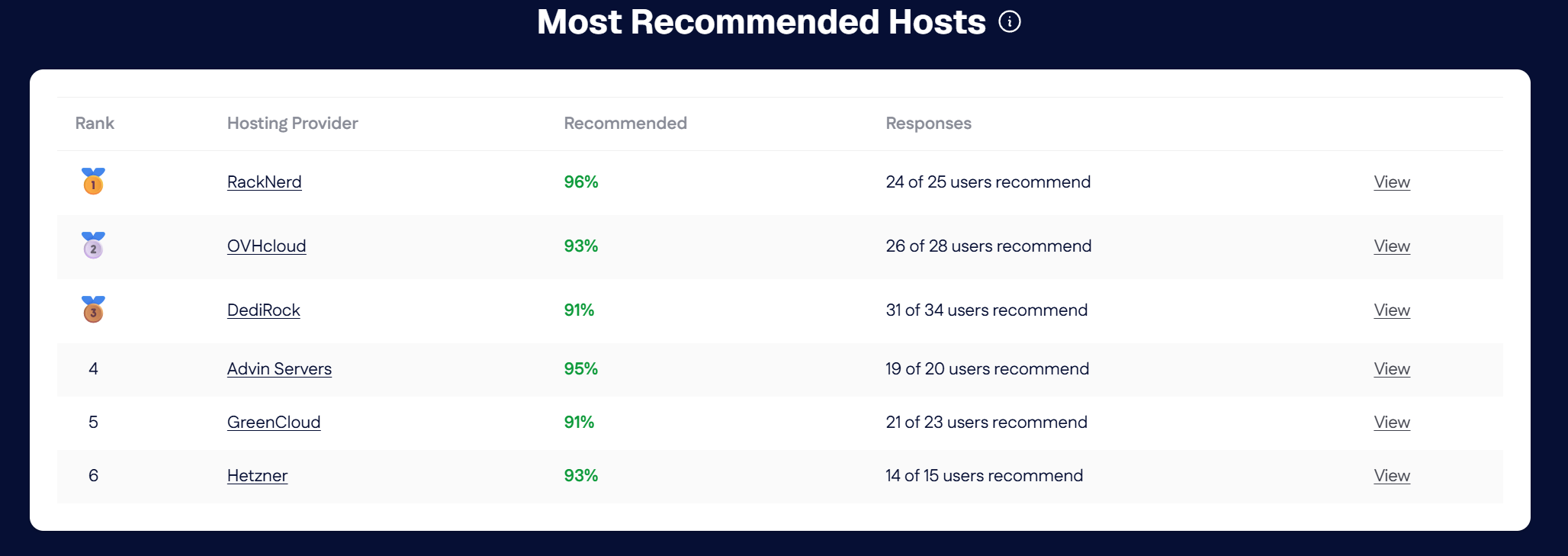
ServerVerify now shows the percentage of benchmark users who would recommend their hosting provider. For the past few months we've been collecting answers to "would you recommend your host" when a benchmark is submitted.
You’ll find the new rating on provider profile pages. The percentage is calculated using responses collected from users when they submit a benchmark, with results based on unique users.
This adds another useful data point alongside benchmark results and customer reviews, giving users a quick view of how existing customers feel about each provider.
I really like this feature because it's less likely to be biased by providers who hunt for positive reviews. It's a pretty real gauge of how users feel about their provider.
https://serververify.com/benchmarks?provider=colocrossing -> https://serververify.com/advanced-search (/html/body/main/div/section[1]/div/div[1]/div[2]/div[4]/a)
Should be https://serververify.com/advanced-search?provider=colocrossing
Wait,
providerdoesn't work on advanced-searchIt should be https://serververify.com/advanced-search?providers_search=&providers=50f29195-efdb-4888-987e-294c73836cd8
Working on this now.
We just rolled out several new recommendation focused features on ServerVerify.
Provider pages now show the percentage of benchmark users who would recommend that host, along with the number of unique users included in the result.
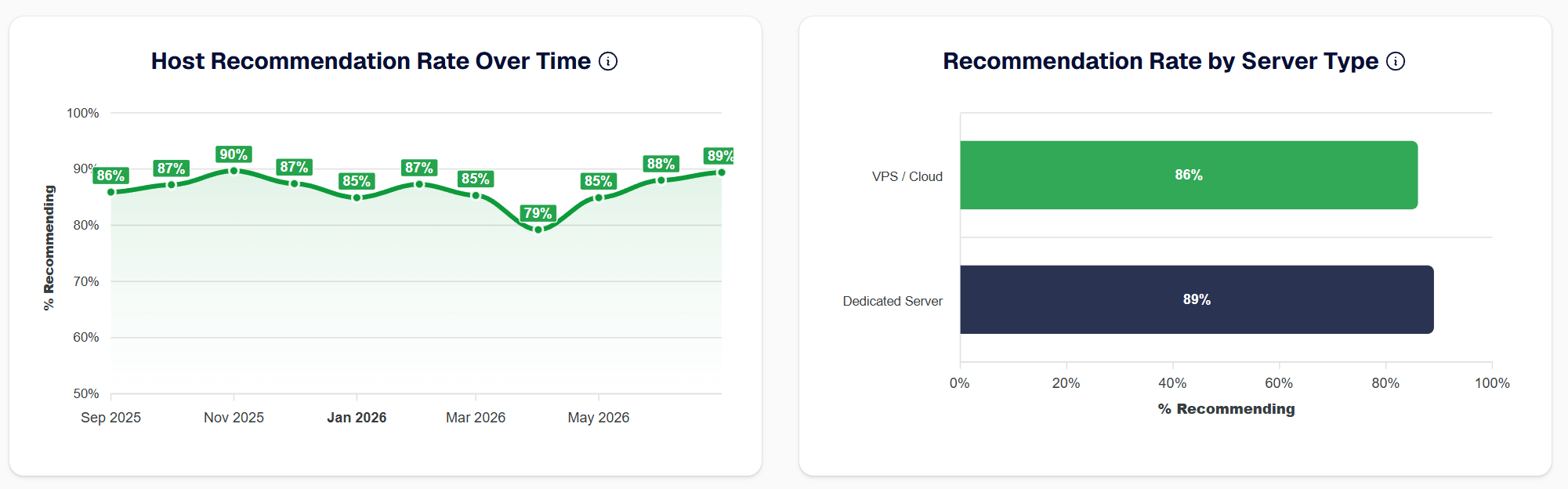
We also added new data to the Insights page, including:
The goal is to add more real user sentiment alongside the benchmark data and make it easier to see which providers customers are actually happy with.
Take a look at your provider profile and the updated Insights and Leaderboards pages:
https://serververify.com/insights
https://serververify.com/leaderboards
Feedback is welcome.
New Leaderboard tables (note this is based on the Wilson score ranking system)
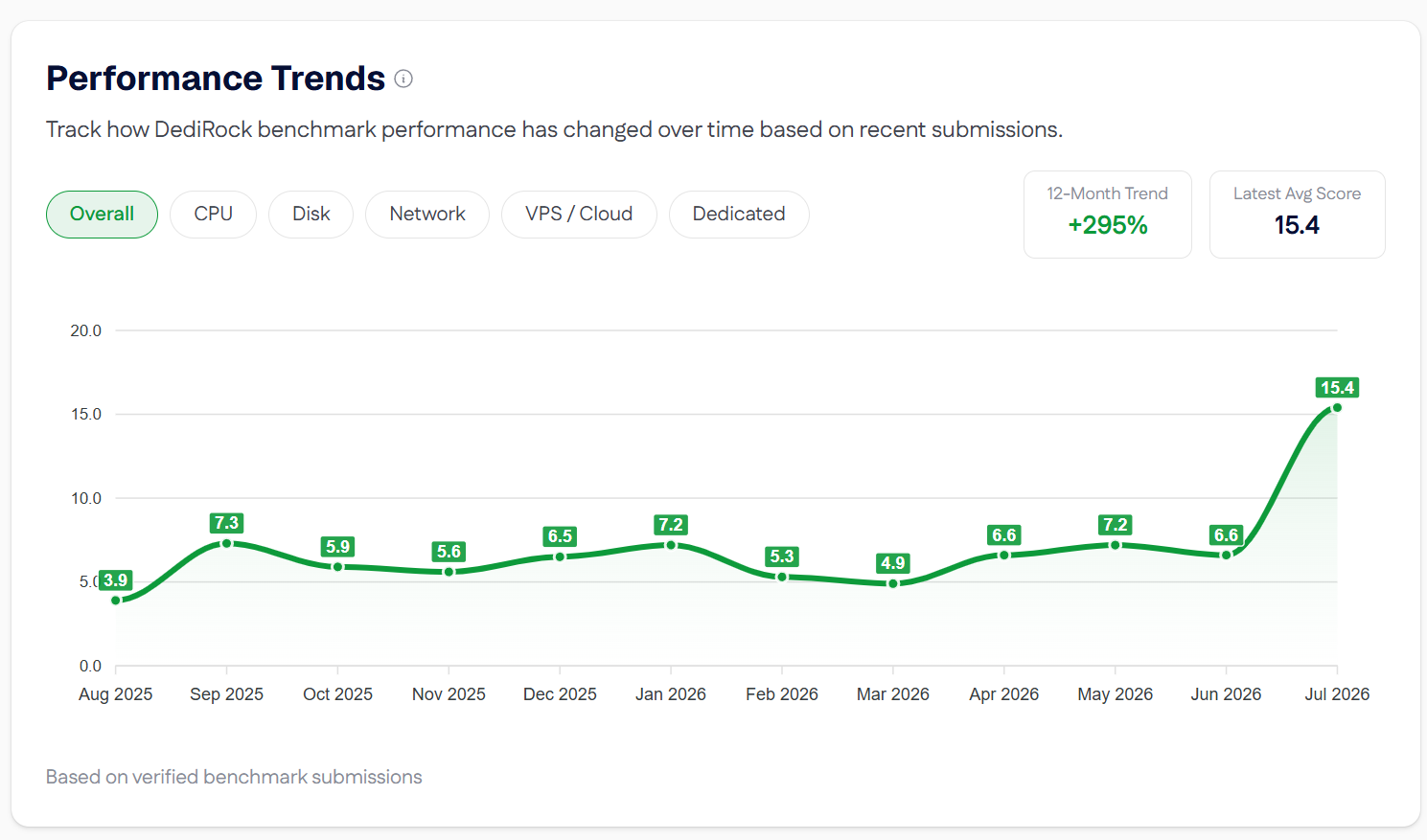
This shows benchmark performance per provider over time (on the provider profile). In this case, we see @DediRock getting a big boost after rolling out their new i9 server lineup on their historical performance graph.
New data on the Insights page:
Hello @jbiloh
Awesome man Thanks for posting. Really cool feature.
The i9 Dream™
The ServerVerify Advanced Search provider filter bug has been fixed.
When viewing benchmarks for a specific provider, clicking Advanced Search will now carry that provider selection over and keep the results properly filtered. Thanks to @rpqu for reporting it.
I've confirmed the feature. Thank you
Awesome. Thanks for confirming.
If there are any other bugs or features you think of just let me know.
We did fix this by only allowing 1 entry per user per provider (the latest submission).
Any other features people would like to see added to ServerVerify?