



























All new Registrations are manually reviewed and approved, so a short delay after registration may occur before your account becomes active.
Help needed. Web Horizon Network Traffic Metering Error
 ask_seek_knock
Member
ask_seek_knock
Member
Hello, everyone.
I'm a customer of Web Horizon since 2021, and I appreciate its affordable and stable services. Now, here is a problem I've encountered for 2 years, but worsened since last migration. As the title suggests, network traffic metering is not accurate at all, for 2 reasons:
My VPS is IPv6-only, but when I monitor the traffic with
sudo iftop -bni eth0, there are traffic from and to IPv4 addresses, and there are nothing I can do, for examplesudo ufw deny 0.0.0.0/0 to 0.0.0.0/0;
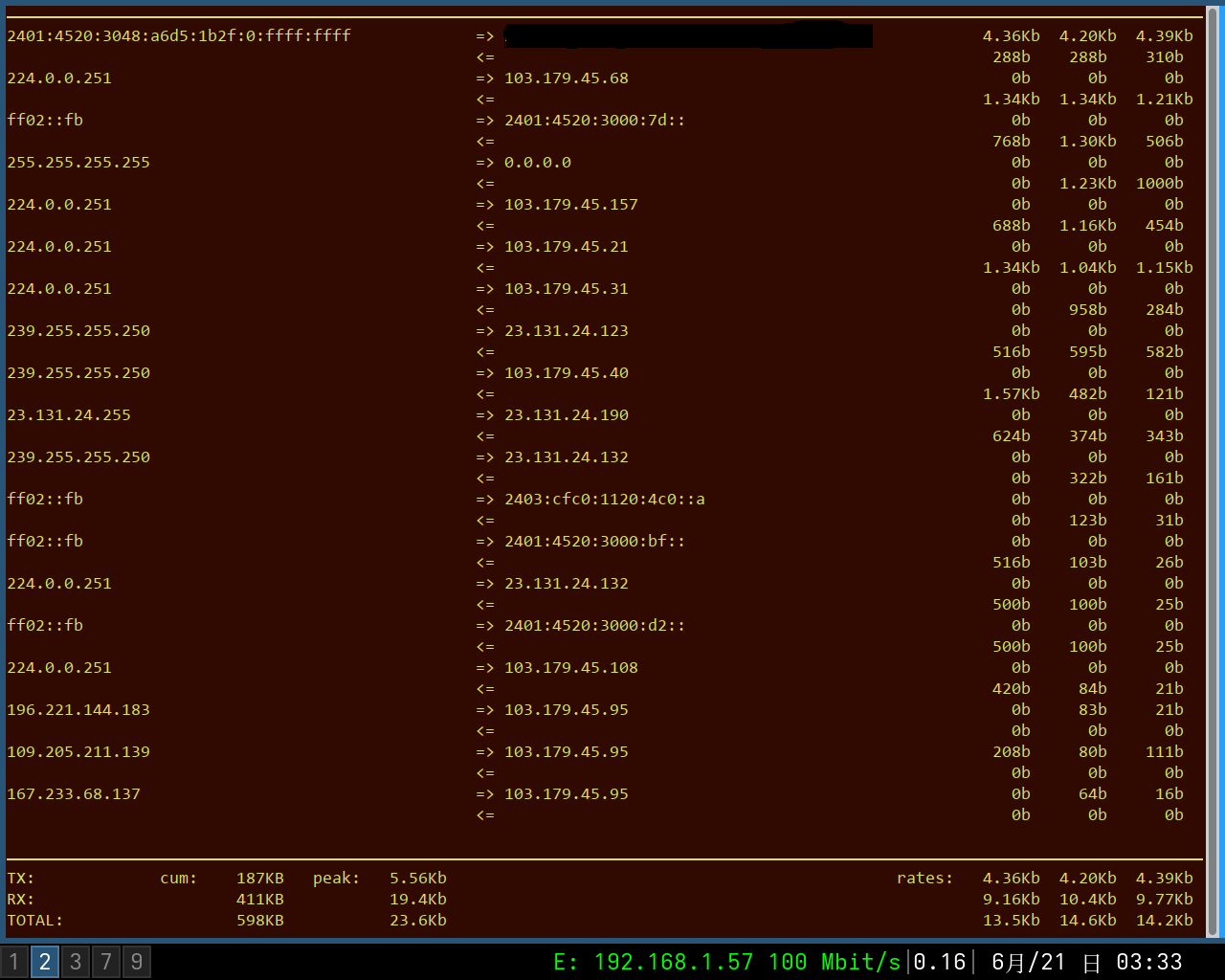
(Note in the screenshots, when no application except SSH use network, there are connections from and to IPv4, and in the following one, inbound traffic speed is about 0.2 Mbps, that is 63.28 GB per month.)The proportion of inbound and outbound traffic is abnormal as well, since this is a private VPN, the expected proportion of inbound and outbound traffic should be around 1:1, but actually it is about 6:1.
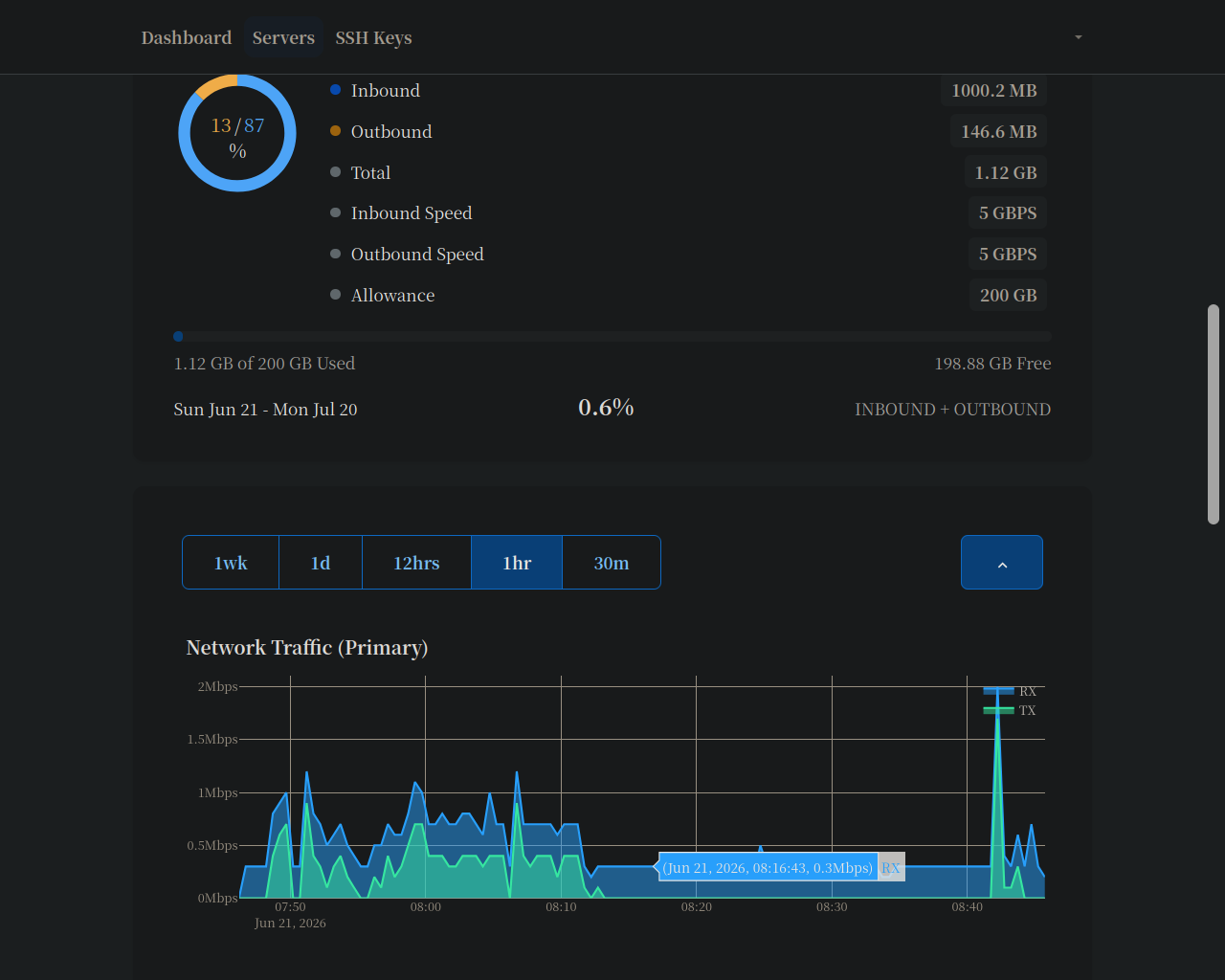
Since monthly traffic allowance is only 200 GB, and tens of GB is not consumed by me, so I really appreciate your help. By the way, I've opened a ticket in late April, which staff responded fast, that they would investigate.
Thank you and have a nice day. @Abd



Comments
There is nothing you can do if it is broadcasted traffic.
Also, why it is thread and not a ticket? If you were my customer I would be very angry at you for not addressing this privately.
LowEndEffort
I've tried that, and stated at the ending of post, I opened a ticket in late April, which the staff replied fast and politely, that they would investigate. As the problem seems have worsened since April's migration, I have no other choice, but to share this thread.
Do you still believe you were justified to get angry now? Thanks for replying, though.
It is definitely better than no ticket at all but did you ask them to apply e.g. some workaround like add extra bandwidth allowance until they solve the root cause?
If you did not communicate that this is important issue for you and just escalated it publicly without letting them adjust priorities is not good.
Actually I've suggested that when Web Horizon was about to migrate from OpenVZ to KVM, because the previous control panel limits the speed after network allowance is reached, but the current control panel, according to Abd , would cut off network until next month.
So I suggested then, a straight cut off is reasonable, but would be nice if a little more allowance is given, say 10% or 20%, though most customers in most cases don't use that much at all. Then, that's it, no more reply. If I had been given 10% more allowance, I would not open the last ticket altogether, and of course this thread would not exist at all.
isn't that bad, trust me...
I know the feeling. Actually i can offer worse percentage of included bandwidth to foreign traffic at another host. Supposedly there's some misconfiguration with VLANs but i don't really push it since the remainder is enough for me. Seems like it's kinda hard to track down or something or the recent ~20kb/s reduction actually is their fix. Like i said, i don't really care about it.
Thanks for replying. You're right and I totally agree that in most cases the traffic allowance is enough, and I've never reached the limit, but the problem seems get worse, so I'm worried what if one day I can't access the VPS for the rest of month?
Of course I can migrate the single service to InterServer in the U.S, which has been stable for more than one year, except one network outage lasting about half an hour, but you know, I've bought several affordable VPS here, only a small proportion are stable, and Web Horizon is one of the stable ones, so I want to use it for as long as it is possible.
Yeah or if you actually wanted to something with your traffic. I don't have much more traffic than you do on the box, where i'm seeing this and ~50% of it gets eaten by ARPs and random other bullshit... It's just a bad configuration on the hosts side in my opinion and if i weren't paying total peanuts i probably wouldn't be amused.
Like others said before there isn't really any option besides pestering them but who know maybe lowend helpdesk will actually accelerate something for once
@webhorizon
Great, please post more as I'm an intermediate English learner as well. I can understand the meaning of the above sentence if looking at it for several seconds, but I probably cannot by only hearing it, though guessing people's attitudes from their tones or facial expressions is easier.
Thank you very much for making the useful reply.
Thanks for the flowers but i'm probably not the best example of grammatically correct
English. I guess years of internet use have done a thing or two but in the end i'm still just a non-native speaker with hardly any education whatsoever (well, technically not entirely true but practically pretty much on point)
English. I guess years of internet use have done a thing or two but in the end i'm still just a non-native speaker with hardly any education whatsoever
You're modest, and that reminds me of a lecturer in school, Mr. Wong, who claimed himself was not knowledgeable at all, because his teacher, a master in the area in last century, claimed himself just a little smart with a little efforts. So when talking with others, I just admit I'm too lazy and not smart at all, which is plain truth, as I haven't finish reading a single book for years.
Hi
This is still an active area of work on our end, and we're evaluating network-level filtering options to address it properly.
A few clients opened tickets about this and I remember we either increased their monthly traffic or asked them to notify us in case they run out of traffic because of this.
Please also mention the ticket number.
It is very kind of you to reply quickly and politely, which is one of major reasons why I support Web Horizon, besides stable service.
I haven't get monthly traffic allowance increase nor have I used up that, but considering the problem seems worsened (the proportion of inbound and outbound traffic jumps from about 3:1 to 6:1 for a private VPN usage), so I'm quite worried maybe I still use same traffic but traffic runs out.
Anyway, here is the ticket number: #955427
Thank you and have a nice day.
You are correct; I forgot to suggest the options; sorry about that.
No worries; please just open a ticket if that's about to happen and we will take care of it.
Thank you, I guess it would be unnecessary as I only used 50% traffic last month even when the problem seems worsened. I feel assured when learning that you were "evaluating network-level filtering options to address it properly", and I will not complain further if the problem is resolved within this year.
Thank you very much for replying and I'd like to change the title to [Resolved], if anyone knows which manager or moderator should I mention?
You can tag @angstrom. I'm not sure if he will change the title but i guess he will close the topic if you request it.