



























New on LowEndTalk? Please Register and read our Community Rules.
All new Registrations are manually reviewed and approved, so a short delay after registration may occur before your account becomes active.
All new Registrations are manually reviewed and approved, so a short delay after registration may occur before your account becomes active.



Comments
Look at support ticket AZ421122 - I'm getting too annoyed by the way this issue is treated by your support team.
It already started when I entered the ticket: the first response/questions were already answered in the initial ticket.
And now they do a ping of less then a minute, don't see packet loss and just say "we don't observe it", while it is an issue that's on and off. I do monitoring (and so should you) and then it's clear that there is something going on. In my IT days, if I got a ticket that a customer would have taken the time to create and to add evidence like graphs with it and I wouldn't see the issue occuring, I would test again and again, for a longer time, to be sure I didn't miss anything. Now another day (or better: night) has gone, and since it mainly occurs in the night it's just lost time.
Also, the reply from your team contains "Minimum = 208ms, Maximum = 225ms, Average = 209ms". WTF? I'll have to go three times around the globe from/to a descent other host to get those kind of latency... if that's where they are testing from/to, it makes me even more worried.
I'll add some graphs from this night - but if it keeps on coming back like "there's nothing going on" I'll report it here.
Seeing the timespan/constant starting time, it most likely is someone/something doing quite some data transfer (I'd guess backups is a contender) and that is saturating a network port or device. With proper infrastructure monitoring that shouldn't too hard to identify, since traffic graphs will tell where it's coming from.
Update: I received this support ticket reply:We made some network level tweaks again now. Could you please check this and verify the issue now.I have tested both of my VPS and do not have the packets' losses anymore! I think the issue is completely fixed~.
@rm_ : can you double-check from your side?
We can only say that after it's fully green for a few days, or a week. Right now it's ok, but earlier today was bad too.
Most likely from India.
Fingers crossed~! 🤞
@Calypso ,
Thank you for sharing the details and the graphs. I completely understand your concern, especially given the intermittent nature and the timing of the issue. You’re right that short tests are not sufficient in such cases, and this is being addressed internally.
To give a clear update for everyone here:
Last week, we identified abnormal traffic caused by a spam-related incident on the network. While implementing mitigation (firewall adjustments), this did lead to intermittent packet loss during certain periods, particularly under load.
This has now been resolved, and the network is currently stable.
We are continuing to monitor traffic and load across nodes to ensure there is no residual congestion or recurring pattern affecting performance.
If anyone is still noticing any issues, please continue open a ticket with support team to resolve issue promptly.
Appreciate everyone for highlighting the issue.
Yes, that was my initial thought too. But on the other hand, if your business is "internet" I'd expect to have at least a decent connection. 200ms seconds latency brings me back to 1991 after an error on the only network cable to the US and pinging a server in Washington, seeing the path went through almost all continents...
I'll keep on monitoring it ofcourse (because I always monitor) and hope it's solved by now. And yes, it was better as a couple of days ago, but still not at the level before the 25th.
Nothing is resolved. The past 1.5 hours up to right now have been rough again (UTC+5 on the graph):
@HostSailor how about you install a SmokePing or another kind of continuous monitoring, and not rely on clients to diagnose your network?
Meh, the network problem is back! That was fast! And now the CPU seems overloaded!
arguably it's worse right at this moment than i've seen it before.
If it’s happening on both IPv4 and IPv6, blaming your ISP is straight up support script nonsense. Refusing to move the VPS to another node is a massive red flag
I dunno, I think we've accumulated enough responses here to see it isn't related to any single node. It sounds like overly-aggressive filtering going on from what @HostSailor posted earlier (my interpretation, mind). Not much we can do but give them time to get it sorted.
The main problem: you hear over and over again "we've sorted it" but nothing really changes. Today exactly the same: "We have applied additional network-level adjustments on our end to further optimize connectivity and address the issue reported". Last couple of days the issue was between 1am and 8am, today - beside that timeframe - also between 12am and 6pm.
And every time "please re-test". No, they should keep an eye on what's happening. I have different hosts on different networks that see the same behaviour from/to this HostSailor VPS. So they should be able to see it too.
More and more it looks like they're randomly trying things, "O, now it could be solved" and then wait for their customers to react again. This is going on for a couple of weeks now.
Wondering, so please answer truthfully, what has been seen this afternoon, because (as you can read here) the issue is still there/returned/whatever.
The first step towards solving is to see what is happening; confirm what your customers experience. If you can do that, every step you take you can see if it brings you near a solution. If it appears so, keep on looking, wait for a long enough time, to see if it returns.
I've heard, since Tuesday, in my ticket 4 times already that "it has been solved" and it hasn't. Looking at that my conclusion is going towards "you don't have a clue what's happening or how to solve it".
@Calypso I think they don't know (yet) the problem for sure, otherwise they'd have solved it (already).
That's exactly what I meant; randomly doing things and saying it is solved doesn't mean you understand it and have really solved it.
This night things went OK, so maybe there is progress... but it went OK for a day or so before before it returned.
Well, this afternoon (12am to 5pm) the issue was back again...
My NEW theory is that someone has been granted unlimited bandwidth and the network just falls when the backup cron is triggered..
time zone:GMT+8
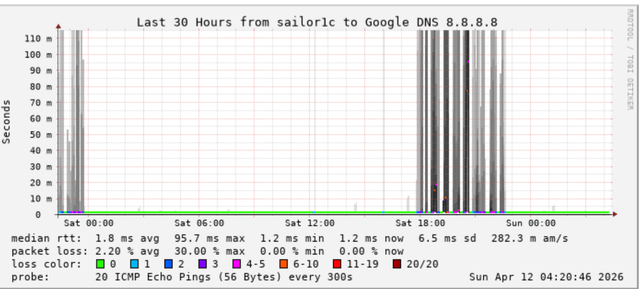
Yep, that's most likely - mentioned it before:
Main thing: as a hosting provider you should also see this and if the first reports come in you should be able to act upon it.
And right on cue, 11:30am [local time] it started again...
Any updates @HostSailor? Having these issues for almost 3 weeks now.
BACKUPS...STARTED!
I don't have any update in the ticket~
I don't trust the handling of tickets of them. Have 4 times "we've solved it" already, problem is still there, and the returning questions/remarks you get are of a level that my neghew of 11 can give too.
Could it be a hardware issue or DDOS attack? I hope the problem has been identified.

You sure it's only 3 weeks?

and I would also go to the "it's backup" as this starts in the middle of the night for EU (local timezone) and the normal traffic should drop rather than increase
Hostailor HQ POV

I agree things are going on some time longer, but the packet loss became a real issue around the 25th of March - the my monitoring started warnings that something was going wrong from multiple locations at the same time.
Now that's the funny part. It started that way, and last week all of a sudden (after the amount of reports here) it shifted to daytime.
Like someone thought "If it's too much of a problem when I start at 1 am, I'll start at 11:30 am"
Hello Everyone,
Thank you for reporting this and sharing the details.
We are currently investigating the issue on priority. From our initial checks, it appears there has been abnormal traffic activity on the network, likely related to spam/abuse originating within the network, which is impacting performance intermittently.
Our team is actively working on isolating the source and applying the necessary filtering and mitigation to stabilize the network.
We understand the impact this is causing and we are monitoring it more closely over extended periods to ensure it is fully resolved rather than relying on short tests.
We’ll keep this thread updated as we progress.
Thank you for your patience and sincere apologies for all the inconvenience.
Now the non-AI generated TL;DR:
And my addition:
It's just after 11:30 am again, here we go, right on cue...
@Calypso We really understand your frustration and inconvenience. Please be assured, our team is thoroughly working on it to fix it ASAP.
We'll keep everyone posted about it.