

























Howdy, Stranger!

It looks like you're new here. If you want to get involved, click one of these buttons!


Shells Virtual Desktop
BMail.ag - Secure Email Service
Server.net
CPLicense.net
VPS Server
Buy VPN
Vultr
VMs for AI
HostDare
ReliableSite White-Label Dedicated Hosting for Resellers
InterServer VPS
BMail.ag - Secure Email Service
Best VPN
High-Performance Bare Metal Server Solutions
Karvl.com
Server Mania Cloud Hosting
DataWagon Hosting
AlphaVPS Hosting
Evoxt.com
Clouvider
VPS Hosting with NVMe
Residential IPs in the US & 4G Mobile Proxies in EU & US with Unlimited Bandwidth
ReliableSite White-Label Dedicated Hosting for Resellers
Rabisu - Hosting Solutions
Shells Virtual Desktop
New on LowEndTalk? Please Register and read our Community Rules.

All new Registrations are manually reviewed and approved, so a short delay after registration may occur before your account becomes active.

HostSailor AMS network issues

2456714

Comments

  • jcn50jcn50 Member
    edited April 4

    @rm_ I have opened a ticket from my side, using Google and CloudFlare as targets (so they can't say it comes from my ISP). My 2x VPS are on the same node but for some reason they have different routing... In any case: I am now getting losses on BOTH.

    Thanked by 1rm_
  • jcn50jcn50 Member

    Meh, got this back from the ticket

    Please be informed that we are not facing any such issues from our side , however we would request you to check any RAM consuming services or if you allow we can try rebooting the servers.

    Thanked by 1rm_
  • jcn50jcn50 Member

    OK I sent the commands over in the ticket so they can see the problem for themselves. I will update back here.

    Thanked by 1bdl
  • rm_rm_ IPv6 Advocate, Veteran
    edited April 4

    @jcn50 said: I have opened a ticket from my side

    That's the way to do it, maybe at some volume of tickets it will become harder for them to pretend "there are no issues on our side". Unfortunately many don't monitor PL to their VMs, and others feel they are too lazy to open a ticket, or hope it will resolve itself somehow.

    Unless the support is not just lazy and incompetent, but straight out lying right now. But I don't see how this can work out for them in the long term.

    Also, it is especially bad today:

    Thanked by 2jcn50 mandala
  • NeoonNeoon Community Contributor, Veteran

    More or less, looks like a certain upstream is fugged.
    04.04.2026 21:06:46 INFO Total 138, Packetloss 90

    Despite that, my smoke is green, shitty routes are skipped.
    @HostSailor how many tickets do we need, so you start moving your ass?

    Thanked by 1jcn50
  • jcn50jcn50 Member
    edited April 4

    Update: after some back & forth, the agent (Udeek) finally saw the problem and escalated the issue, his last reply is: "we will check with our team and update you", with the ticket being "On Hold". So let's wait, it might need to wait until MON 6 APR 2026 or TUE 7 APR 2026 for a resolution I think!

    Thanked by 1mandala
  • jcn50jcn50 Member
    edited April 5

    Update: nothing back from the ticket~ will come back here on TUE 7 APR 2026.

  • toftof Member
    edited April 5

    The suspected malfunction occurred a few days ago. For now it's back to normal.
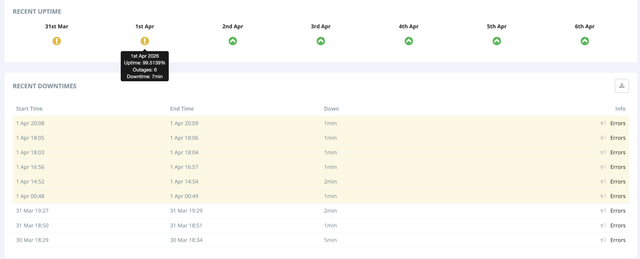
    NODE: kvmnvme06 AMS
    (from:hetrixtools monitor)
    img

    Thanked by 1mandala
  • CalypsoCalypso Member

    Created a ticket also - still seeing periods of packet loss

    Thanked by 1jcn50
  • JabJabJabJab Member

    Hey at least they are consistent /s

    Thanked by 2jcn50 mandala
  • zedzed Member

    well this isn't amusing now

  • jcn50jcn50 Member

    Update: nothing back from HostSailor in the ticket being still "On Hold", which I guess means they are still working on it (or waiting on someone to act in the AMS DC?). I think they just have a faulty NIC or Switch...

    @zed said: well this isn't amusing now

    is your node affected too now?

  • zedzed Member

    @jcn50 said:
    Update: nothing back from HostSailor in the ticket being still "On Hold", which I guess means they are still working on it (or waiting on someone to act in the AMS DC?). I think they just have a faulty NIC or Switch...

    @zed said: well this isn't amusing now

    is your node affected too now?

    yes i probably should have said something sooner but frankly i was annoyed that issues cropped up almost immediately after i posted that everything was fine.

    i'm seeing up to 30% packet loss into my hostsailor vps now from most of my other locations though there's a few with no issue (budgetvm in miami, massivegrid in nyc, sparkedhost in miami).

    i guess i'll add my own ticket to the pile this morning when i get a free moment from posting nonsense on let.

    Thanked by 2jcn50 MohamadSY
  • jcn50jcn50 Member
    edited April 7

    @zed said: yes i probably should have said something sooner but frankly i was annoyed that issues cropped up almost immediately after i posted that everything was fine.

    AH! That's reassuring (for us)~ and it means it is not segregated to one node alone.

    @zed said: i guess i'll add my own ticket to the pile this morning when i get a free moment from posting nonsense on let.

    Yay 🥳!!~ Let's 🌊 swamp 🌊 them!

  • CalypsoCalypso Member

    Ofcourse they came back with a "we don't see anything, try from another host" while I already explained in my ticket I encounter it from several other hosts during periods of time.

    Those Indian helpdesk people are even more "funny" as the IT Crowd series...

    Thanked by 1jcn50
  • CalypsoCalypso Member

    What I can see here, my main issues the last 2 days are between 1am and 8am (local time).

    Still think it's a networkport (either internally or on an interconnect) that is saturated.

    Thanked by 1bdl
  • jcn50jcn50 Member

    I have never seen anything like this, almost half of the network packets are just disappearing:

    Keys:  Help   Display mode   Restart statistics   Order of fields   quit
                                           Packets               Pings
     Host                                Loss%   Snt   Last   Avg  Best  Wrst StDev
     1. _gateway                         45.5%    23  272.3 378.5  15.3 907.1 289.8
     2. 45.10.16.45                      43.5%    23    1.1 255.7   1.1 985.8 320.9
     3. (waiting for reply)
     4. (waiting for reply)
     5. nl-ams17b-rc2-lag-22-0.aorta.net 90.9%    23    0.8   0.8   0.8   0.8   0.0
     6. nl-ams14a-ri1-ae-8-0.aorta.net   34.8%    23    1.3 633.0   1.3 1491. 545.7
     7. 74.125.146.228                   34.8%    23    1.9 556.4   1.8 1392. 458.5
     8. 142.251.70.129                   38.1%    22    1.7 549.4   1.7 1293. 452.7
     9. 142.251.48.181                   33.3%    22    1.0 347.6   1.0 1108. 347.1
    10. bru02s01-in-f14.1e100.net        38.1%    22  379.8 337.0   1.2 1008. 344.6
    
    Thanked by 1rm_
  • jcn50jcn50 Member

    I got a reply from the ticket and it has been fixed:

    Keys:  Help   Display mode   Restart statistics   Order of fields   quit
                                           Packets               Pings
     Host                                Loss%   Snt   Last   Avg  Best  Wrst StDev
     1. _gateway                          0.0%    26    0.3   0.3   0.2   0.4   0.0
     2. 45.10.16.41                       0.0%    26    1.0   1.0   0.8   1.3   0.1
     3. (waiting for reply)
     4. (waiting for reply)
     5. nl-ams17b-rc2-lag-22-0.aorta.net 88.0%    26    0.7   0.7   0.7   0.8   0.1
     6. nl-ams14a-ri1-ae-8-0.aorta.net    0.0%    26    1.0   1.2   0.9   3.3   0.6
     7. 10ge-1-4.cr1.ams2.baseip.com      0.0%    26    1.6   1.8   1.5   2.9   0.3
     8. 142.251.70.127                    0.0%    26    1.0   1.0   1.0   1.1   0.0
     9. 142.251.225.135                   0.0%    25    1.0   1.0   0.9   1.1   0.0
    10. tzamsa-af-in-f14.1e100.net        0.0%    25    0.9   1.0   0.9   2.2   0.3
    
  • zedzed Member

    @jcn50 said: I got a reply from the ticket and it has been fixed:

    Thank you for your service! I just got back to my desk, whew.

    Thanked by 1jcn50
  • CalypsoCalypso Member

    Also got an update to my ticket that apparantly it is fixed, however, I'm still a bit cautious - there have been periods that it was OK before...

    Thanked by 1jcn50
  • rm_rm_ IPv6 Advocate, Veteran
    edited April 8

    Same reply (at about "Tue 18:00"), and that was complete bs, earlier today it was bad again.

    (12:00 gap was my ISP, ignore that)

    Thanked by 1jcn50
  • JabJabJabJab Member

    Hey, at least they are consistent :D

    Thanked by 4rpqu jcn50 mandala host_c
  • @jcn50 said: @rm_ Thanks for the confirmation! I am sure now that the problem is coming from the provider itself @HostSailor ! There is some strange Intermittent jitter/queueing/congestion issue, most likely the node is overloaded (by traffic).

    I tried each Network Card and it did not change anything.
    Did you get any follow-up in your ticket since then?

    It's stupid that they don't give quick feedback when something happens to us or breaks, which we pay money for?

  • rm_rm_ IPv6 Advocate, Veteran

    @muhbootloader said: Did you get any follow-up in your ticket since then?

    Yes, like to everyone else with a ticket, yesterday they told me it's "fixed".

  • jcn50jcn50 Member

    Update: I have re-opened the ticket because the errors are still on 1x VPS only out of the 2x I have. But the loss of packets is tiny @ 0.4% compared to before (but maybe it varies during the day/night).

                                           Packets               Pings
     Host                                Loss%   Snt   Last   Avg  Best  Wrst StDev
     1. _gateway                          0.0%   267    0.2   0.3   0.2   5.8   0.3
     2. 45.10.16.45                       0.4%   267    1.2   0.9   0.8   1.6   0.1
     3. (waiting for reply)
     4. (waiting for reply)
     5. nl-ams17b-rc2-lag-22-0.aorta.net 83.1%   267    0.8   0.8   0.7   1.1   0.1
     6. nl-ams14a-ri1-ae-8-0.aorta.net    0.0%   267    7.6   1.3   1.2   7.6   0.4
     7. 74.125.146.228                    0.0%   267    2.0   1.9   1.7   5.2   0.3
     8. 142.251.70.129                    0.0%   267    1.6   2.3   1.2   4.6   0.6
     9. 142.251.48.181                    0.0%   266    1.0   1.0   0.9   4.4   0.2
    10. bru02s01-in-f14.1e100.net         0.0%   266    1.2   1.2   1.2   3.5   0.1
    
    Thanked by 1mandala
  • rm_rm_ IPv6 Advocate, Veteran
    edited April 8

    @jcn50 that's zero packet loss. If not reconfirmed by each line lower than that, losses on single lines along the way can be ignored. Simply a router having better things to do than answering pings, but still passing all the actual data packets further just fine. I guess you just measured during a "green" period, those seem to be a bit longer now after their "fixed" message.

    Otherwise you could have said "wow 83.1% loss".

    Thanked by 2tentor mandala
  • jcn50jcn50 Member
    edited April 8

    @rm_ said: @jcn50 that's zero packet loss. If not reconfirmed by each line lower than that, losses on single lines along the way can be ignored.

    I don't know, on my other VPS I have 0% loss. The support agent told me they will look into it (most likely tomorrow). I did say in the ticket that 5~6 hours per day were a lot worse.

  • zedzed Member

    it is back, on some routes. i'm guessing the intermittent nature of the issue is leading support folk to holler fixed without anything actually being changed.

    i'm really bummed, this was my most stable and favorite vm for over a year.

    Thanked by 1jcn50
  • NeoonNeoon Community Contributor, Veteran
    edited April 8

    90% I am certain, its a upstream problem.
    Why?

    09.04.2026 00:38:30 INFO Total 77, Packetloss 42

    But my Smokeping looks like this:

    TLDR: There is fuckery but upstream fuckery.
    Maybe even 2 or more problems at the same time, given these large spikes.

    Thanked by 3bdl jcn50 mandala
  • HostSailorHostSailor Member, Patron Provider

    Hello,

    Thank you for bringing this to our attention. We genuinely understand the concerns raised here and take them seriously.

    We will investigate this matter internally with our network and operations teams to identify the root cause and share an update here.

    If anyone is currently experiencing issues, please feel free to open a support ticket with relevant details so we can check specific cases as well.

    We appreciate your patience and feedback.

Sign In or Register to comment.