

























Howdy, Stranger!

It looks like you're new here. If you want to get involved, click one of these buttons!


Shells Virtual Desktop
BMail.ag - Secure Email Service
Server.net
CPLicense.net
VPS Server
Buy VPN
Vultr
VMs for AI
HostDare
HostDare
ReliableSite White-Label Dedicated Hosting for Resellers
InterServer VPS
BMail.ag - Secure Email Service
Best VPN
High-Performance Bare Metal Server Solutions
Karvl.com
Server Mania Cloud Hosting
DataWagon Hosting
AlphaVPS Hosting
Evoxt.com
Clouvider
VPS Hosting with NVMe
Residential IPs in the US & 4G Mobile Proxies in EU & US with Unlimited Bandwidth
ReliableSite White-Label Dedicated Hosting for Resellers
Rabisu - Hosting Solutions
Shells Virtual Desktop
New on LowEndTalk? Please Register and read our Community Rules.

All new Registrations are manually reviewed and approved, so a short delay after registration may occur before your account becomes active.

HostSailor AMS network issues

rm_rm_ IPv6 Advocate, Veteran
edited April 3 in Providers
mtr google.com

 Host                                Loss%   Snt   Last   Avg  Best  Wrst StDev
 1. 185-244-149-1.hostsailor.com     22.9%    48   15.4 156.1   0.1 1464. 346.1
 2. 45.10.16.45                      33.3%    48    1.0 111.0   0.7 981.0 257.2
 3. ???
 4. ???
 5. cz-prg02b-rr5-em0-50.aorta.net   83.0%    48    1.2  35.7   1.2 185.2  68.5
 6. nl-ams14a-ri1-ae-5-0.aorta.net   25.0%    48    1.7 131.0   1.6 1187. 253.9
 7. 74.125.146.228                   17.0%    47  286.8 113.6   2.3 1339. 287.4
 8. 172.253.71.29                    31.9%    47  185.4 131.0   1.3 1767. 380.3
 9. 142.250.224.131                  21.3%    47   85.8 139.0   1.9 1667. 366.8
10. ncamsa-aj-in-f14.1e100.net       19.6%    47   17.7 147.9   1.7 1566. 346.2
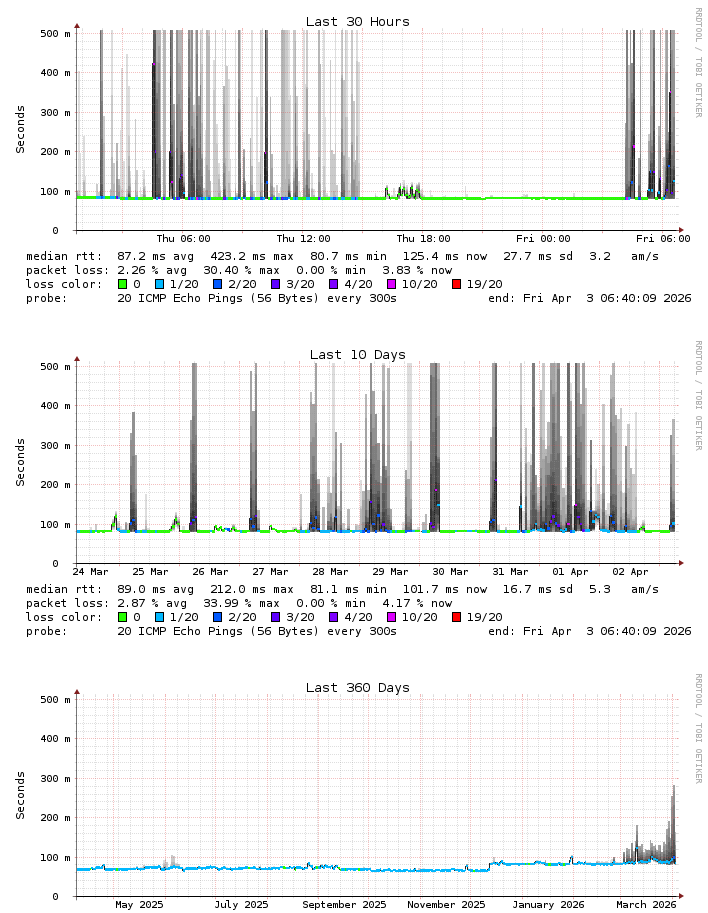
"Support" keeps telling me oh there are no issues on the node, and blames my ISP. I asked to try the simplest thing, move my VPS to a different server. But they are refusing to do even that. They only offered to change the IP (I assume IPv4), but this is observed both on IPv4 and IPv6, so I highly doubt it would help.

Anyone else has the same?

Thanked by 2jcn50 mandala
«13456715

Comments

  • remyremy Member
    edited April 3

    I stopped monitoring my hostsailor services as I'm not using them anymore.

    My recent experience:
    I noticed 2 days ago that my mailcow had stopped working...
    It turns out they blocked all email ports on the node without any prior notice. My mailserver stopped receiving emails ports 993 and 587 were blocked.

    I have been a customer for years, my IPs are clean, and I don’t send mass mail. There may have been some abusers on the node, but the professional way to handle that is to restrict ports for new customers with manual approval not to break existing users setups without warning.

    Because of this, I have decided to stop using their service. Blocking essential ports without informing customers is like breaking their applications deliberately. Moreover, mail server was explicitly allowed in their TOS

    Support is useless as fuck.
    Just a reminder for me that most LET hosts (NOT ALL) are pretty poor lacking both technical expertise and a real understanding of how to run a hosting business.

    They are barely good enough for idling, and not much else (aka useless)

    So, to answer you after my little rant yes, their network is very likely fucked up ;)

    I can check in a few hours if you still need.

  • CalypsoCalypso Member

    There have been a few days of drama on my Hostsailor VPS in Amsterdam, Tuesday and Wednesday. And I monitor from/to several other hosts. Yesterday (Thursday) was quite normal though.

  • AndruAndru Member
    edited April 3

    @remy said:
    I stopped monitoring my hostsailor services as I'm not using them anymore.

    My recent experience:
    I noticed 2 days ago that my mailcow had stopped working...
    It turns out they blocked all email ports on the node without any prior notice. My mailserver stopped receiving emails ports 993 and 587 were blocked.

    I have been a customer for years, my IPs are clean, and I don’t send mass mail. There may have been some abusers on the node, but the professional way to handle that is to restrict ports for new customers with manual approval not to break existing users setups without warning.

    Because of this, I have decided to stop using their service. Blocking essential ports without informing customers is like breaking their applications deliberately. Moreover, mail server was explicitly allowed in their TOS

    Support is useless as fuck.
    Just a reminder for me that most LET hosts (NOT ALL) are pretty poor lacking both technical expertise and a real understanding of how to run a hosting business.

    They are barely good enough for idling, and not much else (aka useless)

    So, to answer you after my little rant yes, their network is very likely fucked up ;)

    I can check in a few hours if you still need.

    They have stated that the discounted VPS have ports mail blocked, am I wrong?

  • NeoonNeoon Community Contributor, Veteran

    Yea, at some point of the day, nearly half of my wg links become lossy.
    03.04.2026 02:53:46 INFO Total 137, Packetloss 67

    Thanked by 1tof
  • AndruAndru Member

    We block email ports on our VPS services such as port 25 to protect the users from spam.
    You must use spam filter device to send email by overriding the blocker. You may visit ‘Our Knowledgebase’ to know how to use our spam filter device.
    In addition, our technical support is available to you while setting the email spam filter device for the smooth email transmission.

  • dbadudedbadude Member
    edited April 3

    @Andru said:
    We block email ports on our VPS services such as port 25 to protect the users from spam.
    You must use spam filter device to send email by overriding the blocker. You may visit ‘Our Knowledgebase’ to know how to use our spam filter device.
    In addition, our technical support is available to you while setting the email spam filter device for the smooth email transmission.

    Its to 'protect the children'

  • I have a $17 yearly vps with them, I use it only when I need to test some application, it goes down often and I don't bother asking support 'why?'.

    Greencloud has been stable for me since day 1.

    Thanked by 1oloke
  • zedzed Member

    @Calypso said:
    There have been a few days of drama on my Hostsailor VPS in Amsterdam, Tuesday and Wednesday. And I monitor from/to several other hosts. Yesterday (Thursday) was quite normal though.

    Same.

  • apollo15apollo15 Member
    edited April 3

    mine went back up since yesterday and it online since

    do you sill experience issues?

  • daviddavid Member

    @remy said: I noticed 2 days ago that my mailcow had stopped working...
    It turns out they blocked all email ports on the node without any prior notice. My mailserver stopped receiving emails ports 993 and 587 were blocked.

    Blocking port 25 if somewhat understandable, especially if that's in their TOS. But I can't think of any good reason to block port 993 or 587. Those are just for email client communication.

    Thanked by 1tentor
  • tentortentor Member, Host Rep

    @david said:

    @remy said: I noticed 2 days ago that my mailcow had stopped working...
    It turns out they blocked all email ports on the node without any prior notice. My mailserver stopped receiving emails ports 993 and 587 were blocked.

    Blocking port 25 if somewhat understandable, especially if that's in their TOS. But I can't think of any good reason to block port 993 or 587. Those are just for email client communication.

    Blocking outbound 25/tcp is the only reasonable restriction IMO.

    I have seen some providers blocking inbound (probably due to incompetence) and 465, 587 and 993 due to bruteforce (also not the brightest idea).

  • remyremy Member

    @david said:

    @remy said: I noticed 2 days ago that my mailcow had stopped working...
    It turns out they blocked all email ports on the node without any prior notice. My mailserver stopped receiving emails ports 993 and 587 were blocked.

    Blocking port 25 if somewhat understandable, especially if that's in their TOS. But I can't think of any good reason to block port 993 or 587. Those are just for email client communication.

    @tentor said:

    @david said:

    @remy said: I noticed 2 days ago that my mailcow had stopped working...
    It turns out they blocked all email ports on the node without any prior notice. My mailserver stopped receiving emails ports 993 and 587 were blocked.

    Blocking port 25 if somewhat understandable, especially if that's in their TOS. But I can't think of any good reason to block port 993 or 587. Those are just for email client communication.

    Blocking outbound 25/tcp is the only reasonable restriction IMO.

    I have seen some providers blocking inbound (probably due to incompetence) and 465, 587 and 993 due to bruteforce (also not the brightest idea).

    Blocking ports by default is totally okay
    But blocking ports without notice for existing services after more 1 year is incompetence.
    0 abuse and mail server well configured on my side (brute force protection, very low email volume)
    And long term customer (first service in 2019 but not sure it was the same owner)
    They just decided to apply that to all their nodes without informing customers

  • tentortentor Member, Host Rep

    @remy said:
    Blocking ports by default is totally okay

    My point is that some blocks make a lot of sense, some not much or not at alll

    But blocking ports without notice for existing services after more 1 year is incompetence.

    Not sure if it is laziness here or something else, but I do agree it is not a customer friendly approach

    Thanked by 1remy
  • AndruAndru Member

    @remy said:

    @david said:

    @remy said: I noticed 2 days ago that my mailcow had stopped working...
    It turns out they blocked all email ports on the node without any prior notice. My mailserver stopped receiving emails ports 993 and 587 were blocked.

    Blocking port 25 if somewhat understandable, especially if that's in their TOS. But I can't think of any good reason to block port 993 or 587. Those are just for email client communication.

    @tentor said:

    @david said:

    @remy said: I noticed 2 days ago that my mailcow had stopped working...
    It turns out they blocked all email ports on the node without any prior notice. My mailserver stopped receiving emails ports 993 and 587 were blocked.

    Blocking port 25 if somewhat understandable, especially if that's in their TOS. But I can't think of any good reason to block port 993 or 587. Those are just for email client communication.

    Blocking outbound 25/tcp is the only reasonable restriction IMO.

    I have seen some providers blocking inbound (probably due to incompetence) and 465, 587 and 993 due to bruteforce (also not the brightest idea).

    Blocking ports by default is totally okay
    But blocking ports without notice for existing services after more 1 year is incompetence.
    0 abuse and mail server well configured on my side (brute force protection, very low email volume)
    And long term customer (first service in 2019 but not sure it was the same owner)
    They just decided to apply that to all their nodes without informing customers

    Agree, we're in the same boat.

    Thanked by 1remy
  • remyremy Member
    edited April 3

    @tentor said:

    @remy said:
    Blocking ports by default is totally okay

    My point is that some blocks make a lot of sense, some not much or not at alll

    But blocking ports without notice for existing services after more 1 year is incompetence.

    Not sure if it is laziness here or something else, but I do agree it is not a customer friendly approach

    Honestly, even if they had blocked port 25, or even 465 and 587, it would have been okay...
    It would have given me some time to migrate and use relay temporarily
    But blocking all incoming ports... I had to migrate urgently.
    Anyway, they can’t be trusted.
    And the support… I won’t go into detail, but it’s just as bad.
    I would say it's mix of incompetence and laziness

    Anyway :p

  • remyremy Member

    @Andru said:

    @remy said:
    I stopped monitoring my hostsailor services as I'm not using them anymore.

    My recent experience:
    I noticed 2 days ago that my mailcow had stopped working...
    It turns out they blocked all email ports on the node without any prior notice. My mailserver stopped receiving emails ports 993 and 587 were blocked.

    I have been a customer for years, my IPs are clean, and I don’t send mass mail. There may have been some abusers on the node, but the professional way to handle that is to restrict ports for new customers with manual approval not to break existing users setups without warning.

    Because of this, I have decided to stop using their service. Blocking essential ports without informing customers is like breaking their applications deliberately. Moreover, mail server was explicitly allowed in their TOS

    Support is useless as fuck.
    Just a reminder for me that most LET hosts (NOT ALL) are pretty poor lacking both technical expertise and a real understanding of how to run a hosting business.

    They are barely good enough for idling, and not much else (aka useless)

    So, to answer you after my little rant yes, their network is very likely fucked up ;)

    I can check in a few hours if you still need.

    They have stated that the discounted VPS have ports mail blocked, am I wrong?

    At the time I bought this service it was not the case.
    It was allowed in their TOS and ports were open.
    That said, if they have since mentioned on LET that this was the case, I’m not aware of it.

  • ascicodeascicode Member

    Maybe some IPs are blacklisted and surely the whole /24 can be, if all ports are open.

  • tentortentor Member, Host Rep

    @ascicode said:
    Maybe some IPs are blacklisted and surely the whole /24 can be, if all ports are open.

    Inbound direction has nothing to do with blacklists

    Thanked by 2oloke stable_genius
  • daviddavid Member

    @tentor said: Blocking outbound 25/tcp is the only reasonable restriction IMO.

    I have seen some providers blocking inbound (probably due to incompetence) and 465, 587 and 993 due to bruteforce (also not the brightest idea).

    Right, even port 25 shouldn't be completely blocked, at most, just outbound 25/tcp.

    There's no threat to receive incoming email. I transferred my HostSailor vps when it came up for renewal, but while I had it I used it for my own incoming mail server.

  • jcn50jcn50 Member
    edited April 3

    HOSTSAILOR #1 (AMS):

     Host                                Loss%   Snt   Last   Avg  Best  Wrst StDev
     1. _gateway                          1.4%    73    0.3   7.1   0.2 235.6  32.2
     2. 45.10.16.41                       4.1%    73    1.0   9.5   0.8 135.7  28.1
     3. (waiting for reply)
     4. (waiting for reply)
     5. nl-ams17b-rc2-lag-22-0.aorta.net 84.5%    72    0.7   0.8   0.7   1.1   0.1
     6. nl-ams14a-ri1-ae-8-0.aorta.net    4.2%    72   32.9   8.0   0.8 226.9  29.4
     7. (waiting for reply)
     8. 142.251.70.129                    4.2%    72    2.4   5.6   1.2 112.3  15.5
     9. 142.251.48.181                    4.2%    72    1.0   6.6   0.9 158.3  23.4
    10. bru02s01-in-f14.1e100.net         5.6%    72    0.8   5.9   0.8  66.2  13.4
    

    HOSTSAILOR #2 (AMS):

     Host                                Loss%   Snt   Last   Avg  Best  Wrst StDev
     1. 185-244-149-1.hostsailor.com      0.0%    77    0.3   0.3   0.2   1.7   0.2
     2. 45.10.16.45                       0.0%    77    0.9   1.1   0.8   3.6   0.4
     3. ???
     4. ???
     5. cz-prg02b-rr5-em0-50.aorta.net   89.5%    77    1.1   1.2   1.1   1.6   0.2
     6. nl-ams14a-ri1-ae-5-0.aorta.net    0.0%    77    1.3   2.3   1.2  25.7   3.5
     7. 74.125.146.228                    0.0%    77    1.9   1.9   1.7   2.6   0.2
     8. 142.251.70.129                    0.0%    76    2.5   2.6   1.6   6.1   0.7
     9. 142.251.48.181                    0.0%    76    1.7   1.7   1.6   1.9   0.1
    10. bru02s01-in-f14.1e100.net         0.0%    76    1.6   1.8   1.5  12.4   1.5
    

    NON-HOSTSAILOR:

     Host                                Loss%   Snt   Last   Avg  Best  Wrst StDev
     1. _gateway                          0.0%    24    3.9  27.3   1.0 273.3  65.0
     2. 199.233.237.156                   0.0%    24    0.6   6.0   0.3  76.7  19.0
     3. lax-b7-link.ip.twelve99.net       0.0%    24    2.2   2.8   1.8   4.1   0.7
     4. lax-bb1-link.ip.twelve99.net      0.0%    24    1.1   1.1   1.0   1.4   0.1
     5. lax-b22-link.ip.twelve99.net     72.7%    23    1.1  11.6   1.1  63.6  25.5
     6. google-ic-344098.ip.twelve99-cus  0.0%    23    1.5   1.9   1.5   2.8   0.4
     7. 142.251.226.193                   0.0%    23    1.0   1.1   0.9   2.6   0.4
     8. 142.251.60.99                     0.0%    23    0.9   1.0   0.9   1.5   0.1
     9. dclaxa-as-in-f14.1e100.net        0.0%    23    0.9   0.9   0.8   1.0   0.0
    

    @HostSailor : what do you think about the first one?

    Thanked by 1mandala
  • tfgp99tfgp99 Member

    Well Well Well
    AMS Node 6:

    IPv4:

     Host                                Loss%   Snt   Last   Avg  Best  Wrst StDev
     1. 185-45-192-193.hostsailor.com     0.0%    78    0.3   0.3   0.2   0.5   0.0
     2. 45.10.16.41                       0.0%    78    1.0   1.1   0.8   6.3   0.7
     3. (waiting for reply)
     4. (waiting for reply)
     5. nl-ams17b-rc2-lag-22-0.aorta.net 81.6%    77    0.8   0.8   0.8   1.4   0.2
     6. nl-ams14a-ri1-ae-8-0.aorta.net    0.0%    77    1.3   1.3   1.2   1.6   0.1
     7. (waiting for reply)
     8. 172.253.71.29                     0.0%    77    1.4   1.3   1.3   1.5   0.0
     9. 142.250.211.91                    0.0%    77    1.3   1.2   1.1   2.4   0.1
    10. lhr25s32-in-f14.1e100.net         0.0%    77    1.1   1.1   1.0   1.4   0.1
    

    IPv6:

     Host                                Loss%   Snt   Last   Avg  Best  Wrst StDev
     1. 2a04:dd01:14::1                   0.0%    83    0.6   0.5   0.4   0.7   0.1
     2. 2a05:e4c1:1001::1                 0.0%    83    1.1   1.2   0.9   5.9   0.5
     3. 2a05:e4c1:0:1::1                  3.6%    83    1.4   1.3   0.9   6.6   0.8
     4. 2001:730:2203:9::d52e:c091       22.9%    83    0.9   0.8   0.7   1.7   0.1
     5. 2001:730:2200::5474:8003          0.0%    83    1.9   2.6   1.6  19.2   2.9
     6. 2a00:1450:82a1::1                 0.0%    82    1.7   1.7   1.5   5.7   0.5
     7. 2a00:1450:82a1::1                 0.0%    82    1.6   1.7   1.5   6.1   0.6
     8. 2001:4860:0:1::611c               0.0%    82    3.9   3.0   2.0   4.2   0.6
     9. 2001:4860:0:1::1a6a               0.0%    82    1.8   1.6   1.5   3.2   0.2
    10. 2001:4860::c:4002:c2cf            0.0%    82    2.1   2.5   2.1   6.0   0.5
    11. (waiting for reply)
    12. 2001:4860:0:1::4fc7               0.0%    82    1.7   1.8   1.6   2.2   0.1
    13. ncamsa-ai-in-x0e.1e100.net        0.0%    82    1.6   1.5   1.3   5.5   0.5
    
    Thanked by 2jcn50 mandala
  • rm_rm_ IPv6 Advocate, Veteran

    @tfgp99 said: Well Well Well

    At the moment mine is ok too. If you check the smokeping pic in the OP, there are periods when it's actually fine.

  • rm_rm_ IPv6 Advocate, Veteran

    And today it's worse again

     Host                                Loss%   Snt   Last   Avg  Best  Wrst StDev
     1. 185-244-149-1.hostsailor.com     20.0%    25    0.3 323.6   0.3 1346. 404.1
     2. 45.10.16.45                      16.0%    25    0.8 228.2   0.8 1246. 361.0
     3. ???
     4. ???
     5. nl-ams17b-rc2-lag-22-0.aorta.net 70.8%    24  225.4  32.8   0.7 225.4  84.9
     6. nl-ams14a-ri1-ae-8-0.aorta.net    4.2%    24    3.4 273.5   1.2 1849. 432.3
     7. ???
     8. 172.253.71.29                    20.8%    24    0.9 227.9   0.9 1648. 411.7
     9. 142.250.211.91                    8.3%    24   21.2 207.7   1.0 1112. 337.4
    10. ncamsa-ai-in-f14.1e100.net       12.5%    24    1.4  84.4   1.3 743.7 177.6
    

    Thanked by 2jcn50 mandala
  • dbadudedbadude Member

    dubai managed chicken what you expect?

  • jcn50jcn50 Member
    edited April 4

    Both of my servers are actually on the same node: kvmnvme04.hostsailor.com, so maybe this is linked with the guest/template OS/kernel?... The one with a lot of network Losses is running linux-ubuntu-18.04-x86_64-minimal-latest.gz (I am using Ubuntu Pro subscription).
    So I have:
    1) upgraded everything
    2) rebooted
    3) ran mtr google.com again and now I am getting:

     Host                                Loss%   Snt   Last   Avg  Best  Wrst StDev
     1. 185-244-149-1.hostsailor.com     23.1%    26  1114. 328.4   0.2 1623. 436.4
     2. 45.10.16.45                      34.6%    26  1014. 331.0   0.9 1523. 442.6
     3. ???
     4. ???
     5. cz-prg02b-rr5-em0-50.aorta.net   80.0%    26  1354. 373.1   1.2 1354. 566.4
     6. nl-ams14a-ri1-ae-5-0.aorta.net   24.0%    25  613.8 319.0   1.3 1803. 527.9
     7. 74.125.146.228                   20.0%    25  514.1 471.1   1.9 1516. 471.9
     8. 142.251.70.129                   24.0%    25  413.5 429.3   1.6 1416. 457.7
     9. 142.251.48.181                   12.0%    25  313.1 235.7   1.6 1316. 349.6
    10. bru02s01-in-f14.1e100.net        36.0%    25  1215. 285.2   1.5 1215. 405.7
    

    Unfortunately: no changes at all. But why is the other server fine?

    @rm_ : what OS template did you install?

  • rm_rm_ IPv6 Advocate, Veteran
    edited April 4

    @jcn50 said: what OS template did you install?

    linux-debian-12-x86_64-gen2-v1.gz

    I really do not think this is OS-related. Especially since it varies per time of day, pointing to link saturation issue during periods of higher load during the day. But my VPS itself is basically idle and is not using much bandwidth.

    Network card is already Virtio, which is the recommended choice for VMs.

    Thanked by 1jcn50
  • jcn50jcn50 Member

    @rm_ Thanks for the confirmation! I am sure now that the problem is coming from the provider itself @HostSailor ! There is some strange Intermittent jitter/queueing/congestion issue, most likely the node is overloaded (by traffic).
    I tried each Network Card and it did not change anything.
    Did you get any follow-up in your ticket since then?

  • rm_rm_ IPv6 Advocate, Veteran

    @jcn50 said: Did you get any follow-up in your ticket since then?

    They reiterated there are no "issues on our end", so I felt this is going nowhere and I only have the same lossy graphs and traces anyway, what other proof or information I can conjure.

    Thanked by 1jcn50
  • zedzed Member

    Just for another datapoint I'm on kvmnvme04, a $10.77/yr unit from 12/24 installed originally from linux-debian-12-x86_64-gen2-v1.gz not experiencing this issue. Good luck gentlemen.

    Thanked by 3jcn50 mandala host_c
  • MumblyMumbly Member

    @rm_ said: They reiterated there are no "issues on our end", so I felt this is going nowhere and I only have the same lossy graphs and traces anyway, what other proof or information I can conjure.

    Link them to this topic, explaining that several of their clients have had similar experiences, which indicates that the issue is on their side.

    It's harder to pretend that everything is fine when more people report the same issue.

Sign In or Register to comment.