
























New on LowEndTalk? Please Register and read our Community Rules.
All new Registrations are manually reviewed and approved, so a short delay after registration may occur before your account becomes active.
All new Registrations are manually reviewed and approved, so a short delay after registration may occur before your account becomes active.
What should I do?

I rented a dedicated server with a CPU that has an integrated graphics card, but the vendor didn't specify that the integrated graphics card on this CPU can't be used. Then I went to the server and found that the integrated graphics card couldn't be used. What should I do?
E-2388G || 32GB DDR4 || 2x960GB SSD || 10Gbit 30TB IN + Out BW || Montreal, Canada ||
Thanked by 10ka



Comments
Ignore and move on. If you need a server with a GPU, rent it where is it clearly stated on your contract/invoice that the server comes with a GPU. The vendor never mentioned about a GPU, so what’s the issue?
Request a refund if you can't then you're cooked
If the GPU /graphic card is not on server description, so service as described and no drama!
I suspect that name the CPU is on the server description. That CPU has a UHD P750 iGPU and when I buy a CPU with an iGPU, I don't really expect to not be able to use it.
I assume from what OP says that the integrated GPU is either disabled in the BIOS or not usable with the motherboard?
I would have the same expectation. Same as if only 16 of the 32GB of installed RAM were enabled in the bios.
I was looking for standalone servers with CPUs that have integrated graphics, and I found the E-2388G model. I checked Intel's official website to confirm that the CPU has integrated graphics, and then I purchased that server. However, upon setting it up, I discovered that the integrated graphics couldn't be used. When I asked customer service, they said the integrated graphics were not functional. But they didn't specify this beforehand. It feels like buying a kettle with a real-time water temperature display feature (which some people might use, while others might not), only to find out that the temperature display doesn't work. They didn't make this clear, and you only find out after purchasing it.
They are unwilling to issue a refund,
The customer service responded like this.
Server has chassis HPE DL20 G10, and due to chassis limitations i heard it doesn't work.
You are free to troubleshoot or find a way to make it work, but we never claim it works.
Did they advertise the chassis before the purchase? What's the provider URL?
https://lowendtalk.com/discussion/209847/vps-dedicated-india-sg-jp-usa-ca-uk-nl-de-amd-epyc-10gbit-from-24-year/p1
https://hostdzire.com/billing/cart.php?a=add&pid=1152&promocode=DSMYC5D0J0
@HostDZire
This is the server specification.
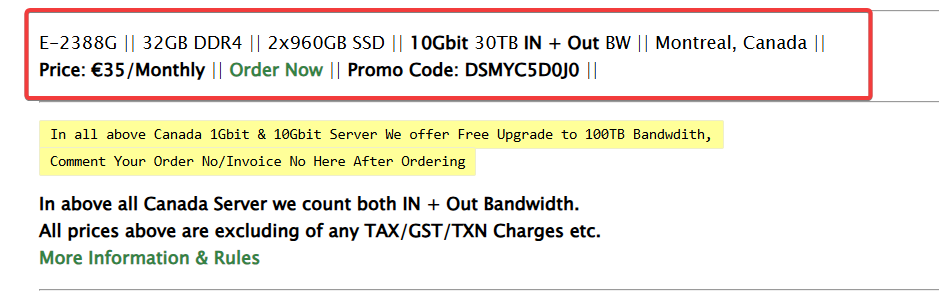
Yes we never specified about iGPU in the specification,
Which means we don't want users to think that it has iGPU enabled and working.
Lots of intel CPU comes with iGPU but due to motherboard limitations it might work or it might not work, so we never specify about iGPU.
Else it would be a good selling point to attract customers, isn't? but if we didnt specify it there is some reason for it.
We did say there is no refund in dedicated server, asked users to get doubts cleared before ordering. just below the specification we have given links to check more information & rules.
LET Link To Check Rules
Website Information Which Says No refund and asked users to get doubts cleared before ordering
So, it's pretty clear that we want to avoid conflicts but still there will be some which we can't avoid, of course we will add some more information to avoid this type of conflicts.
So i will let others judge, if i am doing anything wrong by denying refund request, please let us know.
I guess OP should have double checked if the iGPU was important to them since it’s not always supported by servers.
However you also didn’t specify about VT-X. Does it mean users should expect to not be able to do virtualization on a virtualization capable CPU (sometimes VT-X is disabled by default in the BIOS)? I know it's not the same but still.
Do these servers come with IPMI? Perhaps OP can disable the built in Matrox card or something.
Yes server comes with IPMI, OP is free to do troubleshooting, he has full control of server.
Depends on what you are looking for. If you intend to use a graphics card and you signed up only for it, then ask the provider for a solution.
People do expect higher specs for a few quid, like a few DCs in the UK offering servers with a 10Gbps network card. However, if you read carefully, you’ll find that the server is connected to a 1Gbps network, which isn’t the same as having a 10Gbps connected server.
Do refund
Hi,
you ordered an E-2388G, you got an E-2388G ( even including IPMI access according to the provider ).
What exactly is the refund request good for? You got what you ordered.
That you ordered something that does not fit your needs just means that you lack of knowledge. Thats not really the providers fault. So he should not have to take responsibility for something that is not his fault.
Its like you are buying a banana and complain about you cant make apple juice from it.
If ever, maybe the provider can take the server back and you will pick something else from the provider that fits more your needs!?
Otherwise, take it as a learning lesson. If you have specific requirements, and if they are not explicitly mentioned in the offer, ask the provider first or be ready to have some gamble invest.
That, "he almost certainly has access to IPMI" was my first thought. I'd add the provisio though that it's not the providers problem if a user fucks up his dedi; an innocent small error, no problem, but anything that requires more than 5 minutes should be billed.
As for refunds, I very much dislike products without a chance to get a refund, BUT you wrote it damn clearly, so I think it's OK to refuse a refund.
Just a btw: I don't get the fuss because IMO that "GPU" isn't meant for serious use anyway but rather a "thrown in" pseudo "GPU" anyway. Using it for typical GPU tasks would be nearly useless (because so poor) anyway. And hey that processor offers AVX2 and AVX-512.
What OS are you using and what are you trying to do? What is saying/showing iGPU unavailable?
Why would a banana make apple juice? Are they the same kind of thing? If I buy an orange to make juice, can't I use the orange peel to make infused water? This iGPU is inside the CPU, not separate from the CPU. I'm not asking for a dedicated graphics card.
I asked their customer service, and they said they couldn't resolve it. Later, I asked if a refund was possible.
The system was installed with Windows 10 by them. After accessing it, I opened the Task Manager and found that there was no integrated graphics card. Later, I submitted a work order to report this issue.
I want to use the integrated graphics card to install the emulator and run Android applications.
The system was installed with Windows 10 by them, and when I opened the Task Manager, I didn't see the integrated graphics card. I also didn't see the integrated graphics card in the system information.
I opened the Task Manager and didn't see the integrated graphics card, nor did I see the integrated graphics card in the system information. The work order asked if they could enable the integrated graphics card function, and they said it was not possible and couldn't be resolved.
No refunds allowed.
Now I understand, I will ask the provider first in the future.
One is the network card, and the other is the access network speed. Are these the same? Are they on the same thing? The seller should also clarify the access network speed.
Whatever os you selected while order, we installed it and delivered. You still have full control of server with panel and IPMI.
Login to IPMI
Boot / reboot the server.
Press F9 during POST to enter UEFI System Utilities / System Configuration.
Go to BIOS/Platform Configuration (RBSU).
Navigate to Advanced Options (or similar advanced settings) → Video / Video Options / Display / Embedded Video.
In that menu, look for one of these settings (or similar names):
Embedded Video Connection
Add-in and Embedded Video Enabled
Primary Video Adapter / Select Primary Video
Embedded Video Controller
If present, set it so that embedded (iGPU) is enabled along with or instead of add-in video.
Save and reboot.
Note: iLO remote console will no longer show iGPU output once the Intel GPU takes over unless you have both enabled. So prefer "Along with" option.
there is nothing about cooling fans on the order, why did you put them in the server? i hope you got the point. everyone expects essential parts (which include internal parts of the CPU) of the server to be working, and if they don't work it should be stated, and i still don't see any mention about non-working IGPU on the order page.
the more you post "defending" yourself the more people see that you can screw them up in unexpected ways and blacklist you, i already did.