
























New on LowEndTalk? Please Register and read our Community Rules.
All new Registrations are manually reviewed and approved, so a short delay after registration may occur before your account becomes active.
All new Registrations are manually reviewed and approved, so a short delay after registration may occur before your account becomes active.



Comments
this is interesting https://lowendtalk.com/discussion/comment/4497468/#Comment_4497468 and the time of the comment is the same when there were no reports (down?) on the dash.zgato.dev
You guys have a working IPv6 connection? Mine goes down for weeks at a time. I gave up on support.
added mine to smokeping http://207.127.95.55:81/smokeping/smokeping.cgi?target=Local.hslim_my1_ipv6
can add yours too if you want
I don't know how to answer...
Just look: I have VPS, Dedi-A, Dedi-B. So three network devices.
VPS doesn't have IPv6 at all. I mean, even in Virtualizor/WHMCS I have ipv4 address only.
Then, support was provided /64 IPv6 block for Dedi-B, but my dedi-b never works (another story), but this /64 block works fine on Dedi-A.
So IDK if this is a misunderstanding, or this is not /64 block just for me (and I should share it with other users), or something else.
Quite difficult to understand how it should work.
As I can understand, for a typical VPS you should get /112 (one IPv6) that you will see in WHMCS/Virtualizor
Upon reviewing marketing materials, I found that each VPS/Dedi should be assigned a/64 block. This means we should see a message like "Your gateway is 2406:17c0:0:x::1/64, choose any IP except :1."
But why VPS provided with /112?
What block can we use?
Or, for example, maybe I'm just dumb again.
@0ka shows his IPv6:
2406:17c0:0:2::a6b0:1942
If this is /64,
can he set up on his vps 2406:17c0:0:2::2/64 with gw 2406:17c0:0:2::1 ?
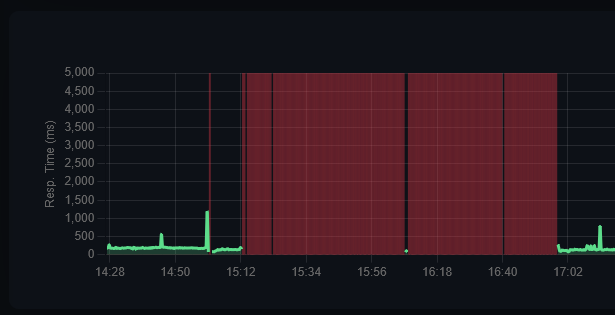
My VMs weren't reporting back to my instance somehow, but I could ping them apparently, so I didn't bother.
Double checking now, seems like they had quite a bit of downtime:
no, only 2406:17c0:0:2::a6b0:1942 works so they gave me a single ip
losses are getting higher again, it means people buy their stuff even after lots of bad reviews, that's a shame

Mine is mostly "okay" compared to a hsitshow it was at some points in the past, but in the last two days indeed getting worse, averaging 2% packet loss now. When you mtr to anywhere from the VPS, the loss starts at the very first hop.
I have a July 4th VPS NL offer from HostSlim. The network is getting worse and worse every day. Sadly, I renewed the VPS for 1 year recently. Connection drops, ping spikes, and short complete outages constantly happen. There were the same problems before, but after moving the datacenter, it was good for quite some time. After renewing the server, it all started again. The 103.214.4.0/22 range has this problem more than other ranges like 2.59.254.0/24. All of my friends and I who bought the 4th of July NL offer have this same issue. I contacted support a couple of times, but the answers are the same - like "please check that again" - but there is no difference. It seems they can't fix the issue, whatever it is. These are some screenshots.
@shmp9675 shut down your vps and check if it still responds to ping for 5 minutes
again and again, stay away from host-/vpsslim!
I shut down my VPS for 5 minutes and there was no ping during that timeframe. I know what issue you are referring to - that maybe my IP address has been assigned to 2 servers. I had this issue before with HostSlim, but this is not the case.
just got an email from another vps provider about planned network downtime in 3 days which will last up to 5 minutes. once again shame on @VPSSLIM , i've never seen any notification, just constant lies about "services will be fixed" (which include barely working VDS you were selling) or complete silence most of the time. You're in business for MORE THAN 10 YEARS but still look like you started yesterday without prior experience.
It seems like nothing has improved in the 12 years since I last tried them.
https://lowendtalk.com/discussion/9742/stay-away-from-vpsslim-hostslim/p1
There seems to be an issue with two NL 10G VM nodes and some abuse on it causing high "noise" for neighbors their network speed and IO problems. We are solving this issue. PLEASE if you still have an issue PLEASE DO open a support ticket and if you want to expedite, please PM me your ticket as well so we can follow up today. We take this very seriously of course!
12 years been a long time Freek. Lots has changed. I invite you to either try our Tallinn or Amsterdam location for free for a month, just to see if you like it. Can be a Dedicated Server if you want.
IPv6 to my vps in Netherlands have been down for two weeks. They just closed the ticket and said they are working on it.
hostslim - a complete disaster!
You’re not the only one i also face the same issue.
My experience from long before I joined LET was so bad that I still remember the name of the guy who serially promised to make it work, solve the problems, etc but I endlessly and frequently had major problems. His name was Ralph.
So IMO it's quite clear that basically scamming people and consistently running a shit show actually is his business model.
I do have a very nice VPS in baltistan (vilnius I think) from @Hosteroid which also is quite cheap and in Amsterdam there are plenty decent options incl. very cheap yet decent ones like, to name just a few examples, @DeluxHost and @Chunkserve. Plus, of course @Hybula the Uber-provider who actually runs their own IX and not a small one btw.
So there is absolutely no reason to let xxxSlim fuck you over and over again! Just run away
if you see ever host/vps-slim - run away and never look on this garbage, just read this topic https://lowendtalk.com/discussion/208212/estonia-the-netherlands-1gbps-unmetered-10gbps-dedicated-server-deals-instant-setup/p1
they selling that never works, might be a scammers.
ipv4 is very weird right now, icmp packets larger than 84 bytes don't go through, when i send any TCP packet with data length >0 through nping to my vps the packet just doesn't go through, but at the same time inbound SSH works, speedtest download shows 20mbit/s, 500mbit/s upload. mtr with large packets stops at the first RETN (there are multiple on the route). ipv6 works fine.
(/discussion/204670/discussion/p1):
I am curious on this @0ka this is a good amount of technical info that is helpful to a DC to help debug it, have you put this into a ticket for them there? What was the response?
yes, i sent him my imgur links multiple times, and after his responses imgur still showed "0 views"
"It should be stabalized now."
"Please have a recheck now. I made some optimizations."
"All should be stable now"
"This week we are upgrading our network to multiple 100G in tallinn, So this will solve the saturation soon."
"We are upgrading our EST network this weekend"
"We are upgrading our network tonight to improve it."
"We're suspending abusing parties on the node. Bare with me."
"It's not network related but hostnode IO related."
packet loss situation actually improved some time ago, but probably not for long. (and now there is this weird ipv4 issue)
after creating this thread i stopped answering in the ticket, im just upping this thread so others can see what is hostslim.
it's barely working again: smokeping says 100% loss, but it works, just unusable for anything network related
Seems that Hostslim added Cogent to their network-mix.
News from clientarea
From my tests from EE vps:
1) Hostslim > Hetzner-FI 2ms (can confirm upgrade)
2) Hostslim > Onlyservers-UK same 32ms (via retn, no cognet in route).
So, @0ka , may be worth checking again.
it has always been the case with RETN
nah... my smokeping says it was down on monday for 15 hours (or maybe they enabled anti-ddos or something which broke ICMP, it makes the network unusable for me anyway, so it was almost like down)
If one still has access to their services, don't forget to backup fast!