
























Howdy, Stranger!

It looks like you're new here. If you want to get involved, click one of these buttons!


Shells Virtual Desktop
BMail.ag - Secure Email Service
Server.net
CPLicense.net
VPS Server
Buy VPN
Vultr
VMs for AI
HostDare
ReliableSite White-Label Dedicated Hosting for Resellers
InterServer VPS
BMail.ag - Secure Email Service
Best VPN
High-Performance Bare Metal Server Solutions
Karvl.com
Server Mania Cloud Hosting
DataWagon Hosting
AlphaVPS Hosting
Evoxt.com
Clouvider
VPS Hosting with NVMe
Residential IPs in the US & 4G Mobile Proxies in EU & US with Unlimited Bandwidth
ReliableSite White-Label Dedicated Hosting for Resellers
Rabisu - Hosting Solutions
Shells Virtual Desktop
New on LowEndTalk? Please Register and read our Community Rules.

All new Registrations are manually reviewed and approved, so a short delay after registration may occur before your account becomes active.

Estonia & The Netherlands 1Gbps Unmetered & 10Gbps Dedicated Server DEALS! **Instant Setup**

1246

Comments

  • Great deals, good luck with sales <3.

    Thanked by 1VPSSLIM
  • @SashkaPro said: Anyway, I will give you advice: why do you think that your network adapter is eno2 and not eno1?

    Because during network configuration, only eno2 seemed to work.

    Thanked by 1SashkaPro
  • @wa44io4 said:

    @SashkaPro said: Anyway, I will give you advice: why do you think that your network adapter is eno2 and not eno1?

    Because during network configuration, only eno2 seemed to work.

    No more advice then :neutral:

    Thanked by 1wa44io4
  • PusePuse Member

    I’m running into the same issue as many of you. After my first ticket, I was able to install Ubuntu successfully, but after trying a Debian reinstall, it broke again :smile:

    I’m fine with waiting for a fix - no rush on my side.

  • VPSSLIMVPSSLIM Patron Provider, Veteran

    @Puse said:
    I’m running into the same issue as many of you. After my first ticket, I was able to install Ubuntu successfully, but after trying a Debian reinstall, it broke again :smile:

    I’m fine with waiting for a fix - no rush on my side.

    Be sure to raise a ticket as well in such cases. Thx!

  • Nuke142Nuke142 Member
    edited August 2025

    Is someone have a giude how to solve all problems when noVnc not works and no ping/ssh to server? I'am tired try to fix all this things myself and slow support response. Day by day they say "try reinstall os".

  • @Puse said:
    I’m running into the same issue as many of you. After my first ticket, I was able to install Ubuntu successfully, but after trying a Debian reinstall, it broke again :smile:

    I’m fine with waiting for a fix - no rush on my side.

    If you have a running system, maybe try this: https://github.com/bin456789/reinstall/blob/main/README.en.md
    It saved me a lot of trouble.

  • qebaqeba Member

    yeahh finally got the server ready after 8 days.

    # ## ## ## ## ## ## ## ## ## ## ## ## ## ## ## ## ## #
    #              Yet-Another-Bench-Script              #
    #                     v2025-04-20                    #
    # https://github.com/masonr/yet-another-bench-script #
    # ## ## ## ## ## ## ## ## ## ## ## ## ## ## ## ## ## #
    
    Fri 15 Aug 02:43:20 BST 2025
    
    Basic System Information:
    ---------------------------------
    Uptime     : 0 days, 1 hours, 21 minutes
    Processor  : Intel(R) Xeon(R) CPU E5-2660 v2 @ 2.20GHz
    CPU cores  : 40 @ 1600.000 MHz
    AES-NI     : ✔ Enabled
    VM-x/AMD-V : ✔ Enabled
    RAM        : 125.8 GiB
    Swap       : 94.2 GiB
    Disk       : 1.7 TiB
    Distro     : Debian GNU/Linux 13 (trixie)
    Kernel     : 6.12.41+deb13-amd64
    VM Type    : NONE
    IPv4/IPv6  : ✔ Online / ❌ Offline
    
    IPv4 Network Information:
    ---------------------------------
    ISP        : HostSlim B.V.
    ASN        : AS207083 HostSlim B.V.
    Host       : HostSlim B.V
    Location   : Tallinn, Harjumaa (37)
    Country    : Estonia
    
    fio Disk Speed Tests (Mixed R/W 50/50) (Partition /dev/sda1):
    ---------------------------------
    Block Size | 4k            (IOPS) | 64k           (IOPS)
      ------   | ---            ----  | ----           ----
    Read       | 150.12 MB/s  (37.5k) | 163.04 MB/s   (2.5k)
    Write      | 150.52 MB/s  (37.6k) | 163.89 MB/s   (2.5k)
    Total      | 300.64 MB/s  (75.1k) | 326.93 MB/s   (5.1k)
               |                      |
    Block Size | 512k          (IOPS) | 1m            (IOPS)
      ------   | ---            ----  | ----           ----
    Read       | 213.73 MB/s    (417) | 231.84 MB/s    (226)
    Write      | 225.09 MB/s    (439) | 247.28 MB/s    (241)
    Total      | 438.82 MB/s    (856) | 479.12 MB/s    (467)
    
    iperf3 Network Speed Tests (IPv4):
    ---------------------------------
    Provider        | Location (Link)           | Send Speed      | Recv Speed      | Ping
    -----           | -----                     | ----            | ----            | ----
    Clouvider       | London, UK (10G)          | 919 Mbits/sec   | 924 Mbits/sec   | 38.2 ms
    Eranium         | Amsterdam, NL (100G)      | 927 Mbits/sec   | 921 Mbits/sec   | 28.3 ms
    Uztelecom       | Tashkent, UZ (10G)        | 913 Mbits/sec   | 712 Mbits/sec   | 53.5 ms
    Leaseweb        | Singapore, SG (10G)       | 788 Mbits/sec   | 573 Mbits/sec   | 183 ms
    Clouvider       | Los Angeles, CA, US (10G) | 800 Mbits/sec   | 393 Mbits/sec   | 165 ms
    Leaseweb        | NYC, NY, US (10G)         | 847 Mbits/sec   | 665 Mbits/sec   | 117 ms
    Edgoo           | Sao Paulo, BR (1G)        | 746 Mbits/sec   | 252 Mbits/sec   | 197 ms
    
    Geekbench 6 Benchmark Test:
    ---------------------------------
    Test            | Value
                    |
    Single Core     | 595
    Multi Core      | 5220
    Full Test       | https://browser.geekbench.com/v6/cpu/13324391
    
    Thanked by 1VPSSLIM
  • @qeba said: yeahh finally got the server ready after 8 days.

    So they fixed Novnc, or they fixed the reinstalling process?

  • qebaqeba Member

    @SashkaPro said:

    @qeba said: yeahh finally got the server ready after 8 days.

    So they fixed Novnc, or they fixed the reinstalling process?

    i got my noVNC working from the start, only network is problem.

    Thanked by 1SashkaPro
  • Nuke142Nuke142 Member
    edited August 2025

    via easydcim OS installed and working well on first server that available via novnc where i changed bios (see screenshots).
    but same reinstall not works for other two new servers - ip is available via ping and ssh but wrong user/password even 30 minutes - i think install is stucked may be because wrong bios settings.
    Because same symptoms with wrong user/pw i see on first server during normal ubuntu install.

    Support can't fix novnc over 1 week. I don't know why because all same problems was with very first server and they fixed it so soon.
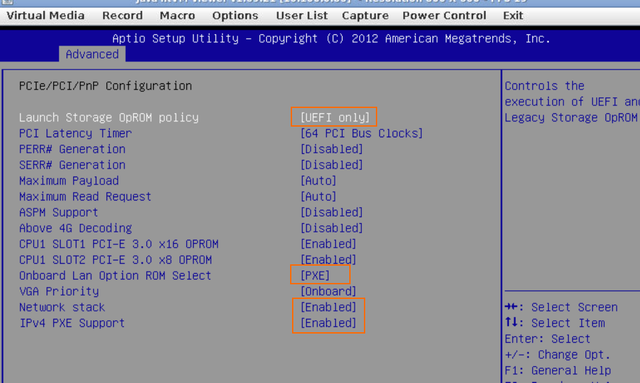
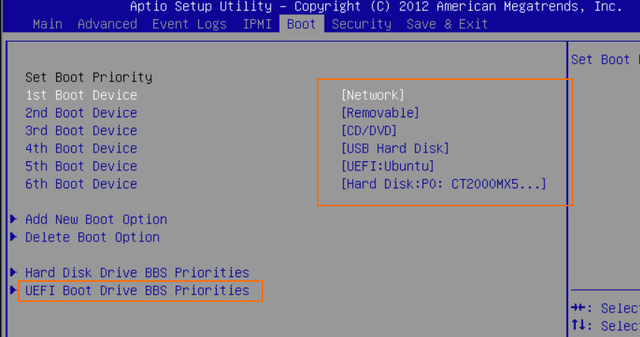
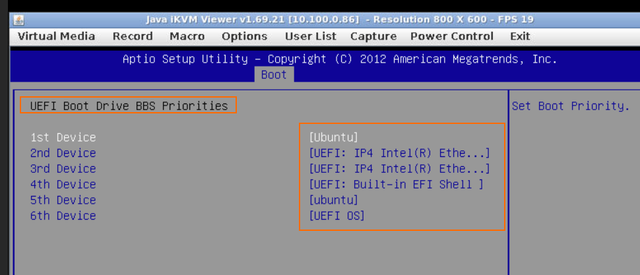
    Yes, installing is stuck!

    and i can't find out don't know why because i dont see a console while novnc not works... is @VPSSLIM understand how to solve it globally or they works only with tickets?

  • xmhkxmhk Member

    Are you trying to delay until the service expires? I've purchased from the 6th and up to now, I can't even view the noVNC.

  • @Nuke142 said: Yes, installing is stuck!

    Try to check the reinstall process from WHMCS.
    For me, for example, when in EasyDCIM I see "OS is currently installed" in WHMCS I see "trying to chassis reset" (or something like that).

    Anyway, that won't help, but at least we can check if we have the same errors while reinstalling :smile:

  • I finally managed to install the OS on all three of my servers. Each one has Dual E5-2660v2 CPUs, 128GB RAM, and a 2TB SSD. For the price, both the hardware and the network are great. If the servers stay online without issues, I’ll keep them for as long as they don’t deadpool. :smiley:

    I didn’t use the “Rebuild Server” option in WHMCS or the “Reinstall” option in EasyDCIM. Instead, I used the “ISO Images” feature in EasyDCIM, booted into the ISO from the noVNC KVM console, and installed the OS from there. If you have access to EasyDCIM, I’m pretty sure this method would work for everyone.

    YABS:

    # ## ## ## ## ## ## ## ## ## ## ## ## ## ## ## ## ## #
    #              Yet-Another-Bench-Script              #
    #                     v2025-04-20                    #
    # https://github.com/masonr/yet-another-bench-script #
    # ## ## ## ## ## ## ## ## ## ## ## ## ## ## ## ## ## #
    
    Fri Aug 15 17:31:17 UTC 2025
    
    Basic System Information:
    ---------------------------------
    Uptime     : 0 days, 0 hours, 32 minutes
    Processor  : Intel(R) Xeon(R) CPU E5-2660 v2 @ 2.20GHz
    CPU cores  : 40 @ 1200.000 MHz
    AES-NI     : ✔ Enabled
    VM-x/AMD-V : ✔ Enabled
    RAM        : 125.8 GiB
    Swap       : 32.0 GiB
    Disk       : 1.8 TiB
    Distro     : Ubuntu 24.04.3 LTS
    Kernel     : 6.8.0-71-generic
    VM Type    : NONE
    IPv4/IPv6  : ✔ Online / ❌ Offline
    
    IPv4 Network Information:
    ---------------------------------
    ISP        : HostSlim B.V.
    ASN        : AS207083 HostSlim B.V.
    Host       : HostSlim B.V
    Location   : Tallinn, Harjumaa (37)
    Country    : Estonia
    
    fio Disk Speed Tests (Mixed R/W 50/50) (Partition /dev/sda4):
    ---------------------------------
    Block Size | 4k            (IOPS) | 64k           (IOPS)
      ------   | ---            ----  | ----           ---- 
    Read       | 150.13 MB/s  (37.5k) | 173.49 MB/s   (2.7k)
    Write      | 150.53 MB/s  (37.6k) | 174.40 MB/s   (2.7k)
    Total      | 300.66 MB/s  (75.1k) | 347.90 MB/s   (5.4k)
               |                      |                     
    Block Size | 512k          (IOPS) | 1m            (IOPS)
      ------   | ---            ----  | ----           ---- 
    Read       | 213.95 MB/s    (417) | 232.10 MB/s    (226)
    Write      | 225.32 MB/s    (440) | 247.56 MB/s    (241)
    Total      | 439.28 MB/s    (857) | 479.67 MB/s    (467)
    
    iperf3 Network Speed Tests (IPv4):
    ---------------------------------
    Provider        | Location (Link)           | Send Speed      | Recv Speed      | Ping           
    -----           | -----                     | ----            | ----            | ----           
    Clouvider       | London, UK (10G)          | 919 Mbits/sec   | 716 Mbits/sec   | 34.7 ms        
    Eranium         | Amsterdam, NL (100G)      | 927 Mbits/sec   | 925 Mbits/sec   | 31.8 ms        
    Uztelecom       | Tashkent, UZ (10G)        | 910 Mbits/sec   | 712 Mbits/sec   | 53.5 ms        
    Leaseweb        | Singapore, SG (10G)       | 762 Mbits/sec   | 568 Mbits/sec   | --             
    Clouvider       | Los Angeles, CA, US (10G) | busy            | 323 Mbits/sec   | 171 ms         
    Leaseweb        | NYC, NY, US (10G)         | busy            | busy            | 117 ms         
    Edgoo           | Sao Paulo, BR (1G)        | 270 Mbits/sec   | 298 Mbits/sec   | 203 ms         
    
    Geekbench 6 Benchmark Test:
    ---------------------------------
    Test            | Value                         
                    |                               
    Single Core     | 569                           
    Multi Core      | 4884                          
    Full Test       | https://browser.geekbench.com/v6/cpu/13336517
    
    YABS completed in 13 min 46 sec
    
  • xmhkxmhk Member

    @wa44io4 said:
    I finally managed to install the OS on all three of my servers. Each one has Dual E5-2660v2 CPUs, 128GB RAM, and a 2TB SSD. For the price, both the hardware and the network are great. If the servers stay online without issues, I’ll keep them for as long as they don’t deadpool. :smiley:

    I didn’t use the “Rebuild Server” option in WHMCS or the “Reinstall” option in EasyDCIM. Instead, I used the “ISO Images” feature in EasyDCIM, booted into the ISO from the noVNC KVM console, and installed the OS from there. If you have access to EasyDCIM, I’m pretty sure this method would work for everyone.

    Congratulations, I can access EasyDCIM, but my noVNC is not working.

    Thanked by 1wa44io4
  • VPSSLIMVPSSLIM Patron Provider, Veteran

    Would anybody be interested in some storage deal with dual cpu? U have some 12 bay x 1TB storage servers (can go up to 12x16tb) with 1Gbps port in Amsterdam and in Tallinn as well. Good backup servers.

  • SashkaProSashkaPro Member
    edited August 2025

    @VPSSLIM said: Would anybody be interested in some storage deal with dual cpu? U have some 12 bay x 1TB storage servers (can go up to 12x16tb) with 1Gbps port in Amsterdam and in Tallinn as well. Good backup servers.

    Ofc its me.

    Tell full specs with price for:
    1) 12x16TB HDD
    2) 8x16TB HDD (in 12-bay so I can upgrade later).
    3) 2x500 SSD + 10x16TB
    4) 2x1000 SSD + 10x16TB
    5) 2x500 SSD + 8x16TB

    in Tallinn

  • Ok, guys, is there an owner of the IP address 69.12.83.190 here? With Debian installed.

    That IP address is mine; maybe you typoed/misconfigured yours?
    As a result, we have two servers with the same IP address.

  • Thanks for the dedicated deals, great pricing!

    Thanked by 1VPSSLIM
  • `# ## ## ## ## ## ## ## ## ## ## ## ## ## ## ## ## ## #

    Yet-Another-Bench-Script

    v2025-04-20

    https://github.com/masonr/yet-another-bench-script

    ## ## ## ## ## ## ## ## ## ## ## ## ## ## ## ## ##

    Sat Aug 16 02:56:56 PM UTC 2025

    Basic System Information:

    Uptime : 2 days, 3 hours, 11 minutes
    Processor : Intel(R) Xeon(R) CPU E5-2660 v2 @ 2.20GHz
    CPU cores : 40 @ 2199.812 MHz
    AES-NI : ✔ Enabled
    VM-x/AMD-V : ✔ Enabled
    RAM : 125.8 GiB
    Swap : 8.0 GiB
    Disk : 1.8 TiB
    Distro : Ubuntu 22.04.5 LTS
    Kernel : 5.15.0-151-generic
    VM Type : NONE
    IPv4/IPv6 : ✔ Online / ✔ Online

    IPv4 Network Information:

    ISP : HostSlim B.V.
    ASN : AS207083 HostSlim B.V.
    Host : HostSlim B.V
    Location : Tallinn, Harjumaa (37)
    Country : Estonia

    fio Disk Speed Tests (Mixed R/W 50/50) (Partition /dev/mapper/ubuntu--vg-ubuntu--lv):

    Block Size 4k (IOPS) 64k (IOPS)
    Read 141.57 MB/s (35.3k) 173.85 MB/s (2.7k)
    Write 141.94 MB/s (35.4k) 174.76 MB/s (2.7k)
    Total 283.51 MB/s (70.8k) 348.62 MB/s (5.4k)
    Block Size 512k (IOPS) 1m (IOPS)
    ------ --- ---- ---- ----
    Read 210.69 MB/s (411) 217.34 MB/s (212)
    Write 221.88 MB/s (433) 231.82 MB/s (226)
    Total 432.58 MB/s (844) 449.16 MB/s (438)

    iperf3 Network Speed Tests (IPv4):

    Provider Location (Link) Send Speed Recv Speed Ping
    Clouvider London, UK (10G) 918 Mbits/sec 904 Mbits/sec 34.7 ms
    Eranium Amsterdam, NL (100G) 926 Mbits/sec 919 Mbits/sec 28.3 ms
    Uztelecom Tashkent, UZ (10G) 909 Mbits/sec 714 Mbits/sec 54.1 ms
    Leaseweb Singapore, SG (10G) 785 Mbits/sec 625 Mbits/sec --
    Clouvider Los Angeles, CA, US (10G) 799 Mbits/sec 394 Mbits/sec 170 ms
    Leaseweb NYC, NY, US (10G) 859 Mbits/sec 668 Mbits/sec 109 ms
    Edgoo Sao Paulo, BR (1G) 768 Mbits/sec 281 Mbits/sec 199 ms

    iperf3 Network Speed Tests (IPv6):

    Provider Location (Link) Send Speed Recv Speed Ping
    Clouvider London, UK (10G) 901 Mbits/sec 828 Mbits/sec 34.7 ms
    Eranium Amsterdam, NL (100G) 908 Mbits/sec 892 Mbits/sec 28.3 ms
    Uztelecom Tashkent, UZ (10G) 896 Mbits/sec 636 Mbits/sec 53.4 ms
    Leaseweb Singapore, SG (10G) 784 Mbits/sec busy 185 ms
    Clouvider Los Angeles, CA, US (10G) 801 Mbits/sec 450 Mbits/sec 169 ms
    Leaseweb NYC, NY, US (10G) 858 Mbits/sec 643 Mbits/sec 109 ms
    Edgoo Sao Paulo, BR (1G) 738 Mbits/sec 386 Mbits/sec 199 ms

    Geekbench 6 Benchmark Test:

    Test | Value
    |
    Single Core | 414
    Multi Core | 3812
    Full Test | https://browser.geekbench.com/v6/cpu/13352324

    YABS completed in 19 min 30 sec
    `

  • plumbergplumberg Veteran, Megathread Squad

    @PinHead said:
    `# ## ## ## ## ## ## ## ## ## ## ## ## ## ## ## ## ## #

    Yet-Another-Bench-Script

    v2025-04-20

    https://github.com/masonr/yet-another-bench-script

    ## ## ## ## ## ## ## ## ## ## ## ## ## ## ## ## ##

    Sat Aug 16 02:56:56 PM UTC 2025

    Basic System Information:

    Uptime : 2 days, 3 hours, 11 minutes
    Processor : Intel(R) Xeon(R) CPU E5-2660 v2 @ 2.20GHz
    CPU cores : 40 @ 2199.812 MHz
    AES-NI : ✔ Enabled
    VM-x/AMD-V : ✔ Enabled
    RAM : 125.8 GiB
    Swap : 8.0 GiB
    Disk : 1.8 TiB
    Distro : Ubuntu 22.04.5 LTS
    Kernel : 5.15.0-151-generic
    VM Type : NONE
    IPv4/IPv6 : ✔ Online / ✔ Online

    IPv4 Network Information:

    ISP : HostSlim B.V.
    ASN : AS207083 HostSlim B.V.
    Host : HostSlim B.V
    Location : Tallinn, Harjumaa (37)
    Country : Estonia

    fio Disk Speed Tests (Mixed R/W 50/50) (Partition /dev/mapper/ubuntu--vg-ubuntu--lv):

    Block Size 4k (IOPS) 64k (IOPS)
    Read 141.57 MB/s (35.3k) 173.85 MB/s (2.7k)
    Write 141.94 MB/s (35.4k) 174.76 MB/s (2.7k)
    Total 283.51 MB/s (70.8k) 348.62 MB/s (5.4k)
    Block Size 512k (IOPS) 1m (IOPS)
    ------ --- ---- ---- ----
    Read 210.69 MB/s (411) 217.34 MB/s (212)
    Write 221.88 MB/s (433) 231.82 MB/s (226)
    Total 432.58 MB/s (844) 449.16 MB/s (438)

    iperf3 Network Speed Tests (IPv4):

    Provider Location (Link) Send Speed Recv Speed Ping
    Clouvider London, UK (10G) 918 Mbits/sec 904 Mbits/sec 34.7 ms
    Eranium Amsterdam, NL (100G) 926 Mbits/sec 919 Mbits/sec 28.3 ms
    Uztelecom Tashkent, UZ (10G) 909 Mbits/sec 714 Mbits/sec 54.1 ms
    Leaseweb Singapore, SG (10G) 785 Mbits/sec 625 Mbits/sec --
    Clouvider Los Angeles, CA, US (10G) 799 Mbits/sec 394 Mbits/sec 170 ms
    Leaseweb NYC, NY, US (10G) 859 Mbits/sec 668 Mbits/sec 109 ms
    Edgoo Sao Paulo, BR (1G) 768 Mbits/sec 281 Mbits/sec 199 ms

    iperf3 Network Speed Tests (IPv6):

    Provider Location (Link) Send Speed Recv Speed Ping
    Clouvider London, UK (10G) 901 Mbits/sec 828 Mbits/sec 34.7 ms
    Eranium Amsterdam, NL (100G) 908 Mbits/sec 892 Mbits/sec 28.3 ms
    Uztelecom Tashkent, UZ (10G) 896 Mbits/sec 636 Mbits/sec 53.4 ms
    Leaseweb Singapore, SG (10G) 784 Mbits/sec busy 185 ms
    Clouvider Los Angeles, CA, US (10G) 801 Mbits/sec 450 Mbits/sec 169 ms
    Leaseweb NYC, NY, US (10G) 858 Mbits/sec 643 Mbits/sec 109 ms
    Edgoo Sao Paulo, BR (1G) 738 Mbits/sec 386 Mbits/sec 199 ms

    Geekbench 6 Benchmark Test:

    Test | Value
    |
    Single Core | 414
    Multi Core | 3812
    Full Test | https://browser.geekbench.com/v6/cpu/13352324

    YABS completed in 19 min 30 sec
    `

    how did you get this working?

  • Okay, today I got a reply in my ticket that they raised a ticket with EasyDCIM for the noVNC issue.

    Let's wait again.

  • xmhkxmhk Member

    @SashkaPro said:
    Okay, today I got a reply in my ticket that they raised a ticket with EasyDCIM for the noVNC issue.

    Let's wait again.

    Me too, I hope to successfully fix it.

  • @plumberg said:

    @PinHead said:
    `# ## ## ## ## ## ## ## ## ## ## ## ## ## ## ## ## ## #

    Yet-Another-Bench-Script

    v2025-04-20

    https://github.com/masonr/yet-another-bench-script

    ## ## ## ## ## ## ## ## ## ## ## ## ## ## ## ## ##

    Sat Aug 16 02:56:56 PM UTC 2025

    Basic System Information:

    Uptime : 2 days, 3 hours, 11 minutes
    Processor : Intel(R) Xeon(R) CPU E5-2660 v2 @ 2.20GHz
    CPU cores : 40 @ 2199.812 MHz
    AES-NI : ✔ Enabled
    VM-x/AMD-V : ✔ Enabled
    RAM : 125.8 GiB
    Swap : 8.0 GiB
    Disk : 1.8 TiB
    Distro : Ubuntu 22.04.5 LTS
    Kernel : 5.15.0-151-generic
    VM Type : NONE
    IPv4/IPv6 : ✔ Online / ✔ Online

    IPv4 Network Information:

    ISP : HostSlim B.V.
    ASN : AS207083 HostSlim B.V.
    Host : HostSlim B.V
    Location : Tallinn, Harjumaa (37)
    Country : Estonia

    fio Disk Speed Tests (Mixed R/W 50/50) (Partition /dev/mapper/ubuntu--vg-ubuntu--lv):

    Block Size 4k (IOPS) 64k (IOPS)
    Read 141.57 MB/s (35.3k) 173.85 MB/s (2.7k)
    Write 141.94 MB/s (35.4k) 174.76 MB/s (2.7k)
    Total 283.51 MB/s (70.8k) 348.62 MB/s (5.4k)
    Block Size 512k (IOPS) 1m (IOPS)
    ------ --- ---- ---- ----
    Read 210.69 MB/s (411) 217.34 MB/s (212)
    Write 221.88 MB/s (433) 231.82 MB/s (226)
    Total 432.58 MB/s (844) 449.16 MB/s (438)

    iperf3 Network Speed Tests (IPv4):

    Provider Location (Link) Send Speed Recv Speed Ping
    Clouvider London, UK (10G) 918 Mbits/sec 904 Mbits/sec 34.7 ms
    Eranium Amsterdam, NL (100G) 926 Mbits/sec 919 Mbits/sec 28.3 ms
    Uztelecom Tashkent, UZ (10G) 909 Mbits/sec 714 Mbits/sec 54.1 ms
    Leaseweb Singapore, SG (10G) 785 Mbits/sec 625 Mbits/sec --
    Clouvider Los Angeles, CA, US (10G) 799 Mbits/sec 394 Mbits/sec 170 ms
    Leaseweb NYC, NY, US (10G) 859 Mbits/sec 668 Mbits/sec 109 ms
    Edgoo Sao Paulo, BR (1G) 768 Mbits/sec 281 Mbits/sec 199 ms

    iperf3 Network Speed Tests (IPv6):

    Provider Location (Link) Send Speed Recv Speed Ping
    Clouvider London, UK (10G) 901 Mbits/sec 828 Mbits/sec 34.7 ms
    Eranium Amsterdam, NL (100G) 908 Mbits/sec 892 Mbits/sec 28.3 ms
    Uztelecom Tashkent, UZ (10G) 896 Mbits/sec 636 Mbits/sec 53.4 ms
    Leaseweb Singapore, SG (10G) 784 Mbits/sec busy 185 ms
    Clouvider Los Angeles, CA, US (10G) 801 Mbits/sec 450 Mbits/sec 169 ms
    Leaseweb NYC, NY, US (10G) 858 Mbits/sec 643 Mbits/sec 109 ms
    Edgoo Sao Paulo, BR (1G) 738 Mbits/sec 386 Mbits/sec 199 ms

    Geekbench 6 Benchmark Test:

    Test | Value
    |
    Single Core | 414
    Multi Core | 3812
    Full Test | https://browser.geekbench.com/v6/cpu/13352324

    YABS completed in 19 min 30 sec
    `

    how did you get this working?

    • From controlpanel NOVNC enter bios
    • adjust PCI settings to UEFI and PXE rom boot
    • set boot priority first: network, second: disk
    • select reinstall from controlpanel and choose desired OS
    • reboot from controlpanel or from NoVNC
    • let it do it's job

    It took me multiple times on try and error, encountered ip4 networkissues where installation took forever because of the networkissues, but once the networkissues were resolved installation worked flawless.

    Thanked by 1plumberg
  • plumbergplumberg Veteran, Megathread Squad

    @PinHead said:

    @plumberg said:

    @PinHead said:
    `# ## ## ## ## ## ## ## ## ## ## ## ## ## ## ## ## ## #

    Yet-Another-Bench-Script

    v2025-04-20

    https://github.com/masonr/yet-another-bench-script

    ## ## ## ## ## ## ## ## ## ## ## ## ## ## ## ## ##

    Sat Aug 16 02:56:56 PM UTC 2025

    Basic System Information:

    Uptime : 2 days, 3 hours, 11 minutes
    Processor : Intel(R) Xeon(R) CPU E5-2660 v2 @ 2.20GHz
    CPU cores : 40 @ 2199.812 MHz
    AES-NI : ✔ Enabled
    VM-x/AMD-V : ✔ Enabled
    RAM : 125.8 GiB
    Swap : 8.0 GiB
    Disk : 1.8 TiB
    Distro : Ubuntu 22.04.5 LTS
    Kernel : 5.15.0-151-generic
    VM Type : NONE
    IPv4/IPv6 : ✔ Online / ✔ Online

    IPv4 Network Information:

    ISP : HostSlim B.V.
    ASN : AS207083 HostSlim B.V.
    Host : HostSlim B.V
    Location : Tallinn, Harjumaa (37)
    Country : Estonia

    fio Disk Speed Tests (Mixed R/W 50/50) (Partition /dev/mapper/ubuntu--vg-ubuntu--lv):

    Block Size 4k (IOPS) 64k (IOPS)
    Read 141.57 MB/s (35.3k) 173.85 MB/s (2.7k)
    Write 141.94 MB/s (35.4k) 174.76 MB/s (2.7k)
    Total 283.51 MB/s (70.8k) 348.62 MB/s (5.4k)
    Block Size 512k (IOPS) 1m (IOPS)
    ------ --- ---- ---- ----
    Read 210.69 MB/s (411) 217.34 MB/s (212)
    Write 221.88 MB/s (433) 231.82 MB/s (226)
    Total 432.58 MB/s (844) 449.16 MB/s (438)

    iperf3 Network Speed Tests (IPv4):

    Provider Location (Link) Send Speed Recv Speed Ping
    Clouvider London, UK (10G) 918 Mbits/sec 904 Mbits/sec 34.7 ms
    Eranium Amsterdam, NL (100G) 926 Mbits/sec 919 Mbits/sec 28.3 ms
    Uztelecom Tashkent, UZ (10G) 909 Mbits/sec 714 Mbits/sec 54.1 ms
    Leaseweb Singapore, SG (10G) 785 Mbits/sec 625 Mbits/sec --
    Clouvider Los Angeles, CA, US (10G) 799 Mbits/sec 394 Mbits/sec 170 ms
    Leaseweb NYC, NY, US (10G) 859 Mbits/sec 668 Mbits/sec 109 ms
    Edgoo Sao Paulo, BR (1G) 768 Mbits/sec 281 Mbits/sec 199 ms

    iperf3 Network Speed Tests (IPv6):

    Provider Location (Link) Send Speed Recv Speed Ping
    Clouvider London, UK (10G) 901 Mbits/sec 828 Mbits/sec 34.7 ms
    Eranium Amsterdam, NL (100G) 908 Mbits/sec 892 Mbits/sec 28.3 ms
    Uztelecom Tashkent, UZ (10G) 896 Mbits/sec 636 Mbits/sec 53.4 ms
    Leaseweb Singapore, SG (10G) 784 Mbits/sec busy 185 ms
    Clouvider Los Angeles, CA, US (10G) 801 Mbits/sec 450 Mbits/sec 169 ms
    Leaseweb NYC, NY, US (10G) 858 Mbits/sec 643 Mbits/sec 109 ms
    Edgoo Sao Paulo, BR (1G) 738 Mbits/sec 386 Mbits/sec 199 ms

    Geekbench 6 Benchmark Test:

    Test | Value
    |
    Single Core | 414
    Multi Core | 3812
    Full Test | https://browser.geekbench.com/v6/cpu/13352324

    YABS completed in 19 min 30 sec
    `

    how did you get this working?

    • From controlpanel NOVNC enter bios
    • adjust PCI settings to UEFI and PXE rom boot
    • set boot priority first: network, second: disk
    • select reinstall from controlpanel and choose desired OS
    • reboot from controlpanel or from NoVNC
    • let it do it's job

    It took me multiple times on try and error, encountered ip4 networkissues where installation took forever because of the networkissues, but once the networkissues were resolved installation worked flawless.

    What to do when novnc is blank?

  • PinHeadPinHead Member
    edited August 2025

    @plumberg said:

    @PinHead said:

    @plumberg said:

    @PinHead said:
    `# ## ## ## ## ## ## ## ## ## ## ## ## ## ## ## ## ## #

    Yet-Another-Bench-Script

    v2025-04-20

    https://github.com/masonr/yet-another-bench-script

    ## ## ## ## ## ## ## ## ## ## ## ## ## ## ## ## ##

    Sat Aug 16 02:56:56 PM UTC 2025

    Basic System Information:

    Uptime : 2 days, 3 hours, 11 minutes
    Processor : Intel(R) Xeon(R) CPU E5-2660 v2 @ 2.20GHz
    CPU cores : 40 @ 2199.812 MHz
    AES-NI : ✔ Enabled
    VM-x/AMD-V : ✔ Enabled
    RAM : 125.8 GiB
    Swap : 8.0 GiB
    Disk : 1.8 TiB
    Distro : Ubuntu 22.04.5 LTS
    Kernel : 5.15.0-151-generic
    VM Type : NONE
    IPv4/IPv6 : ✔ Online / ✔ Online

    IPv4 Network Information:

    ISP : HostSlim B.V.
    ASN : AS207083 HostSlim B.V.
    Host : HostSlim B.V
    Location : Tallinn, Harjumaa (37)
    Country : Estonia

    fio Disk Speed Tests (Mixed R/W 50/50) (Partition /dev/mapper/ubuntu--vg-ubuntu--lv):

    Block Size 4k (IOPS) 64k (IOPS)
    Read 141.57 MB/s (35.3k) 173.85 MB/s (2.7k)
    Write 141.94 MB/s (35.4k) 174.76 MB/s (2.7k)
    Total 283.51 MB/s (70.8k) 348.62 MB/s (5.4k)
    Block Size 512k (IOPS) 1m (IOPS)
    ------ --- ---- ---- ----
    Read 210.69 MB/s (411) 217.34 MB/s (212)
    Write 221.88 MB/s (433) 231.82 MB/s (226)
    Total 432.58 MB/s (844) 449.16 MB/s (438)

    iperf3 Network Speed Tests (IPv4):

    Provider Location (Link) Send Speed Recv Speed Ping
    Clouvider London, UK (10G) 918 Mbits/sec 904 Mbits/sec 34.7 ms
    Eranium Amsterdam, NL (100G) 926 Mbits/sec 919 Mbits/sec 28.3 ms
    Uztelecom Tashkent, UZ (10G) 909 Mbits/sec 714 Mbits/sec 54.1 ms
    Leaseweb Singapore, SG (10G) 785 Mbits/sec 625 Mbits/sec --
    Clouvider Los Angeles, CA, US (10G) 799 Mbits/sec 394 Mbits/sec 170 ms
    Leaseweb NYC, NY, US (10G) 859 Mbits/sec 668 Mbits/sec 109 ms
    Edgoo Sao Paulo, BR (1G) 768 Mbits/sec 281 Mbits/sec 199 ms

    iperf3 Network Speed Tests (IPv6):

    Provider Location (Link) Send Speed Recv Speed Ping
    Clouvider London, UK (10G) 901 Mbits/sec 828 Mbits/sec 34.7 ms
    Eranium Amsterdam, NL (100G) 908 Mbits/sec 892 Mbits/sec 28.3 ms
    Uztelecom Tashkent, UZ (10G) 896 Mbits/sec 636 Mbits/sec 53.4 ms
    Leaseweb Singapore, SG (10G) 784 Mbits/sec busy 185 ms
    Clouvider Los Angeles, CA, US (10G) 801 Mbits/sec 450 Mbits/sec 169 ms
    Leaseweb NYC, NY, US (10G) 858 Mbits/sec 643 Mbits/sec 109 ms
    Edgoo Sao Paulo, BR (1G) 738 Mbits/sec 386 Mbits/sec 199 ms

    Geekbench 6 Benchmark Test:

    Test | Value
    |
    Single Core | 414
    Multi Core | 3812
    Full Test | https://browser.geekbench.com/v6/cpu/13352324

    YABS completed in 19 min 30 sec
    `

    how did you get this working?

    • From controlpanel NOVNC enter bios
    • adjust PCI settings to UEFI and PXE rom boot
    • set boot priority first: network, second: disk
    • select reinstall from controlpanel and choose desired OS
    • reboot from controlpanel or from NoVNC
    • let it do it's job

    It took me multiple times on try and error, encountered ip4 networkissues where installation took forever because of the networkissues, but once the networkissues were resolved installation worked flawless.

    What to do when novnc is blank?

    Is the server running? Can you ping the IP? If not, start it from controlpanel.
    If it's pingable and NoVNC refuses to connect, create a ticket.

    NoVNC should ask to continue and to ask if you want to run the Java viewer application, if it doesn't your NoVNC looks broken and only thing you can do is create a ticket and let Hostslim fix the NoVNC.


    Have you tried another browser? Maybe it's browser permissions issue or something.

    Thanked by 1plumberg
  • plumbergplumberg Veteran, Megathread Squad

    @PinHead said:

    @plumberg said:

    @PinHead said:

    @plumberg said:

    @PinHead said:
    `# ## ## ## ## ## ## ## ## ## ## ## ## ## ## ## ## ## #

    Yet-Another-Bench-Script

    v2025-04-20

    https://github.com/masonr/yet-another-bench-script

    ## ## ## ## ## ## ## ## ## ## ## ## ## ## ## ## ##

    Sat Aug 16 02:56:56 PM UTC 2025

    Basic System Information:

    Uptime : 2 days, 3 hours, 11 minutes
    Processor : Intel(R) Xeon(R) CPU E5-2660 v2 @ 2.20GHz
    CPU cores : 40 @ 2199.812 MHz
    AES-NI : ✔ Enabled
    VM-x/AMD-V : ✔ Enabled
    RAM : 125.8 GiB
    Swap : 8.0 GiB
    Disk : 1.8 TiB
    Distro : Ubuntu 22.04.5 LTS
    Kernel : 5.15.0-151-generic
    VM Type : NONE
    IPv4/IPv6 : ✔ Online / ✔ Online

    IPv4 Network Information:

    ISP : HostSlim B.V.
    ASN : AS207083 HostSlim B.V.
    Host : HostSlim B.V
    Location : Tallinn, Harjumaa (37)
    Country : Estonia

    fio Disk Speed Tests (Mixed R/W 50/50) (Partition /dev/mapper/ubuntu--vg-ubuntu--lv):

    Block Size 4k (IOPS) 64k (IOPS)
    Read 141.57 MB/s (35.3k) 173.85 MB/s (2.7k)
    Write 141.94 MB/s (35.4k) 174.76 MB/s (2.7k)
    Total 283.51 MB/s (70.8k) 348.62 MB/s (5.4k)
    Block Size 512k (IOPS) 1m (IOPS)
    ------ --- ---- ---- ----
    Read 210.69 MB/s (411) 217.34 MB/s (212)
    Write 221.88 MB/s (433) 231.82 MB/s (226)
    Total 432.58 MB/s (844) 449.16 MB/s (438)

    iperf3 Network Speed Tests (IPv4):

    Provider Location (Link) Send Speed Recv Speed Ping
    Clouvider London, UK (10G) 918 Mbits/sec 904 Mbits/sec 34.7 ms
    Eranium Amsterdam, NL (100G) 926 Mbits/sec 919 Mbits/sec 28.3 ms
    Uztelecom Tashkent, UZ (10G) 909 Mbits/sec 714 Mbits/sec 54.1 ms
    Leaseweb Singapore, SG (10G) 785 Mbits/sec 625 Mbits/sec --
    Clouvider Los Angeles, CA, US (10G) 799 Mbits/sec 394 Mbits/sec 170 ms
    Leaseweb NYC, NY, US (10G) 859 Mbits/sec 668 Mbits/sec 109 ms
    Edgoo Sao Paulo, BR (1G) 768 Mbits/sec 281 Mbits/sec 199 ms

    iperf3 Network Speed Tests (IPv6):

    Provider Location (Link) Send Speed Recv Speed Ping
    Clouvider London, UK (10G) 901 Mbits/sec 828 Mbits/sec 34.7 ms
    Eranium Amsterdam, NL (100G) 908 Mbits/sec 892 Mbits/sec 28.3 ms
    Uztelecom Tashkent, UZ (10G) 896 Mbits/sec 636 Mbits/sec 53.4 ms
    Leaseweb Singapore, SG (10G) 784 Mbits/sec busy 185 ms
    Clouvider Los Angeles, CA, US (10G) 801 Mbits/sec 450 Mbits/sec 169 ms
    Leaseweb NYC, NY, US (10G) 858 Mbits/sec 643 Mbits/sec 109 ms
    Edgoo Sao Paulo, BR (1G) 738 Mbits/sec 386 Mbits/sec 199 ms

    Geekbench 6 Benchmark Test:

    Test | Value
    |
    Single Core | 414
    Multi Core | 3812
    Full Test | https://browser.geekbench.com/v6/cpu/13352324

    YABS completed in 19 min 30 sec
    `

    how did you get this working?

    • From controlpanel NOVNC enter bios
    • adjust PCI settings to UEFI and PXE rom boot
    • set boot priority first: network, second: disk
    • select reinstall from controlpanel and choose desired OS
    • reboot from controlpanel or from NoVNC
    • let it do it's job

    It took me multiple times on try and error, encountered ip4 networkissues where installation took forever because of the networkissues, but once the networkissues were resolved installation worked flawless.

    What to do when novnc is blank?

    Is the server running? Can you ping the IP? If not, start it from controlpanel.
    If it's pingable and NoVNC refuses to connect, create a ticket.

    NoVNC should ask to continue and to ask if you want to run the Java viewer application, if it doesn't your NoVNC looks broken and only thing you can do is create a ticket and let Hostslim fix the NoVNC.


    Have you tried another browser? Maybe it's browser permissions issue or something.

    Thank you
    Novnc worked randomly
    Sigh

    Plus bios showed 1 disk when it worked

  • webcloudwebcloud Member
    edited August 2025

    So far my server is not working.

    There was a problem with the RAM and it hasn't even worked since I received it.

    And @VPSSLIM support seems to be doing ticket tourism.

  • @webcloud said:
    There was a problem with the RAM and it hasn't even worked since I received it.

    And @VPSSLIM support seems to be doing ticket tourism.

    How did you understand that problem with ram?

    Today no replies on ticket tho.

  • @SashkaPro said:

    @webcloud said:
    There was a problem with the RAM and it hasn't even worked since I received it.

    And @VPSSLIM support seems to be doing ticket tourism.

    How did you understand that problem with ram?

    Today no replies on ticket tho.

    He responded to the ticket on 08/14, today we are on the 18th and nothing.

    Thanked by 1SashkaPro
Sign In or Register to comment.