


























New on LowEndTalk? Please Register and read our Community Rules.
All new Registrations are manually reviewed and approved, so a short delay after registration may occur before your account becomes active.
All new Registrations are manually reviewed and approved, so a short delay after registration may occur before your account becomes active.



Comments
Great deals, good luck with sales .
.
Because during network configuration, only eno2 seemed to work.
No more advice then
I’m running into the same issue as many of you. After my first ticket, I was able to install Ubuntu successfully, but after trying a Debian reinstall, it broke again
I’m fine with waiting for a fix - no rush on my side.
Be sure to raise a ticket as well in such cases. Thx!
Is someone have a giude how to solve all problems when noVnc not works and no ping/ssh to server? I'am tired try to fix all this things myself and slow support response. Day by day they say "try reinstall os".
If you have a running system, maybe try this: https://github.com/bin456789/reinstall/blob/main/README.en.md
It saved me a lot of trouble.
yeahh finally got the server ready after 8 days.
So they fixed Novnc, or they fixed the reinstalling process?
i got my noVNC working from the start, only network is problem.
via easydcim OS installed and working well on first server that available via novnc where i changed bios (see screenshots).
but same reinstall not works for other two new servers - ip is available via ping and ssh but wrong user/password even 30 minutes - i think install is stucked may be because wrong bios settings.
Because same symptoms with wrong user/pw i see on first server during normal ubuntu install.
Support can't fix novnc over 1 week. I don't know why because all same problems was with very first server and they fixed it so soon.
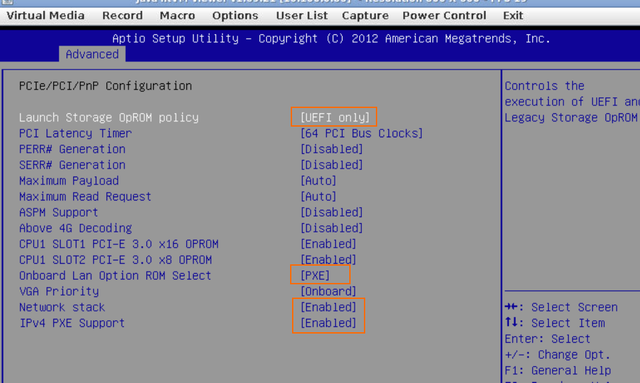
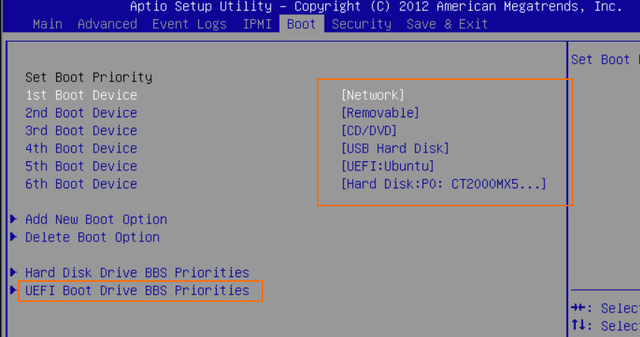
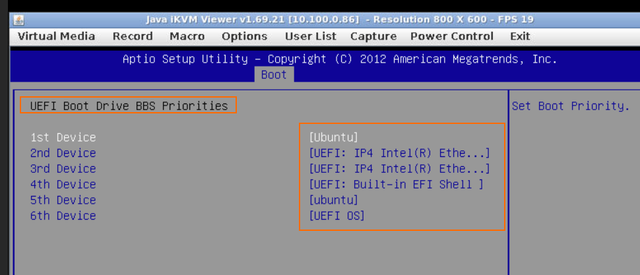
Yes, installing is stuck!
and i can't find out don't know why because i dont see a console while novnc not works... is @VPSSLIM understand how to solve it globally or they works only with tickets?
Are you trying to delay until the service expires? I've purchased from the 6th and up to now, I can't even view the noVNC.
Try to check the reinstall process from WHMCS.
For me, for example, when in EasyDCIM I see "OS is currently installed" in WHMCS I see "trying to chassis reset" (or something like that).
Anyway, that won't help, but at least we can check if we have the same errors while reinstalling
I finally managed to install the OS on all three of my servers. Each one has Dual E5-2660v2 CPUs, 128GB RAM, and a 2TB SSD. For the price, both the hardware and the network are great. If the servers stay online without issues, I’ll keep them for as long as they don’t deadpool.
I didn’t use the “Rebuild Server” option in WHMCS or the “Reinstall” option in EasyDCIM. Instead, I used the “ISO Images” feature in EasyDCIM, booted into the ISO from the noVNC KVM console, and installed the OS from there. If you have access to EasyDCIM, I’m pretty sure this method would work for everyone.
YABS:
Congratulations, I can access EasyDCIM, but my noVNC is not working.
Would anybody be interested in some storage deal with dual cpu? U have some 12 bay x 1TB storage servers (can go up to 12x16tb) with 1Gbps port in Amsterdam and in Tallinn as well. Good backup servers.
Ofc its me.
Tell full specs with price for:
1) 12x16TB HDD
2) 8x16TB HDD (in 12-bay so I can upgrade later).
3) 2x500 SSD + 10x16TB
4) 2x1000 SSD + 10x16TB
5) 2x500 SSD + 8x16TB
in Tallinn
Ok, guys, is there an owner of the IP address 69.12.83.190 here? With Debian installed.
That IP address is mine; maybe you typoed/misconfigured yours?
As a result, we have two servers with the same IP address.
Thanks for the dedicated deals, great pricing!
`# ## ## ## ## ## ## ## ## ## ## ## ## ## ## ## ## ## #
Yet-Another-Bench-Script
v2025-04-20
https://github.com/masonr/yet-another-bench-script
## ## ## ## ## ## ## ## ## ## ## ## ## ## ## ## ##
Sat Aug 16 02:56:56 PM UTC 2025
Basic System Information:
Uptime : 2 days, 3 hours, 11 minutes
Processor : Intel(R) Xeon(R) CPU E5-2660 v2 @ 2.20GHz
CPU cores : 40 @ 2199.812 MHz
AES-NI : ✔ Enabled
VM-x/AMD-V : ✔ Enabled
RAM : 125.8 GiB
Swap : 8.0 GiB
Disk : 1.8 TiB
Distro : Ubuntu 22.04.5 LTS
Kernel : 5.15.0-151-generic
VM Type : NONE
IPv4/IPv6 : ✔ Online / ✔ Online
IPv4 Network Information:
ISP : HostSlim B.V.
ASN : AS207083 HostSlim B.V.
Host : HostSlim B.V
Location : Tallinn, Harjumaa (37)
Country : Estonia
fio Disk Speed Tests (Mixed R/W 50/50) (Partition /dev/mapper/ubuntu--vg-ubuntu--lv):
iperf3 Network Speed Tests (IPv4):
iperf3 Network Speed Tests (IPv6):
Geekbench 6 Benchmark Test:
Test | Value
|
Single Core | 414
Multi Core | 3812
Full Test | https://browser.geekbench.com/v6/cpu/13352324
YABS completed in 19 min 30 sec
`
how did you get this working?
Okay, today I got a reply in my ticket that they raised a ticket with EasyDCIM for the noVNC issue.
Let's wait again.
Me too, I hope to successfully fix it.
It took me multiple times on try and error, encountered ip4 networkissues where installation took forever because of the networkissues, but once the networkissues were resolved installation worked flawless.
What to do when novnc is blank?
Is the server running? Can you ping the IP? If not, start it from controlpanel.
If it's pingable and NoVNC refuses to connect, create a ticket.
NoVNC should ask to continue and to ask if you want to run the Java viewer application, if it doesn't your NoVNC looks broken and only thing you can do is create a ticket and let Hostslim fix the NoVNC.
Have you tried another browser? Maybe it's browser permissions issue or something.
Thank you
Novnc worked randomly
Sigh
Plus bios showed 1 disk when it worked
So far my server is not working.
There was a problem with the RAM and it hasn't even worked since I received it.
And @VPSSLIM support seems to be doing ticket tourism.
How did you understand that problem with ram?
Today no replies on ticket tho.
He responded to the ticket on 08/14, today we are on the 18th and nothing.