


























New on LowEndTalk? Please Register and read our Community Rules.
All new Registrations are manually reviewed and approved, so a short delay after registration may occur before your account becomes active.
All new Registrations are manually reviewed and approved, so a short delay after registration may occur before your account becomes active.



Comments
I see your ticket - working on it!
Glad all works now!
Solved for you? If not, PM me your ticket ID
Guys, someone has experienced the same type of network mess that I have:
Lets say, we got dedi with the following settings:
IP: 69.12.83.123 (just a random IP)
Suggested mask and GW (I can't see it anywhere in panel, that just my suggestion):
Mask: /24 255.255.255.0
GW: 69.12.83.1
That "server IP" (69.12.83.123) we got from the first email.
Next, we try to install OS via "prebuilt images", the server boots to PXE, trying to download necessary images and throws us an error that "can't download packages". So no OS installed.
Okay. We mount our iso, installing OS via noVNC, but there is no internet at all on the server.
We can't ping* gateway 69.12.83.1, and we can't SSH from outside; nothing is working.
I already raised the ticket (879773), but maybe I'm just dumb?
Maybe gateway not .1 ?
That's a strange issue but that's another dedicated server - not in this offer - I can see this b/c of the subnet. Anyhow, I want to investigate this myself. Do you have ticket ID for me by any chance?
May that's me
Ticket #879773, v4 promo.
So, for today, I can ping 69.12.83.1 with 70-80% packet loss. And even I was able to download some packages.
But still not usable.
Sounds like a config issue. Will look into it.
Order Number: 2682681847
Okay, issue resolved.
IPv6 left
YABS 2x Intel XEON E5-2695v4 64 GB DDR4 2x 1 TB SAMSUNG SSD 100 TB 10Gbps 49 EUR / month
@gtz I tried the solution you suggested, but OS reinstallation still does not work. Support staff offered a manual OS reinstall, but that does not address the real problem.
@VPSSLIM could you check order #2067164?
Ordered 3 days ago, still in pending state.
Ticket #051115
Thanks.
Okay, guys who bought dedi
May I ask you to ping 69.12.83.1 (this is our gateway) for approximately 30 minutes?
I have flapping, 0.2-190ms latency, and around 5% packet loss (to the gateway).
View Ticket #431255
yeah, I have this same problem. but ping 8.8.8.8 is stable。
this need their support to sloved 。 > @wa44io4 said:
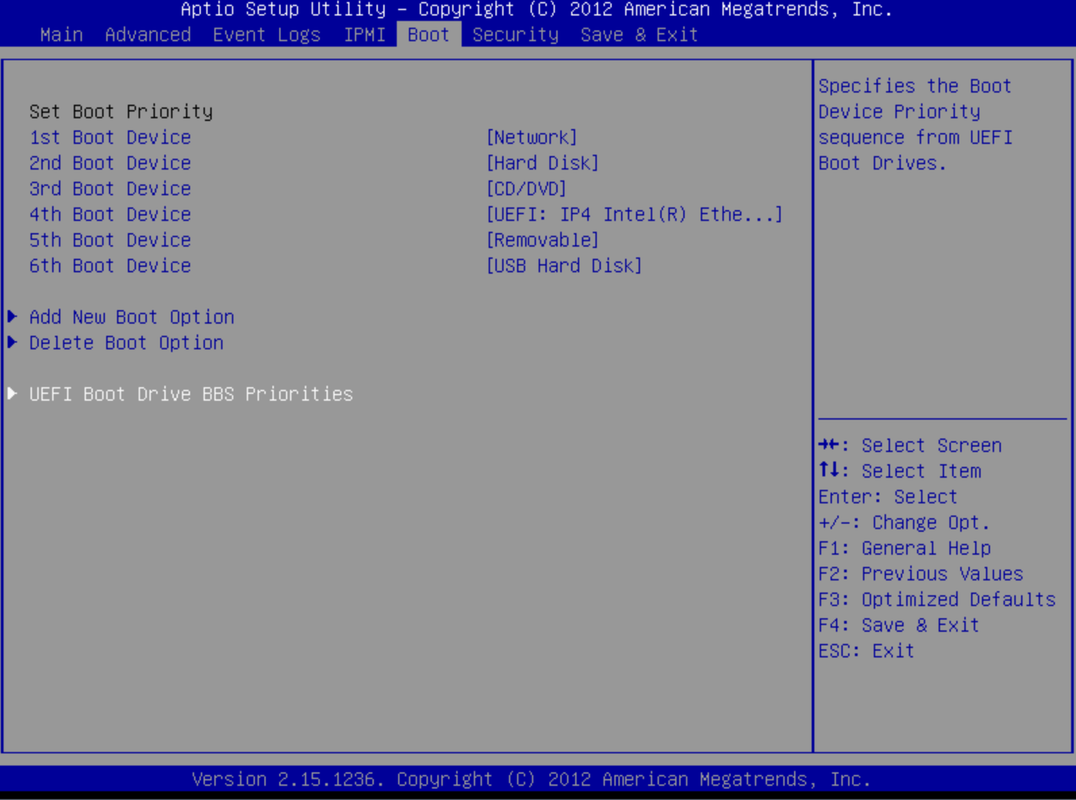
in Boot
1st boot Device Network
2nd boot Device Hard disk
NOTE:(if your system is UEFI boot not BIOS boot )
UEFI Boot Drive BBS Priorites need set 1. network card 2 network card
then rebuild OS from user control panel . reboot will auto set up.
Advanced make sure your PEX enable
like those picture show if this don't work need to get help form their support
vnc support needs to be resolved by their support. Users cannot solve this problem by themselves.
VNC should generally work as it works via a proxy. It's the same way for all servers so if one works for you, other should too. You sure it's not some java block?
Looks like I forgot the discontinue the promo code. Oh well, might as well let it run today too... 8 servers left for this price!
Can you fix VNC or install Ubuntu? Two servers not works since buying (6 aug)
Generally speaking, yes. Unless they have issues with their native Java? I'm not sure about that. But I have no issues with it.
How about fixing the issues with the servers you have already sold?
If there's any issues with a client - of course we solve this - this doesn't mean we are not able to talk regarding a sales offer.
Looking into your ticket as well
I am not in a position to question your rights. My point was that while clients from the first wave of the promotional offer have been unable to use their servers for four days, it would make sense to resolve their issues first, so new promotional customers do not face the same problems.
Anyway, let’s see how long it takes to resolve the issues with the three servers I ordered.
Okay guys, very interesting what's happening with v2.
Grabbed one too.
maybe there will be 10G lotto
The server was provisioned, and I won the KVM/reinstall problem like the other guys.
First time I got an ATEN Java error, and then noVNC shows just a black screen.
reinstall via CP is stuck at "IPMI command: chassis power on"
As I understand, Novnc acts as a proxy and attempts to establish a connection with 10.100.0.x:443 without success.
Ticket created.
My crazy history with this guy(s): Taken one server 23/07 - n/a via ssh/ping, not working VNC, etc.
Next day they changed it to other machine (ip+1) - this one is unknown for me because of user/pw and OS reinstall not works via panel.
Soon they reinstall it again and give me new user/pw.
OK, this machine work and all was perfect almost a month, until.. read..
Next i bought two new servers (6/08) - one with same IP that was in july (-1ip) and second new with next ip. Of course new machines n/a, etc - all same problems that was previous. But worse.
All last week since buying is a nightmare - slow useless ticket response and (prepare to laught) 30 mins ago they REINSTALLED very first machine that works perfect since july and all data is lost. ARE YOU OK?
Two new machines still n/a!
You get what you pay. Hope they fix all this s**t sooner or later. Yes i am pissed as a dog.
Hi! I looked into your ticket. You opened a ticket request about the server that has been re-installed according to request. It looks like in the ticket your selected the wrong server for the help request and we did not double check with you if it's actual the server you wanted re-installed. So that's a lesson for us to always double check and for you to always include as much as information as possible on which server / ip etc you want reinstalled as now you selected a support request with your other server.
We are now looking in your other two servers as well.