



























All new Registrations are manually reviewed and approved, so a short delay after registration may occur before your account becomes active.
【inst.sh】how to install debian into embeded pve with lxc redroid from docker(other oci may work too)

epve (formerly named devdesk) is an easy-to-setup fork of PVE. It maintains the core feature set of PVE/LXC and is intended to be embedded into major Linux distributions (currently Debian 11 supported), epve is also designed to be user-friendly for beginners, with the help of inst.sh — a script that helps install applications more easily on epve: It now integrates many scripts and applications out-of-the-box (which can be found at github.com/minlearn/inst/_build/appp).
And today, we can even employ OCI images from Docker to broaden our application ecosystem.
Why does PVE/LXC support Docker images?

The underlying theory is that Docker and the Docker engine are implementations of the OCI container standard.
Compared to KVM, both Docker and LXC offer lightweight and scalable virtualization solutions.
One key difference between Docker and LXC is that Docker is more like an application: its entry point does not need to be the system init process,
whereas LXC containers typically behave like a VM: they require a standard Linux init as their main process.
But anyway, they both share common Linux infrastructure, such as cgroups.

In fact, the original Docker implementation was based on LXC. and LXC natively supports OCI templates,
but for PVE, thanks to lurenJBD and his PCT-patches, we can now automate the process even further with additional tooling job: and that is inst.sh who play the role!!
In this article, we demonstrate how to use inst.sh to install Redroid 11 on epve. The steps below are based on Debian 11, but epve aims to support as many distributions as possible in the future.
Let us begin:
1) Firstly, execute inst.sh in Debian 11's SSH (a Debian 11 desktop is required if you want to use adb/scrcpy later in stage 2):
wget -qO- inst.sh | bash -s - -t redroid/redroid:11.0.0-latest

(this installs Redroid in Debian 11, it will install both epve and Redroid 11 as an LXC app.
!!! Caution: the first time generating redroid11.tar.xz template may take long, you should be enough patient)


wget -qO- inst.sh | bash -s - -t devdesk
(use this if you only want to install epve in Debian 11)

wget -qO- inst.sh | bash -s - -t appname
(use this if you only want to install other apps after installing epve)
you will see container run if all succeeded. You can now log in to the PVE interface at https://ip:8006 to view the redroid phone container.
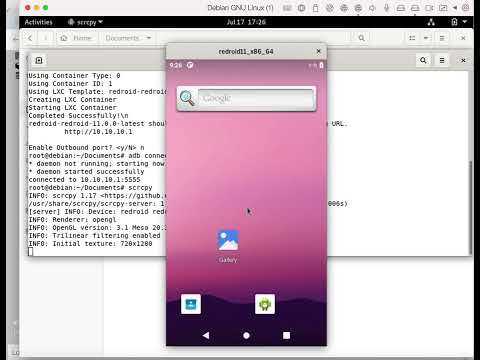
2) Secondly, (if you have installed the Debian 11 desktop)you can connect to Redroid with adb and view the Redroid screen after container run:
apt-get install adb scrcpy
adb connect 10.10.10.1:5555
scrcpy
you will see redroid screen if all succeeded.
Last) Ensure essential things are there and all are always working, and try below to debug if unexpected things happen:
Give 3 out of 32 /dev/binder devices from host, to map into container as /dev/binder, /dev/hwbinder, /dev/vndbinder.
(For the first Redroid LXC app using -t redroid/redroid:11.0.0-latest, the default set of /dev/binder1, /dev/binder2, /dev/binder3 are given and should work as expected, but for more Redroid LXC apps after this, you should manually add and map them in container/resources view -> mount entry)
For more on how you can find out the available /dev/binder devices set, and how you can use adb, nginx/scrcpy-web, please refer to logics in github.com/inst/app/redroid to check for pure Docker setup of a Redroid management system.

Caution!! Not all Docker images can be used as PVE LXC containers and can be hooked up to run, because their init and other settings need to be adjusted further. redroid is only a exception
You can even give /data mount point in container/resources view -> mount point
and adjust the initcmd in container/options view.
Enjoy yourself!!
video:



Comments
What the goal to install Android in a LXC debian container in a hypervisor ?
docker redroid, not kvm android
native pve lxc container,not nested pve qemu hypervisor