Howdy, Stranger!

It looks like you're new here. If you want to get involved, click one of these buttons!


Shells Virtual Desktop
BMail.ag - Secure Email Service
Server.net
CPLicense.net
VPS Server
Buy VPN
Vultr
VMs for AI
HostDare
ReliableSite White-Label Dedicated Hosting for Resellers
InterServer VPS
BMail.ag - Secure Email Service
Best VPN
High-Performance Bare Metal Server Solutions
Karvl.com
Server Mania Cloud Hosting
DataWagon Hosting
AlphaVPS Hosting
Evoxt.com
Clouvider
VPS Hosting with NVMe
Residential IPs in the US & 4G Mobile Proxies in EU & US with Unlimited Bandwidth
ReliableSite White-Label Dedicated Hosting for Resellers
Rabisu - Hosting Solutions
Shells Virtual Desktop
New on LowEndTalk? Please Register and read our Community Rules.

All new Registrations are manually reviewed and approved, so a short delay after registration may occur before your account becomes active.

Network/Interfaces overwritten on every restart

d2411d2411 Member

I have Serves from some providers where I am installed a fresh OS from ISO File.
After every restart from the control panel
The /etc/network/interfaces is overwritten from the control panel.
That’s really annoying especially when I have custom settings in that config.
Why ? And how can I disable it ?

Comments

  • LuprdeLuprde Member

    @d2411 said:
    I have Serves from some providers where I am installed a fresh OS from ISO File.
    After every restart from the control panel
    The /etc/network/interfaces is overwritten from the control panel.
    That’s really annoying especially when I have custom settings in that config.
    Why ? And how can I disable it ?

    Is VPs or dedicate server?

    Try with this

    sudo touch /etc/cloud/cloud-init.disabled
    sudo systemctl disable cloud-init

    Thanked by 1quicksilver03
  • cmeerwcmeerw Member

    @d2411 said:
    I have Serves from some providers where I am installed a fresh OS from ISO File.
    After every restart from the control panel

    Which panel? (I have seen Virtualizor do that)

    The /etc/network/interfaces is overwritten from the control panel.
    That’s really annoying especially when I have custom settings in that config.
    Why ? And how can I disable it ?

    chattr +i /etc/network/interfaces might help

    Thanked by 2oloke tentor
  • emghemgh Member, Megathread Squad

    What? A fresh OS from ISO but your provider still change your interface file? Something here does not make sense

  • AndreixAndreix Member, Host Rep

    Your OS may have cloud-init support. In some cases, it overrides the network configuration.

  • AnaisAnais Member

    What panel are they using?

  • d2411d2411 Member
    edited May 2025

    It’s virtualizor.
    I’ve uninstalled cloud-init
    But the issue is still there

    The Debian 12 is a fresh install from the ISO file.
    After installation ive changed the /etc/network/interfaces and restarted the server.
    after restart the config file is still overwritten from something from the control panel or something

  • smarty24smarty24 Member
    edited May 2025

    @d2411 said:
    I have Serves from some providers where I am installed a fresh OS from ISO File.
    After every restart from the control panel
    The /etc/network/interfaces is overwritten from the control panel.
    That’s really annoying especially when I have custom settings in that config.
    Why ? And how can I disable it ?

    That's a Virtualizor problem I'm having for years when using my own Debian ISO installation. My default email text to the support is:

    Would you mind to deactivate the automatic network configuration for my VPS (it overwrites my interfaces file after a restart using the control panel).

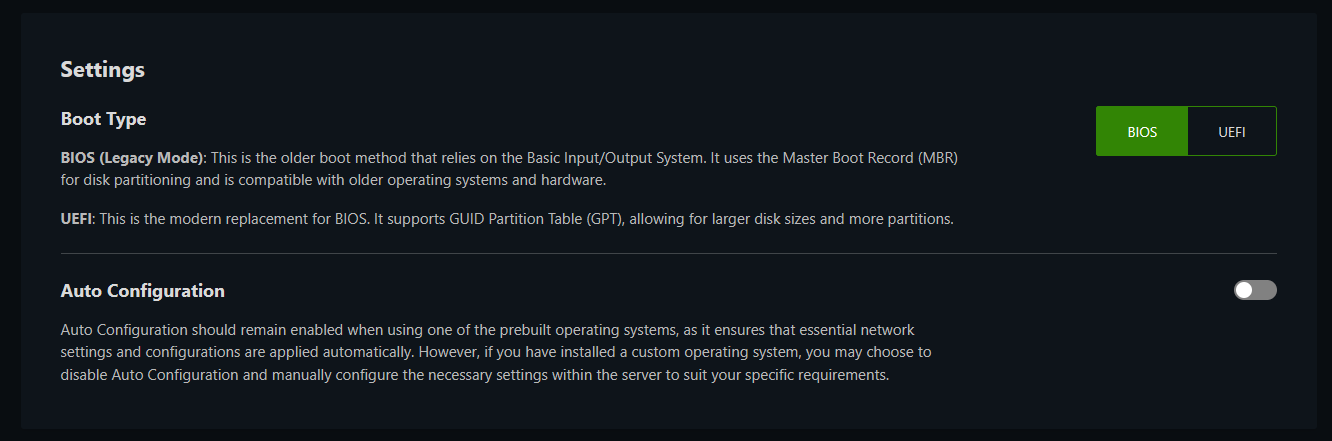
    https://www.virtualizor.com/docs/admin/creating-a-vps/#network-settings => the option "Disable network configuration" should do the magic.

    In most cases the support changes the settings and everything is fine. :)

  • d2411d2411 Member

    Oh perfect.

    Thank you so much.
    I will try that

  • I've experienced the same problem from some provider too.

    Network interfaces remains the same if i restart it from ssh.
    But it will reset to to default if restarted from vps panel (solus/virtualizor)

  • xHostsxHosts Member, Patron Provider

    If you contact your provider they can disable network file writing in Virtulizor for you

  • d2411d2411 Member

    Thank you so much

  • Can the "disable network configuration" setting be made available to the customer side to avoid those tickets? Another way to circumvent it is to use netplan which gets not overwritten by Virtualizor.
    Also does anybody have experience with Virtualizor uefi version? Since they don't seem to support q35, does it still work well, also compared to Proxmox?

  • Carlin0Carlin0 Member

    I do the custom settings in
    /etc/network/interfaces.d/50-extra
    :wink:

    Thanked by 1imok
  • xHostsxHosts Member, Patron Provider

    @webcraft said:
    Can the "disable network configuration" setting be made available to the customer side to avoid those tickets? Another way to circumvent it is to use netplan which gets not overwritten by Virtualizor.
    Also does anybody have experience with Virtualizor uefi version? Since they don't seem to support q35, does it still work well, also compared to Proxmox?

    It can be done as a node level for all VPS on that node and plan but I do not believe there is a way to allow customers to enable/disable this feature yet

    Thanked by 1webcraft
  • zGatozGato Member

    Install with your own ISO, purge and prevent apt from installing qemu-guest-agent and cloud-init (with a simple apt preference file). Should do the job (or at least seems to, in my case)

    Some panels like ISPSystem are very aggressive and will just modify the disk raw and install. There's not really much you can do against that, besides LUKS.

    Thanked by 2quicksilver03 vicaya
  • zGatozGato Member

    @xHosts said:

    @webcraft said:
    Can the "disable network configuration" setting be made available to the customer side to avoid those tickets? Another way to circumvent it is to use netplan which gets not overwritten by Virtualizor.
    Also does anybody have experience with Virtualizor uefi version? Since they don't seem to support q35, does it still work well, also compared to Proxmox?

    It can be done as a node level for all VPS on that node and plan but I do not believe there is a way to allow customers to enable/disable this feature yet

    Virtfuuuuuuusiooooooooon ;)

    Thanked by 2imok tentor
  • also sometimes it applies with netplan and not interfaces file

    just chattr +i

  • xHostsxHosts Member, Patron Provider

    @zGato said:

    @xHosts said:

    @webcraft said:
    Can the "disable network configuration" setting be made available to the customer side to avoid those tickets? Another way to circumvent it is to use netplan which gets not overwritten by Virtualizor.
    Also does anybody have experience with Virtualizor uefi version? Since they don't seem to support q35, does it still work well, also compared to Proxmox?

    It can be done as a node level for all VPS on that node and plan but I do not believe there is a way to allow customers to enable/disable this feature yet

    Virtfuuuuuuusiooooooooon ;)

    Are the you person that is emailing providers about moving to Virtfusion currently ? ;)

  • zGatozGato Member

    @xHosts said:

    @zGato said:

    @xHosts said:

    @webcraft said:
    Can the "disable network configuration" setting be made available to the customer side to avoid those tickets? Another way to circumvent it is to use netplan which gets not overwritten by Virtualizor.
    Also does anybody have experience with Virtualizor uefi version? Since they don't seem to support q35, does it still work well, also compared to Proxmox?

    It can be done as a node level for all VPS on that node and plan but I do not believe there is a way to allow customers to enable/disable this feature yet

    Virtfuuuuuuusiooooooooon ;)

    Are the you person that is emailing providers about moving to Virtfusion currently ? ;)

    I'm not that insane :joy:

Sign In or Register to comment.