

























New on LowEndTalk? Please Register and read our Community Rules.
All new Registrations are manually reviewed and approved, so a short delay after registration may occur before your account becomes active.
All new Registrations are manually reviewed and approved, so a short delay after registration may occur before your account becomes active.



Comments
Oke sounds nice where can I find the guide ? Thanks in Advanced would like to set this up for a Livestream of the beach here
I'm sure it's only a matter of hours until we get to see your tutorial and I'm preparing accordingly.
I keep watching the stream because I want to know when someone will come up to change the laundry in the background
With that rationale you don’t need icecast either, just ffmpeg to output to hls/dash files and any webserver
But hls/dash won't naturally play on html5 browsers without plugins.
By the way ffmpeg has a HTTP server mode where it can serve steams over http but it's primitive and limited (only a single client can connect, and the command will exit as soon as the client disconnects...):
If you run this on VPS:
ffmpeg -i $input -c copy -f mpegts -listen 1 -http_persistent 1 http://0.0.0.0:8080Then you can simply play the stream URL on any video player: http://IP:8080
In Firefox it opens at 00:00 out of 4:03:44, but it's definitely live and starts from the current live time when refreshing despite the misleading time reading
Nice work OP
The stream is awesome first was Miss Monique I like her music very much
Nice taste!
You might wanna check out my man
Indeed very good, been to some Loveland festivals it's in my hometown
Where is this nice guide ?
There won't be any. As expected OP is ghosting us. At most, he'll come out of the shadows one last time to say we should wait just a bit longer, and then disappear for good...
I believe he was actually hoping for PMs to try and fish for buyers (for a tutorial that may or may not exist).
As expected
not a promotional post at all sense
Not really surprising considering they sell TV broadcast services (and streams). Probably needed some SEO
@webm I'll make sure to tell everyone to avoid your company
+1
Where tutorial @webm?
Super interesting, can't wait to get the tuto.
HLS is used not because it's the only way to stream the video in browser, but because it's a very efficient way caching-wise.
It's trivial to cache and distribute files over CDNs for example, as the case with HLS/MPEG-DASH.
It's not trivial to retransmit MPEG-TS or WEBM as efficient and effortlessly.
That's basically the only real reason why HLS/MPEG-DASH is used so widely.
@yoshiki — Since you took a screenshot of the page, which contains the small dos gif, I’d recommend checking out this post before you start diving into streaming and making judgments. 🙂
Here’s a detailed explanation of how the small gif was crafted, showing how intricate and unique even a tiny gif can be.
Read it here: https://tinyurl.com/4mk9uu8r
Tip: You can use Google Translate or ChatGPT DeepSeek if you're not familiar with Greek! 😉
Hey everyone, sorry for the lag! 😅
I’m currently working on a detailed manual that will cover the following:
Playlist setup: How to convert your videos with ffmpeg to get the best possible bitrate and video quality.
Icecast server settings: The recommended configuration for optimal streaming performance, including its built-in authentication features for private streaming (e.g., password-protected mounts, token-based access).
Pros and cons: A breakdown of the advantages and limitations of this method compared to others.
Authentication: Secure your stream with methods like .htaccess (Apache), Icecast’s native user/password system, or advanced token-based controls for granular access management.
Centova Cast compatibility: We’ll discuss integration options with Centova Cast playlists and feature comparisons.
Live streaming (Phase 2): A follow-up guide will cover live streaming setups using this approach.
I’ll finish this tomorrow or the day after and share the full guide here. Thanks for your patience and interest!
I didn't know spam was permitted on the forum. No one cares about your crappy gifs, either post the tutorial or leave us alone
@yoshiki — Instead of focusing on the GIF itself, I’d appreciate it if you took a moment to read the post in the previous comment, where I explain just how much effort and difficulty goes into creating even a simple cinemagraph like this one. It’s not just a random GIF, but something crafted with purpose and creativity.
By the way, the GIF was uploaded because you were the first to post the screenshot, and since it was showing up above, I thought it would be a fun way to highlight it.
While critical feedback is always welcome in this forum (and can even be helpful), I do believe it’s important to keep discussions constructive and respectful—especially when acknowledging the effort behind creative work.
As for the VP9/Icecast/Webm tutorial, it’s on the way—thanks for your patience!
Looking forward to test on my vm..kudos
Here is the first manual I promised, explaining how to broadcast video files via Icecast, using playlists.
📄 Text version (English):
https://dos.gr/forumdata/lyk/105icecast/enwebm.txt
🖼️ Full original version with screenshots:
https://f105.dos.gr
📄 It also includes the example XML config file: icewebm.txt
Let me know if you have any questions or suggestions. More manuals coming soon.
manual my ass
You deserve the ban :-D
It> @webm said:
It's encrypted in Greek can you Decrypt it and post it here ? Thank you
@JabJab
Thanks for the feedback — sharp as ever. 😊
Indeed, this is a minimal working example, drafted in about an hour to help others get started with something that’s often considered “impossible.”
It’s not a polished manual (yet), but it’s functional, tested, and live.
I’d rather release something useful early, iterate fast, and improve with real feedback — not just sarcasm.
Constructive input is welcome. Until then, the stream is live, the setup is public, and the results speak for themselves.
@WhiteRoseG
Oops, apologies — the text version is still in Greek for now.
I’m currently preparing the full English version and I’ll publish it here in a little while. 😊
Thanks for your patience!
Also, here is an example of a working XML configuration file, taken directly from the actual server that is currently online and broadcasting:
🎯 Live stream:
https://rdst.win:59000/dos.webm
Mirror: https://webm.win
🧾 XML config file:
https://dos.gr/forumdata/lyk/105icecast/icewebm.txt
This configuration is being used right now to stream WebM/VP9 video via Icecast.
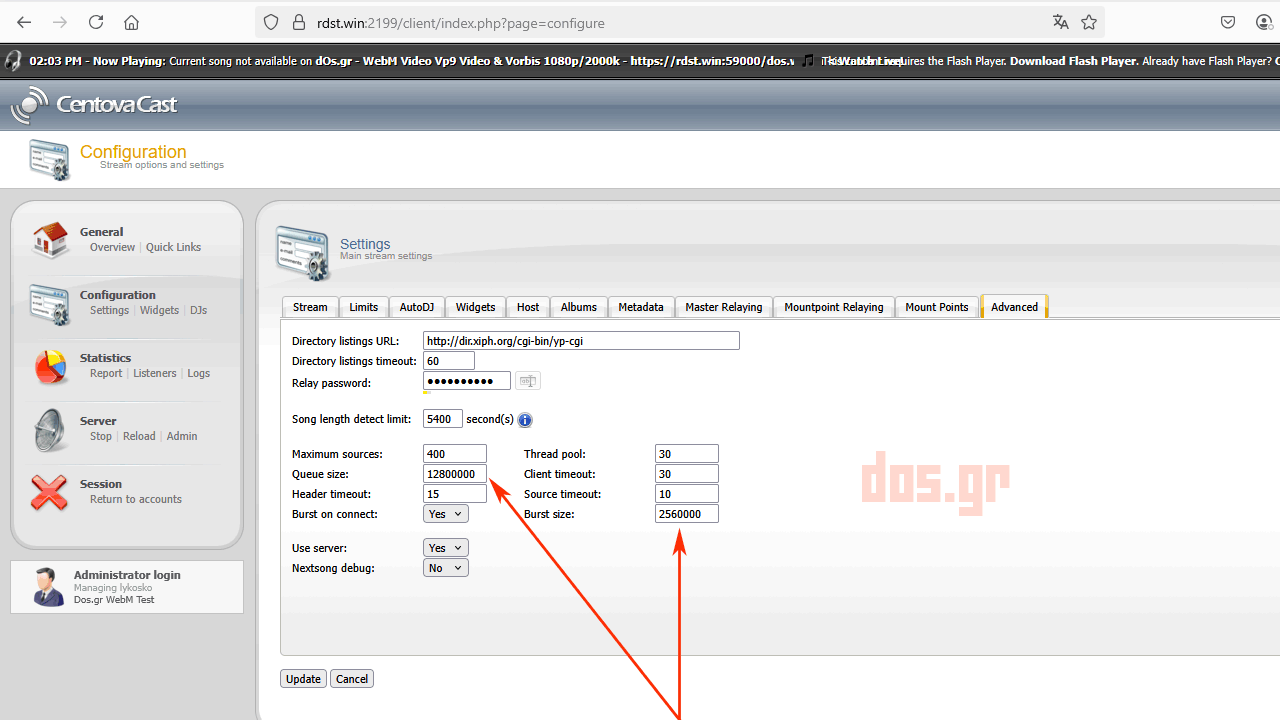
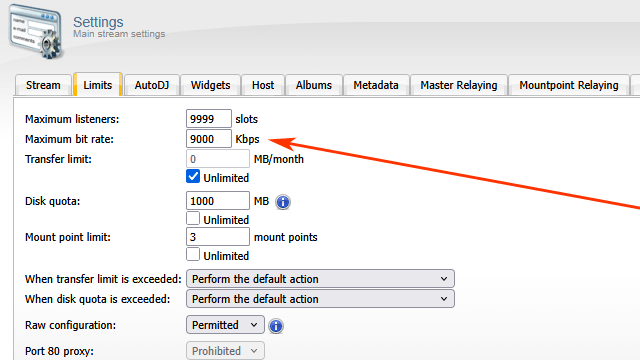
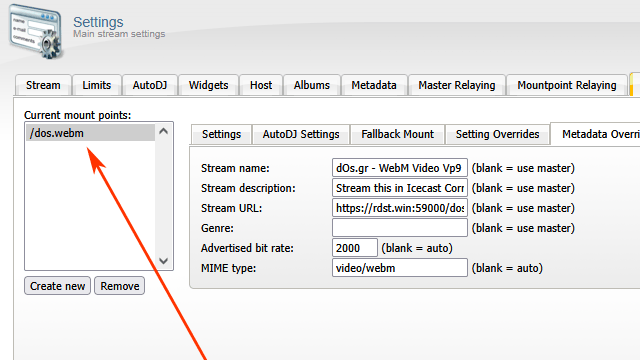
Following up with some screenshots related to the current setup, posted separately for clarity.
📸 Some screenshots from the live setup:
Centova Cast interface (Icecast server):
Windows server running FFmpeg (sending to Icecast):