
























Howdy, Stranger!

It looks like you're new here. If you want to get involved, click one of these buttons!


Shells Virtual Desktop
BMail.ag - Secure Email Service
Server.net
CPLicense.net
VPS Server
Buy VPN
Vultr
VMs for AI
HostDare
ReliableSite White-Label Dedicated Hosting for Resellers
InterServer VPS
BMail.ag - Secure Email Service
Best VPN
High-Performance Bare Metal Server Solutions
Karvl.com
Server Mania Cloud Hosting
DataWagon Hosting
AlphaVPS Hosting
Evoxt.com
Clouvider
VPS Hosting with NVMe
Residential IPs in the US & 4G Mobile Proxies in EU & US with Unlimited Bandwidth
ReliableSite White-Label Dedicated Hosting for Resellers
Rabisu - Hosting Solutions
Shells Virtual Desktop
New on LowEndTalk? Please Register and read our Community Rules.

All new Registrations are manually reviewed and approved, so a short delay after registration may occur before your account becomes active.

(help needed) Proxmox passing SMB to LXC (and more...)

here is my setup;

i have few (soon tons) of vms running on proxmox
one of them beeing paperless (debian 12)

i have my smb or sftp (connected via netbird, shouldnt matter) mounted to proxmox
then i have using the config file, passing it to a lxc
mp0: /mnt/pve/truenashome/matti,mp=/mnt/paperless

the container is unprivilidged and should stay like this, i inted to deploy at least 2 paperless instances, probably more (working on some custom stuff to maybe resell them to friends)

however i cannot write to the container from the LXC (im getting permission denied), only proxmox, im unsure how to adjust the permissions so all my containers (now 2, soon more) can write to /mnt/pve/truenashome (proxmox path)
the lxc accesses /mnt/pve/truenashome/NAME mounted as /mnt/paperless (more than 1 lxc)

how do i set the permissions up?

2nd question
after a chat with chatgpt, i was made aware i can use flask and Gunicorn as extra security layer, similar to CF access but custom
does nginx work with multiple machines across the subnet? i made a custom 192.168.0.1/24 subnet for my vms (basically NAT)
nginx will get public ip and will forward requests (if consitions are met) to private adresses, serving the websites

i suck at networking so please give me tipps

Comments

  • 1) I suggest using uid mapping, which means each container read/writes with a specific uid that can then be the owner of you shared dir. See: https://pve.proxmox.com/wiki/Unprivileged_LXC_containers#Using_local_directory_bind_mount_points

    2) yes, create vhosts per domain and use proxy directive to pass the requests to the correct container. ChatGPT for sure cann tell you how to do that 😉

    Thanked by 1yoursunny
  • DeadlyChemistDeadlyChemist Member
    edited December 2024

    @Falzo said: 1) I suggest using uid mapping, which means each container read/writes with a specific uid that can then be the owner of you shared dir. See: https://pve.proxmox.com/wiki/Unprivileged_LXC_containers#Using_local_directory_bind_mount_points

    asked chatgpt as well a little... but he is stuck giving same things over and over

    root@proxmox-bakker:/mnt/pve/truenashome/matti# chown -R 1010:1010 /mnt/pve/truenashome/matti
    root@proxmox-bakker:/mnt/pve/truenashome/matti# 
    root@proxmox-bakker:/mnt/pve/truenashome/matti# ls -lah /mnt/pve/truenashome
    total 4.0K
    drwxr-xr-x 2 root root    0 Dec 13 18:23 .
    drwxr-xr-x 3 root root 4.0K Dec 13 15:25 ..
    drwxr-xr-x 2 root root    0 Dec  3 21:21 consume
    drwxr-xr-x 2 root root    0 Dec 13 15:26 images
    drwxr-xr-x 2 root root    0 Dec 14 01:26 matti
    drwxr-xr-x 2 root root    0 Nov 18 19:33 media
    drwxr-xr-x 2 root root    0 Aug  3 20:19 scans
    drwxr-xr-x 2 root root    0 Sep  9 12:04 temporary_backups
    root@proxmox-bakker:/mnt/pve/truenashome/matti# cat /etc/subuid
    cat /etc/subgid
    root:100000:65536
    root:1010:1
    root:100000:65536
    root:1010:1
    root@proxmox-bakker:/mnt/pve/truenashome/matti# df -T /mnt/pve/truenashome
    Filesystem                 Type  1K-blocks  Used  Available Use% Mounted on
    //192.168.178.23/paperless cifs 4259119872   128 4259119744   1% /mnt/pve/truenashome
    root@proxmox-bakker:/mnt/pve/truenashome/matti# 
    

    does not seem to work, maybe because it's cifs?
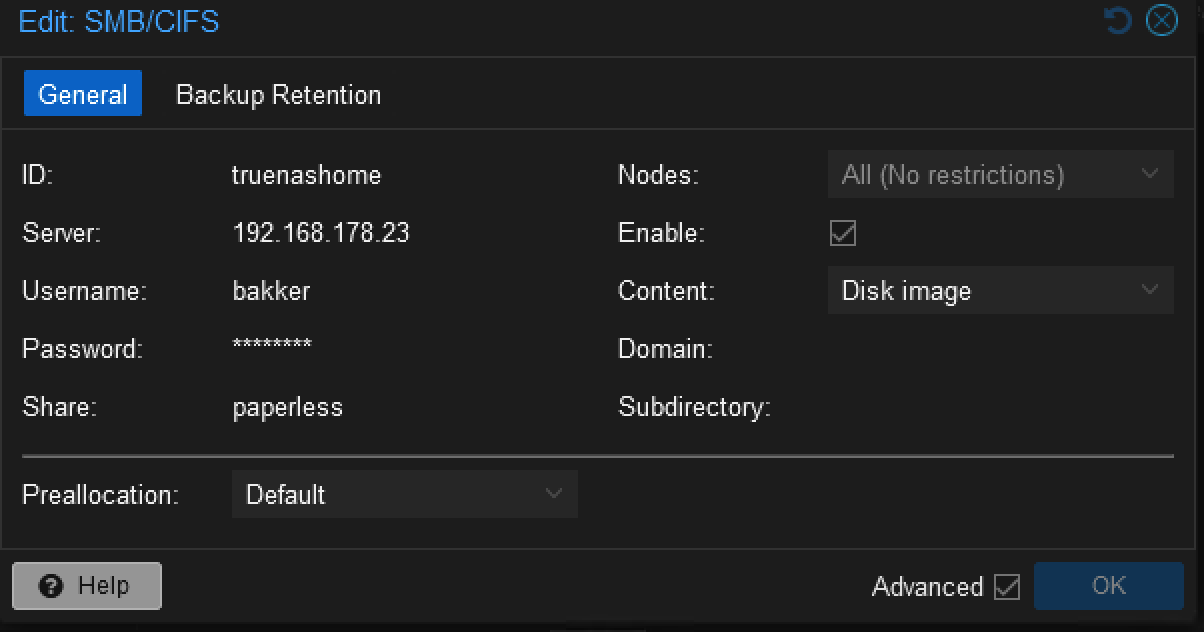
    i looked at proxmox and idk how can i change the group

  • figured it out !
    i needed to add options vers=3.0,uid=1010,gid=1010 to /etc/pve/storage.cfg

    Thanked by 2Falzo mandala
  • ahhh nvm it works only for root user and not other user.... need to figure out how the ids and shits works... anooying

  • Oh yes, smb/cifs is a culprit here, as it cannot handle mixed UIDs. If I remember correctly, you can provide a uid/gid when mounting, but would still need to have separate mounts for different users and still map the user from inside the container or use groups and so on.

    One way around that could be creating disk images on your smb storage and theseas drives to the containers maybe?

  • @Falzo said:
    Oh yes, smb/cifs is a culprit here, as it cannot handle mixed UIDs. If I remember correctly, you can provide a uid/gid when mounting, but would still need to have separate mounts for different users and still map the user from inside the container or use groups and so on.

    One way around that could be creating disk images on your smb storage and theseas drives to the containers maybe?

    figured it out... appended to a group and appears to work fine
    options vers=3.0,uid=101000,gid=110000
    and uuid group lxcshares is 10 000
    and user paperless 1000
    so works fine, now i need to duplicae the containers and see how that all works...

    trying to set up few paperless instances and 1 db and 1 nginx

    Thanked by 1Falzo
  • You should use lxc.mount instead, if you could make mp: works, it would still mess up snapshot and backup later on. I found this to be the most convinent for sharing data between LXCs.

    lxc.mount.entry: /mnt/pve/truenashome/matti mnt/paperless none bind,rw 0 0
    That's not a typo, the internal path should not have a leading "/"

  • @hades_corps said:
    You should use lxc.mount instead, if you could make mp: works, it would still mess up snapshot and backup later on. I found this to be the most convinent for sharing data between LXCs.

    lxc.mount.entry: /mnt/pve/truenashome/matti mnt/paperless none bind,rw 0 0
    That's not a typo, the internal path should not have a leading "/"

    okay, will see, i assume i need to add the uid=101000,gid=110000 somehow?

  • @DeadlyChemist said:

    @hades_corps said:
    You should use lxc.mount instead, if you could make mp: works, it would still mess up snapshot and backup later on. I found this to be the most convinent for sharing data between LXCs.

    lxc.mount.entry: /mnt/pve/truenashome/matti mnt/paperless none bind,rw 0 0
    That's not a typo, the internal path should not have a leading "/"

    okay, will see, i assume i need to add the uid=101000,gid=110000 somehow?

    On the host, you need to allow LXC user to write to that folder. Other than that, you can mount it any way you'd like.

  • @DeadlyChemist said:

    @hades_corps said:
    You should use lxc.mount instead, if you could make mp: works, it would still mess up snapshot and backup later on. I found this to be the most convinent for sharing data between LXCs.

    lxc.mount.entry: /mnt/pve/truenashome/matti mnt/paperless none bind,rw 0 0
    That's not a typo, the internal path should not have a leading "/"

    okay, will see, i assume i need to add the uid=101000,gid=110000 somehow?

    @DeadlyChemist said:

    @hades_corps said:
    You should use lxc.mount instead, if you could make mp: works, it would still mess up snapshot and backup later on. I found this to be the most convinent for sharing data between LXCs.

    lxc.mount.entry: /mnt/pve/truenashome/matti mnt/paperless none bind,rw 0 0
    That's not a typo, the internal path should not have a leading "/"

    okay, will see, i assume i need to add the uid=101000,gid=110000 somehow?

    I for got to add that this method require the internal folder to exist before using lxc.mount otherwise it will not boot.

Sign In or Register to comment.