



























New on LowEndTalk? Please Register and read our Community Rules.
All new Registrations are manually reviewed and approved, so a short delay after registration may occur before your account becomes active.
All new Registrations are manually reviewed and approved, so a short delay after registration may occur before your account becomes active.



Comments
Yes, somewhere in the forum a member posted that support confirmed this practice. They offer 1 Gbps as download and only upload limited on KS and SYS.
I think if you have an intervention on your server the tech will reset your network to 300/1gbit.. Just a guess..
I do know if you blast too much on a 10G lottery port, OVH would set it back to default in quit short time.
Intrevenetions are disabled on the server. I didn't get any notification about any work/intervetion being done on my server.
EDIT:
It came back to normal somehow after reset from the panel:
Best Results
948.13 Mbps
948.86 Mbps
False alarm.
Lucky
So I was having a bit of fun today with the API and the python-ovh helper that OVH provides here: https://github.com/ovh/python-ovh
I've made a python script which queries the API for the datacenters I like, for servers with a name that starts with the string I like (for example, "KS-LE", "KS-A").
The script loops every xx seconds, and shows me what's available.
Once I find something I like, I press CTRL-C to stop the loop and it lets me buy the server.
I have tested with a KS-5 and it worked.
It looks like this:
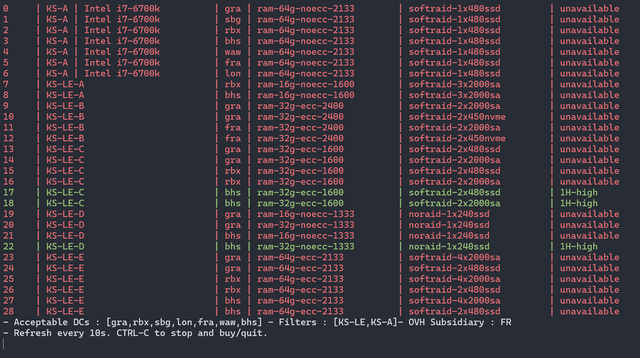
I've put it on Github: https://github.com/bousquetfrederic/buy_ovh
It needs an ovh.conf file like OVH explains here: https://github.com/ovh/python-ovh
This comes with zero support of course. I don't recommend anyone uses it. It does what the website does anyway.
Also I suck at Python, so it's pythonically not a great piece of software.
The exception handling is basically if something strange happens, ignore it, so I am not responsible if the script orders 16 expensive servers.
I thought I'd share, maybe someone will want to help me make it better.
Looking for KS-A or KS-LE-B server to buy, PM me with your price
Right. You just joined and your first comment is begging for a server.
Anybody tried KS-LE-A with ZFS RAID-5?
I found out that its abysmally slow. 200Mbps going straight to the disk completly freezes NoMachine and SSH commands respond after like 2 seconds. I needed to limit it to 100Mbps so it is still accessible and usable when downloading.
I think the oldass 72k hour HDD is causing this issue, but OVH didn't respond to the ticket about replacing it so far...
@Pilzbaum have you noticed such bad performance when ARC overflows (so basically more than 50GB file)?
just a got a KS-LE-C with same advertised specs, no 64 RAM, slow old SSDs. I'm still waiting for a KS-LE-B, ordered 2 days ago, we'll see
I am running a RAID-Z on a KS-LE-A at the moment. Haven't noticed any issues so far. But I am trying to move some big files to check if I can reproduce your issue.
Does the issue occur while starting the write operation or after a certain amount?
Just had my KS-2 from the 1st of November delivered, still no -E HDD though unfortunately. Hoping some other options show up around Black Friday, else I'll probably end up sticking with my leaseweb 16T boxes
I think they’re really busy because of all the orders from this flash sale.
At least I got my KS-LE-C online for a few days now, waiting for the KS-LE-B, probably going to cancel the KS-LE-C when the B is delivered.
I'll try the same thing, do you think they will refund the whole amount ?
I wouldn't bet on them refunding install fee
I think they have to within the first 14 days as long as you’re in the EU.
I do not get it. If I peg the array with FIO write test there is no lag with both SSH and NoMachine with 200MB/s write. Once I start downloading file in Chrome/qBittorrent it gets slowed down to oblivion by 200Mb/s / 25MB/s.
There is no way SSL/AES decryption is that demanding. It's not RAM either, I get 20833 MiB/s in RAM Benchmark. Somehow ZFS does "something" that completly crawls the system. I never had such issue on any of my ZFS arrays/dedis.
KS-LE-A on ZFS RAID 1
## ## ## ## ## ## ## ## ## ## ## ## ## ## ## ## ##
Yet-Another-Bench-Script
v2024-06-09
https://github.com/masonr/yet-another-bench-script
## ## ## ## ## ## ## ## ## ## ## ## ## ## ## ## ##
Sat Nov 9 05:33:13 UTC 2024
Basic System Information:
Uptime : 0 days, 0 hours, 10 minutes
Processor : Intel(R) Xeon(R) CPU E3-1225 V2 @ 3.20GHz
CPU cores : 4 @ 2374.728 MHz
AES-NI : ✔ Enabled
VM-x/AMD-V : ✔ Enabled
RAM : 15.5 GiB
Swap : 1.5 GiB
Disk : 987.4 MiB
Distro : Debian GNU/Linux 12 (bookworm)
Kernel : 6.1.0-26-amd64
VM Type : NONE
IPv4/IPv6 : ✔ Online / ✔ Online
IPv6 Network Information:
ISP : OVH SAS
ASN : AS16276 OVH SAS
Host : OVH SAS
Location : Roubaix, Hauts-de-France (HDF)
Country : France
fio Disk Speed Tests (Mixed R/W 50/50) (Partition zp0/zd0):
iperf3 Network Speed Tests (IPv4):
iperf3 Network Speed Tests (IPv6):
Geekbench 6 Benchmark Test:
Test | Value
|
Single Core | 724
Multi Core | 2276
Full Test | https://browser.geekbench.com/v6/cpu/8731756
I used them install Wizard with ZFS and Raid 5 but it become ZFS Raid 1 for me so you might want check the raid again
My yabs is absolutely fine just like on what you have posted. I see CPU usage is total 99% with Chrome/qBittorrent download, but I do not see any process that uses that - everything sums up to roughly 15-20%. Something not visible eats rest and I think that is the ZFS. I need to diagnose it somehow
With my French account they refund the setup fee plus the price of the server minus the time you used it (pro rata).
That's how I don't pay setup fees when I don't want to. I cancel, get the refund, then cancel the cancellation and get a new invoice for the remaining of the month, without setup fees.
Disabling swap with 'swapoff -a' fixed this issue completly. CPU went from 99% during downloading in Chrome/qBitTorrent to 25-45%. Weird, RAM usage was just 9GB / 16GB and now after disabling swap its 10GB / 16GB.
Edit: I've read online that this issue is caused by context switching/rebalancing between ARC Cache and Linux page cache that has SWAP. All my other ZFS machines are 32-128GB RAM and I never saw such issue.
Turn swap back on and turn swappiness to 1
You're running chrome on the machine? Running Linux desktop enviroment or Windows? I have tried everything to get a similar load but never had problems you decribe.
Re-enabled with swapiness set to '10'.
After one minute SWAP is used 0.5GB/1.5GB, RAM usage went from 10GB to 9.5GB, CPU usage went to 60-70% average.
After 3 minutes SWAP is used 1GB/1.5GB, RAM usage went to 9.2GB and CPU usage went to 70-80% and I have massive lags inside both SSH and NoMachine is basically unusable (new frame draws every couple of seconds).
I'll try with swapiness set to '1' now.
Ubuntu 24.04 + Gnome.
Issue is completly gone when I enter 'swapoff -a' into SSH.
Server installed from OVH Ubuntu template with ZFS RAID-Z1/RAID-5 set there + installed GNOME Minimal via apt.
I would completly understand if I would have typical OOM issues, but without SWAP there is no issues whatsoever and I'm not even close to utilizing all RAM. Additionally this only happens when downloading via Chrome or qBittorrent. With wget and curl there is no issues whatsover. Hmmmm... maybe GNOME has some memory leak with ZFS?
Are you using XFCE to connect to it remotely?
that's very strange memory behaviour given your memory pressure is pretty relaxed. great if turning off swap fixes it but you still dont know why it's aggressively swapping like that
Welcome to ZFS. By default it uses up to 50% of the available memory, aka 8 GB on this machine.
If you run out of the remaining 8 Gigs, it will start swapping. You didn't put swap on the zfs itself, did you?
Swapiness set to 1, then enabled SWAP.
After one minute:

There is ton of RAM available that is being utilized as page cache.
It is indeed very strange, it's way too agressive. Plenty of RAM is available to use

Swapiness '1':
SWAP is disabled:

Notice the CPU usage
The problem is that I don't run out of remaining 8 Gigs.
There is no such issue in both curl and wget.
There is no issue if I open more tabs in Chrome and then download by either curl or wget.
Issue starts once I start to download anything using Chrome or qBittorrent.
After disabling SWAP issue disappears and I have no crashes/OOM issues, which I definetly should have if SWAP is being taken after just one minute with '1' swapiness.
Edit: I investigated it a little bit. I THINK If app is using GTK or Qt and saves something to disk then this problem starts to happen. This is why I didnt saw this issue in curl/wget/fio. So weird. I just disabled swap for now and I'll see if there will be any OOM crash in 24hours.