


























All new Registrations are manually reviewed and approved, so a short delay after registration may occur before your account becomes active.
Are there any Bhyve users here? Can it be installed on a Proxmox system and vice versa?

The new offerings from UltraVPS are based on Bhyve and it is not a system I'm familiar with.
Their implementation also doesn't seem to be fully configured or has some teething problems.
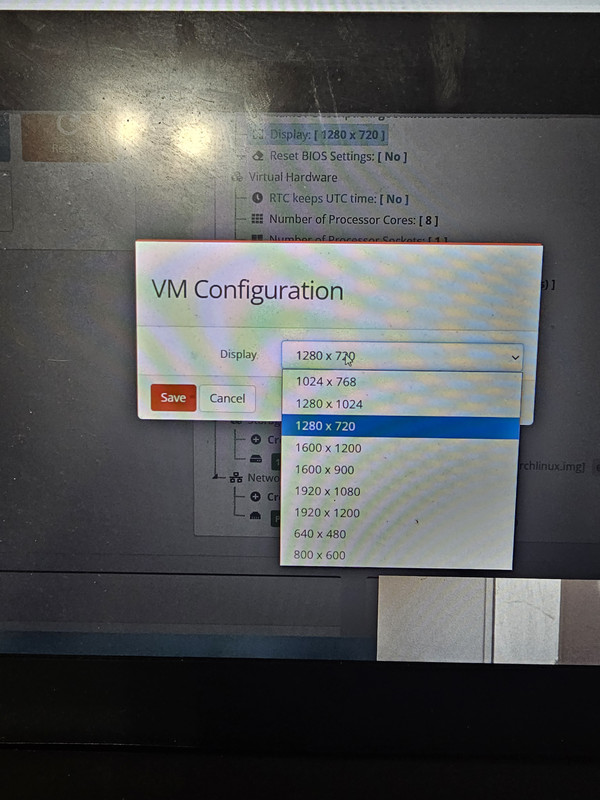
The underlying system seems to have a higher resolution in the network boot screen and it has options to change it in some preboot or BIOS setup screen, but the graphics screen is limited to 640x480 and DHCP is not working when it boots into my preferred SystemRescueCD.
It also looks like the recovery console boots into an on disk recovery partition which is setup by their reinstall template, so if you do your own custom installation that option will not work. Usually it is a network boot or some other system that is independent of the local disks.
In the meantime I will just use a custom install on the 10GB disk, copy my old data over to the 100Gb disk then change the grub settings to include the old installation.
Anyway this is the curse of modern IT, always having to explore or learn new things for marginal benefits which you soon forget ... until  .
.



Comments
Bhyve is the BSD equivalent of (Linux) KVM - so you can't run it on Proxmox.
I'm sure you should be able to manually setup the IP (either within the booted rescue environment or via a netboot.xyz type of boot ISO) and then you should be all set.
Why? If Proxmox virtualizes properly and you can run Windows or FreeBSD then why can't you run Bhyve on Proxmox, or vice versa? Aren't both VM systems supposed to be virtualizing the hardware?
What I mean is that Proxmox (on the host) uses/runs KVM to virtualize guests.
UltraVPS uses FreeBSD on the host and so they use Bhyve to virtualize guests.
Bhyve can't be used by Proxmox directly to virtualize guests. You can of course run Bhyve with FreeBSD (as a guest OS) on top of Promox.
I think you mean to say that Proxmox needs a Debian or Redhat system, ie a Linux distro, whereas Bhyve needs a FreeBSD system.
So if everything works well, I should be able to install Proxmox on the Debian, then install a FreeBSD guest in that Proxmox, then install Bhyve in that FreeBSD, then install a Debian in that Bhyve, then install a Proxmox on that Debian, then I install a BSD on which I install Bhyve ad infinitum.
It is turtles, tortoises and terrapins all the way down. If Proxmoxi are the turtles and Bhyven are the tortoises, then what are the terrapins? Xen-CP? VMWare? VirtualBoxen?
Proxmox install on top of Debian (not Redhat or any other distro).
Bhyve runs on top of (or rather maybe is part of) FreeBSD.
As for turtles and tortoises... you're entering Inception territory.
I not only use Bhyve since years but in fact installed both (one after the other) on a server in my lab and benchmarked them. IIrc Bhye was (slightly) faster than KVM, except in disk IO where KVM was (slightly) faster.
All in all I personally prefer Bhyve for multiple reasons and I have run quite a few OSs as guests on Bhyve (except Windows but from what I hear that also works fine).
TL;DR: most users shouldn't care, both Bhyve and KVM work fine and performance is very similar. Also, most guests won't experience differences or difficulties; the guests simply see a (virtual) machine as usual.
Note: my benchmarking was done some time ago (a year or two ago) so it seems likely that Bhyve nowadays is even a bit more performant. Mature it already was way back then.
No. This is nested virtualization and has limits. At least to use hardware virtualization features of the CPU.
If you are still using Bhyve and it is a recent one can you boot SystemRescueCD 10 or 11 into the XFCE screen on and check if you'll get a video screen bigger than 640x480?
I've a feeling that the version of Bhyve used at UltraVPS uses a video adapter SystemRescueCD does not recognize, or lacks an adequate RAM configuration?
No, I can't, sorry, because I don't care flying fuck about GUIs on a server and hence never tried that. I strongly assume though that higher resolutions than 640x480 are possible. But again lacking any interest I didn't read up or experiment with graphics on a server.
I don't run GUIs on servers either. Problem is their system does not boot automatically with DHCP, and SystemRescueCD starts up firewalled so it easier for me to go into the graphics system to open the terminal, setup the IP address, open the browser and download the scripts needed for the initial setup, and once that it is done I login via SSH on my local terminal to proceed.
You do know that you can VNC into a Bhyve guest, right?
That is what I'm doing and the screen in both terminal and X11 mode is set at 640x480
Ultravps might be able to set your resolution manually, I'm using npulse bvcp and I have option. If you need something to test on just lmk.
$ man bhyveDone that it didn't work.
There is even a BIOS setting to change that. It didn't take.
In any case the DHCP is more important. Newer things are supposed to be better in functionality not worse.
Indeed, networking needs to be set up manually, but this has nothing specifically to do with Bhyve. It's simply a choice that the provider has made
And many, if not most do not offer DHCP but simply provide an IP, the netmask and the router/gateway IP - which I in fact prefer (i.a. because it's a really static IP one gets).
Yes but it is not a helpful decision if you have to log into it first before you can run setup scripts.
When you boot from your own ISO it can connect to a central server and set itself up based on its IP address without you having to type in that awkward noVNC interface.
When you have lots of servers these things matter. The BIOS/EFI setup screens have boxes which are supposed to enable you to program these settings even if DHCP is not configured but I don't know if they are implemented or enabled in the underlying system.