























Howdy, Stranger!

It looks like you're new here. If you want to get involved, click one of these buttons!


Shells Virtual Desktop
BMail.ag - Secure Email Service
Server.net
CPLicense.net
VPS Server
Buy VPN
Vultr
VMs for AI
HostDare
HostDare
ReliableSite White-Label Dedicated Hosting for Resellers
InterServer VPS
BMail.ag - Secure Email Service
Best VPN
High-Performance Bare Metal Server Solutions
Karvl.com
Server Mania Cloud Hosting
DataWagon Hosting
AlphaVPS Hosting
Evoxt.com
Clouvider
VPS Hosting with NVMe
Residential IPs in the US & 4G Mobile Proxies in EU & US with Unlimited Bandwidth
ReliableSite White-Label Dedicated Hosting for Resellers
Rabisu - Hosting Solutions
Shells Virtual Desktop
New on LowEndTalk? Please Register and read our Community Rules.

All new Registrations are manually reviewed and approved, so a short delay after registration may occur before your account becomes active.

VPS ran outta juice, nerfed after a month - HostHatch (16GB)

13»

Comments

  • AXYZEAXYZE Member

    @zGato said:

    @AXYZE said:

    @zGato said:

    @AXYZE said:

    @zGato said:

    @socialterms said:

    @zGato said:
    There has been several reports of HostHatch's VPS performance going down after a few days / months. Check: https://lowendtalk.com/discussion/comment/3692091#Comment_3692091
    I've not personally used them though.

    So they doing it on purpose to lure people in and silently nerfing the performance of resources after a week or so.

    This is pure scam isn't it? Or its like a norm for the Server Providers nowdays.

    They probably just oversell, and if the user doesn't catch up (or he doesn't care) they'll leave it as is. But that user asked for a fix and HostHatch transfered to a different node for him and seems like it fixed his CPU steal.

    Either way, this varies a lot depending on the provider. I have some VPS for like $1.20 USD / month which are not oversold in any way, and performance is great.

    This is another VM that costs around 1.5€ / month with Ryzen 5 CPU

    I have over 30 VMs and I've never seen that CPU steal in my life.

    Where do you see ANY cpu steal in these graphs?

    "I have some VPS for like $1.20 USD / month which are not oversold in any way, and performance is great."

    There is NO cpu steal whatsoever in these graphs.

    And of course you dont have "$1.20 USD / month which are not oversold in any way" as it wouldnt be enough to cover electricity and transit without overselling resources at least 3x, but that wasnt my point at all. Im just asking where do you see any CPU steal in these graphs as there is no such metric in these images at all.

    If you mean my 2 screenshots, I'm specifically showing how you can spend less than a coffee a month to have better performance than what the OP got for the price.

    Those 2 VMs have 0 CPU steal. Never said otherwise.

    And this is what OP's VM has idling https://lowendtalk.com/discussion/comment/3692466#Comment_3692466

    These screens dont show performance nor CPU steal AT ALL. These screens show metrics of CURRENT USAGE of provisioned resources, nothing else and nothing more.

  • zGatozGato Member
    edited July 2023

    @AXYZE said:

    @zGato said:

    @AXYZE said:

    @zGato said:

    @AXYZE said:

    @zGato said:

    @socialterms said:

    @zGato said:
    There has been several reports of HostHatch's VPS performance going down after a few days / months. Check: https://lowendtalk.com/discussion/comment/3692091#Comment_3692091
    I've not personally used them though.

    So they doing it on purpose to lure people in and silently nerfing the performance of resources after a week or so.

    This is pure scam isn't it? Or its like a norm for the Server Providers nowdays.

    They probably just oversell, and if the user doesn't catch up (or he doesn't care) they'll leave it as is. But that user asked for a fix and HostHatch transfered to a different node for him and seems like it fixed his CPU steal.

    Either way, this varies a lot depending on the provider. I have some VPS for like $1.20 USD / month which are not oversold in any way, and performance is great.

    This is another VM that costs around 1.5€ / month with Ryzen 5 CPU

    I have over 30 VMs and I've never seen that CPU steal in my life.

    Where do you see ANY cpu steal in these graphs?

    "I have some VPS for like $1.20 USD / month which are not oversold in any way, and performance is great."

    There is NO cpu steal whatsoever in these graphs.

    And of course you dont have "$1.20 USD / month which are not oversold in any way" as it wouldnt be enough to cover electricity and transit without overselling resources at least 3x, but that wasnt my point at all. Im just asking where do you see any CPU steal in these graphs as there is no such metric in these images at all.

    If you mean my 2 screenshots, I'm specifically showing how you can spend less than a coffee a month to have better performance than what the OP got for the price.

    Those 2 VMs have 0 CPU steal. Never said otherwise.

    And this is what OP's VM has idling https://lowendtalk.com/discussion/comment/3692466#Comment_3692466

    These screens dont show performance nor CPU steal AT ALL. These screens show metrics of CURRENT USAGE of provisioned resources, nothing else and nothing more.

    So OP's VM is idling and all 4 CPUs should spike in random intervals

    Wondering why my idlers don't do that

  • AXYZEAXYZE Member

    @davide said:

    @tentor said:

    All VPS offers (expect ones with dedicated cores) are overselled. However someone oversells slightly and someones does it as hard as possible without caring about performance.

    How can a core be oversold if it's dedicated?

    because host scheduler doesnt give a fuck about virtualisation layer and places tasks to different cores that are most suitable to new task (Core2core latency, CCX latency, thermal limit etc).

    Providers may pin your cores to one NUMA, but thats all.

    Dedicated core = you can use it 24/7 without problems

    Dedicated network port = you can use it 24/7 without problems.

    If you need 100% pefromance you choose dedicated server and your own network cables. Dedicated is NOT guaranteed. It means that they allow you to use this resource and thats all. No guarantee of X performance.

  • davidedavide Member
    edited July 2023

    @AXYZE

    Is there any implication that "dedicated" means that no more than the amount of host cores are sold to customers as dedicated VM cores? Or supposedly it just means that 100% CPU usage is permitted, regardless of the amount of VM cores versus host cores?

  • AXYZEAXYZE Member

    @zGato said:

    @AXYZE said:

    @zGato said:

    @AXYZE said:

    @zGato said:

    @AXYZE said:

    @zGato said:

    @socialterms said:

    @zGato said:
    There has been several reports of HostHatch's VPS performance going down after a few days / months. Check: https://lowendtalk.com/discussion/comment/3692091#Comment_3692091
    I've not personally used them though.

    So they doing it on purpose to lure people in and silently nerfing the performance of resources after a week or so.

    This is pure scam isn't it? Or its like a norm for the Server Providers nowdays.

    They probably just oversell, and if the user doesn't catch up (or he doesn't care) they'll leave it as is. But that user asked for a fix and HostHatch transfered to a different node for him and seems like it fixed his CPU steal.

    Either way, this varies a lot depending on the provider. I have some VPS for like $1.20 USD / month which are not oversold in any way, and performance is great.

    This is another VM that costs around 1.5€ / month with Ryzen 5 CPU

    I have over 30 VMs and I've never seen that CPU steal in my life.

    Where do you see ANY cpu steal in these graphs?

    "I have some VPS for like $1.20 USD / month which are not oversold in any way, and performance is great."

    There is NO cpu steal whatsoever in these graphs.

    And of course you dont have "$1.20 USD / month which are not oversold in any way" as it wouldnt be enough to cover electricity and transit without overselling resources at least 3x, but that wasnt my point at all. Im just asking where do you see any CPU steal in these graphs as there is no such metric in these images at all.

    If you mean my 2 screenshots, I'm specifically showing how you can spend less than a coffee a month to have better performance than what the OP got for the price.

    Those 2 VMs have 0 CPU steal. Never said otherwise.

    And this is what OP's VM has idling https://lowendtalk.com/discussion/comment/3692466#Comment_3692466

    These screens dont show performance nor CPU steal AT ALL. These screens show metrics of CURRENT USAGE of provisioned resources, nothing else and nothing more.

    So OP's VM is idling and should CPU spike all the time

    Wondering why my idlers don't do that

    ????????????????
    You couldnt mix it up more. Where did you get such info?

    If he has CPU spike it means that his own OS/app requires CPU at that time.

    Just look up task manager on your PC, its same thing.

    Problem with CPU steal is that instead of fast spikes to calculate what is needed you need to wait for CPU resources so task will take longer to do and you will notice longer load that takes less % per second.

  • zGatozGato Member
    edited July 2023

    @AXYZE said:

    @zGato said:

    @AXYZE said:

    @zGato said:

    @AXYZE said:

    @zGato said:

    @AXYZE said:

    @zGato said:

    @socialterms said:

    @zGato said:
    There has been several reports of HostHatch's VPS performance going down after a few days / months. Check: https://lowendtalk.com/discussion/comment/3692091#Comment_3692091
    I've not personally used them though.

    So they doing it on purpose to lure people in and silently nerfing the performance of resources after a week or so.

    This is pure scam isn't it? Or its like a norm for the Server Providers nowdays.

    They probably just oversell, and if the user doesn't catch up (or he doesn't care) they'll leave it as is. But that user asked for a fix and HostHatch transfered to a different node for him and seems like it fixed his CPU steal.

    Either way, this varies a lot depending on the provider. I have some VPS for like $1.20 USD / month which are not oversold in any way, and performance is great.

    This is another VM that costs around 1.5€ / month with Ryzen 5 CPU

    I have over 30 VMs and I've never seen that CPU steal in my life.

    Where do you see ANY cpu steal in these graphs?

    "I have some VPS for like $1.20 USD / month which are not oversold in any way, and performance is great."

    There is NO cpu steal whatsoever in these graphs.

    And of course you dont have "$1.20 USD / month which are not oversold in any way" as it wouldnt be enough to cover electricity and transit without overselling resources at least 3x, but that wasnt my point at all. Im just asking where do you see any CPU steal in these graphs as there is no such metric in these images at all.

    If you mean my 2 screenshots, I'm specifically showing how you can spend less than a coffee a month to have better performance than what the OP got for the price.

    Those 2 VMs have 0 CPU steal. Never said otherwise.

    And this is what OP's VM has idling https://lowendtalk.com/discussion/comment/3692466#Comment_3692466

    These screens dont show performance nor CPU steal AT ALL. These screens show metrics of CURRENT USAGE of provisioned resources, nothing else and nothing more.

    So OP's VM is idling and should CPU spike all the time

    Wondering why my idlers don't do that

    ????????????????
    You couldnt mix it up more. Where did you get such info?

    If he has CPU spike it means that his own OS/app requires CPU at that time.

    Just look up task manager on your PC, its same thing.

    Problem with CPU steal is that instead of fast spikes to calculate what is needed you need to wait for CPU resources so task will take longer to do and you will notice longer load that takes less % per second.

    I just lost track of everything tbh. Sorry if I misunderstood anything. Just want to recall that OP said that he's not running anything on the VM and it's idling.

    My experience is that I've never seen a VM spike that much being idling.

  • AXYZEAXYZE Member

    @davide said:
    @AXYZE

    Is there any implication that "dedicated" means that no more than the amount of host cores are sold to customers as dedicated VM cores? Or supposedly it just means that 100% CPU usage is permitted?

    It just means that 100% usage is permitted unless they wrote that CPU is guaranteed, only then you can be sure that your VDS is pinned to some cores. Never saw provider doing that as its not cost effective at all and its better to just sell whole dedi.

  • As all the nice & experienced people in here suggested:

    It is normal for such servers to work like this after a few weeks. Just don't expect the performance or benchmarking results to be the same, nothing is guranteed.

    Thanked by 1plumberg
  • @AXYZE said:

    Im just asking where do you see any CPU steal in these graphs as there is no such metric in these images at all.

    You can see my Hosthatch VPS top results for cpu stealing. its a 8 core vps (4 dedicated and 4 shared), 39$/month non promotional VPS.

    It becomes 40–48+ in the night, and I face performance issues. I have opened a ticket and have been waiting for a solution for the last 40 hours. I also purchased this VPS 1 month ago. After purchasing it, it was rock solid; there was no stealing at all. My application performs so fast that I feel like I'm on a dedicated server. Anyway can you please explain weather it's normal or not?

    Yesterday top result:

  • AXYZEAXYZE Member

    @zGato said:

    @AXYZE said:

    @zGato said:

    @AXYZE said:

    @zGato said:

    @AXYZE said:

    @zGato said:

    @AXYZE said:

    @zGato said:

    @socialterms said:

    @zGato said:
    There has been several reports of HostHatch's VPS performance going down after a few days / months. Check: https://lowendtalk.com/discussion/comment/3692091#Comment_3692091
    I've not personally used them though.

    So they doing it on purpose to lure people in and silently nerfing the performance of resources after a week or so.

    This is pure scam isn't it? Or its like a norm for the Server Providers nowdays.

    They probably just oversell, and if the user doesn't catch up (or he doesn't care) they'll leave it as is. But that user asked for a fix and HostHatch transfered to a different node for him and seems like it fixed his CPU steal.

    Either way, this varies a lot depending on the provider. I have some VPS for like $1.20 USD / month which are not oversold in any way, and performance is great.

    This is another VM that costs around 1.5€ / month with Ryzen 5 CPU

    I have over 30 VMs and I've never seen that CPU steal in my life.

    Where do you see ANY cpu steal in these graphs?

    "I have some VPS for like $1.20 USD / month which are not oversold in any way, and performance is great."

    There is NO cpu steal whatsoever in these graphs.

    And of course you dont have "$1.20 USD / month which are not oversold in any way" as it wouldnt be enough to cover electricity and transit without overselling resources at least 3x, but that wasnt my point at all. Im just asking where do you see any CPU steal in these graphs as there is no such metric in these images at all.

    If you mean my 2 screenshots, I'm specifically showing how you can spend less than a coffee a month to have better performance than what the OP got for the price.

    Those 2 VMs have 0 CPU steal. Never said otherwise.

    And this is what OP's VM has idling https://lowendtalk.com/discussion/comment/3692466#Comment_3692466

    These screens dont show performance nor CPU steal AT ALL. These screens show metrics of CURRENT USAGE of provisioned resources, nothing else and nothing more.

    So OP's VM is idling and should CPU spike all the time

    Wondering why my idlers don't do that

    ????????????????
    You couldnt mix it up more. Where did you get such info?

    If he has CPU spike it means that his own OS/app requires CPU at that time.

    Just look up task manager on your PC, its same thing.

    Problem with CPU steal is that instead of fast spikes to calculate what is needed you need to wait for CPU resources so task will take longer to do and you will notice longer load that takes less % per second.

    I just lost track of everything tbh. Sorry if I misunderstood anything. Just want to recall that OP said that he's not running anything on the VM and it's idling.

    My experience is that I've never seen a VM spike that much being idling.

    CPU spike has nothing to do with CPU steal.
    It means his OWN systems demands CPU and CPU was available for this spike to happen.

    If he has problem with spikes he should just look up what app in his own OS is causing it.

    For example something he installed can call unexisting services over and over causing these spikes - problem that my friend got some time ago, because some old app was trying to run php7.1fpm over and over 50 times a second.

    Thanked by 1emgh
  • plumbergplumberg Veteran, Megathread Squad

    @socialterms said:
    As all the nice & experienced people in here suggested:

    It is normal for such servers to work like this after a few weeks. Just don't expect the performance or benchmarking results to be the same, nothing is guranteed.

  • AXYZEAXYZE Member
    edited July 2023

    @jobayer said:

    @AXYZE said:

    Im just asking where do you see any CPU steal in these graphs as there is no such metric in these images at all.

    You can see my Hosthatch VPS top results for cpu stealing. its a 8 core vps (4 dedicated and 4 shared), 39$/month non promotional VPS.

    It becomes 40–48+ in the night, and I face performance issues. I have opened a ticket and have been waiting for a solution for the last 40 hours. I also purchased this VPS 1 month ago. After purchasing it, it was rock solid; there was no stealing at all. My application performs so fast that I feel like I'm on a dedicated server. Anyway can you please explain weather it's normal or not?

    Yesterday top result:

    No, its not normal. This is real CPU steal that causes severe system latency.
    Depending on app it may be noticeable (for example database) or not at all (for example serving static files with nginx). I see that you run MySQL so queries with such high steal will be dozen times slower (more than steal suggests as youre dealing with latency issues here), but it can be still fast enough (for example 0.1ms vs 1ms) or your most common queries are cached either by plugins, web server or MySQL in-memory cache.

    I would suggest to contact HostHatch.
    CPU steal above 20 is unacceptable in anything more than $2/mo VPS.

    Thanked by 3emgh jobayer maverick
  • @jobayer said:

    Just tried the command you suggested previously:

    Not sure if its considered bad or good.

  • emghemgh Member, Megathread Squad

    @AXYZE said:

    @jobayer said:

    @AXYZE said:

    Im just asking where do you see any CPU steal in these graphs as there is no such metric in these images at all.

    You can see my Hosthatch VPS top results for cpu stealing. its a 8 core vps (4 dedicated and 4 shared), 39$/month non promotional VPS.

    It becomes 40–48+ in the night, and I face performance issues. I have opened a ticket and have been waiting for a solution for the last 40 hours. I also purchased this VPS 1 month ago. After purchasing it, it was rock solid; there was no stealing at all. My application performs so fast that I feel like I'm on a dedicated server. Anyway can you please explain weather it's normal or not?

    Yesterday top result:

    No, its not normal. This is real CPU steal that causes severe system latency.
    Depending on app it may be noticeable (for example database) or not at all (for example serving static files with nginx). I see that you run MySQL so queries with such high steal will be dozen times slower (more than steal suggests as youre dealing with latency issues here), but it can be still fast enough (for example 0.1ms vs 1ms) or your most common queries are cached either by plugins, web server or MySQL in-memory cache.

    I would suggest to contact HostHatch.
    CPU steal above 20 is unacceptable in anything more than $2/mo VPS.

    Exactly

    But also, before causing the provider the headache, think about if you actually benefit from the resources

    So many people are constantly complaining but in reality run NOTHING except for benchmarks

  • ailiceailice Member

    Pretty much you got noisy neighbour, I dont know how they manage pool with dedicated + shared core, but that looks horrible even my contabo not have steal like that :D

    Hope you got resolve pretty soon.

  • febryanvaldofebryanvaldo Member
    edited July 2023

    @socialterms said: Not sure if its considered bad or good.

    Idling? If so then try to run some benchmark like Geekbench 6, and see the CPU Steal, surely it will be higher. CPU Steal is not good if it's above 10 (constant average). Especially if you are running intensive task like database queries, it will be slower for sure, comparing with "almost" zero Steal VPS.

  • JabJabJabJab Member
    edited July 2023

    Hosthatch dedicated core means you can use 100% of it, not that it's dedicated (exclusive) to your VM (it's still shared with other people). Kinda missleading, but this is how it works (at least for offer on this forum, I've asked ;') )

    Steal 30% is no good.
    5% steal on idler is no good either. Steal happens when your VM wants to do something, asks for CPU, got denied... So the more you run, the more you ask, the more steal you will get.

    Because all those servers are shared (one way or another) - CPU/RAM/disk etc. shit like that will always happen - however it's providers job to monitor those things and react to those - limit/kick an abusive neighbour on your node, investigate things etc.

    If someone decided to run some very CPU intensive program for 5 minutes and it generate some steal on neighbours you just go with it - it will happen from time to time on shared. If that goes for 40+ hours then :| If it happens for 40+ hours and support thinks everything is okey then run ASAP.

    btw. Everyone oversold VPS, that is the only way to get profit for those - you calculate some 'avg' uses, you put the number of people on node that they won't overload the machine (like 99.95% of users don't use 100% CPU 24/7). Some oversold more, some oversold less, some can just have a machine "abused" (or overloaded) because half of people on that node found out this new cryptoshit and they just run 100% CPU out of blue... after months of 2.5% avg. This will happen, always, anywhere on shared machines - it's the provider reaction you judge the quality of host.

    also just open a ticket with provider - maybe it's not an abusive user and it's something they know about and they just didn't wanted to message all users with "You can have degraded performance for next 48 hours as one of the disks dropped out of array and rebuild process takes some time" etc. - most of people (2.5% CPU avg fe.) won't notice.

    Thanked by 2AXYZE maverick
  • @AXYZE said:

    thanks for you detailed explanation. My entire database is cached on RAM and that's the reason my application is still running. But when st goes above 40 i start facing problem. specially grabing record from the db as it is a dynamic app it takes time to create the cache after receiving new data.

    @emgh said:

    So many people are constantly complaining but in reality run NOTHING except for benchmarks

    Don't get me wrong, but for benchmarking, I will never purchase a $39/month plan, just 5$/month will do the work. I need power (not always), which is why I purchased a bigger package. I may or may not consume the resources, but they should be available for sudden visitors/data spike. Normally, I do not require this many resources. as I have optimized my database to mainly work from the RAM. But still, I need power to get piece of mind that my app will not crush if there is any sudden load. i have a busy application there

    For example my server mysql stats (as per phpmyadmin):
    Uptime: 1 days, 15 hours, 7 minutes and 28 seconds
    Questions:
    ø per hour: 29,863
    ø per minute: 498
    ø per second: 8

    last 24 hour records (Cloudflare):
    Total Requests
    103.98k
    Percent Cached
    62.16%

    After purchasing hosthatch my server load was less than 0.60 all time for first few weeks. now it's more than 1.5 (At night 2.5). Still it's okay but this server will definitely fail if i get sudden visitor spike. that's what i don't want and thats the reason i have purchased more resources than i use. i select HH because they have offered 4 dedicated core and 48GB ram. But i made a mistake. i will increase the budget and find any better provider. thanks anyway.

    Thanked by 1tinokun
  • AXYZEAXYZE Member

    @jobayer said:

    @AXYZE said:

    thanks for you detailed explanation. My entire database is cached on RAM and that's the reason my application is still running. But when st goes above 40 i start facing problem. specially grabing record from the db as it is a dynamic app it takes time to create the cache after receiving new data.

    @emgh said:

    So many people are constantly complaining but in reality run NOTHING except for benchmarks

    Don't get me wrong, but for benchmarking, I will never purchase a $39/month plan, just 5$/month will do the work. I need power (not always), which is why I purchased a bigger package. I may or may not consume the resources, but they should be available for sudden visitors/data spike. Normally, I do not require this many resources. as I have optimized my database to mainly work from the RAM. But still, I need power to get piece of mind that my app will not crush if there is any sudden load. i have a busy application there

    For example my server mysql stats (as per phpmyadmin):
    Uptime: 1 days, 15 hours, 7 minutes and 28 seconds
    Questions:
    ø per hour: 29,863
    ø per minute: 498
    ø per second: 8

    last 24 hour records (Cloudflare):
    Total Requests
    103.98k
    Percent Cached
    62.16%

    After purchasing hosthatch my server load was less than 0.60 all time for first few weeks. now it's more than 1.5 (At night 2.5). Still it's okay but this server will definitely fail if i get sudden visitor spike. that's what i don't want and thats the reason i have purchased more resources than i use. i select HH because they have offered 4 dedicated core and 48GB ram. But i made a mistake. i will increase the budget and find any better provider. thanks anyway.

    I would heavily suggest GreenCloud VDS in similar budget
    https://greencloudvps.com/epyc-nvme-kvm-vds.php

    I have 3x VPS from GreenCloud and all of them have steal less than 2%.
    Amazing performance, VERY fast support, good price.

    Thanked by 3jobayer nick_ maverick
  • jobayerjobayer Member
    edited July 2023

    @AXYZE said:

    Thanks for the suggestion. actually, I have talked with them, they use cdn77 and it has latency problem. CDN77 route traffic from Singapore to Bangladesh via India. Most of the time packet loss occurs at india location. This was another reason for selecting HH.

    For example rack central

    from cdn77:

    OVH, Contabo (use HE i guess), Equinix, Rack central and everyone send the traffic directly to bangladesh except cdn77.

  • febryanvaldofebryanvaldo Member
    edited July 2023

    @jobayer said: For example rack central

    As i said, Speedypage use Datacamp aka CDN77 as their upstream in SG. Or maybe try Kuroit and Webhorizon. They are using RacksCentral, and blend Datacamp (CDN77) - Telstra as their upstreams.

    https://sg.lg.kuroit.com
    https://lg-sg-sin.webhorizon.net

    Thanked by 1Abd
  • @febryanvaldo said:
    As i said, Speedypage use Datacamp aka CDN77 as their upstream in SG.

    Yes, you're right. But Speedypage has very good latency and a direct connection to Bangladesh (even if they use datacamp). While @greencoludvps is routing via India using airtel connection. if they route like speedypage i will take their vds plan.

  • febryanvaldofebryanvaldo Member
    edited July 2023

    @jobayer said: Yes, you're right. But Speedypage has very good latency and a direct connection to Bangladesh (even if they use datacamp). While @greencoludvps is routing via India using airtel connection. if they route like speedypage i will take their vds plan.

    Ah sorry, looks like miscommunication. Speedypage SG use Datapacket network.

  • @srch07 said:
    CPU performance is normal actually.

    I had a discussion on this before I made last purchase on them, and I was clearly said expectation of EPYC should be in 800-900 range on YABS.
    Intel ones are expected to be in range of 500.

    (Please note I am talking about G5 marks, and not G6)

    Anything beyond that you see is because the Node has not been loaded at capacity yet.

    Probably this. OP could be on a new node and not fully populated so turbo is still in effect.

  • jarjar Patron Provider, Top Host, Veteran
    edited July 2023

    I always like to judge my servers by very few metrics:

    Is it doing what I want it to do, in the time that I want it to do it? If it isn't, is that inherent in what I'm making it do, or the fault of the server to process it in the time I want it to, given that the time I want it to is a reasonable expectation for the job?

    Nothing else matters.

    Thanked by 3emgh ariq01 Liso
  • @jar said:
    I always like to judge my servers by very few metrics:

    Is it doing what I want it to do, in the time that I want it to do it? If it isn't, is that inherent in what I'm making it do, or the fault of the server to process it in the time I want it to, given that the time I want it to is a reasonable expectation for the job?

    Nothing else matters.

    BUT THE TOP COMMAND JARLAND

    Thanked by 1jar
  • Daniel15Daniel15 Veteran
    edited July 2023

    HostHatch is generally good, but I've also noticed slower performance and stolen CPU peaking around 40% on one of my VPSes in Los Angeles in the past month:

    Zooming in to the past month:
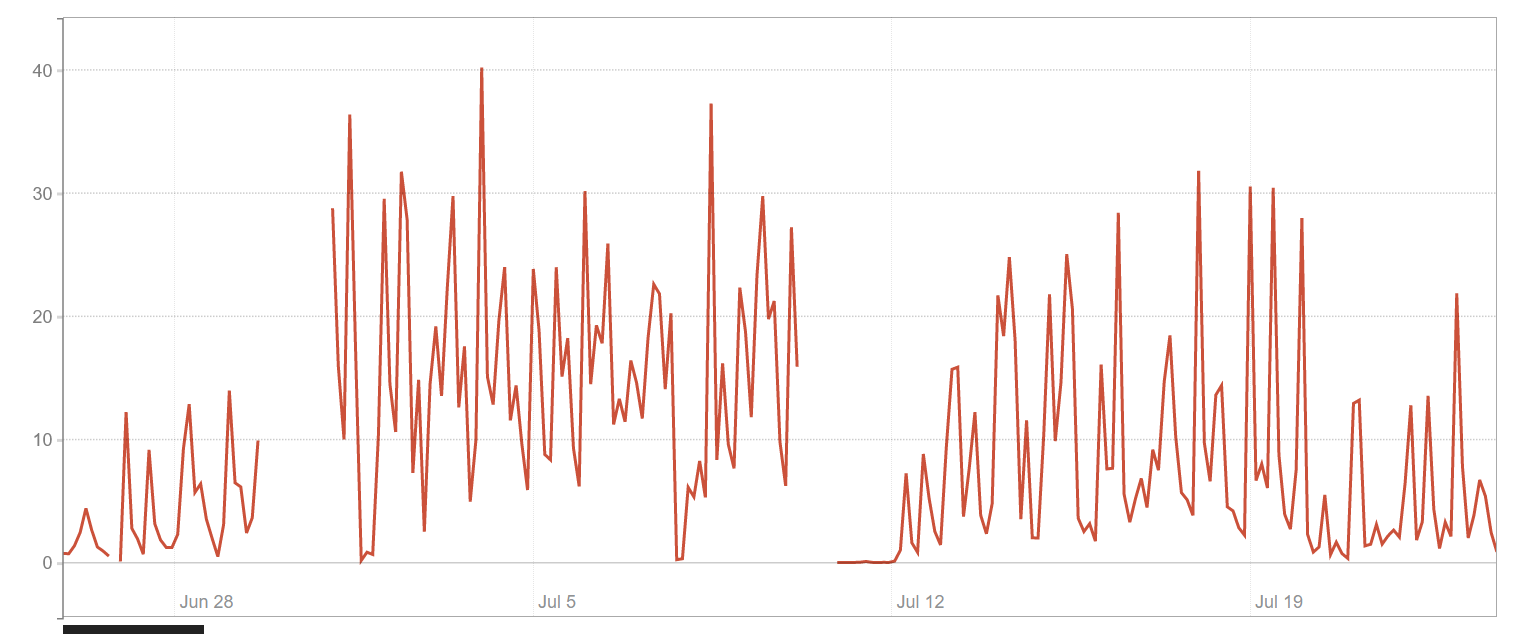
    (the gaps were unexpected node reboots which I asked them about, and they couldn't explain other than "There was a sudden reboot on the host node but this has been resolved already and should not happen again in the future", only for it to happen again ~2 weeks later)

    I did open a ticket too.

  • I reached out to HostHatch and they said there was another VPS on the same server as mine that was abusive / using way too much CPU. I think they throttled that VPS. It's better now - steal is mostly gone.

  • hosthatchhosthatch Patron Provider, Top Host, Veteran

    Sorry just seeing this thread.

    We had a backlog after dealing with the New York fire last month, which led to some abusive VMs not being caught on time.

    In any case: you should never see CPU steal on a HostHatch VM. If you do, please open a ticket, and we will fix it for you and give you a reason for why it happened in the first place.

    We take pride in the fact that we provide consistent performance on our AMD Compute servers (unlike some of the German providers who market "dedicated CPU" and then you end up competing with all your neighbors on the node for that CPU)

Sign In or Register to comment.