

























Howdy, Stranger!

It looks like you're new here. If you want to get involved, click one of these buttons!


Shells Virtual Desktop
BMail.ag - Secure Email Service
Server.net
CPLicense.net
VPS Server
Buy VPN
Vultr
VMs for AI
HostDare
ReliableSite White-Label Dedicated Hosting for Resellers
InterServer VPS
BMail.ag - Secure Email Service
Best VPN
High-Performance Bare Metal Server Solutions
Karvl.com
Server Mania Cloud Hosting
DataWagon Hosting
AlphaVPS Hosting
Evoxt.com
Clouvider
VPS Hosting with NVMe
Residential IPs in the US & 4G Mobile Proxies in EU & US with Unlimited Bandwidth
ReliableSite White-Label Dedicated Hosting for Resellers
Rabisu - Hosting Solutions
Shells Virtual Desktop
New on LowEndTalk? Please Register and read our Community Rules.

All new Registrations are manually reviewed and approved, so a short delay after registration may occur before your account becomes active.

★ VirMach ★ RYZEN ★ NVMe ★★ $8.88/YR- 384MB ★★ $21.85/YR- 2.5GB ★ Instant ★ Japan Pre-order ★ & More

1303304306308309339

Comments

  • loleelolee Member

    @nick_ said:

    @tototo said:

    @lolee said:

    @nick_ said:
    I'm willing to transfer my VirMach 2.5 GB RAM 2 Ryzen 5950X cores 50GB NVMe 6TB bandwidth VPS in Tokyo at the initial price. Is it possible to transfer?

    I want to How to contact you
    I want this vps

    I heard that in the past you could transfer by opening a ticket, but I am not sure if transfers are still allowed. In any case, VirMach has many many tickets right now, so transfers will take time. Also, technically you could probably change the owner of the server by changing the email address, but I think that they would not allow you to do that.

    Yeah, that's what I think too. Not as easy as GreenCloud and HostHatch.

    Change email address?

  • nick_nick_ Member

    No, I'm not gonna give anyone my account. I'm fine with letting the VPS expire too.

  • loleelolee Member

    @nick_ said:
    No, I'm not gonna give anyone my account. I'm fine with letting the VPS expire too.

    Suffering from mental illness
    First said willing to sell at original price
    Later said no
    Not in his right mind
    You can keep it as a family heirloom
    Bye

  • @lolee said:

    @nick_ said:
    No, I'm not gonna give anyone my account. I'm fine with letting the VPS expire too.

    Suffering from mental illness
    First said willing to sell at original price
    Later said no
    Not in his right mind
    You can keep it as a family heirloom
    Bye

    people like you are mostly the reason why virmach is so fucking busy

  • totototototo Member
    edited July 2022

    @lolee said:

    Suffering from mental illness
    First said willing to sell at original price
    Later said no
    Not in his right mind
    You can keep it as a family heirloom
    Bye

    Hint: VPS != account

    (edit) Here at LET, transfering VPS by changing email address is not common. Many providers do not allow it.

    Thanked by 1FrankZ
  • J0rmoJ0rmo Member
    edited July 2022

    Monitoring information link:
    https://status.211985.best/report/uptime/eb83d1d82c04acf8beccc5f2d7b30a11/

    @lemoncube said:

    @k2775739 said: Same as me. The upload speed is limited to 50Mbps.

    I couldn't reproduce that on tyoz027. I'm getting at least 10MiB/s+ with wget (single thread) from multiple locations. Could anything that you were running make virmach's script think you were abusing the network? (I'm not judging or assuming anything, just comming up with some possibilites.)
    And if iperf3 is running on windows as a client, the results can be way lower than it should be when ping goes a little bit high.

    Ookla's speedtest results:
    japan server, https://www.speedtest.net/result/c/ceaf2623-a333-46d8-bcb1-ab7ab56be258
    brazil server, https://www.speedtest.net/result/c/eb778882-f1cc-4213-8ea6-2323dbdf419a

    It transfer 100MB of data per hour.

    @fan said:

    @k2775739 said: Same as me. The upload speed is limited to 50Mbps.

    Have you tried reinstalling the OS? Same happened to mine on TYOC029 and reinstallation fixed that.

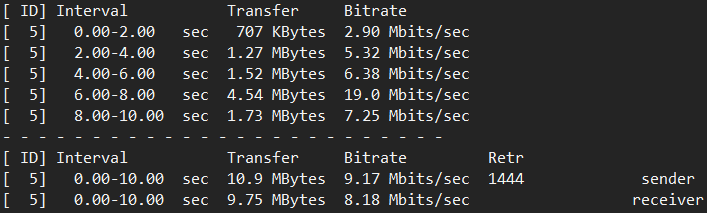
    I don't want to reinstall the system, but I did the test in rescue mode (bbr enabled).

    Hong Kong (iperf3 -i2 -c 147.78.243.* -R)
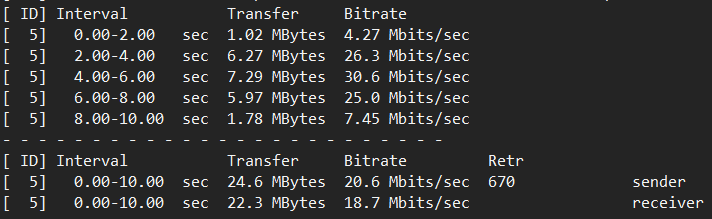
    Los Angeles (iperf3 -i2 -c 147.78.243.* -R)
  • FrankZFrankZ Barred

    @LiliLabs said: Do you plan on releasing this? It looks fantastic!

    I expect it would need more testing on different Debian based systems for that to happen as the agent was designed to run on CentOS/Alma/Rocky systems.

  • donbdonb Member

    Okay, so services resumed for me.
    Node: DENZ001

    I, however, have a pending paid migration to Europe, which I suppose would be done later at ease, by the @VirMach team.

    Cc: @FrankZ

    Thanked by 1FrankZ
  • Networking issues on recent migration to SEAZ009 node.

    I can't ping from server to gateway and there is no DNS resolution. No joy from several attempts to correct using "Reconfigure Network". Should the interface be using ifcfg-eth0 or ifcfg-ens3 on that node? If its ens3 can anyone confirm good settings?

    Thanks.

  • FrankZFrankZ Barred
    edited July 2022

    @SeaScoot said: Should the interface be using ifcfg-eth0 or ifcfg-ens3

    That would depend on what operating system you are using and if you installed from ISO or template. If your current system has ens3 as the primary network nic then "Reconfigure Networking" probably will not work for you. You will need to VNC in to your VM and change the IP, gateway, and netmask manually. Then reboot or restart networking.

    The method used for changing the network config manually is o/s dependent, so if you need further assistance please let us know what o/s and version you are using.

    @SeaScoot said: can anyone confirm good settings?

    You can find the correct setting in the SolusVM panel for your VM under networking, then click the IPv4 address shown there.

    Thanked by 1skorous
  • @lolee said:

    @nick_ said:
    No, I'm not gonna give anyone my account. I'm fine with letting the VPS expire too.

    Suffering from mental illness
    First said willing to sell at original price
    Later said no
    Not in his right mind
    You can keep it as a family heirloom
    Bye

    You're one useless fellow.

  • @FrankZ said: You can find the correct setting in the SolusVM panel for your VM under networking, then click the IPv4 address shown there.

    This is only if there is no duplicate ip on the network :)

  • Any update on the storage nodes of TYO? this pre-order seems to be never ending...

  • NJa64FNJa64F Barred
    edited July 2022

    Node RYZE.TYO-C035.VMS and/or TYOC035 is up
    ( it is named differently in 2 places in my client area )

    My vps came back up . was down not quite a week. according to fail2ban it became reachable about 14 hrs ago

    my /etc/network/interfaces was updated by solusvm. It listed both the old and new ip and I removed the old one although the client are on virmach still lists 2 ips. i read other posts where that might clear up on its own

    was involuntarily moved from Buffalo to Tokyo. Ping time went up to 175ms as I am in USA although that probably isnt a big deal for me. mxtoolbox.com lists ip as clear which is an improvement over my other ip. did a quick speedtest-cli and it went to Seoul 286.63 Mbit/s down. later it went to Vladivostok and Khabarovsk and got 720~ Mbit/s down . up speed is in the 150-300 Mbit/s

    quick check shows port 25 open. no ability to set the reverse dns yet. He did say it would take awhile.

    I am relieved it is back up . Thank you

    gonna backup the data now. better late than never . lol

    Thanked by 2skorous ZA_capetown
  • FrankZFrankZ Barred
    edited July 2022

    @Freelogic said:

    @FrankZ said: You can find the correct setting in the SolusVM panel for your VM under networking, then click the IPv4 address shown there.

    This is only if there is no duplicate ip on the network :)

    There is an exception to almost every rule :sunglasses:

    Thanked by 1Freelogic
  • @VirMach I have a VM on NYCB040 that had 2IPs before migration that now has only 1 IP. i remember you said something few months back but never decided on what to do with them.

    Any idea when to expect a solution?

  • ArkasArkas Member, Retired Moderator
    edited July 2022

    @lolee said: Suffering from >mental illness
    First said willing to sell at original price
    Later said no
    Not in his right mind
    You can keep it as a family heirloom
    Bye

    Tone it done a bit my friend.

  • VirMachVirMach Member, Patron Provider

    @tototo said:

    @lolee said:

    @nick_ said:
    I'm willing to transfer my VirMach 2.5 GB RAM 2 Ryzen 5950X cores 50GB NVMe 6TB bandwidth VPS in Tokyo at the initial price. Is it possible to transfer?

    I want to How to contact you
    I want this vps

    I heard that in the past you could transfer by opening a ticket, but I am not sure if transfers are still allowed. In any case, VirMach has many many tickets right now, so transfers will take time. Also, technically you could probably change the owner of the server by changing the email address, but I think that they would not allow you to do that.

    Allowed but highly unlikely it will be processed right now, just in terms of support load.

    @donb said:
    Okay, so services resumed for me.
    Node: DENZ001

    I, however, have a pending paid migration to Europe, which I suppose would be done later at ease, by the @VirMach team.

    Cc: @FrankZ

    I don't handle those anymore, our developer does so he can deal with the bugs but I think we've gotten to a point where I can reliably do it too. Except I'm not doing them right now, if it failed to automatically transfer then you'd have to wait for either a refund or for it to process. As for paid migration with data, it was broken on SVM but recently fixed and I did process a good amount of those, just not all of them,

    @jperkins said:
    Node RYZE.TYO-C035.VMS and/or TYOC035 is up
    ( it is named differently in 2 places in my client area )

    My vps came back up . was down not quite a week. according to fail2ban it became reachable about 14 hrs ago

    my /etc/network/interfaces was updated by solusvm. It listed both the old and new ip and I removed the old one although the client are on virmach still lists 2 ips. i read other posts where that might clear up on its own

    was involuntarily moved from Buffalo to Tokyo. Ping time went up to 175ms as I am in USA although that probably isnt a big deal for me. mxtoolbox.com lists ip as clear which is an improvement over my other ip. did a quick speedtest-cli and it went to Seoul 286.63 Mbit/s down. later it went to Vladivostok and Khabarovsk and got 720~ Mbit/s down . up speed is in the 150-300 Mbit/s

    quick check shows port 25 open. no ability to set the reverse dns yet. He did say it would take awhile.

    I am relieved it is back up . Thank you

    gonna backup the data now. better late than never . lol

    Yeah these ones went disastrously bad. Luckily there weren't too many but I need to make sure you at least move back to a proper location soon. And of course cases like yours are in the minority but yeah, very sorry.

    @DanSummer said:
    @VirMach I have a VM on NYCB040 that had 2IPs before migration that now has only 1 IP. i remember you said something few months back but never decided on what to do with them.

    Any idea when to expect a solution?

    Idea is a button to request it, so keep an eye out for the buttons in the area and of course I'll probably talk about it here.

  • aliletalilet Member

    @DanSummer said:
    @VirMach I have a VM on NYCB040 that had 2IPs before migration that now has only 1 IP. i remember you said something few months back but never decided on what to do with them.

    Any idea when to expect a solution?

    One of my VPS has exactly the same issue.
    By the way everyone check VPS on node NYCB030 as it is now working fine. It was showing some boot error before but now working fine.

  • netrixnetrix Member

    All my @VirMach VPS having problem pinging to 8.8.8.8. Is it only me or widespread problem?

    root@:~# ping 8.8.8.8
    PING 8.8.8.8 (8.8.8.8) 56(84) bytes of data.
    ^C
    --- 8.8.8.8 ping statistics ---
    16 packets transmitted, 0 received, 100% packet loss, time 15345ms
    
  • Ping to 8.8.8.8 works fine on my TYOC039 box

  • @netrix said:
    All my @VirMach VPS having problem pinging to 8.8.8.8. Is it only me or widespread problem?

    root@:~# ping 8.8.8.8
    PING 8.8.8.8 (8.8.8.8) 56(84) bytes of data.
    ^C
    --- 8.8.8.8 ping statistics ---
    16 packets transmitted, 0 received, 100% packet loss, time 15345ms
    

    tokyo vps ok

    lax vps no ok

  • FrankZFrankZ Barred

    @netrix said: All my @VirMach VPS having problem pinging to 8.8.8.8. Is it only me or widespread problem?

    Ping to 8.8.8.8 works on the 15 VMs I tested just now, so no issues here. Tested from the following nodes:
    AMSD026, ATLZ007, DALZ003, DALZ006, DENZ001, FFME001, FFME003, LAXA009, SJCZ008, SEAZ004, SEAZ008, NYCB015, TYOC029, TYOC039, TYOC002S

    What nodes are "all my VPS"?

  • netrixnetrix Member
    edited July 2022

    @FrankZ said:

    @netrix said: All my @VirMach VPS having problem pinging to 8.8.8.8. Is it only me or widespread problem?

    Ping to 8.8.8.8 works on the 15 VMs I tested just now, so no issues here. Tested from the following nodes:
    AMSD026, ATLZ007, DALZ003, DALZ006, DENZ001, FFME001, FFME003, LAXA009, SJCZ008, SEAZ004, SEAZ008, NYCB015, TYOC029, TYOC039, TYOC002S

    What nodes are "all my VPS"?

    i'm sorry, all my vps is in LA rn..

    LAXA014
    LAXA016
    LAXA015
    LAXA024
    LAXA006

    all failed.

    edit: ALREADY FIXED

  • @netrix said:
    All my @VirMach VPS having problem pinging to 8.8.8.8. Is it only me or widespread problem?

    root@:~# ping 8.8.8.8
    PING 8.8.8.8 (8.8.8.8) 56(84) bytes of data.
    ^C
    --- 8.8.8.8 ping statistics ---
    16 packets transmitted, 0 received, 100% packet loss, time 15345ms
    

    Works fine here.

  • cybertechcybertech Member
    edited July 2022

    mine in LAXA008 got fixed too

  • Anyone got the issues where your main ip change suddenly, but your are not moved so your vps just go down ? I fixed it myself, but it's quite annoying. I think this is the second time this is happening to me.

  • VirMachVirMach Member, Patron Provider

    @cybertech said:
    mine in LAXA008 got fixed too

    Just be clear I can confirm absolutely nothing was done on LAX by us but what you're describing sounds like it could potentially be QN's auto nullroutes. I don't see anything crazy on ping charts either recently.

    @ben47955 said:
    Anyone got the issues where your main ip change suddenly, but your are not moved so your vps just go down ? I fixed it myself, but it's quite annoying. I think this is the second time this is happening to me.

    This should only happen once if it's broken recently, and once before we applied the network changes a couple weeks ago for some people that were on mixed subnets.

  • @VirMach said: @ben47955 said:
    Anyone got the issues where your main ip change suddenly, but your are not moved so your vps just go down ? I fixed it myself, but it's quite annoying. I think this is the second time this is happening to me.

    This should only happen once if it's broken recently, and once before we applied the network changes a couple weeks ago for some people that were on mixed subnets.

    I mean, the vps is still on CC. I'm expecting either nothing or migration. Not just getting some random IP as main IP out of nowhere.

  • appvappv Member
    edited July 2022

    @netrix said:

    @FrankZ said:

    @netrix said: All my @VirMach VPS having problem pinging to 8.8.8.8. Is it only me or widespread problem?

    Ping to 8.8.8.8 works on the 15 VMs I tested just now, so no issues here. Tested from the following nodes:
    AMSD026, ATLZ007, DALZ003, DALZ006, DENZ001, FFME001, FFME003, LAXA009, SJCZ008, SEAZ004, SEAZ008, NYCB015, TYOC029, TYOC039, TYOC002S

    What nodes are "all my VPS"?

    i'm sorry, all my vps is in LA rn..

    LAXA014
    LAXA016
    LAXA015
    LAXA024
    LAXA006

    all failed.

    edit: ALREADY FIXED

    @VirMach LAXA028 I can not ping my IP, although VPS is up and running and is accessible from SolusVM VNC. UPD: Ticket #634836 (created 07/04/22)

This discussion has been closed.
