


























New on LowEndTalk? Please Register and read our Community Rules.
All new Registrations are manually reviewed and approved, so a short delay after registration may occur before your account becomes active.
All new Registrations are manually reviewed and approved, so a short delay after registration may occur before your account becomes active.



Comments
He is an entertainer by nature. That's why he hire other smarter people. And he is good at what he does (entertain people).
IMHO it's better than a tech channel that is too savvy, too nerdy, and it becomes boring.
seems like no end to issues
Its not that terrible, if you take into account, the response times, plus they actually put a working drive into your server.
Some other providers, I won't name here, put broken drives or even some in worse condition e.g more smart errors in your server.
Once, I requested a new drive, since bad sector count did rise and they actually manage to find a drive with even more bad sectors and put it into my server.
Its not as good as Hetzner, where you can actually talk to the guy, including the decent response times.
The hardware was so naive it cried whole night for an IP address.
When you decide to order anything from OVH, you have to think directly at NO MANAGEMENT, everything is on you to fix and solve, if you have the nerves for it then go with OVH else do not do it, pay a little extra and get a decent provider.
OVH took a few weeks for FO IPs issues to sort out and at the end they just closed the ticket. Nothing changed, I still couldn't use some IPs.
Accept the fact and their culture. Or just move on.
@FlorinMarian : Just delete the subnet and order new ones, or hire me.
Haha, instead of deleting and re-purchase just move from server to another and back this way it will reset the network on failover IPs.
you should team up with the hotswap ram guy.
usually deleting and readding a virtual mac will also help with such issues.
Someone from LET proposed this step and I did it 1 hour ago but still encountering issues.
Thank you for feedback!
Not sure why anyone hasn't said this before, but here goes.
SUE.
Do these failover IP’s work on another server or VPS?
Have you ordered new failover IP to test?
Have you tried adding the failover ip to the server naturally without try to use it as a VPS IP on the server?
Have you tried different O/S?
Have you check for any firewalls?
If the server is defective just ditch it and order a new one. Is not worth the downtime of troubleshooting an accidented server. Just move the backups and IP's to a new server.
Don't ever use the main server IP, the main IP cannot be moved to another server, only order failover. Failover IP's can be bought from loyalty points. 200 points = 1 IP.
The defective server is like a repaired car after an accident. It looks like now but the plastics are squeeching, the airbags are already popped, lots of parts with ruptures and the body straightened and repaired with plaster.

Would you buy a car implied in an accident and repaired? Like you won't trust the car unsafe like one from the factory, this way you should respect your customers and offer
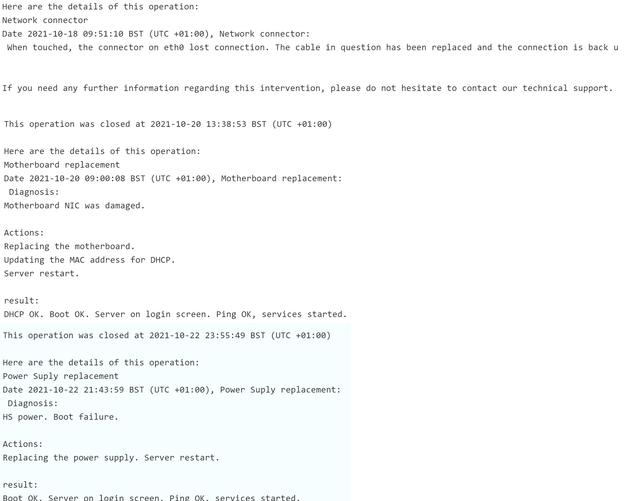
them only new hardware.
Look at this particular OVH server that had network issues, lots of parts were replaced and the server was still accidented and not working every few other days.
well, but doesn't sell shit for good. At least you cant invest, if u deadpool early by bankrupcy.
It's unclear whether the server or the IP is defective.
OP stated that there's packet loss but only on one IP.
In case the problem is with the IP, moving it to another server does not guarantee a solution.
Not really. The "smarter people" he hired, he kept in the dark. His value in "entertainment" was at the cost of others.
If I wanted to be informed about anything, someone like cociu is literally the LAST person I would consider. Barring the "nerdy"/"savvy" bullshit you spew... Imagine considering anything that dipshit ever said is more valuable than a GOOD source of information because it's too nerdy is fucking laughable. You are a fucking joke.
pretty much
besides googling up my problems how do i break out of this nutshell and start learning the real crap?
Which are your issues?
No.
No, but I have another ranges which have no trouble.
Yes, first time few seconds ago and it works as expected without any MAC generated but only on dedi, not on KVM machine.
Yes.
Yes.
Drink more coffee and brag about it or something... I think that's how adults who can't get away with doing cocaine like REAL adults cope with their lack of "nutshell"
So, it's your config that causes issues, not the OVH network does.
host VM17 { hardware ethernet 02:00:00:XX:XX:XX; option routers 51.195.61.254; option subnet-mask 255.255.255.255; fixed-address 51.195.48.96; option domain-name-servers 8.8.8.8,8.8.4.4; }host VM18 { hardware ethernet 02:00:00:XX:XX:XX; option routers 51.195.61.254; option subnet-mask 255.255.255.255; fixed-address 51.195.48.97; option domain-name-servers 8.8.8.8,8.8.4.4; }Having same OS [Openstack template] and same DHCP information on both IPs, why .97 works as expected and .96 not ?
All 32 FO IPs have exactly same DHCP config and only this IP has troubles.
I can't see any issue on our side.
Best regards, Florin.
From your subnet, there are 2 IPs will not work (51.195.48.96 and 51.195.48.111) with majority of OS.
OpenStack is guest OS or host?
With OVH and SYS the first and the last IP of subnet, I used to use Debian GNU/Linux or Alpine Linux as guest OS, with static config:
I SNORT RITALIN
ITS WAYYYY BETTER THAN COCAINE
30 mins of meh vs 4 hours of pure intensity and no withdrawal symptoms after extended use
@FlorinMarian : Try this
Your first post stated that the IP has "packet loss" i.e. some packets cannot be received, but this is not packet loss.
My guess is that the DHCP response did not cause the guest OS to configure routing correctly.
Please post the output of these commands in guest OS from one working IP and one non-working IP:
It would reveal the problem.
The output must be posted as text, not pictures.
My earlier suspicious was that the guest OS would treat .96 as "network address" of the /27 subnet (just like .0 and .255 in a /24), causing it to not work.
Seeing that the guest OS is receiving /32 subnet, this denies my hypothesis.
My current conclusion is that, the issue is not inside the guest OS, but on the host/hypervisor side.
Unfortunately, I don't have any experience with OpenStack.