



























New on LowEndTalk? Please Register and read our Community Rules.
All new Registrations are manually reviewed and approved, so a short delay after registration may occur before your account becomes active.
All new Registrations are manually reviewed and approved, so a short delay after registration may occur before your account becomes active.
Software RAID Resyncs Can Be So Painful
 raindog308
Administrator, Veteran
raindog308
Administrator, Veteran
in General
Had 3x12TB drives in a Synology DS418. Decided to add a fourth...
Personalities : [raid1] [raid6] [raid5] [raid4] [raidF1]
md2 : active raid5 sdd5[3] sda5[0] sdc5[2] sdb5[1]
      23416309760 blocks super 1.2 level 5, 64k chunk, algorithm 2 [4/4] [UUUU]
      [=>...................]  reshape =  7.9% (931304416/11708154880) finish=5084.5min speed=35325K/sec
That's with /proc/sys/dev/raid/speed_limit_max set at 600000. This is using Synology's SHR RAID with 1 drive fault tolerance.
The CPU is a Realtek RTD1296 quad-core 1.4GHz, which is probably a big part of why it's slow. Or maybe the fact that these are 7200rpm SATA drives. The original 3x12TBs are WD Gold, but I got an IronWold Pro for the 4th drive because it was $200 cheaper and still had a 5-year warranty (same 256MB cache).
This is just my backup NAS so I'm less performance-sensitive...but I wasn't expect a 4-day rsync odyssey.
All the drives are at 32C/90F. Sync started about 7 hours ago.



Comments
Set
speed_limit_minto that as well, or even better both to something like 2000000. The speed should pick up, but then don't expect to access the NAS a lot in the meantime.There's nothing inherent about "software" RAID being bad here compared to hardware.
Finally, not a great decision to run 4x12TB RAID5, hope you have backups. One drive could fail even right now for you (being startled by an increased load), leading to a full data loss.
echo 50000 > /proc/sys/dev/raid/speed_limit_min
(you set max but there is also min, default is usually low)
echo 2048 > /sys/block/md2/md/stripe_cache_size
(use more RAM for active RAID blocks, default is usually 256)
If anything, software RAID can be faster if it's tightly integrated with the filesystem (which mdraid is not), but hardware RAID will never be integrated with the filesystem since it's by definition filesystem agnostic.
In the future, look towards bcachefs being more mature! It is designed to be very fast with the use of a small SSD cache and has RAID support tightly integrated with full support for erasure coding, so you lose that RAID5 write hole.
If you've got four drives and want a level of redundancy where you need to tolerate the failure of just one drive, you should go with RAID10. As a bonus, you get enhanced multithreaded read performance, no write penalty, and half the time you can handle the failure of two drives. But yes even then, HDD resyncs can be slow.
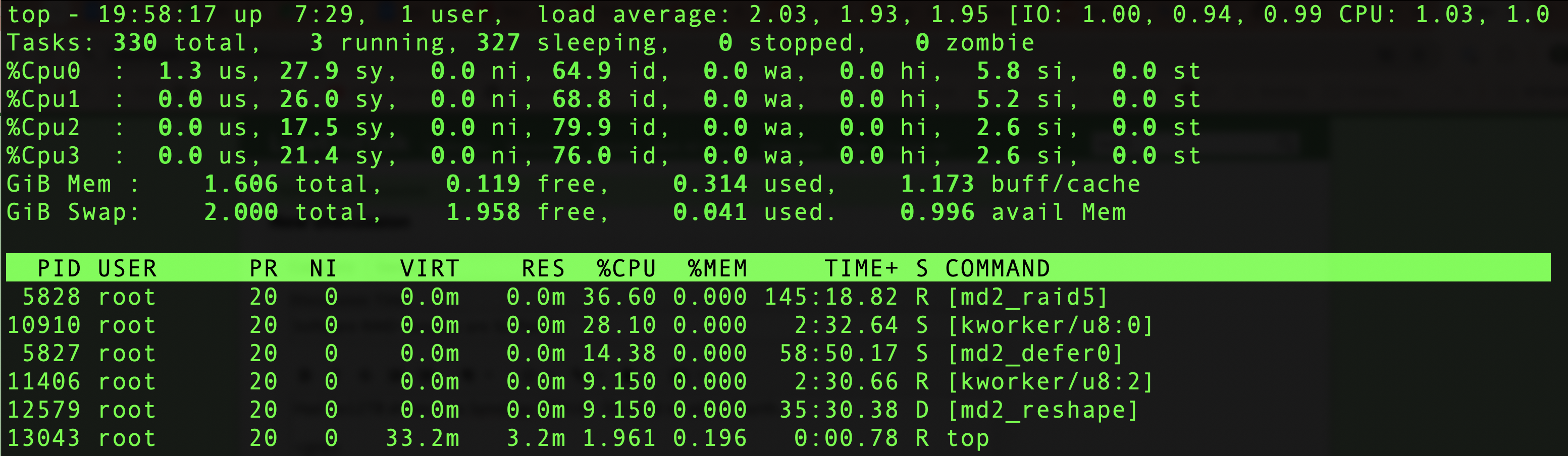
It's pretty much just doing a lot of XOR, so even a slow CPU should handle the speeds of spinning rust. But to be sure, check
topto see how much CPU time the mdraid resync kernel thread is using.I've not been following it too much, but there's been enough drama over it already. I don't use it at all - so any insights would be welcome. I'm not sure at all on why I (or anyone) would pick it over ZFS for anything worth preserving (and of course how much time to invest in it).
The drama has been largely resolved now that development has been taken (temporarily) out of tree. There was a lot of friction earlier due to the fast pace of development that caused arguments on LKML when it was still in-tree. Now it's temporarily installed with dkms until it goes back in tree.
The main reason to pick it over ZFS, other than being GPL instead of CDDL, is its focus on performance (Even ZFS with L2ARC and SLOG on SSD doesn't come anywhere near it) while simultaneously having an extremely rugged design with data safety as a priority. Its main selling point is that it's extremely reliable and very fast.
Fair points but I tend to be very conservative when it comes to trusting filesystems with my data. So it'll take me some time (and a LOT more other users using it regularly and consistently for some extended amount of time across many kernel versions and distro releases) before I'd be willing to wade into such territory. Till then ext4, mdadm, lvm, luks and ZFS (where possible/useful) for me...
Me too. It's promising so far, but for high-reliability, I still go with ZFS (or ext4/xfs + mdraid). It is definitely something to look forward to in the near future, though!
This could also be the reason.
Looks like you have the drives of the same size, which involves less Synology's proprietary tricks, but still.
Default was set to 1024, but doubling to 2048 shaved ~600 mins off the estimate.
That guy is not OK in the head unfortunately, meanwhile it seemed like a promising project.
Now I'd trust ReiserFS more than this.
Recently, one of my vps experienced a RAID failure. After it became available again after rebuilding, I ran a btrfs scrub, and the data was corrupt. A good reason to use a filesystem with the ability to check data integrity (zfs would be good, too).
which one are we talking about? hopefully you didnt run raid5 btrfs
The RAID was managed by the provider; I'm not sure what they used.
It's hard to tell what chip https://www.cpubenchmark.net/cpu.php?cpu=ARM+Cortex-A53+4+Core+1400+MHz&id=4143 exactly refers to but if the RTD1296 is that range it being slow is sadly not much of surprise. I kind of would expect a lot of expensive operations (encryption and such) to be implemented in hardware though, which at least in theory should somewhat offset the slowness.
Considering how readily available low power ARM boards are these days it shouldn't be too hard to mcgyver something more powerful. If interest/time aligns with that is obviously a completely different question.
Hi,
as long as the process has no 100% CPU usage, the CPU should not be the (primary) problem.
So that leaves configuration settings and the disks itself as potential sources of slowliness.
But since waiting activity seems also not to exist, most probably the settings are slowing down things here.
I suggest asking the good old AI and/or your favorite search engine howto speed up raid 5 stuff.
4-core ARM Cortex-A53 @ 1.4 GHz, I bet your phone has more horsepower then that CPU.

Synolgy OS might throttle the CPU time also for this task, but that really depends on what other services you have started on that NAS.
Also, even if some think that RAID5 is simple to calculate, for rebuild, that cpu will have to do a shit load math and it ain't a storage ASIC.
Larger the drives, the longer it will take.
At 12TB / drive, I would give it ~2-3 days probably.
As some context, a 24 Drive Raid60 Array ( 8x3 Raid 6 ) of 22TB SAS Drives 7200 RPM on a modern ASIC with light load took ~ 8 days to complete.
So I think you are good.
EDIT:
Also, if it makes you fell better, I have a QNAP TS-435XEU that has a Marvell OCTEON TX2 CN9131 and 32 GB ram, it is a piece of garbage that cost ~2000 USD with the shelf it has. It is slow as a snail. We upgraded the drives from 12 GB to 24 TB SATA, it was a 3 week project.
This is my backup Synology, so I don't mind it being slow...well, until now.
My main ones are
Yeah, kind of expected but in general hardware acceleration goes a long way.
This ~20 year old snail gets dwarfed by the RTD1296 (assuming the passmark data is representative) but still manages to push 30mbits of encrypted traffic as long as VIA's proprietary padlock engine is used.
What for? AES is implemented pretty much everywhere nowadays (incl. even quite a few MCUs) and the core of Raid 5 are two simple binary operations (and even error correction can be done by normal processors).
Well, encryption is obviously useless for raid but nothing is stopping manufacturers from implementing stuff that's actually useful. I mean, CPUs could do AES before intel added their ops too. It's just faster now. How a raid version would look like... i don't really know. Something bulk, i guess. If VIA can cook their own proprietary extension others can do it too
One time, I had an initial software raid sync take several days to complete. After giving it the old turn it off and back on (reboot) the ETA went from several days to a few hours.