























Howdy, Stranger!

It looks like you're new here. If you want to get involved, click one of these buttons!


Shells Virtual Desktop
BMail.ag - Secure Email Service
Server.net
CPLicense.net
VPS Server
Buy VPN
Vultr
VMs for AI
HostDare
ReliableSite White-Label Dedicated Hosting for Resellers
InterServer VPS
BMail.ag - Secure Email Service
Best VPN
High-Performance Bare Metal Server Solutions
Karvl.com
Server Mania Cloud Hosting
DataWagon Hosting
AlphaVPS Hosting
Evoxt.com
Clouvider
VPS Hosting with NVMe
Residential IPs in the US & 4G Mobile Proxies in EU & US with Unlimited Bandwidth
ReliableSite White-Label Dedicated Hosting for Resellers
Rabisu - Hosting Solutions
Shells Virtual Desktop
New on LowEndTalk? Please Register and read our Community Rules.

All new Registrations are manually reviewed and approved, so a short delay after registration may occur before your account becomes active.

TierHive's IPv6 test review

TierHive of @backtogeek recently added IPv6 support to their hourly billed chickens, ref to their blog.

It appears that will allocated a /64 IPv6 subnet for each region, from which you can assign multiple addresses to the VPS instances within that region.

I haven't actually tested exactly how many can be assigned, though—after all, a single IPv6 address is sufficient for each of my VPS instances.

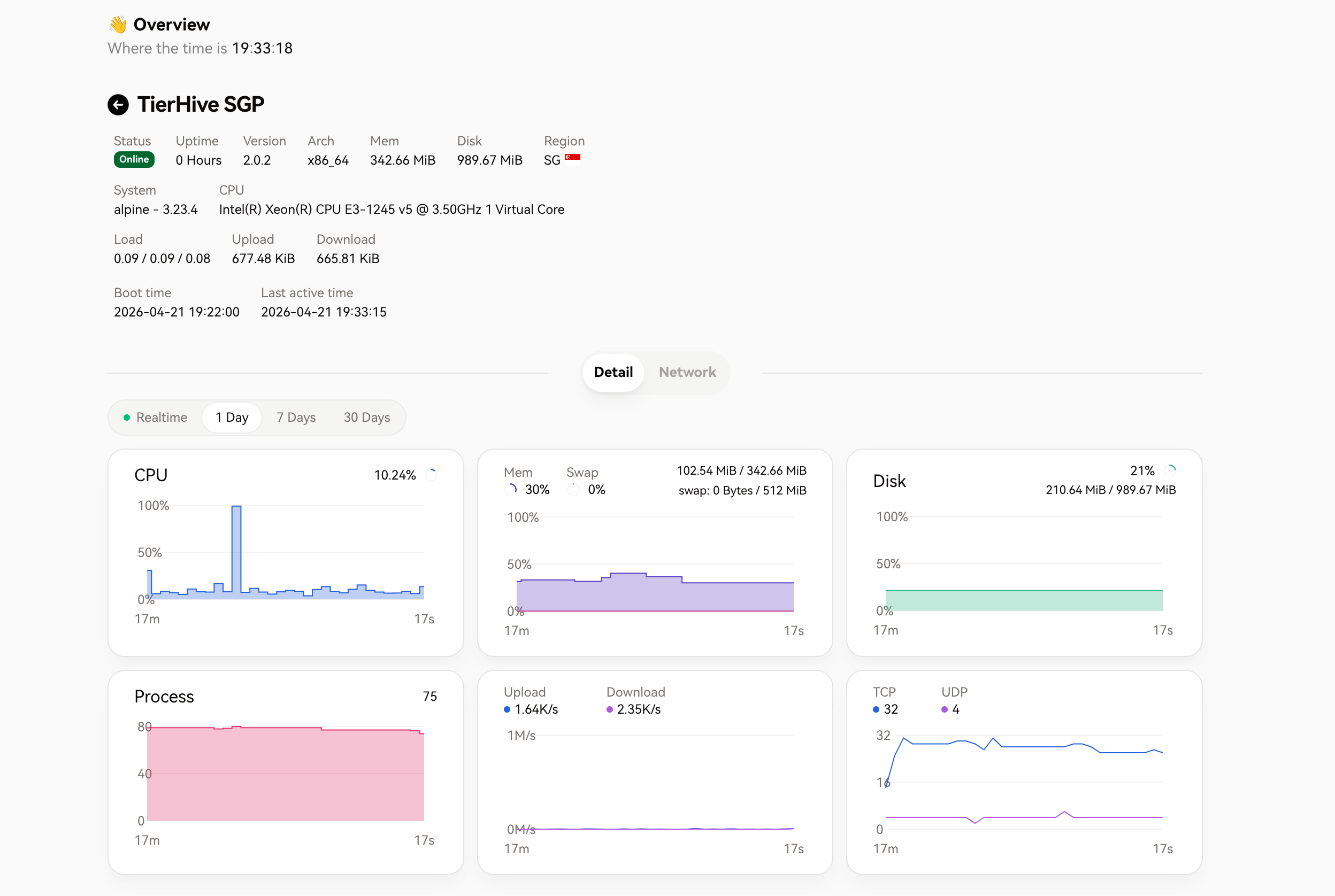
I no longer have to put up with NAT; I've provisioned a tiny little chicken with 1 vCPU, 384MB of RAM, and 1GB of storage. (about $0.32/m)

It seems to be running on KVM virtualization? So I tried using netboot.xyz again to reinstall a minimal Alpine Linux 3.23.4.
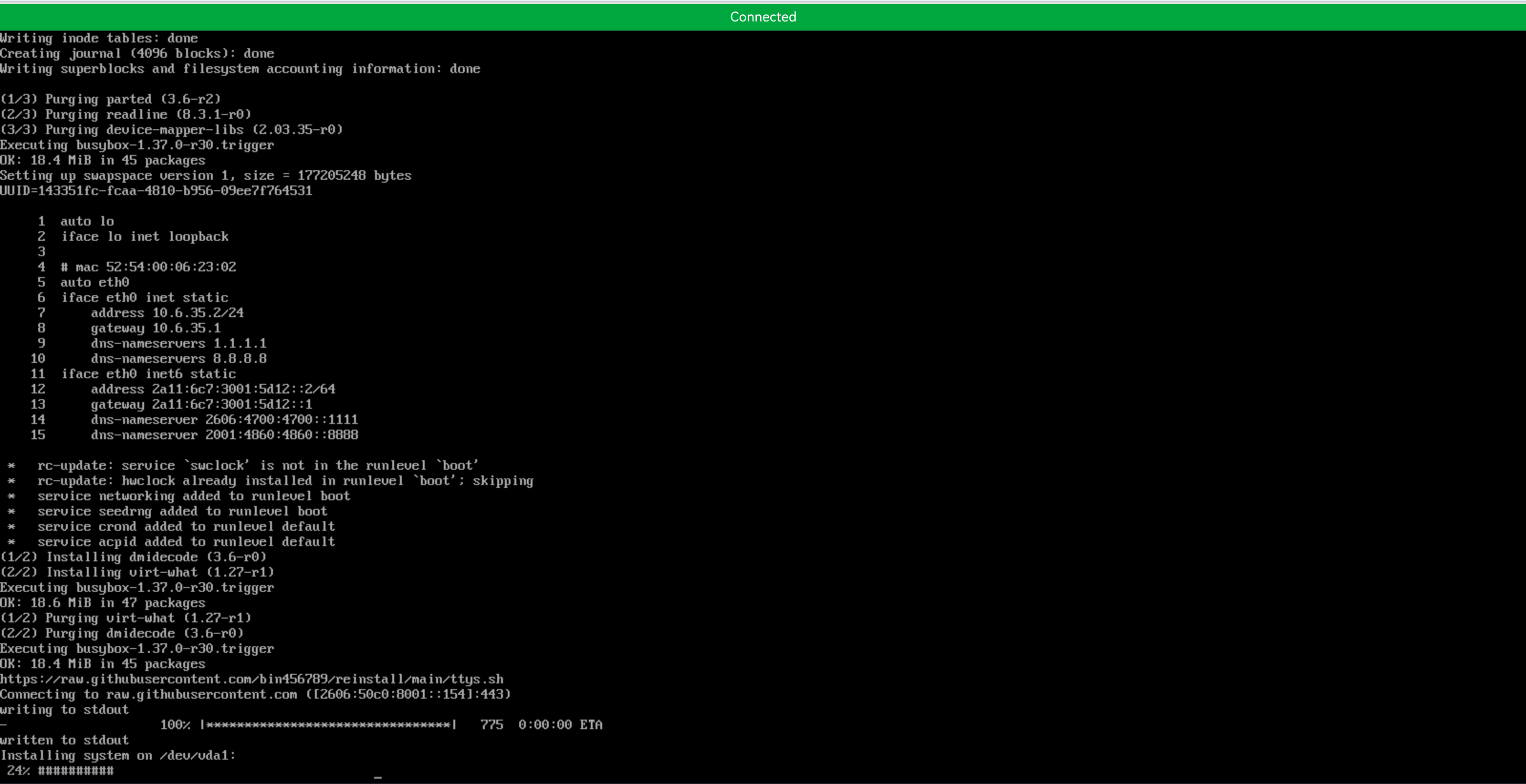
I’m running WireGuard on it, using Cloudflare Warp as the IPv4 egress; then I just added it to my collection of "little chickens"—it’s as simple as that.

curl -4 ip.zsh.moe
IP:              104.28.222.43
Network:         104.28.222.43/32
Continent:       Asia
Continent Code:  AS
Country:         Singapore
Country Code:    SG
City:            Singapore
Location:        1.2872, 103.8507
Postal:          17
Timezone:        Asia/Singapore
ASN:             AS13335
ASN Org:         Cloudflare, Inc.
Cloudflare Node: SIN
User-Agent:      curl/8.17.0

I really love this little chicken; it’s absolutely yummy 😋.
Comments

  • rpqurpqu Member

    @yoursunny so, which list are you going to put tierhive?

    Thanked by 2DejavuMoe xms
  • @rpqu said:
    @yoursunny so, which list are you going to put tierhive?

    If it weren't for the routable /64 IPv6, I guess @yoursunny would still nail them to the "pillar of shame" 😨

    Thanked by 1oloke
  • tenjitenji Member
    edited April 21

    well another cheap toy were always welcome, especially SG location

    Thanked by 3DejavuMoe oloke xms
  • @tenji said:
    well another cheap toy were always welcome, especially SG location

    yeap! a cheap toy.

    However, for users with extremely limited budgets, they can also serve as a Linux learning environment.

    Deploying small Telegram bots or running various scripts—all of this is perfectly feasible.

    It’s good really.

  • zedzed Member

    big step, very cool.

    Thanked by 2DejavuMoe oloke
  • rpqurpqu Member
    edited April 21

    @DejavuMoe said:

    @tenji said:
    well another cheap toy were always welcome, especially SG location

    yeap! a cheap toy.
    However, for users with extremely limited budgets, they can also serve as a Linux learning environment.
    Deploying small Telegram bots or running various scripts—all of this is perfectly feasible.
    It’s good really.

    Since it's hourly vps, it's perfect for experiments. And with reasonable pricing

    Thanked by 2DejavuMoe oloke
  • sshboxsshbox Member

    /64 per region? Is there a particular reason for not giving a /56?

    Thanked by 1xms
  • @sshbox said:
    /64 per region? Is there a particular reason for not giving a /56?

    I don't know... :o

  • daviddavid Member

    I've also got a 128MB TierHive instance running in Singapore, with IPv6. About 10 cents a month. I just used the Alpine 3.23.2 template to install it.

    I found it's best to install on 256MB first, then setup ZRAM swap, then downgrade to 128MB, so apk will run.

    I'm running shadowsocks on it.

  • VTCuongVTCuong Member

    If only I could get an account to try them out🥲.

    Thanked by 2oloke DejavuMoe
  • @david said:
    I've also got a 128MB TierHive instance running in Singapore, with IPv6. About 10 cents a month. I just used the Alpine 3.23.2 template to install it.

    I found it's best to install on 256MB first, then setup ZRAM swap, then downgrade to 128MB, so apk will run.

    I'm running shadowsocks on it.

    I used to running a 128MB for Alpine Linux, it's cooool

    Thanked by 1david
  • @VTCuong said:
    If only I could get an account to try them out🥲.

    just have a try :D

  • daviddavid Member

    They're not allowing customers from China, Russia, Brazil, Vietnam, and Iran. He might be from one of those countries.

    Thanked by 3rpqu DejavuMoe VTCuong
  • sshboxsshbox Member

    @DejavuMoe said:

    @sshbox said:
    /64 per region? Is there a particular reason for not giving a /56?

    I don't know... :o

    @backtogeek

  • RubbenRubben Member

    @MikePT can you buy this for me?

  • sshboxsshbox Member

    @david said:
    I found it's best to install on 256MB first, then setup ZRAM swap, then downgrade to 128MB, so apk will run.

    You can just use the 128 MB template and enable a swap file if/when you need apk.

    If you really want to get fancy you can use the Tierhive guide on how to run Alpine in 23 MB RAM:
    https://tierhive.com/blog/tierhive-howto/how-to-run-alpine-with-just-23mb-ram

  • daviddavid Member

    @sshbox said:

    @david said:
    I found it's best to install on 256MB first, then setup ZRAM swap, then downgrade to 128MB, so apk will run.

    You can just use the 128 MB template and enable a swap file if/when you need apk.

    If you really want to get fancy you can use the Tierhive guide on how to run Alpine in 23 MB RAM:
    https://tierhive.com/blog/tierhive-howto/how-to-run-alpine-with-just-23mb-ram

    I did try that guide, but in the end, I decided to keep it simple and go with the stock setup. It's easy to setup ZRAM swap, and leave it on, and then apk works. It's just compressed RAM, so it's not using disk resources.

  • daviddavid Member

    Here's the guide for setting up ZRAM on Alpine linux:

    https://wiki.alpinelinux.org/wiki/Zram

    Specifically, this is what I did:

    apk add zram-init
    
    change /etc/conf.d/zram-init
      change num_devices=1
      change size0=128
    
    change /etc/modprobe.d/zram.conf
      options zram num_devices=1
    
    rc-update add zram-init
    
    reboot
    
    Thanked by 1DejavuMoe
  • sshboxsshbox Member

    @david said:

    @sshbox said:

    @david said:
    I found it's best to install on 256MB first, then setup ZRAM swap, then downgrade to 128MB, so apk will run.

    You can just use the 128 MB template and enable a swap file if/when you need apk.

    If you really want to get fancy you can use the Tierhive guide on how to run Alpine in 23 MB RAM:
    https://tierhive.com/blog/tierhive-howto/how-to-run-alpine-with-just-23mb-ram

    I did try that guide, but in the end, I decided to keep it simple and go with the stock setup. It's easy to setup ZRAM swap, and leave it on, and then apk works. It's just compressed RAM, so it's not using disk resources.

    Fair enough. I just prefer using a regular swap file when I need it because I can use the stock template and don't need to resize RAM.

    Thanked by 1DejavuMoe
  • MikePTMikePT Veteran

    @Rubben said:
    @MikePT can you buy this for me?

    No. :expressionless:

  • @Rubben said:
    @MikePT can you buy this for me?

    No.

    Thanked by 1MikePT
  • Also grabbed ipv6 to try. I initially tried to run Alpine on 256MB with docker and it was a bit slow...so I increased it to 386MB I think and it is fine. However, on London node I was struggling to even start docker, was crashing due to whatever overlay error, seems like a hypervisor issue. I tried DE and CA locations, both work fine with docker.

    Thanked by 2DejavuMoe oloke
Sign In or Register to comment.
