



























All new Registrations are manually reviewed and approved, so a short delay after registration may occur before your account becomes active.
[DigiRDP] Earn up to 50% on RDP/VPS Hosting referrals- lifetime recurring.
How to Become a DigiRDP Affiliate and Start Earning
A complete walkthrough for promoters. Signup, dashboard, tiers, vouchers, payouts.
Welcome. What this program is
DigiRDP's affiliate program pays you a recurring percentage every time someone buys through your link, not just the first payment. Commissions scale with your performance: the more customers you bring in, the higher your percentage climbs, and a monthly bonus layers on top when you have a hot month. This guide walks you through every piece of the program end-to-end so you can go from "just signed up" to running a profitable side channel in an afternoon.
Who this is for: creators, sysadmins, YouTubers and newsletter writers, coupon and review sites, Telegram/Discord community owners, and anyone with an audience that needs affordable RDP or VPS hosting.
At a glance
- Commissions apply to the first payment and every renewal for the life of the service.
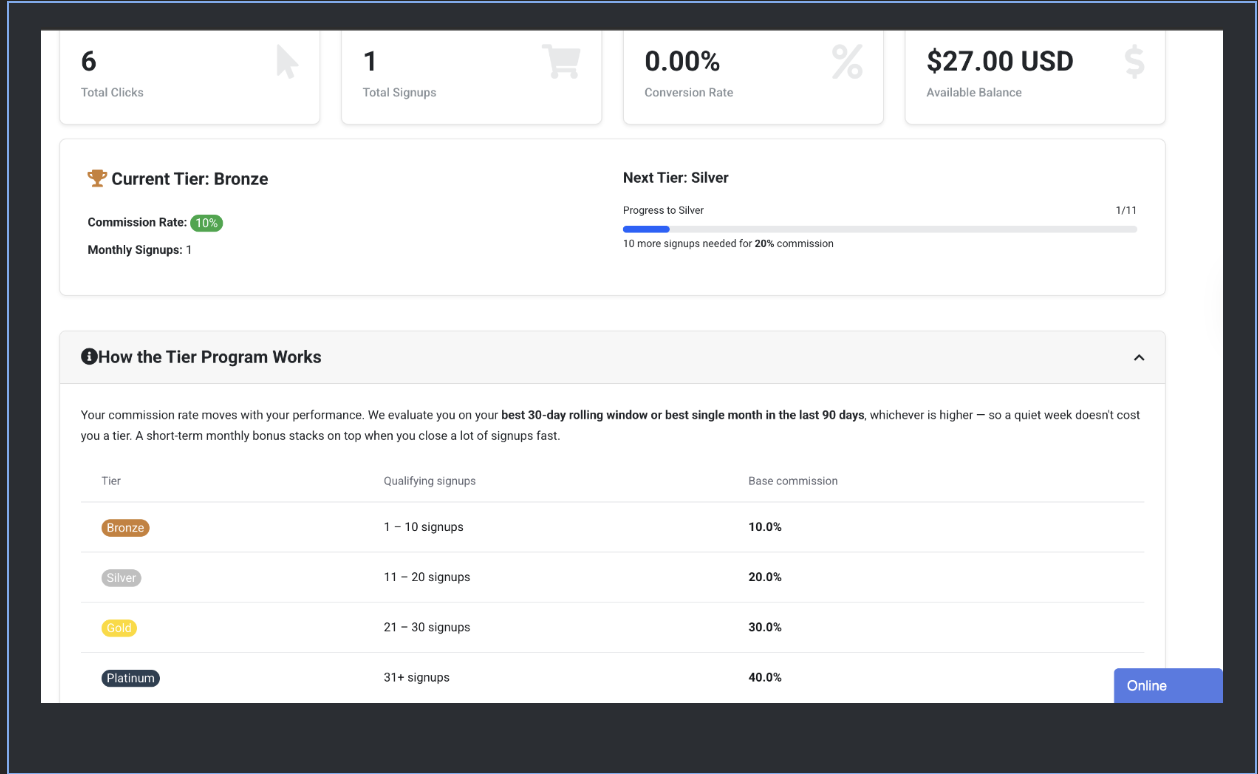
- Four performance tiers: Bronze 10% → Silver 20% → Gold 30% → Platinum 40%.
- Monthly bonus on top: hit 5 signups in a month for +5%, or 15 signups for +10%.
- Inactivity safeguard: stop referring for 60 days and you drop one tier. Bring in anyone new and you start climbing right back.
- Custom tracking links, branded vouchers, ready-made banners, email templates and social posts.
- Minimum payout: $100. Paid through PayPal, bank transfer, or crypto.
Step 1: Sign up as a DigiRDP affiliate
Signing up takes about 30 seconds. You need an existing DigiRDP account first. If you don't have one, create one at manage.digirdp.com/register.php, then come back to this step.
- Log in at manage.digirdp.com/login.php.
- Go to Affiliates in the top menu.
- Click "Activate Affiliate Account." There is no form to fill out. Your existing client details are used.
- Your account is created instantly at the Bronze tier with a welcome bonus queued up. The welcome bonus unlocks once your real balance passes the minimum payout threshold.
If your application is pending
In rare cases an account lands in a "pending approval" state. You'll see a yellow banner on the dashboard. Email support or open a ticket and we'll approve within one business day. No volume or follower requirements, we just do a quick anti-fraud sanity check.
Step 2: Tour of the affiliate dashboard
The dashboard is your home base. Everything you need lives here in one screen. Let's walk through the pieces top-to-bottom.
Stats cards
Four live counters across the top:
- Total clicks: every visit to your referral link.
- Total signups: clicks that converted to a DigiRDP account.
- Conversion rate: signups ÷ clicks, rounded to two decimals.
- Available balance: withdrawable earnings plus any unlocked welcome bonus.
Tier card
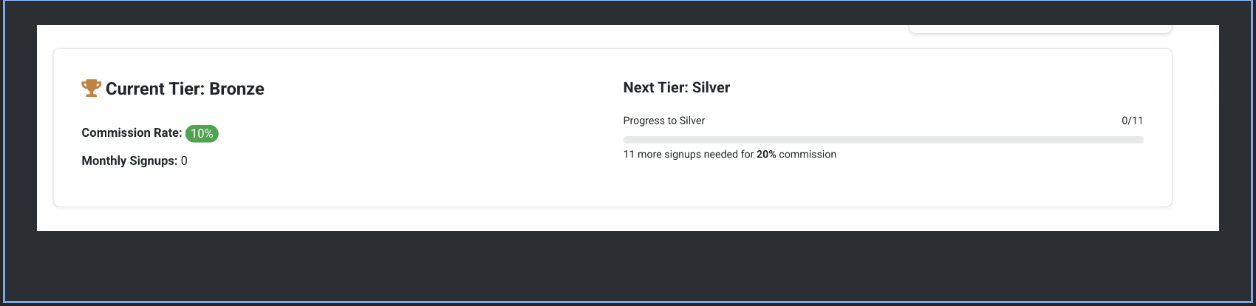
Shows your current tier, your current commission rate (base plus any active monthly bonus), signups this month, and a progress bar to the next tier. The "How the Tier Program Works" panel just below expands to show the full rules: thresholds, bonus milestones, and inactivity policy. All pulled live from the admin settings, so what you see is always the program as it's actually configured.
Referral link block
Your primary link with a one-click Copy button. Copy it once, keep it in your notes app. This one link is your default attribution channel. It carries your affiliate ID and sets a lifetime tracking cookie on the visitor's browser (both under digirdp.com and manage.digirdp.com, so it follows them through the entire purchase flow).
Earnings summary and recent referrals
Side-by-side cards: month-to-date earnings, pending commissions, lifetime approved commissions, withdrawn total, and the last five referrals with their product, date and status.
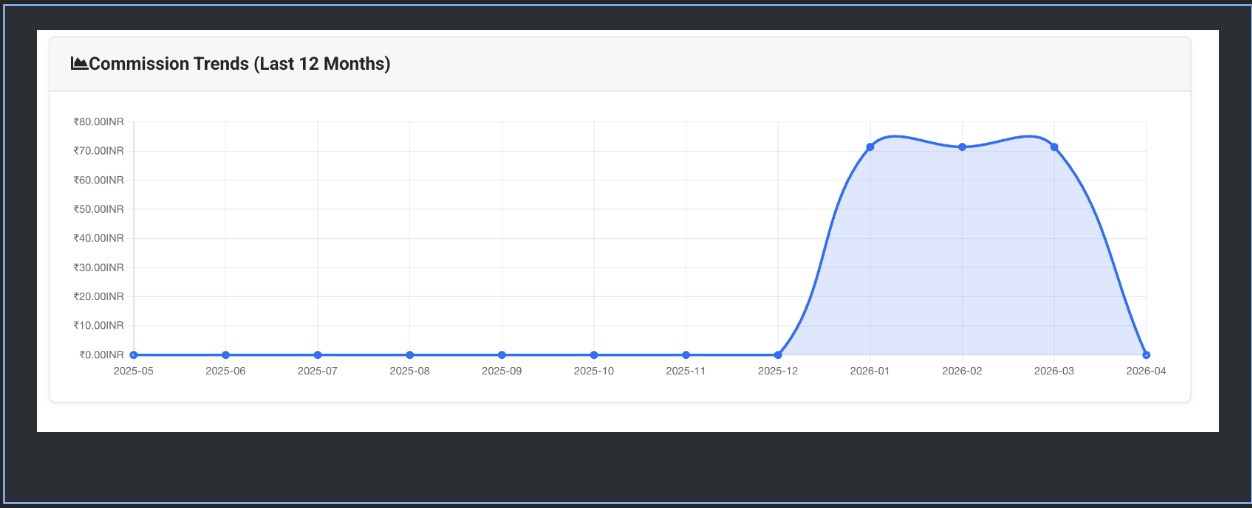
Commission Trends chart
Line chart of your monthly earnings across the last twelve months. Hover any point to see the exact figure for that month. Useful for spotting which months of the year are your strongest.
Step 3: Get your referral link
Your referral link is already visible on the dashboard. The structure is:
https://digirdp.com/?aff=YOUR_ID
When someone clicks that link, two things happen simultaneously: a first-party cookie named WHMCSAffiliateID is set under .digirdp.com with your ID for a lifetime, and the visitor is taken to the DigiRDP storefront. From that point forward, any purchase they make, even if they browse around for days first, is attributed to you. The URL also always carries your ID as a fallback, so even visitors with cookies blocked still convert.
Linking to a specific product
Want to send traffic straight to a specific product page instead of the homepage? Append your ID to any DigiRDP URL:
https://digirdp.com/rdp-plan/canada-admin-rdp?aff=YOUR_ID
Every "Order Now" button on those pricing pages inherits your ID automatically once the cookie is set, so a visitor can click three different product pages before buying and you still get credit.
Step 4: Create custom tracking links
Raw affiliate URLs look a bit clinical. Custom Links let you create short, branded slugs that redirect to any DigiRDP landing page while still attributing the signup to you. Great for TikTok bios, QR codes, or campaign-specific tracking ("reddit-post-may" vs "newsletter-june").
- From the dashboard click Custom Links.
- Click "Create New Link."
- Give it a name (for your own reference) and paste the destination URL. For example,
https://digirdp.com/rdp-plan/canada-admin-rdp. - Save. You'll get back a short URL like
https://manage.digirdp.com/go.php?slug=canada-may. Copy and use that everywhere.
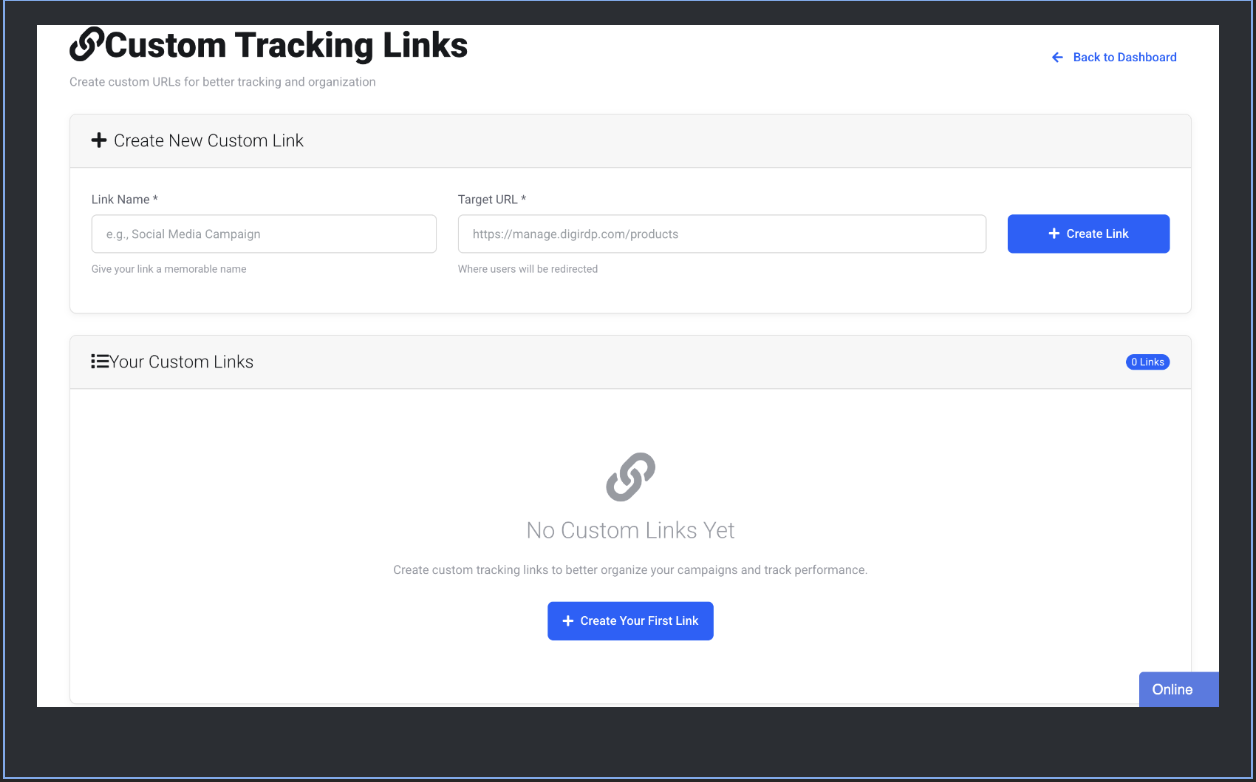
Why this matters: Each custom link has its own click counter in your dashboard, so you can see exactly which placement (YouTube description vs Telegram pinned message) is actually converting. Cookies and URL-fallback attribution work the same way as the main link.
Step 5: Issue branded discount vouchers
Vouchers are your closer. Give your audience a code like SAVE10-MARIA and they get a recurring discount on their purchase. Meaning they get the discount on the first invoice and every renewal, for the life of the service. That recurring nature drives dramatically higher conversion than a one-off discount.
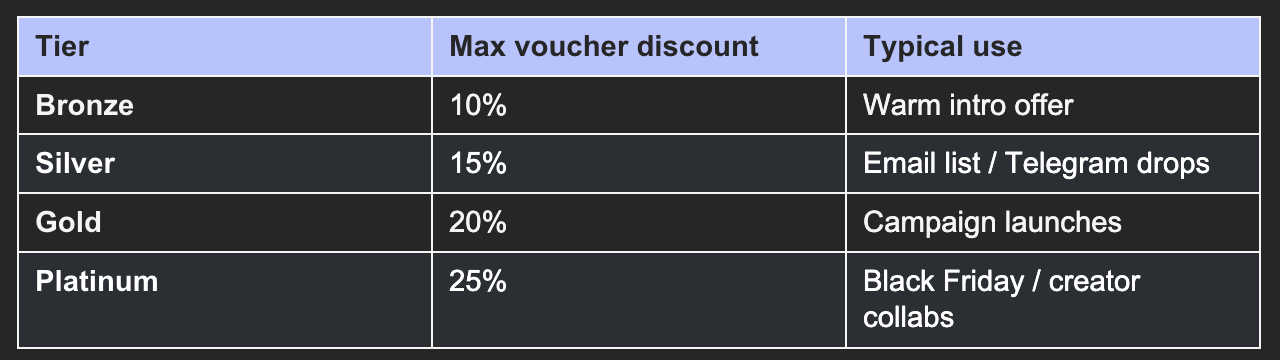
How much discount can you offer?
Your tier controls the maximum percentage:
Creating a voucher
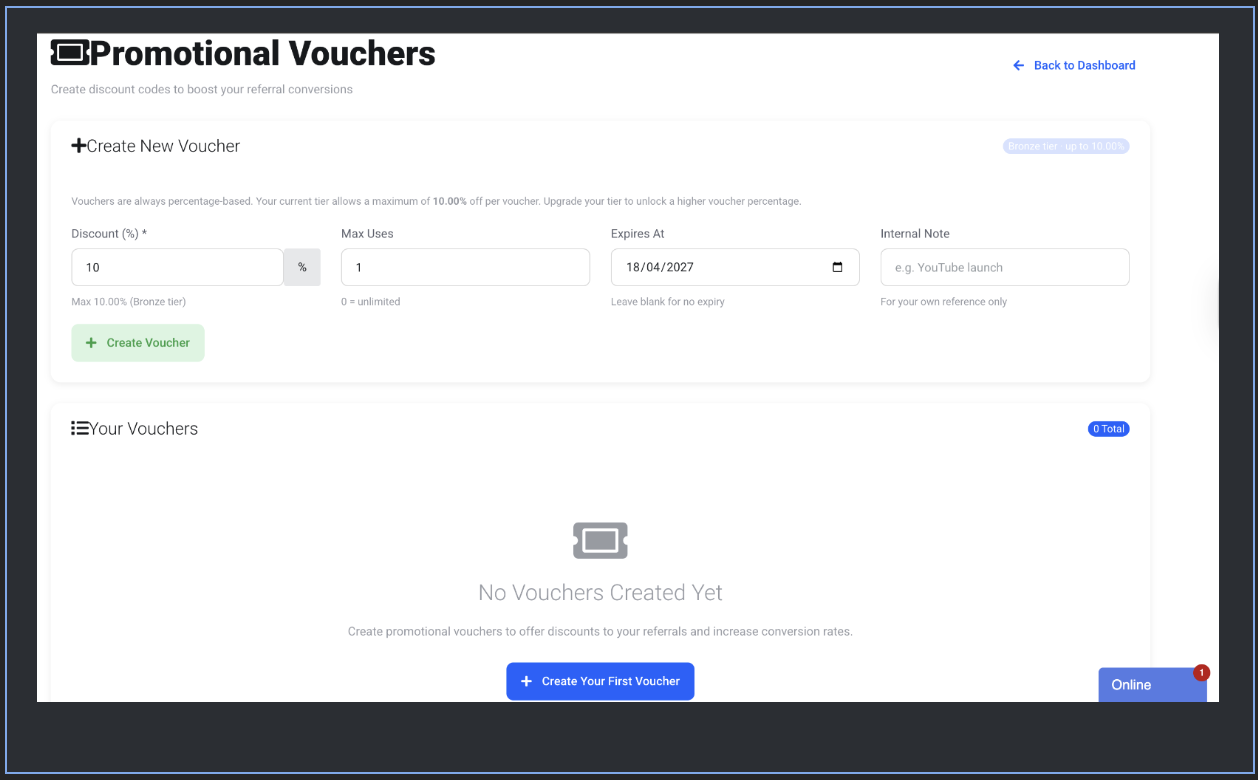
- Open Vouchers from the dashboard.
- Enter a discount percentage (capped at your tier's maximum).
- Optionally set a maximum number of uses and an expiry date.
- Click "Create Voucher." You get a short, memorable code generated for you. Share it verbatim with your audience.
Step 6: Grab ready-made marketing materials
You don't have to design anything. Under Marketing Tools you'll find four categories of assets you can drop straight into your channel:
Banners
Standard IAB sizes: 728×90 leaderboards, 300×250 medium rectangles, 120×600 skyscrapers. Each banner comes with its own HTML embed that already carries your affiliate ID. Copy, paste into your blog sidebar, done.
Email templates
Pre-written subject lines and bodies in plain text and HTML. Swap in your own intro paragraph and send. The CTA link is pre-populated with your affiliate ID.
Social media posts
Short copy for Twitter/X, LinkedIn and Facebook with one-click share buttons. Image attachments are generated to the correct aspect ratio for each platform.
Text ads
One-line headlines designed for Google Ads-style limits and for dropping into forum signatures or Discord bios.
The tier system, explained in detail
This is where the program differentiates itself from most affiliate programs. Your commission rate is not static. It moves with your performance, and there's a short-term bonus on top for hot streaks.
The four base tiers
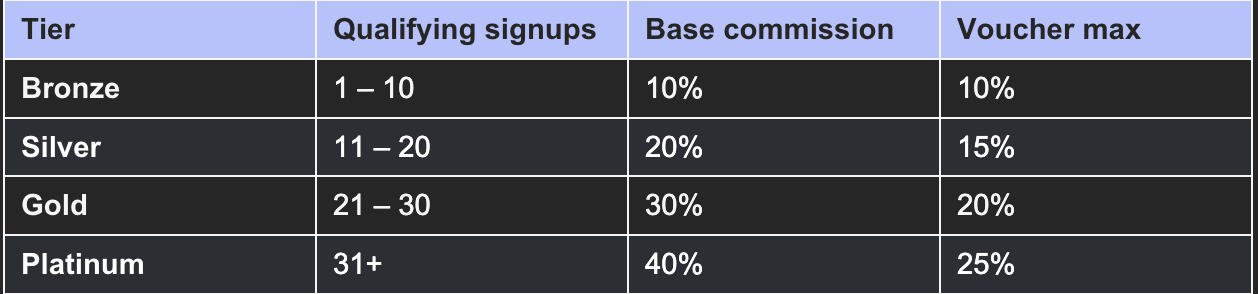
We evaluate your tier on your best 30-day rolling window or best single month in the last 90 days, whichever is higher. That means one slow week doesn't cost you your tier, and a strong month continues paying out while you build momentum.
Monthly bonus boost
On top of your base tier rate, bonus percentages kick in when you close signups in bursts within the same calendar month:
- Bonus 1: hit 5 signups this month → +5% for the rest of the month
- Bonus 2: hit 15 signups this month → +10% (replaces, does not stack with, Bonus 1)
Worked example: you're a Silver affiliate (20%) who has 16 signups this month. Your rate for the rest of this month is 20% + 10% = 30%. When the next month starts, the monthly bonus resets. You're back to your base tier until you earn a bonus again.
Inactivity downgrade
To keep the program sustainable, if you go 60 days without any new signups, you drop one tier. Platinum → Gold, Gold → Silver, Silver → Bronze. The moment you bring in even one new signup, the demotion rule no longer applies, and the next rolling-window evaluation will push you back up as soon as your volume warrants it.
Change without warning: Every tier change (upgrade, downgrade, or inactivity adjustment) triggers an email and an in-dashboard banner on your next login. You won't be surprised.
Getting paid
Commissions go through a two-phase flow that mirrors how WHMCS handles affiliates natively: pending → cleared. When a customer pays, your commission is recorded immediately but held as pending for a short clearing delay (protects against refunds/chargebacks). Once cleared, it moves to your available balance and is withdrawable.
Minimum payout
The minimum withdrawal is $100 of cleared earned balance. Welcome bonus amounts don't count toward this threshold until your real balance reaches it. This avoids prefunding abuse and keeps payouts honest.
Requesting a withdrawal
- From the dashboard click Withdrawals.
- Pick a payment method (PayPal, bank transfer, or crypto).
- Enter the amount. It must be ≤ available balance and ≥ minimum payout.
- Submit. A support ticket is opened automatically with the request details. We process payouts within 3 to 5 business days.
Where to see past payouts
The same page lists your full withdrawal history with status (pending / completed / rejected) and transaction notes. Click any row to see full details in a modal.
Tips for making this work
Pick a niche and lean in
Affiliates who do best almost always pick a vertical: "forex bots," "cheap Windows RDP for students," "scraping / automation infrastructure," "crypto mining tools," "game server hosting." Generic "best VPS 2026" content gets buried. A narrow audience who trusts you converts 5 to 20× better.
Use custom links per placement
Instead of one master link, create a custom link per channel: YouTube bio, TikTok bio, Twitter pinned tweet, newsletter signature, Reddit-post-X, Telegram pin. In a month you'll know exactly which placement is carrying the program.
Time your campaigns to the monthly bonus
If you plan a large push, do it early in a calendar month. The bonus tiers reset monthly. Spending your campaign's peak in the first 10 days of the month lets you benefit from the bonus on the whole rest of that month. A push that peaks on the 29th earns the bonus for 2 days.
Lead with the recurring discount
Your vouchers apply on every renewal for the lifetime of the service. That's a very different sell from a one-off "use my code for 10% off." Headline it explicitly: "20% off every month, forever, with code SAVE20-MARIA."
Double up: link AND voucher
Your tracking link credits you, your voucher discounts the customer. They're not mutually exclusive. Put your link in the CTA and your voucher in the copy. You earn commission, they save money, everybody wins.
FAQ
How long does the tracking cookie last?
Ninety days. If a visitor clicks your link today and converts three months from now, you still get credit, provided they don't clear their cookies or click another affiliate's link in between (first-click wins, including across incognito sessions where the cookie is reset).
Do I get paid on renewals or just the first payment?
Both. The commission model is lifetime-recurring. Every renewal invoice your referred customer pays generates a commission for you, at your tier's rate on that invoice's date.
What happens to my commission if my referred customer refunds?
The commission is reversed. That's why there's a clearing delay between when commissions are recorded (pending) and when they become withdrawable (cleared). Chargebacks within the clearing window are automatically reversed without touching your available balance.
Can I promote to customers who already have a DigiRDP account?
Our affiliate program is designed for net-new customers. Existing accounts won't attribute to your link, but if they haven't purchased a particular product yet, a new purchase may still credit you depending on the product category. When in doubt, ask support.
I stopped referring for a while. Can I get my tier back?
Yes. The inactivity downgrade is not permanent. Bring in one new signup and you're immediately eligible for the rolling-window evaluation again. If your 30-day or best-90-day volume qualifies for a higher tier, you'll be upgraded on the next daily run.
Can I combine my voucher with other discounts?
Generally no. WHMCS applies one promotion per invoice line. If a customer has a voucher and is already in a sale period, the larger discount wins.
Can I self-refer?
Self-referrals are detected and rejected. Same billing email or payment method as your own affiliate account will not pay a commission. Don't try to game it; accounts that do get banned and forfeit their balance.
How do I track which campaign is actually converting?
Create a custom tracking link per campaign. Every link has its own click counter in your dashboard, and commissions are attributed to the most-recent link clicked within 30 days of the signup.
What's the difference between Available Balance and Pending Commissions?
Pending is money you've earned but which is still in the clearing window. Available is cleared and withdrawable. If you're close to minimum payout, the Pending counter tells you how close you are to unlocking your next withdrawal.
Need help?
Open a support ticket from your client area. The affiliate team typically responds within a business day. For urgent questions during a live campaign ("my voucher code isn't applying," "my referral didn't track"), mention "affiliate urgent" in the ticket subject and we'll prioritise.
That's everything. Copy your referral link, set a voucher, drop a banner into your next post, and you're earning. Welcome to the program.



Comments
Happy good bad day gyes
what's the signup policy on digirdp for an account? can people just sign up for one or the account can only be created when they make an order? (i know some provider do this, no account made unless you make an order)
also what's going to happen in future if you failed to payout your affiliate? there's plenty of thread in LET where people had to beg publicly for their affiliate being paid and they got postponed in too many days.
GLWS
Hey there,
There's no signup policy just goto our register page mentioned in this post and you are good to go. No order required.
We have plenty of affiliate promoter and we have been doing this for last 6 years, whatever you earn you will get payout for that.
Let us know if you need help with anything else.