

























New on LowEndTalk? Please Register and read our Community Rules.
All new Registrations are manually reviewed and approved, so a short delay after registration may occur before your account becomes active.
All new Registrations are manually reviewed and approved, so a short delay after registration may occur before your account becomes active.



Comments
same here
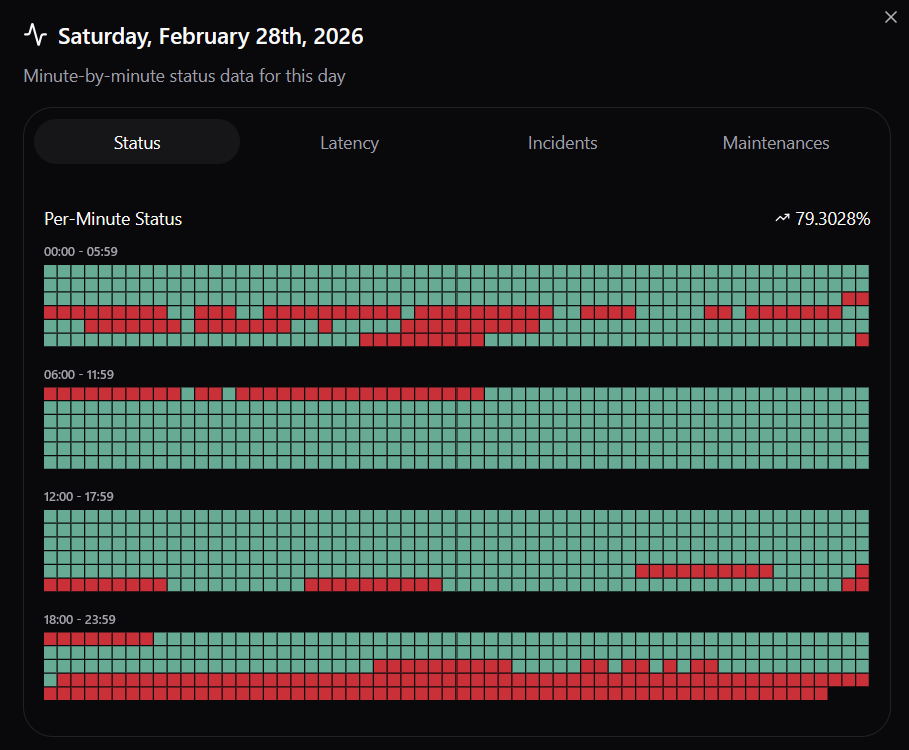
Same issue on my end.
photo:
I don't have uptime monitoring software installed on my BG VM, but info about the server is not resolving in the control panel, so I can only assume my VM is undergoing similar ups and downs.
Over 5 hours of downtime today (In total) which started way before MannDude logged off LET today and left in the dark on what causing it.
BG is finally back up 🥳
Likewise.
Steal consistently below 1% for me in BG.
Steal usually around ~3% with spikes up to 30% in SE.
If any of you using Prometheus, I highly recommend combination of vmagent + Prometheus to collect system metrics locally on same VPS and then push to Prometheus, see docs, very useful to figure out what's happening with the system when network is offline temporarily
just got this
Incognet is prem, nothing else to add.
Yup, @MannDude make Incognet one of my favorite providers.
Ok, sorry about the Bulgaria incident. This falls on me since the weekends is generally my time to keep an eye on things.
Got the downtime alert but overlooked it by mistake. Been moving to a new home and between packing, going back and forth across town, and other personal life stuff didn't notice until I sat down at my desk and saw the tickets. That is 100% on me.
I've updated how alerts are delivered so they spam us every 30 minutes until resolved. Also working on some better monitoring for individual VM resource consumption since a few VMs in Sweden still like to jump up and use a metric shit-ton of CPU for an amount of time that would be considered abuse. VirtFusion is great but it really lacks internal monitoring like Virtualizor has. Going to review this in more detail ( https://github.com/noxitylabs/virtfusion-cpu-abuse-detector ) and see about some alert delivery via webhooks (Slack, Telegram, SMS, etc)
Anyhow, credit (+1 week) has been applied to everyone already on the impacted hypervisor today. I think there was 3 or 4 people with lifetime plans on this hypervisor, I've added +256MB RAM to your VPS but you need to reboot for it to take effect.
We don't actually have or advertise an SLA of any sort, but when stuff like this happens, especially when things are basically "our fault" (as the case for the slow response today), it only seems fair to compensate.
You should advertise an SLA! You did compensate for "our fault case" and that is what SLA is about. Many providers just falsely promise SLA and hide in details that you should open a ticket within 3 days to get compensation on the other hand you are fairly compensating users, you should definitely advertise your pros!
Thanks, I see the free week in BG.
As compensation for the hypervisor issue in Sweden, support offered 512 MB extra RAM on my lifetime plan per ticket #0217Y55Y7. I'm mentioning this again since extra RAM was already applied for Bulgaria lifetime plans, but I understand if persistent hypervisor issues mean that RAM cannot be applied at this moment.
Incognet has been consistent about this and I commend you and the team for that.
@MannDude Your SE node is still suffering extremely high steal. I'm getting a consistent 35-40% right now (my CPU is 50-60% idle time). Could you look into it? It's not impacting me very heavily because I'm not CPU bound currently, but it should still be addressed.
I already got some free extra RAM for my lifetime plan after running into severe swapping, so it would be unfair for me to ask for even more. I'll just ask for an extension to my lifetime plan so I can use it in the afterlife too.
I have 2 BG lifetime VPS, didn't get RAM upgrade, but didn't ask for it either. I am running Adguard Home on both of them for my family and it's more than happy with what resources it got.
Yeah my steal in SE has occasionally spiked to around 30%, once to 52%, when I ran
topand watched for a little while.Good idea
I figure that @MannDude is keeping track of who was affected by the Stockholm hypervisor issue, but as I said before, he has already applied free RAM to lifetime plans in both SE and BG, and I am still waiting on the free +512 MB offered by support on February 17th.
Still unstable in BG. Getting multiple downtime notifications per day still.
feels like these are more hardware related issues
@MannDude
I'm thinking the same I was talking to @MannDude about it. He just moved houses yesterday/today so might delay it being fully investigated.
SSH refused in Stockholm again. No issues in Sofia.
@MannDude Would it be possible to add the option to change the domain I manage in DNS Management?
SSH is still being refused in Stockholm. Anyone else have updates on their SE VMs?
SSH is working fine here.
Yeah, got moved and office moved. Still no internet (or air conditioning, in hot and humid Asia!) yet but I'm sweating it out for y'all on a mobile hotspot with a newly purchased fan blowing on me for the time being. At least my chair is one of those mesh back ones so I'm not sticking to it like those leather/fake-leather ones. Sadly, no one moves fast or with any sort of urgency here. Such is life. Should be settled in and comfortable in the next few days however.
Reviewing the Sweden stuff. I ran some tests on two project VMs on the same hypervisor. Even with two different VMs running things like GB6 benchmark tests at the same time (One VM has 1 vCPU, one has 4 vCPU) I saw no unusual or unexpected spikes in the CPU load of the hypervisor. Those measuring things like CPU steal, feel free to confirm that things didn't go crazy when purposely stressing two VMs. (Yabs results below for timestamps)
The issue everyone is experiencing is when the hypervisor is hitting triple digit CPU loads. When we receive these high load alerts I'll SSH in and take a look, and it's always a single VM as the culprit. (A single VM, but not always the same VM). This is important to note because I'm unable to replicate this when purposely using 100% of the two test VMs as described above. In fact, some of the "culprit VMs" belonged to some of the ones in here complaining, but I don't think they were actually doing anything malicious. Just pointing it out that it seems almost random.
There is no other measurable metrics spiking at the same time as the CPU load. No disk IO spikes. No network spikes. I'll check out what VM it is and what resources are assigned to it, and it's almost always a single or double core VPS. Any ideas here? There are plenty of available CPU resources. While these aren't dedicated CPU cores we've never really loaded things down to the point where individuals couldn't use 100% of their CPU for prolonged periods. In fact, I've never had to do CPU throttling on a VPS until recently. The option has always been there, but had never had to utilize the feature.
Anyhow, the simultaneous benchmarks for transparency. This is on a "full" and capped hypervisor, which was capped at least one or two weeks before any issues began so it's not like this was a result of new VM creation.
So, for Sweden, what to do? Well, we're out of stock and have no more hardware in that POP at the moment so will try to get some new hardware online. That doesn't actually fix anything, just allows for a transferable location for those who seek it. Will continue to review things but from my side I've not seen any spikes or grave urgent alerts in the last 12+ hours.
RE: Bulgaria. Looking into it now.
Glad the move is going well. Most of the chairs I've had were made of wood, so I have no idea what kinds of QOL improvements I might see if I switched to mesh etc
Take your time. We appreciate your commitment to the business and to communicating with us.
Can you post some detailed usage metrics? Something like each QEMU PID, the core(s) it is currently running on, context switches per second, and CPU usage would be very valuable.
Another possible issue is a misconfiguration that's increasing overhead, for example not using virtio_net or not using vhost_net. You might also want to tweak the scheduler settings that determine how aggressively processes are migrated across cores.
I assume there's a qemu KVM process per VM?
What's the process state on the offenders? Is it running or blocked on disk I/O? (D state)
I know you said there's no measurable I/O or other load at the time, but I am curious if I/O is blocked or something for a little bit.
What does your disk setup look like?
Do you have systat / sar logs? Those can be very handy.
Based on this response to @forest, would it be possible to move my 2 GB VM (Currently in Stockholm, SE) to KCMO, USA? Liberty Lake is also acceptable.
Looks like the downtime has returned..... 5 different outages today in BG.