

























All new Registrations are manually reviewed and approved, so a short delay after registration may occur before your account becomes active.
[FREE] Mail Server Builder - Automate your SMTP/IMAP/POP3 stack on any VPS (SPF/DKIM/DMARC included)
 TungKaiYing
Member
TungKaiYing
Member
Hi LET community,
We all know the pain of setting up a mail server from scratch. Managing Postfix, Dovecot, OpenDKIM, and getting that perfect 10/10 on mail-tester can be a weekend-killer.
I’ve built Mail Server Builder, a Windows-based tool designed to automate the heavy lifting of deploying a full mail stack on your VPS. Whether you use Linode, DigitalOcean, or your favorite LowEndBox provider, this tool gets you up and running in minutes.
Why use it?
Total Privacy: This is a local desktop app. Your SSH keys and server credentials never leave your machine. No "cloud" middleman.
One-Click DNS: Full automation for SPF, DKIM, and DMARC (via Linode API or manual wizard).
Lightweight Stack: Installs Postfix, Dovecot, OpenDKIM, Fail2Ban, and Lightmeter for monitoring.
Perfect for LET: Ideal for those $2-5/mo VPS you have lying around.
Features:
Unlimited server deployments.
Automated SSL via Let's Encrypt.
Perfect 10/10 deliverability score.
Real-time installation logs.
Screenshot:
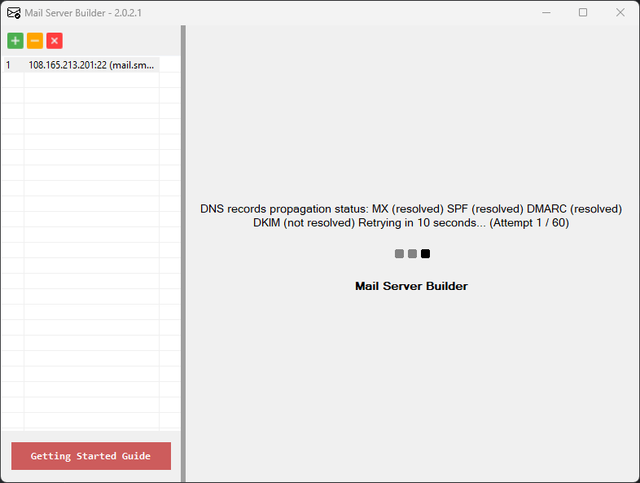
Requirements:
A domain name.
A VPS running Ubuntu 20.04+.
Windows 10/11 with .NET 8.0.
Download & Links:
👉 Official Page: https://buy-source-code.com/apps/mail-server-builder/
👉 Getting Started Guide: https://buy-source-code.com/apps/mail-server-builder/getting-started-guide.pdf
👉 Privacy Policy: https://buy-source-code.com/apps/mail-server-builder/privacy/
I'm looking for feedback from the community. If you have any questions or specific feature requests, let me know in the thread!
Thanks!



Comments
Why lindows ?
GL with your project, its a nice thing to have those who use windows.
EDIT Oh now i see what this does. It automate your buying domain, vps and setup things.
Thanks !
I went with Windows mainly because I wanted a solid, visual dashboard for the UI/UX. I know most of us here live in the terminal, but I found that handling DNS APIs and tracking install logs across multiple servers is just way more comfortable with a dedicated local 'Control Center.'
Basically, it’s a tool for your workstation to manage your Linux fleet without the manual headache.
Yes i wrote before checking getting started guide. Nice