



























All new Registrations are manually reviewed and approved, so a short delay after registration may occur before your account becomes active.
[Share]ReferenceGrade — Hardware Quality Check Script #bash <(curl -Ls Hardware.Check.Place) -E

About the XY Script Series
Back in 2024, I released the IP Quality Check Script (GitHub repo), followed by the Network Quality Check Script in 2025 (GitHub repo) (Primarily designed for the China network environment; not published on LET).
First of all, a sincere thank you to all the LET friends who have supported and appreciated the xy script series over the years. The first two scripts received 6K+ / 4K+ ⭐ stars respectively, which gave me the motivation to continue and finally bring you the third — and final — entry in the server checking series in 2026:
👉 Hardware Quality Check Script 👈
A Few Words from the Author
Writing scripts is honestly hard work — especially as a hobbyist. Daytime is for hard working, nighttime should be for rest… yet instead of lying flat after work, I often end up staying up late coding. Pulling all-nighters to polish details until 2–3 AM, then getting up early the next day — what started as “fun” slowly turned into self-inflicted suffering 😅
The only thing pushing me forward was that small spark of curiosity and passion.
Thankfully, AI tools are much more capable than last year. And because of that, the hardware script was completed in about half a month, unlike the network script, which absolutely destroyed me with nearly two months of nonstop grinding.
Philosophy Behind the Script
Even though development time was shorter this round, my standards didn’t drop at all.
I still aim for:
a rigorous and careful style
clear logic
and a bit of craftsman spirit
My goal is to pack as much useful information as possible into a reasonable output length, while keeping the results readable, structured, and visually pleasant.
Some of you may already be used to YABS-style output, and this script may feel unfamiliar at first. That’s totally fine — I don’t mind at all.
After all, I exist to change habits 😉 (a small tribute to Steve Jobs).
I hope this script helps LET friends rediscover the fun of hardware testing, turns benchmark reports into something a bit more elegant, and makes playing with servers and stress-testing hardware even more enjoyable.
That’s enough rambling from me — please enjoy, and feedback is always welcome.
GitHub Project Repository (Feel Free to Star): https://github.com/xykt/HardwareQuality


Hardware Quality Check Script - 硬件质量体检脚本 (CN)
Supported OS / Platforms: Ubuntu | Debian | Linux Mint | Fedora | Red Hat Enterprise Linux (RHEL) | CentOS | Arch Linux | Manjaro | Alpine Linux | AlmaLinux | Rocky Linux | Anolis OS | Alibaba Cloud Linux | SUSE Linux | openSUSE | Void Linux | Windows (via Docker)
- Bilingual support (Chinese / English)
- Elegant layout with intuitive presentation, optimized for single-screen display across multiple terminals, easy to screenshot and share
- Supports servers / VPS virtual machines / containers / bare metal, covering ARM and AMD multi-architecture devices
- Comprehensive hardware information collection for CPU / GPU / memory / disks / motherboard / sound card / network card, etc.
- Automated sysbench / fio / Geekbench tests for CPU / GPU / memory / disks, with visual benchmark comparison for clear performance insight
- Automatically detects operating system distribution, kernel version, and runtime environment to understand system status
- Motherboard: Collects motherboard model, BIOS information, and onboard devices including sound cards and network cards; suitable for server and industrial equipment identification
- CPU: Fully parses CPU model, architecture, cores, threads, and frequency; stress testing provides intuitive performance insight while monitoring temperature for optimization evaluation
- GPU: Automatically detects discrete and integrated GPUs, parses vendor and device information, analyzes driver environment, monitors temperature, and provides intuitive scoring
- Memory: Retrieves total, used/available memory and usage rate; counts memory slots and modules; tests bandwidth and latency; adapts to multi-channel and server memory configurations
- Disk: Supports SATA / NVMe / RAID device detection, automatically matches mount points with test devices, parses SMART / NVMe health data, and uses fio performance tests to fully simulate CrystalDiskMark / ATTO visual test workloads
- JSON output for big data analysis
Screenshots
| Standard Test | Disk Mode |
|---|---|
 |
 |
Usage
Easy Mode: Interactive Interface

Bash:
bash <(curl -Ls https://Check.Place) -H
Docker:
- Linux
docker run --rm -it --privileged --net=host --pid=host -v /:/host:ro xykt/check -H && docker rmi xykt/check > /dev/null 2>&1
- Windows (CMD)
docker run --rm -it --privileged xykt/check -H & docker rmi xykt/check > NUL 2>&1
Due to Windows architecture limitations, full hardware information cannot be obtained
Advanced Mode: Run with Parameters

Standard Check:
bash <(curl -Ls https://Hardware.Check.Place)
Fast Mode:
bash <(curl -Ls https://Hardware.Check.Place) -F
Disk Mode:
bash <(curl -Ls https://Hardware.Check.Place) -D
Specify Disk Test Directory:
bash <(curl -Ls https://Hardware.Check.Place) -d /path/to/testdir
Skip specific sections:
bash <(curl -Ls https://Hardware.Check.Place) -S 1234567
Bilingual support:
bash <(curl -Ls https://Hardware.Check.Place) -l cn|en
JSON output(Example):
bash <(curl -Ls https://Hardware.Check.Place) -j
Output report to file in ANSI/JSON/Text format:
bash <(curl -Ls https://Hardware.Check.Place) -o /path/to/file.ansi
bash <(curl -Ls https://Hardware.Check.Place) -o /path/to/file.json
bash <(curl -Ls https://Hardware.Check.Place) -o /path/to/file.txtoranyother
Skip checking OS and dependencies:
bash <(curl -Ls https://Hardware.Check.Place) -n
Auto-install dependencies:
bash <(curl -Ls https://Hardware.Check.Place) -y
Display Full IP Address and Path Information in Report:
bash <(curl -Ls https://Hardware.Check.Place) -f
Privacy mode - Disable online report link:
bash <(curl -Ls https://Hardware.Check.Place) -p
Docker (supports runtime arguments; insert them before the &):
- Linux命令行
docker run --rm -it --privileged --net=host --pid=host -v /:/host:ro xykt/hardwarequality && docker rmi xykt/hardwarequality > /dev/null 2>&1
- Windows (CMD)
docker run --rm -it --privileged xykt/hardwarequality & docker rmi xykt/hardwarequality > NUL 2>&1
Due to Windows architecture limitations, full hardware information cannot be obtained
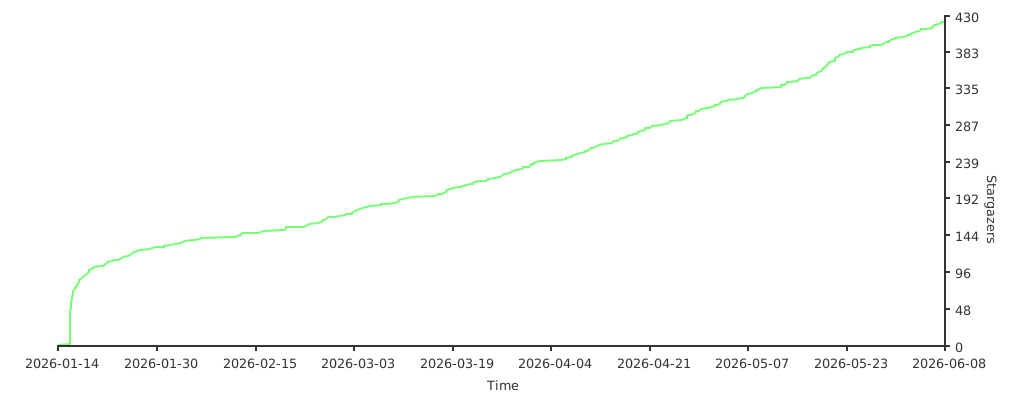
Stars History:
Daily Runs History:

Appendix
JSON Output
{
  "Head": {
    "IP": "221.223.*.*",
    "Command": "bash <(curl -sL https://Check.Place) -H",
    "GitHub": "https://github.com/xykt/HardwareQuality",
    "Time": "2026-01-13 23:57:36 CST",
    "Version": "v2026-01-13"
  },
  "OS": {
    "name": "Debian GNU/Linux 12 (bookworm)",
    "kernel": "6.12.18-trim",
    "architecture": "x86_64",
    "uptime": "",
    "virtualization": {
      "type": "physical-machine",
      "kind": "physical-machine"
    },
    "load_average": {
      "load_1": "0.40",
      "load_5": "0.38",
      "load_15": "0.32"
    },
    "users": {
      "online": "3"
    },
    "processes": {
      "total": "640"
    },
    "services": {
      "running": "85",
      "total": "301"
    },
    "locale": {
      "language": "en_US",
      "charset": "UTF-8"
    },
    "timezone": {
      "name": "Asia/Shanghai ",
      "abbr": "CST",
      "offset": "+0800"
    }
  },
  "Motherboard": {
    "board": {
      "vendor": "TianBei",
      "name": "WTR MAX",
      "version": "",
      "serial": ""
    },
    "bios": {
      "vendor": "American Megatrends International, LLC.",
      "version": "0.01"
    },
    "chipset": {
      "pci_root": "[AMD] Phoenix Root Complex",
      "pch": "[AMD] FCH SMBus Controller"
    },
    "devices": {
      "audio": [
        "[AMD/ATI] Rembrandt Radeon High Definition Audio Controller",
        "[AMD] Family 17h/19h HD Audio Controller"
      ],
      "network": [
        "Intel Ethernet Controller X710 for 10GbE SFP+",
        "Intel Ethernet Controller X710 for 10GbE SFP+",
        "Intel Ethernet Controller I226-V",
        "Intel Ethernet Controller I226-V"
      ]
    },
    "platform": {
      "os": "Linux"
    }
  },
  "CPU": {
    "architecture": "x86_64",
    "model": "AMD Ryzen 7 PRO 8845HS Radeon 780M Graphics",
    "op_mode": "32/64-bit",
    "family": "25",
    "stepping": "2",
    "topology": {
      "sockets": 1,
      "cores_per_socket": 8,
      "threads_per_core": 2,
      "cores": 8,
      "threads": 16,
      "cgroup_threads": null
    },
    "frequency_mhz": {
      "current": 2209.904,
      "min": 400,
      "max": 5137
    },
    "usage_percent": 2,
    "cache": {
      "l1d": "256 KiB",
      "l1i": "256 KiB",
      "l2": "8 MiB",
      "l3": "16 MiB",
      "total_fallback": "",
      "fallback_used": false
    },
    "features": {
      "virtualization": true,
      "aes": true,
      "avx2": true,
      "bmi": true,
      "ept": true,
      "neon": false,
      "sve": false,
      "atomics": false
    },
    "benchmarks": {
      "sysbench": {
        "single": 6143.14,
        "multi": 47592.29
      },
      "geekbench5": {
        "url": "https://browser.geekbench.com/v5/cpu/24035617",
        "single": 1935,
        "multi": 11622
      }
    },
    "temperature": {
      "packages_detected": 1,
      "min": 63,
      "max": 89,
      "packages": [
        {
          "id": 0,
          "min": 63,
          "max": 89
        }
      ]
    },
    "flags": [
      "fpu",
      "vme",
      "de",
      "pse",
      "tsc",
      "msr",
      "pae",
      "mce",
      "cx8",
      "apic",
      "sep",
      "mtrr",
      "pge",
      "mca",
      "cmov",
      "pat",
      "pse36",
      "clflush",
      "mmx",
      "fxsr",
      "sse",
      "sse2",
      "ht",
      "syscall",
      "nx",
      "mmxext",
      "fxsr_opt",
      "pdpe1gb",
      "rdtscp",
      "lm",
      "constant_tsc",
      "rep_good",
      "amd_lbr_v2",
      "nopl",
      "xtopology",
      "nonstop_tsc",
      "cpuid",
      "extd_apicid",
      "aperfmperf",
      "rapl",
      "pni",
      "pclmulqdq",
      "monitor",
      "ssse3",
      "fma",
      "cx16",
      "sse4_1",
      "sse4_2",
      "x2apic",
      "movbe",
      "popcnt",
      "aes",
      "xsave",
      "avx",
      "f16c",
      "rdrand",
      "lahf_lm",
      "cmp_legacy",
      "svm",
      "extapic",
      "cr8_legacy",
      "abm",
      "sse4a",
      "misalignsse",
      "3dnowprefetch",
      "osvw",
      "ibs",
      "skinit",
      "wdt",
      "tce",
      "topoext",
      "perfctr_core",
      "perfctr_nb",
      "bpext",
      "perfctr_llc",
      "mwaitx",
      "cpb",
      "cat_l3",
      "cdp_l3",
      "hw_pstate",
      "ssbd",
      "mba",
      "perfmon_v2",
      "ibrs",
      "ibpb",
      "stibp",
      "ibrs_enhanced",
      "vmmcall",
      "fsgsbase",
      "bmi1",
      "avx2",
      "smep",
      "bmi2",
      "erms",
      "invpcid",
      "cqm",
      "rdt_a",
      "avx512f",
      "avx512dq",
      "rdseed",
      "adx",
      "smap",
      "avx512ifma",
      "clflushopt",
      "clwb",
      "avx512cd",
      "sha_ni",
      "avx512bw",
      "avx512vl",
      "xsaveopt",
      "xsavec",
      "xgetbv1",
      "xsaves",
      "cqm_llc",
      "cqm_occup_llc",
      "cqm_mbm_total",
      "cqm_mbm_local",
      "avx512_bf16",
      "clzero",
      "irperf",
      "xsaveerptr",
      "rdpru",
      "wbnoinvd",
      "cppc",
      "arat",
      "npt",
      "lbrv",
      "svm_lock",
      "nrip_save",
      "tsc_scale",
      "vmcb_clean",
      "flushbyasid",
      "decodeassists",
      "pausefilter",
      "pfthreshold",
      "vgif",
      "x2avic",
      "v_spec_ctrl",
      "vnmi",
      "avx512vbmi",
      "umip",
      "pku",
      "ospke",
      "avx512_vbmi2",
      "gfni",
      "vaes",
      "vpclmulqdq",
      "avx512_vnni",
      "avx512_bitalg",
      "avx512_vpopcntdq",
      "rdpid",
      "overflow_recov",
      "succor",
      "smca",
      "fsrm",
      "flush_l1d"
    ]
  },
  "GPU": {
    "summary": {
      "count": 3,
      "has_dgpu": true,
      "driver_loaded": true,
      "opencl": true,
      "cuda": true
    },
    "devices": [
      {
        "id": 0,
        "type": "integrated",
        "vendor": "AMD",
        "name": "[AMD/ATI] Phoenix3 (rev d5)",
        "vram_gb": 16,
        "max_frequency_mhz": 2700
      }
      {
        "id": 1,
        "type": "discrete",
        "vendor": "NVIDIA",
        "name": "NVIDIA TU104GL [Tesla T4] (rev a1)",
        "vram_gb": 15,
        "max_frequency_mhz": 1590
      },
      {
        "id": 2,
        "type": "discrete",
        "vendor": "NVIDIA",
        "name": "NVIDIA TU104GL [Tesla T4] (rev a1)",
        "vram_gb": 15,
        "max_frequency_mhz": 1590
      }
    ],
    "benchmarks": {
      "geekbench5": {
        "url": "https://browser.geekbench.com/v5/compute/6920300",
        "score": 72889,
        "api": "OpenCL"
      }
    },
    "temperature": {
      "devices_detected": 2,
      "min": 27,
      "max": 33,
      "devices": [
        {
          "id": 0,
          "min": 30,
          "max": 33
        },
        {
          "id": 1,
          "min": 27,
          "max": 28
        }
      ]
    }
  },
  "Memory": {
    "summary": {
      "total": "46.9 GB",
      "used": "2.2 GB",
      "available": "44.7 GB",
      "used_percent": 5,
      "avail_percent": 95
    },
    "swap": {
      "total": "8.0 GB",
      "used": "1.5 GB",
      "available": "6.5 GB",
      "used_percent": 19,
      "avail_percent": 81
    },
    "devices": [
      {
        "id": 0,
        "slot": "P0A",
        "size": "32GB",
        "type": "DDR5",
        "speed_mhz": 5600,
        "vendor": "Hynix",
        "serial": "87AC7C01",
        "part_number": "HMCG88AGBAA092N"
      },
      {
        "id": 1,
        "slot": "P0B",
        "size": "32GB",
        "type": "DDR5",
        "speed_mhz": 5600,
        "vendor": "Hynix",
        "serial": "87AC7ADF",
        "part_number": "HMCG88AGBAA092N"
      }
    ],
    "virtualization": {
      "balloon": false,
      "ksm": false,
      "neighbor": null
    },
    "benchmarks": {
      "read_MBps": 68130.5,
      "write_MBps": 42916.3,
      "latency_ns": 91
    }
  },
  "Disk": {
    "summary": {
      "total_bytes": 163245299515392,
      "used_bytes": 50186237676521,
      "avail_bytes": 113035211333655,
      "used_percent": 30,
      "avail_percent": 70
    },
    "devices": [
      {
        "id": 1,
        "name": "sda",
        "device": "/dev/sda",
        "type": "HDD",
        "model": "MG08ACA16TE 00MX141",
        "serial": "61W0A1ZX",
        "firmware": "TJ83",
        "capacity": "16.0TB",
        "rotation_rpm": "7200rpm",
        "form_factor": "3.5\"",
        "health": {
          "power_cycles": 92,
          "power_hours": 26620,
          "temperature": 47,
          "smart_status": "PASSED",
          "smart": {
            "01": 0,
            "05": 0,
            "BB": 0,
            "C4": 0,
            "C5": 0,
            "C6": 0
          }
        }
      },
      {
        "id": 2,
        "name": "sdb",
        "device": "/dev/sdb",
        "type": "HDD",
        "model": "MG08ACA16TE 00MX141",
        "serial": "61W0A029",
        "firmware": "TJ83",
        "capacity": "16.0TB",
        "rotation_rpm": "7200rpm",
        "form_factor": "3.5\"",
        "health": {
          "power_cycles": 116,
          "power_hours": 26211,
          "temperature": 48,
          "smart_status": "PASSED",
          "smart": {
            "01": 0,
            "05": 0,
            "BB": 0,
            "C4": 0,
            "C5": 0,
            "C6": 0
          }
        }
      },
      {
        "id": 3,
        "name": "sdc",
        "device": "/dev/sdc",
        "type": "HDD",
        "model": "MG08ACA16TE 00MX141",
        "serial": "61D0A3MQ",
        "firmware": "TJ83",
        "capacity": "16.0TB",
        "rotation_rpm": "7200rpm",
        "form_factor": "3.5\"",
        "health": {
          "power_cycles": 78,
          "power_hours": 19899,
          "temperature": 48,
          "smart_status": "PASSED",
          "smart": {
            "01": 0,
            "05": 0,
            "BB": 0,
            "C4": 0,
            "C5": 0,
            "C6": 0
          }
        }
      },
      {
        "id": 4,
        "name": "sdd",
        "device": "/dev/sdd",
        "type": "HDD",
        "model": "MG08ACA16TE 00MX141",
        "serial": "61E0A26U",
        "firmware": "TJ83",
        "capacity": "16.0TB",
        "rotation_rpm": "7200rpm",
        "form_factor": "3.5\"",
        "health": {
          "power_cycles": 90,
          "power_hours": 19935,
          "temperature": 49,
          "smart_status": "PASSED",
          "smart": {
            "01": 0,
            "05": 0,
            "BB": 0,
            "C4": 0,
            "C5": 0,
            "C6": 0
          }
        }
      },
      {
        "id": 5,
        "name": "sde",
        "device": "/dev/sde",
        "type": "HDD",
        "model": "MG08ACA16TE 00MX141",
        "serial": "61E0A2PX",
        "firmware": "TJ83",
        "capacity": "16.0TB",
        "rotation_rpm": "7200rpm",
        "form_factor": "3.5\"",
        "health": {
          "power_cycles": 83,
          "power_hours": 19857,
          "temperature": 50,
          "smart_status": "PASSED",
          "smart": {
            "01": 0,
            "05": 0,
            "BB": 0,
            "C4": 0,
            "C5": 0,
            "C6": 0
          }
        }
      },
      {
        "id": 6,
        "name": "sdf",
        "device": "/dev/sdf",
        "type": "HDD",
        "model": "MG08ACA16TE 00MX141",
        "serial": "61D0A3J5",
        "firmware": "TJ83",
        "capacity": "16.0TB",
        "rotation_rpm": "7200rpm",
        "form_factor": "3.5\"",
        "health": {
          "power_cycles": 84,
          "power_hours": 19890,
          "temperature": 49,
          "smart_status": "PASSED",
          "smart": {
            "01": 0,
            "05": 0,
            "BB": 0,
            "C4": 0,
            "C5": 0,
            "C6": 0
          }
        }
      },
      {
        "id": 7,
        "name": "nvme0",
        "device": "/dev/nvme0n1",
        "type": "NVMe",
        "model": "SAMSUNG MZVLW256HEHP-000L7",
        "serial": "S35ENA0JA17144",
        "firmware": "4L7QCXB7",
        "capacity": "256GB",
        "rotation_rpm": "",
        "form_factor": "",
        "health": {
          "power_cycles": 271,
          "power_hours": 4209,
          "temperature": 50,
          "smart_status": "PASSED",
          "read": 20567295,
          "write": 39974696,
          "life_percent": 94,
          "spare_percent": 100
        }
      },
      {
        "id": 8,
        "name": "nvme1",
        "device": "/dev/nvme1n1",
        "type": "NVMe",
        "model": "YMTC PC300-1TB-B",
        "serial": "YMA21T0KA2403202BP",
        "firmware": "YM0500CC",
        "capacity": "1.02TB",
        "rotation_rpm": "",
        "form_factor": "",
        "health": {
          "power_cycles": 95,
          "power_hours": 4204,
          "temperature": 55,
          "smart_status": "PASSED",
          "read": 577127455,
          "write": 143608887,
          "life_percent": 91,
          "spare_percent": 100
        }
      }
    ],
    "raid": [
      {
        "name": "md127",
        "level": "RAID5",
        "members": [
          "sde1[5]",
          "sda1[0]",
          "sdc1[3]",
          "sdf1[4]",
          "sdb1[1]",
          "sdd1[2]"
        ],
        "mountpoint": ""
      },
      {
        "name": "md1",
        "level": "RAID1",
        "members": [
          "nvme0n1p3[0]"
        ],
        "mountpoint": ""
      },
      {
        "name": "md0",
        "level": "LINEAR",
        "members": [
          "nvme1n1p1[0]"
        ],
        "mountpoint": "/vol2"
      }
    ],
    "test": {
      "directory": "/h**e/x*****s",
      "device": "nvme0n1p2",
      "device_type": "DISK",
      "members": [],
      "mountpoint": ""
    },
    "benchmarks": {
      "fio": {
        "read": {
          "seq_q1": {
            "bw": 1527380,
            "iops": 1491
          },
          "seq_q8": {
            "bw": 1765911,
            "iops": 1724
          }
        },
        "randread": {
          "4k_q32": {
            "bw": 1069101,
            "iops": 267275
          },
          "4k_q1": {
            "bw": 66936,
            "iops": 16734
          }
        },
        "randwrite": {
          "4k_q1": {
            "bw": 190629,
            "iops": 47657
          },
          "4k_q32": {
            "iops": 63914,
            "bw": 255656
          }
        },
        "write": {
          "seq_q8": {
            "bw": 941693,
            "iops": 919
          },
          "seq_q1": {
            "iops": 374,
            "bw": 383461
          }
        }
      }
    }
  }
}



Comments
Will it check if drive speeds are in line with what they should be, and fail them if not?
At the disk level, the script checks SMART information, displays key SMART attributes, and reports the overall SMART passed/failed status.
For performance testing, the fio benchmarks follow CrystalDiskMark–style workloads by default. In
-Ddisk mode, the script also runs additional tests using ATTO’s default workload.The results are visualized as bar charts, with performance clearly indicated by color coding:
green = excellent, yellow = normal, red = low performance.