
























New on LowEndTalk? Please Register and read our Community Rules.
All new Registrations are manually reviewed and approved, so a short delay after registration may occur before your account becomes active.
All new Registrations are manually reviewed and approved, so a short delay after registration may occur before your account becomes active.



Comments
We haven't been able to find the cause of the issue so we've built a feature so users can disable the moving background. To disable follow these steps:
Glad you are enjoying it. Thanks for the feature idea.
We optimized the moving animations more but for users who are still facing a problem you can now disable them entirely in the EDIT PROFILE section:
Happy to see Falzo still coming up with the right questions
In my opinion, it should be possible to disable the animation without logging in
We'll consider this. Hopefully the feature resolves the issue for you.
ServerVerify is ad supported, just like LowEndBox and LowEndTalk. We don't ever use affiliate commission programs because we don't want to be a tax on users.
At ServerVerify advertising start at $180 per month. All ads on all three sites are very reasonably priced.
I don't sign up for websites that are unusable
You must decide whether:
or
The answer seems pretty obvious to me
Do me a favor if you don't mind, please send me a private message with the exact version of the browser you're using plus your operating system with the exact version and the specifications of your computer so maybe we can track down this rare issue once and for all.
I've now tested this on more than a dozen different computers running a variety of different Intel and AMD Hardware with both external and integrated graphics on both windows Linux and mac and have been unable to replicate the problem.
When will the fake AI reviews be removed? These aren't "anonymized" as these words don't exist anywhere on LET/LEB in the order they're shown on ServerVerify, still a good chunk of reviews and ratings are just fake AI generated slop.
Glad to see the performance and feature updates. While that makes the site more usable, it doesn't address the untrustworthiness of the platform.
@jbiloh Can you implement a filter for SSD/HDD disk benchmarks? I want to see storage VPS-es that use HDDs, but there is no filter category for that, only storage size. And maybe smarter Location/CPU groupings, like add countries, continents, processor families or just the main manufacturers instead of listing 200+ possibilities for each of these.
Thanks for the suggestion will take a look at this.
Good to see the AI fake reviews finally removed without really any public address to the issue. Data looks better now!
All the junk like what is above is finally gone it seems. I guess the next adminstrative challenge to keeping the data legitimate would be to implement some sort of review verification system for reviews directly submitted to the site since there doesn't seem to be any mechanism in place to prevent someone from creating shill accounts just to leave a single positive (or negative) review then never returning. LET is pretty good about IDing these people and calling them out when they appear.
Something like verification of a paid invoice or something may suffice, just something to keep things mostly honest and difficult to game.
Is there any plan to remove dead-pooled companies or implement a feature that flags them as out of business / non-operational? Ex: https://serververify.com/hosting-providers/nexus-bytes
Yep, the manual data review and cleanup is almost completed site-wide now. Should be looking pretty good at this point. As time allows I am going to continue reviewing all data to get it really close to perfect (right now I would consider it "very good.")
This is a good point. Right now all newly submitted reviews and benchmarks are manually approved on the site. I am still thinking through how to make it better.
TrustPilot sometimes requires invoices. I was thinking about as a first step asking users to upload a supporting document when submitting reviews but that opens up other technical complications.
Another provider suggested removing providers who are out of business as well. I can see both sides. I'm not really sure how to approach this.
Newly added features:
Coming Soon:
The new Dashboard recently deployed:
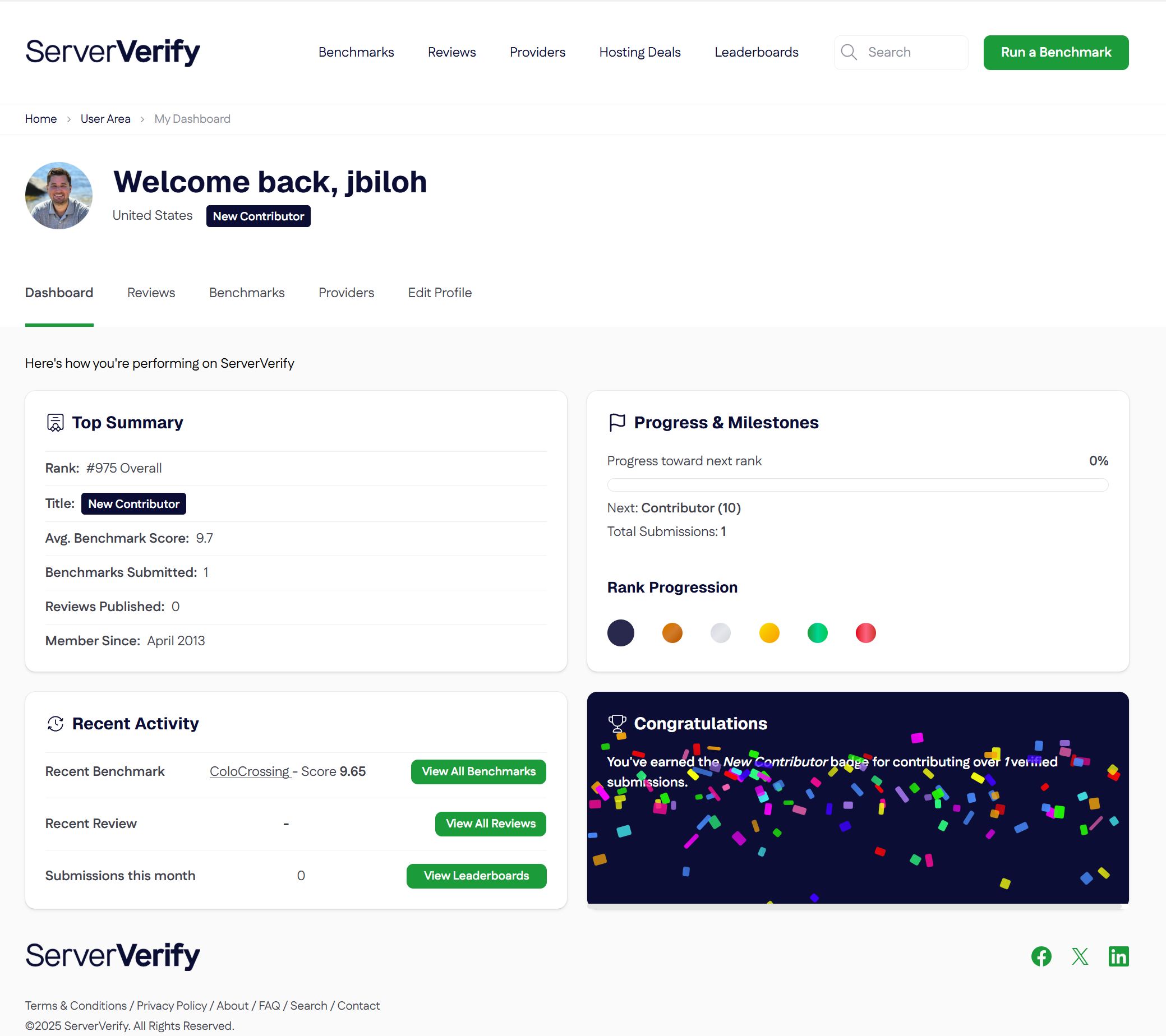
I suggest to not delete them but to rather clearly mark them as inactive. Main reason: sometimes they come back (maybe with another name) and also for other reasons, basically "don't throw away good data".
I looked at this suggestion, because I think it is a good one - issue is, other than inferring that is SSD or HDD based on IOPS performance we don't have a way to determine HDD/SSD based on the benchmark submission data.
If Deadpool Provider continues to expose itself and the link remains active, it's a very bad user experience. I and Search Engine Bot don't trust the web site providing the dead pool link.
At the very least, serververify should notify users in advance that the link/site has been removed or closed before they click on it. "Visit Nexus Bytes" What a nonsense.
Thanks for your feedback. We will at least note that NexusBytes (and the few others that are dead) are no longer operating.
We got a C grade on network?? Multi homed, dual routers, dual switches at all levels, 100g+ uplinks, dual network redundancy to all servers, our own ASN and we own all network hardware, not outsourced, very high uptime, at all of our 6 locations...
What do we need to do get a B? Invent subspace communications?
And D grade on everything else?
Scoring a service is more than just numbers from Yabs...
I didn't consent my benchmarks to be uploaded.
I consider them my own creation.
Where can I opt out and remove my benchmark?
Looking at your 6 latest benchmarks your Network score was your highest grade.
If any specific benchmark you feel is not accurate please hit the report button.
Yabs network benchmark is just not good enough. It's too biased towards particular locations (e.g., they have many high-capacity US/EU PoPs but not in Asia/Africa/South America).
Plus it's only a good indicator of network capacity allocated to the VM, not much else.
Isn't that the point?
No.
A network test should show how diverse a host's network is in addition to how well it can drag race.
Example.
I've seen two ISPs in NZ produce two very different results thanks to LeaseWeb's less than desirable peering to their TYO11 rack. My previous ISP went through Cogent because fuck TATA so I went to Seattle > San Fran and then across the pacific again into Tokyo at a awful 243ms RTT. Current ISP hands off in TATA via their Singapore PoP. 172ms RTT.
That's not as good as HostHatch's GSL which goes directly to Tokyo via Guam. 145MS RTT.
Let's go the other way as well. HostHatch's GSL to my OVH BHS Mystery is 148ms. Straight from the GSL PoP in Seattle and into OVH's network.
LeaseWeb is via Cogent again... but I go through LAX... and then via DFW with a RTT of 172ms.
But then I have no idea what the peering agreements are for either and how much they are paying for X/gbps.
But what I can say is that I can line speed my HostHatch VPS over Wireguard when I occasionally want a Japanese IP that has an amazing rep and some how has OK treatment from streaming platforms (not that I do that, it was just a test).
What a great improvement going from 200k reviews to 1274!
You see, quality is better than quantity!
Getting better and better every week.
In our experience, latency is often a much bigger priority than network capacity in most cases. I doubt most clients would be pushing >1 Gbps consistently in most cases, especially on low-end VPS.
Why are my YABS being published to serververify linked to my account without my approval? I'm getting emails to an OLD email address
Thank you for your request to take a commission on sales, similar to those on this forum where some providers are protected and others not (tags).