


























New on LowEndTalk? Please Register and read our Community Rules.
All new Registrations are manually reviewed and approved, so a short delay after registration may occur before your account becomes active.
All new Registrations are manually reviewed and approved, so a short delay after registration may occur before your account becomes active.
Cloudflare blocking my new VPS IPv4 range – HestiaCP and SSL issues

Hi everyone,
I recently moved my VPS to a new dedicated server from my hosting provider.
The old one worked perfectly fine — no IPv6, no SSL issues.
After the migration, I was assigned a new IPv4 and IPv6 range, and ever since then:
🧩 Issues:
Cloudflare Error 1000 – DNS points to prohibited IP
- This happens when Cloudflare Proxy is ON.
- If I turn the proxy OFF, the site loads fine.
- The error appears as:
Error 1000: DNS points to prohibited IP
Let's Encrypt SSL Timeout (HestiaCP)
When I try to issue SSL via Let's Encrypt from HestiaCP, I get:
Error: Let's Encrypt validation status 400 (Timeout during connect)Happens only with Cloudflare-protected domains.
- Non-Cloudflare domains work fine.
- When IPv6 is enabled, the SSL sometimes works; with IPv4 only, it fails.
HestiaCP installation
- HestiaCP installer only works when IPv6 is enabled.
- When I disable IPv6, installation hangs during "Installing dependencies...".
- Seems like all IPv4 requests to Cloudflare-hosted mirrors (apt.hestiacp.com, deb.nodesource.com, etc.) time out.
🔍 What I think:
- It looks like the new IPv4 range from my hosting provider is blocked or filtered by Cloudflare.
- Cloudflare Radar scan shows
Network connection closed. - IPv6 works fine, IPv4 doesn’t.
❓ What I want to confirm:
- Has anyone else seen Cloudflare blocking a whole IPv4 subnet or ASN like this?
- If yes, is there any workaround other than asking the provider for a new IP range?
- Could this be fixed by Cloudflare support if the hosting provider contacts them?
Thanks for any insights!



Comments
What IP is your A record.
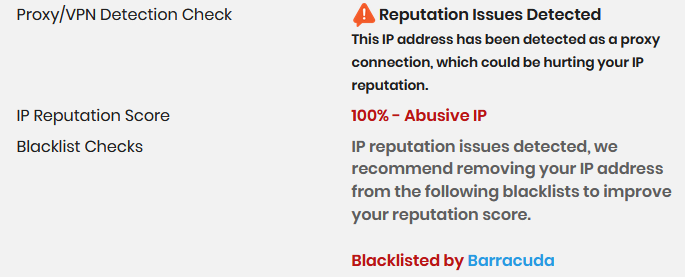
Cloudflare blocks IPs that were used for scam or IPs that were reported as scam. Ask your host to reassign a new clean IP block.
You can probably use this to check the IP reputation:
LET IP, clean: https://www.ipqualityscore.com/ip-reputation-check/lookup/172.67.68.9
A shared IP that was used as a proxy: https://www.ipqualityscore.com/ip-reputation-check/lookup/103.108.228.242
A bad/blocked IP: https://www.ipqualityscore.com/ip-reputation-check/lookup/78.29.46.43
I think lets encrypt does not issue ssl certificates based on ip. But they rate limit when you issue lot of ssl certs on the same day. A good solution would be get a origin certificate from cloudflare and add it in hestia and set cloudflare ssl to full.
Name the provider of VPS. To be on cf 1000 list is almost the same as on spamhaus shitlist.
https://developers.cloudflare.com/support/troubleshooting/http-status-codes/cloudflare-1xxx-errors/error-1000/
In their documentation they don't mention this behaviour
Disable IPv4 and use IPv6 only.
try change hostiacp port
my home ip is 100% and yet I can use it with CF just fine. I wouldn't trust that website...
Turn proxy off. Wait 5 min. Turn it on. Fixed
Wait, i read that wrong... not sure why your IP is ok... cloudflare should be blocking it
I dont think you read the thread... Oh well, it is almost low effort november
I checked and it doesn't show any problems with that IP address.
SSL is the only name, there are other problems, when going to the website with Cloudflare Proxy On, Error 1000: DNS points to prohibited IP comes up.
Download Link from Terminal does not work on Domains with Cloudflare, for example - http://apt.hestiacp.com/ .
I bought a VPS from the relevant Provider, about 20 for my Client, I am in trouble at the moment with nothing to do. There is no one to ask for help, I am very helpless.
I asked the Hosting Provider and they said they opened a Support Ticket for Cloudflare but they said there was no reply.
They said they would add another IP range but they are worried that they are blocked by Cloudflare.
They had bought the IP from IPXO.com, and the Support there told my Hosting Provider 'Please note that we make no guarantees about any of our leased IPs working with third-party services. '
They got a /24 IP range for around $100. Is there a better place to get a /24 IP for this price?
That error only shows if you set the DNS A record to a Cloudflare IP or 1.1.1.1/1.0.0.1. It shouldn't have anything to do with IP reputation. What IP is your DNS A record set to?
Have you checked the IP address on https://www.ip2location.com/demo? If so, is it flagged as a proxy or for abuse?
No, we have given the server IP correctly. When we turn on the proxy, the error occurs, when we turn off the proxy, it works fine.
Download links from domains using Cloudflare also cannot be loaded from our VPS.
For example - api.hestiacp.com
dlm.mariadb.com
I changed the IP range of my hosting provider, and the problem was solved. I think it is a problem because the IP is blocked by Cloudflare.
Thank you very much, I found the reason through the website you gave.