



























New on LowEndTalk? Please Register and read our Community Rules.
All new Registrations are manually reviewed and approved, so a short delay after registration may occur before your account becomes active.
All new Registrations are manually reviewed and approved, so a short delay after registration may occur before your account becomes active.
Help installing from ISO

I've always used the provider templates, but I thought I'd try installing from an ISO.
I mounted the ISO. Debian Trixie RC 1. I've tried both the DVD and the netinst ISO's.
In the VPS Settings, I've selected the ISO and changed the boot order so CDROM1 is first.
I start vnc and reboot. It starts to install, but then I get errors after selecting the language and region.
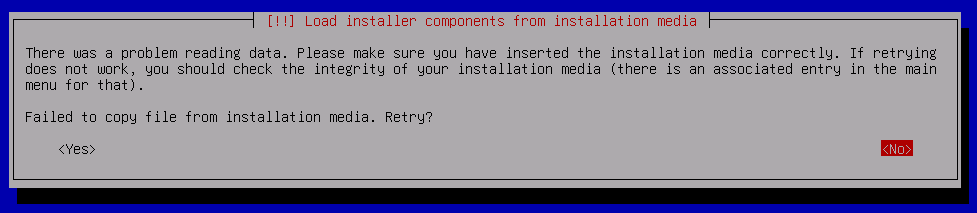
If I try to verify the media from the menu, it also fails. If I try to detect network hardware, it fails.
What am I missing?



Comments
How are you attaching the ISO? Using your own URL or a host-provided image? Seems to me like the image is corrupt in some form. I just tested Trixie RC1 installer and was able to install fine.
I'm using the URL's from here:
https://www.debian.org/devel/debian-installer/
If the ISO is cached on the system you should ask the host to delete it. If it's being mounted via streaming HTTPS then maybe there's connection issues. Probably something only the host can fix really.
try this
https://cdimage.debian.org/cdimage/trixie_di_rc1/amd64/iso-cd/debian-trixie-DI-rc1-amd64-netinst.iso
install from network, this file should be smaller than you used
That's the netinst ISO that I'm using.
I went back to the VPS settings, cleared them out, and then set it back to the same ISO again, and rebooted again. This time it seems to be working, though it's a raw text interface now.
Be aware that debian are using mirrors to redirect to the nearest server. It could be a connection issue between your server and the mirror.