
























Howdy, Stranger!

It looks like you're new here. If you want to get involved, click one of these buttons!


Shells Virtual Desktop
BMail.ag - Secure Email Service
Server.net
CPLicense.net
VPS Server
Buy VPN
Vultr
VMs for AI
HostDare
HostDare
ReliableSite White-Label Dedicated Hosting for Resellers
InterServer VPS
BMail.ag - Secure Email Service
Best VPN
High-Performance Bare Metal Server Solutions
Karvl.com
Server Mania Cloud Hosting
DataWagon Hosting
AlphaVPS Hosting
Evoxt.com
Clouvider
VPS Hosting with NVMe
Residential IPs in the US & 4G Mobile Proxies in EU & US with Unlimited Bandwidth
ReliableSite White-Label Dedicated Hosting for Resellers
Rabisu - Hosting Solutions
Shells Virtual Desktop
New on LowEndTalk? Please Register and read our Community Rules.

All new Registrations are manually reviewed and approved, so a short delay after registration may occur before your account becomes active.

F I B E R S T A T E - L A - O V E R L O A D - DOUBLE ALL THE THINGS. 9950X MADNESS + GIVEAWAYS

17810121329

Comments

  • porrosyhd123porrosyhd123 Member
    edited May 2025

    @porrosyhd123 said:
    FIBERSTATE - DOUBLE THE POWER, ORDER #2649604578 Invoice #21493

    hello @fiberstate, i already got the double disk but not the double bandwidth, can i get the bandwidth here? :*

  • sliixsliix Member
    edited May 2025

    @zrj766 said:
    Does anyone here think that the temperature of 9950X is too high? My friends and I have all got it, but currently, whether in Salt Lake City or Los Angeles, the temperature is above 50℃ when not loaded, and 96℃ when tested under stress. Thanks to TSMC's process and AMD's design improvements, the heat accumulation problem of 9950X has been improved. Why is it hotter than 7950X? (39℃ when not loaded, 90℃ when fully loaded)

    The high temperature makes me very worried about the future stability of the server, and the CPU frequency cannot reach the ideal state. In severe cases, it is only 5.2GHz, and only 4.6GHz during stress test, which cannot reach the optimal state of 5.5-5.7GHz.


    I also noticed this. I got around 60°C when under normal load. Didn’t tried putting it under continuous load yet.

    My (outgoing) Ryzen 5700G from Fiberstate at SLC only around 30°C when under normal load (basically same load as the Ryzen 9, because I’m still migrating things).

    Any idea @fiberstate ? Just concerned about the long term stability.

    Thanked by 1zrj766
  • sswcnetsswcnet Member

    Double traffic, order number 21244

  • artxsartxs Member
    edited May 2025

    @fiberstate FIBERSTATE - DOUBLE THE POWER, ORDER #1689157381

  • fiberstatefiberstate Member, Patron Provider
    edited May 2025

    My (outgoing) Ryzen 5700G from Fiberstate at SLC only around 30°C when under normal load (basically same load as the Ryzen 9, because I’m still migrating things).

    Any idea @fiberstate ? Just concerned about the long term stability.

    Everything we are seeing from AMD says the 9950X when 100% maxed can reach 95c and is normal.

    AMD Ryzen 9 9950X is designed to run at up to 95°C under full load, and this is intentional behavior by AMD.

    •   TjMax (maximum junction temperature) for the 9950X is 95°C.
    •   AMD’s Precision Boost 2 and XFR technologies allow the CPU to boost clocks dynamically up to thermal and power limits.
    •   That means the CPU will maximize performance right up to 95°C. Operating at 90–95°C under heavy load is expected.
    
    Thanked by 1sliix
  • sliixsliix Member
    edited May 2025

    @fiberstate said:

    My (outgoing) Ryzen 5700G from Fiberstate at SLC only around 30°C when under normal load (basically same load as the Ryzen 9, because I’m still migrating things).

    Any idea @fiberstate ? Just concerned about the long term stability.

    Everything we are seeing from AMD says the 9950X when 100% maxed can reach 95c and is normal.

    AMD Ryzen 9 9950X is designed to run at up to 95°C under full load, and this is intentional behavior by AMD.

    • TjMax (maximum junction temperature) for the 9950X is 95°C.
    • AMD’s Precision Boost 2 and XFR technologies allow the CPU to boost clocks dynamically up to thermal and power limits.
    • That means the CPU will maximize performance right up to 95°C. Operating at 90–95°C under heavy load is expected.

    I’m glad to know that. I know you guys know your stuff, and thank you for reaffirming that that is expected and it is fine.

    I also take back my words that the Ryzen 5700G runs at 30°C. I’ve replicated my exact setup on both 9950X and 5700G and I can see that they both lingers more than 60°C.

    How about yours @zrj766 ?

    Edit: 9950X a bit higher now at almost 70°C but that’s probably me utilising it again.

    Thanked by 1fiberstate
  • zrj766zrj766 Member
    edited May 2025

    @sliix said:

    @fiberstate said:

    My (outgoing) Ryzen 5700G from Fiberstate at SLC only around 30°C when under normal load (basically same load as the Ryzen 9, because I’m still migrating things).

    Any idea @fiberstate ? Just concerned about the long term stability.

    Everything we are seeing from AMD says the 9950X when 100% maxed can reach 95c and is normal.

    AMD Ryzen 9 9950X is designed to run at up to 95°C under full load, and this is intentional behavior by AMD.

    •   TjMax (maximum junction temperature) for the 9950X is 95°C.
    •   AMD’s Precision Boost 2 and XFR technologies allow the CPU to boost clocks dynamically up to thermal and power limits.
    •   That means the CPU will maximize performance right up to 95°C. Operating at 90–95°C under heavy load is expected.
    

    I’m glad to know that. I know you guys know your stuff, and thank you for reaffirming that that is expected and it is fine.

    I also take back my words that the Ryzen 5700G runs at 30°C. I’ve replicated my exact setup on both 9950X and 5700G and I can see that they both lingers more than 60°C.

    How about yours @zrj766 ?

    Edit: 9950X a bit higher at almost 70°C but that’s probably me utilising it again.

    I am very busy today, so I have not continued for the time being.

    I think it is still the small space in the chassis, where 8 servers are crowded together, which leads to the accumulation of heat. Air cooling alone cannot solve the heat of 170w or even 200w.
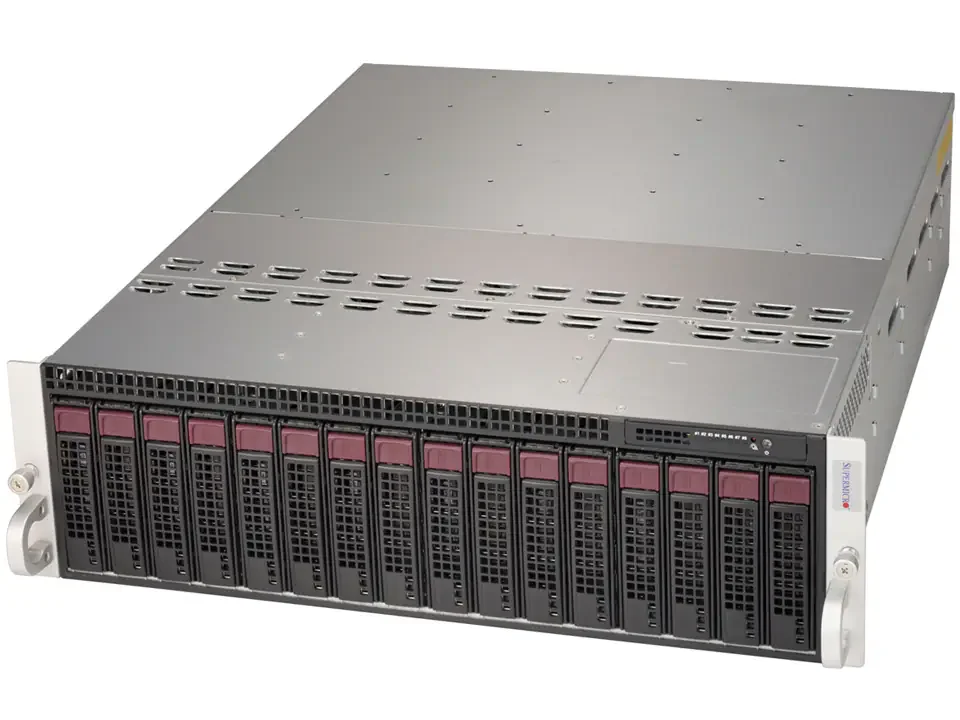
    The 7950X server uses a 1U or larger chassis, so the heat dissipation performance will be better. The temperature of the 9950X should be lower than that of the 7950X due to the improvement of TSMC process and AMD design.

    Perhaps the advantage of using a small chassis may bring certain cost advantages. I am not a practitioner in the relevant industry, just a guess.

    I understand that AMD has a temperature wall limit, and the CPU is also a durable product. The main problem I am worried about is that if I run high load for a long time, how long can the continuous high temperature keep the CPU from being damaged? As far as I know, some Ryzen servers of Hetzner will also crash due to overheating.

    At the same time, too high a temperature will not allow the 9950X to play its performance advantage. I performed a one-minute stress test and the CPU was downgraded to 4.6GHz, and my friend even had only 4.1GHz. This performance is closer to 5950X.

    I am grateful to @fiberstate for providing such a cost-effective product. But I also hope that they can strike a balance between price and performance. The seemingly favorable price may not bring out the ideal performance and may even cause the risk of breakdown. I hope fiberstate can see my suggestions.

  • fiberstatefiberstate Member, Patron Provider
    edited May 2025

    I am grateful to @fiberstate for providing such a cost-effective product. But I also hope that they can strike a balance between price and performance. The seemingly favorable price may not bring out the ideal performance and may even cause the risk of breakdown. I hope fiberstate can see my suggestions.

    You should not see a downgrade in performance. AMD does have a variable clock speed and some of this could be impacted by voltage settings. These CPU's can handle 95C for sustained periods and its not the chassis design and or cooling of the chassis, we use a combination in customer deployments of 1U chassis and Supermicro chassis and both see identical operation with no difference. Supermicro designed and built the chassis with the AM5 7950X / 9950X in mind and has several, very high speed fans integrated into the front of the chassis to ensure cooling is optimized.

    We'd also like to point out that Supermicro has a far superior stability track record when it comes to AM5 products and motherboards than Asrock Rack and better IPMI interface.

    We can have a look at cpu voltage settings to ensure its optimal and or migrate you to a 1U chassis if you'd prefer. Please open / update a ticket and we'll be glad to assist.

  • fiberstatefiberstate Member, Patron Provider

    @sliix said:

    @fiberstate said:

    My (outgoing) Ryzen 5700G from Fiberstate at SLC only around 30°C when under normal load (basically same load as the Ryzen 9, because I’m still migrating things).

    Any idea @fiberstate ? Just concerned about the long term stability.

    Everything we are seeing from AMD says the 9950X when 100% maxed can reach 95c and is normal.

    AMD Ryzen 9 9950X is designed to run at up to 95°C under full load, and this is intentional behavior by AMD.

    •   TjMax (maximum junction temperature) for the 9950X is 95°C.
    •   AMD’s Precision Boost 2 and XFR technologies allow the CPU to boost clocks dynamically up to thermal and power limits.
    •   That means the CPU will maximize performance right up to 95°C. Operating at 90–95°C under heavy load is expected.
    

    I’m glad to know that. I know you guys know your stuff, and thank you for reaffirming that that is expected and it is fine.

    I also take back my words that the Ryzen 5700G runs at 30°C. I’ve replicated my exact setup on both 9950X and 5700G and I can see that they both lingers more than 60°C.

    How about yours @zrj766 ?

    Edit: 9950X a bit higher now at almost 70°C but that’s probably me utilising it again.

    60-70C is well within normal operating range. We'll be testing a rack based water cooled 9950X version here shortly.

    Thanked by 1sliix
  • fiberstatefiberstate Member, Patron Provider

    @artxs said:
    @fiberstate FIBERSTATE - DOUBLE THE POWER, ORDER #1689157381

    Power has been doubled, 4TB and 660TB transfer. Thank you!

  • 💥🔥 KABOOM! FiberState’s LA OVERLOAD is UNREAL — Grab yours now: https://deals.fiberstate.com 🔥💥

  • sliixsliix Member
    edited May 2025

    @fiberstate said:

    @sliix said:

    @fiberstate said:

    My (outgoing) Ryzen 5700G from Fiberstate at SLC only around 30°C when under normal load (basically same load as the Ryzen 9, because I’m still migrating things).

    Any idea @fiberstate ? Just concerned about the long term stability.

    Everything we are seeing from AMD says the 9950X when 100% maxed can reach 95c and is normal.

    AMD Ryzen 9 9950X is designed to run at up to 95°C under full load, and this is intentional behavior by AMD.

    • TjMax (maximum junction temperature) for the 9950X is 95°C.
    • AMD’s Precision Boost 2 and XFR technologies allow the CPU to boost clocks dynamically up to thermal and power limits.
    • That means the CPU will maximize performance right up to 95°C. Operating at 90–95°C under heavy load is expected.

    I’m glad to know that. I know you guys know your stuff, and thank you for reaffirming that that is expected and it is fine.

    I also take back my words that the Ryzen 5700G runs at 30°C. I’ve replicated my exact setup on both 9950X and 5700G and I can see that they both lingers more than 60°C.

    How about yours @zrj766 ?

    Edit: 9950X a bit higher now at almost 70°C but that’s probably me utilising it again.

    60-70C is well within normal operating range. We'll be testing a rack based water cooled 9950X version here shortly.

    Agreed. Even my homelab mini pc also lingers around that range. So it’s fine and happy with it.

    Will be happier if we can get that water cooled rack :sunglasses:

    Thanked by 1fiberstate
  • mwmw Member
    edited May 2025

    big thanks to Brianna from fiberstate for the 1:1 sales and support. by far the best experience i've had with a host (i literally have not logged into the fiberstate portal since sign up)

    Ryzen 5700G

    # ## ## ## ## ## ## ## ## ## ## ## ## ## ## ## ## ## #
    #              Yet-Another-Bench-Script              #
    #                     v2025-04-20                    #
    # https://github.com/masonr/yet-another-bench-script #
    # ## ## ## ## ## ## ## ## ## ## ## ## ## ## ## ## ## #
    
    Fri May  9 05:44:33 PM PDT 2025
    
    Basic System Information:
    ---------------------------------
    Uptime     : 0 days, 0 hours, 20 minutes
    Processor  : AMD Ryzen 7 5700G with Radeon Graphics
    CPU cores  : 16 @ 400.000 MHz
    AES-NI     : ✔ Enabled
    VM-x/AMD-V : ✔ Enabled
    RAM        : 125.2 GiB
    Swap       : 0.0 KiB
    Disk       : 
    Distro     : Debian GNU/Linux 12 (bookworm)
    Kernel     : 6.8.4-2-pve
    VM Type    : NONE
    IPv4/IPv6  : ✔ Online / ❌ Offline
    
    IPv4 Network Information:
    ---------------------------------
    ISP        : FiberState, LLC
    ASN        : AS26042 FiberState, LLC
    Host       : Fiberstate LLC
    Location   : Draper, Utah (UT)
    Country    : United States
    
    fio Disk Speed Tests (Mixed R/W 50/50) (Partition rpool/ROOT/pve-1):
    ---------------------------------
    Block Size | 4k            (IOPS) | 64k           (IOPS)
      ------   | ---            ----  | ----           ---- 
    Read       | 174.09 MB/s  (43.5k) | 1.35 GB/s    (21.1k)
    Write      | 174.55 MB/s  (43.6k) | 1.36 GB/s    (21.2k)
    Total      | 348.65 MB/s  (87.1k) | 2.71 GB/s    (42.4k)
               |                      |                     
    Block Size | 512k          (IOPS) | 1m            (IOPS)
      ------   | ---            ----  | ----           ---- 
    Read       | 2.32 GB/s     (4.5k) | 2.20 GB/s     (2.1k)
    Write      | 2.44 GB/s     (4.7k) | 2.35 GB/s     (2.2k)
    Total      | 4.77 GB/s     (9.3k) | 4.55 GB/s     (4.4k)
    
    iperf3 Network Speed Tests (IPv4):
    ---------------------------------
    Provider        | Location (Link)           | Send Speed      | Recv Speed      | Ping           
    -----           | -----                     | ----            | ----            | ----           
    Clouvider       | London, UK (10G)          | 839 Mbits/sec   | 137 Mbits/sec   | 126 ms         
    Eranium         | Amsterdam, NL (100G)      | 846 Mbits/sec   | 690 Mbits/sec   | 133 ms         
    Uztelecom       | Tashkent, UZ (10G)        | 741 Mbits/sec   | 131 Mbits/sec   | 243 ms         
    Leaseweb        | Singapore, SG (10G)       | 729 Mbits/sec   | 512 Mbits/sec   | --             
    Clouvider       | Los Angeles, CA, US (10G) | 940 Mbits/sec   | 942 Mbits/sec   | 1.44 ms        
    Leaseweb        | NYC, NY, US (10G)         | 738 Mbits/sec   | 292 Mbits/sec   | 220 ms         
    Edgoo           | Sao Paulo, BR (1G)        | 796 Mbits/sec   | 142 Mbits/sec   | 169 ms         
    
    Geekbench 6 Benchmark Test:
    ---------------------------------
    Test            | Value                         
                    |                               
    Single Core     | 2054                          
    Multi Core      | 9458                          
    Full Test       | https://browser.geekbench.com/v6/cpu/11889042
    
    YABS completed in 8 min 51 sec
    

    Ryzen 9950X

    # ## ## ## ## ## ## ## ## ## ## ## ## ## ## ## ## ## #
    #              Yet-Another-Bench-Script              #
    #                     v2025-04-20                    #
    # https://github.com/masonr/yet-another-bench-script #
    # ## ## ## ## ## ## ## ## ## ## ## ## ## ## ## ## ## #
    
    Fri May  9 05:44:37 PM PDT 2025
    
    Basic System Information:
    ---------------------------------
    Uptime     : 0 days, 0 hours, 44 minutes
    Processor  : AMD Ryzen 9 9950X 16-Core Processor
    CPU cores  : 32 @ 5173.944 MHz
    AES-NI     : ✔ Enabled
    VM-x/AMD-V : ✔ Enabled
    RAM        : 186.3 GiB
    Swap       : 0.0 KiB
    Disk       : 
    Distro     : Debian GNU/Linux 12 (bookworm)
    Kernel     : 6.8.4-2-pve
    VM Type    : NONE
    IPv4/IPv6  : ✔ Online / ❌ Offline
    
    IPv4 Network Information:
    ---------------------------------
    ISP        : FiberState, LLC
    ASN        : AS26042 FiberState, LLC
    Host       : Fiberstate LLC
    Location   : Draper, Utah (UT)
    Country    : United States
    
    fio Disk Speed Tests (Mixed R/W 50/50) (Partition rpool/ROOT/pve-1):
    ---------------------------------
    Block Size | 4k            (IOPS) | 64k           (IOPS)
      ------   | ---            ----  | ----           ---- 
    Read       | 548.84 MB/s (137.2k) | 2.74 GB/s    (42.8k)
    Write      | 550.29 MB/s (137.5k) | 2.75 GB/s    (43.1k)
    Total      | 1.09 GB/s   (274.7k) | 5.50 GB/s    (86.0k)
               |                      |                     
    Block Size | 512k          (IOPS) | 1m            (IOPS)
      ------   | ---            ----  | ----           ---- 
    Read       | 3.18 GB/s     (6.2k) | 3.08 GB/s     (3.0k)
    Write      | 3.35 GB/s     (6.5k) | 3.29 GB/s     (3.2k)
    Total      | 6.53 GB/s    (12.7k) | 6.38 GB/s     (6.2k)
    
    iperf3 Network Speed Tests (IPv4):
    ---------------------------------
    Provider        | Location (Link)           | Send Speed      | Recv Speed      | Ping           
    -----           | -----                     | ----            | ----            | ----           
    Clouvider       | London, UK (10G)          | 1.37 Gbits/sec  | 1.38 Gbits/sec  | 125 ms         
    Eranium         | Amsterdam, NL (100G)      | 1.69 Gbits/sec  | 1.73 Gbits/sec  | 132 ms         
    Uztelecom       | Tashkent, UZ (10G)        | 831 Mbits/sec   | 874 Mbits/sec   | 241 ms         
    Leaseweb        | Singapore, SG (10G)       | 808 Mbits/sec   | 926 Mbits/sec   | 227 ms         
    Clouvider       | Los Angeles, CA, US (10G) | 8.75 Gbits/sec  | 5.56 Gbits/sec  | 0.324 ms       
    Leaseweb        | NYC, NY, US (10G)         | 491 Mbits/sec   | 1.00 Gbits/sec  | 219 ms         
    Edgoo           | Sao Paulo, BR (1G)        | 950 Mbits/sec   | 1.34 Gbits/sec  | 172 ms         
    
    Geekbench 6 Benchmark Test:
    ---------------------------------
    Test            | Value                         
                    |                               
    Single Core     | 3168                          
    Multi Core      | 17823                         
    Full Test       | https://browser.geekbench.com/v6/cpu/11889040
    
    YABS completed in 8 min 35 sec
    
  • fiberstatefiberstate Member, Patron Provider

    Ryzen 7 instant deploy restock (ready in under 10 minutes or less)


    AMD Ryzen 7 5700G (8 Cores / 16 Threads) - Instant Deploy

    128GB RAM (DOUBLE RAM PROMO)
    1TB Samsung NVMe
    1Gbps Unlimited
    📍 Salt Lake City
    $49.95/mo
    👉 Order Now


  • mwmw Member

    @zrj766 said:
    Does anyone here think that the temperature of 9950X is too high? My friends and I have all got it, but currently, whether in Salt Lake City or Los Angeles, the temperature is above 50℃ when not loaded, and 96℃ when tested under stress. Thanks to TSMC's process and AMD's design improvements, the heat accumulation problem of 9950X has been improved. Why is it hotter than 7950X? (39℃ when not loaded, 90℃ when fully loaded)

    The high temperature makes me very worried about the future stability of the server, and the CPU frequency cannot reach the ideal state. In severe cases, it is only 5.2GHz, and only 4.6GHz during stress test, which cannot reach the optimal state of 5.5-5.7GHz.


    since we have several 9950X's and 7950X3D's with them i wanted to test mine

    with fan mode set to full speed in the BIOS:

    after about 5 minutes running stress-ng it gets toasty but maintains above base on all cores

    and power use seems within spec

    Thanked by 1sliix
  • zrj766zrj766 Member

    @mw said:

    @zrj766 said:
    Does anyone here think that the temperature of 9950X is too high? My friends and I have all got it, but currently, whether in Salt Lake City or Los Angeles, the temperature is above 50℃ when not loaded, and 96℃ when tested under stress. Thanks to TSMC's process and AMD's design improvements, the heat accumulation problem of 9950X has been improved. Why is it hotter than 7950X? (39℃ when not loaded, 90℃ when fully loaded)

    The high temperature makes me very worried about the future stability of the server, and the CPU frequency cannot reach the ideal state. In severe cases, it is only 5.2GHz, and only 4.6GHz during stress test, which cannot reach the optimal state of 5.5-5.7GHz.


    since we have several 9950X's and 7950X3D's with them i wanted to test mine

    with fan mode set to full speed in the BIOS:

    after about 5 minutes running stress-ng it gets toasty but maintains above base on all cores

    and power use seems within spec

    The GB6 score you shared only has 3100 points for single core, which is barely better than 7950X.

  • fiberstatefiberstate Member, Patron Provider
    edited May 2025

    7950X and 9950X aren't that far away from each other in performance

    https://cpubenchmark.net/high_end_cpus.html

    AMD Ryzen 9 9950X passmark score: 66,146
    AMD Ryzen 9 7950X passmark score: 62,532

    9950X is AMD’s Zen 5 successor to the 7950X, but the performance uplift over Zen 4 in raw PassMark scores is modest — around 6%

    Thanked by 1sliix
  • mwmw Member
    edited May 2025

    @zrj766 said:

    @mw said:

    @zrj766 said:
    Does anyone here think that the temperature of 9950X is too high? My friends and I have all got it, but currently, whether in Salt Lake City or Los Angeles, the temperature is above 50℃ when not loaded, and 96℃ when tested under stress. Thanks to TSMC's process and AMD's design improvements, the heat accumulation problem of 9950X has been improved. Why is it hotter than 7950X? (39℃ when not loaded, 90℃ when fully loaded)

    The high temperature makes me very worried about the future stability of the server, and the CPU frequency cannot reach the ideal state. In severe cases, it is only 5.2GHz, and only 4.6GHz during stress test, which cannot reach the optimal state of 5.5-5.7GHz.


    since we have several 9950X's and 7950X3D's with them i wanted to test mine

    with fan mode set to full speed in the BIOS:

    after about 5 minutes running stress-ng it gets toasty but maintains above base on all cores

    and power use seems within spec

    The GB6 score you shared only has 3100 points for single core, which is barely better than 7950X.

    https://browser.geekbench.com/search?q=AMD+Ryzen+9+9950X+16-Core+Processor

    and remember im running 4 DIMMs, so my RAM is only running at 3600Mhz

    Thanked by 1sliix
  • sliixsliix Member

    Did some more tests on mine (more or less the same as what @mw did) and can confirm everything is indeed as expected (did some research on 9950X specs itself to verify it).

    I just realized that the base clock is 4.3Ghz. I swear I thought it was higher 😂

    All in all thank you very much @fiberstate for the awesome deal. One cannot get better offer than this anywhere afaik.

    Thanked by 1fiberstate
  • fiberstatefiberstate Member, Patron Provider

    @sliix said:
    Did some more tests on mine (more or less the same as what @mw did) and can confirm everything is indeed as expected (did some research on 9950X specs itself to verify it).

    I just realized that the base clock is 4.3Ghz. I swear I thought it was higher 😂

    All in all thank you very much @fiberstate for the awesome deal. One cannot get better offer than this anywhere afaik.

    Thank you and glad to see things are running well!

    Thanked by 1sliix
  • zrj766zrj766 Member

    @mw said:

    @zrj766 said:

    @mw said:

    @zrj766 said:
    Does anyone here think that the temperature of 9950X is too high? My friends and I have all got it, but currently, whether in Salt Lake City or Los Angeles, the temperature is above 50℃ when not loaded, and 96℃ when tested under stress. Thanks to TSMC's process and AMD's design improvements, the heat accumulation problem of 9950X has been improved. Why is it hotter than 7950X? (39℃ when not loaded, 90℃ when fully loaded)

    The high temperature makes me very worried about the future stability of the server, and the CPU frequency cannot reach the ideal state. In severe cases, it is only 5.2GHz, and only 4.6GHz during stress test, which cannot reach the optimal state of 5.5-5.7GHz.


    since we have several 9950X's and 7950X3D's with them i wanted to test mine

    with fan mode set to full speed in the BIOS:

    after about 5 minutes running stress-ng it gets toasty but maintains above base on all cores

    and power use seems within spec

    The GB6 score you shared only has 3100 points for single core, which is barely better than 7950X.

    https://browser.geekbench.com/search?q=AMD+Ryzen+9+9950X+16-Core+Processor

    and remember im running 4 DIMMs, so my RAM is only running at 3600Mhz

    Does memory frequency also affect Geekbench scores? The difference is as much as 400 points. I don't understand.

    Some people in LET also sell 9950X vps. I don't believe that their servers only have two memory sticks and run at 5600+MHz.

  • 💥🔥 KABOOM! FiberState’s LA OVERLOAD is UNREAL — Grab yours now: https://deals.fiberstate.com 🔥💥

  • 💥🔥 KABOOM! FiberState’s LA OVERLOAD is UNREAL — Grab yours now: https://deals.fiberstate.com 🔥💥

  • 💥🔥 KABOOM! FiberState’s LA OVERLOAD is UNREAL — Grab yours now: https://deals.fiberstate.com 🔥💥

  • sswcnetsswcnet Member

    @fiberstate DOUBLE THE POWER, Invoice #21244

  • fiberstatefiberstate Member, Patron Provider

    @sswcnet said:
    @fiberstate DOUBLE THE POWER, Invoice #21244

    Power doubled, 4TB and 660TB has been applied. Thanks! :)

  • 💥🔥 KABOOM! FiberState’s LA OVERLOAD is UNREAL — Grab yours now: https://deals.fiberstate.com 🔥💥

  • AwaninAwanin Member

    Invoice #21620

    💥🔥 KABOOM! FiberState’s LA OVERLOAD is UNREAL — Grab yours now: https://deals.fiberstate.com 🔥💥

  • FIBERSTATE - DOUBLE THE POWER, ORDER #2212877417

  • 💥🔥 KABOOM! FiberState’s LA OVERLOAD is UNREAL — Grab yours now: https://deals.fiberstate.com 🔥💥

Sign In or Register to comment.