






















Howdy, Stranger!

It looks like you're new here. If you want to get involved, click one of these buttons!


Shells Virtual Desktop
BMail.ag - Secure Email Service
Server.net
CPLicense.net
VPS Server
Buy VPN
Vultr
VMs for AI
HostDare
ReliableSite White-Label Dedicated Hosting for Resellers
InterServer VPS
BMail.ag - Secure Email Service
Best VPN
High-Performance Bare Metal Server Solutions
Karvl.com
Server Mania Cloud Hosting
DataWagon Hosting
AlphaVPS Hosting
Evoxt.com
Clouvider
VPS Hosting with NVMe
Residential IPs in the US & 4G Mobile Proxies in EU & US with Unlimited Bandwidth
ReliableSite White-Label Dedicated Hosting for Resellers
Rabisu - Hosting Solutions
Shells Virtual Desktop
New on LowEndTalk? Please Register and read our Community Rules.

All new Registrations are manually reviewed and approved, so a short delay after registration may occur before your account becomes active.

(help) Awful performance on Windows 2022 via Proxmox

finally managed to migrate my server to proxmox as seen here https://lowendtalk.com/discussion/202212/need-help-move-windows-vps-to-proxmox#latest

anyways, same hardware but now proxmox is in the way, i expect slightly worse performance....
but it's terrible
i just booted windows and cpu usage is like 50%

will send configs (windows vm) and proxmox so you can see hardware/allocation later when im home
opening browser takes forever, doing anthing takes forever
feels like intel pentium

please let me know what i could adjust/send here

«1

Comments

  • I'm not sure if you have enabled full cpu pass through but try disabling it - Windows seems to automagically enable spectre/meltdown (etc.) mitigations which can result in poor performance. Of course it's just a hunch that may help you.

  • first guess would be vm config not properly set for windows os. it also could be simply windows update or anti malware due to rebooting. check resource monitor and the vm config. the virtio drivers will perform better but require the the drivers to be installed in the guest first. it matters for disk mostly but could result in cpu

  • vm config
    root@hbrr-proxmox:/etc/pve/qemu-server# ls
    100000.conf
    root@hbrr-proxmox:/etc/pve/qemu-server# cat 100000.conf
    boot: order=ide2;scsi0
    cores: 7
    cpu: qemu64
    ide2: none,media=cdrom
    memory: 18048
    meta: creation-qemu=8.1.5,ctime=1740547915
    name: Windows-Server-22
    net0: virtio=BC:24:11:BD:A4:A8,bridge=vmbr1,firewall=1
    numa: 0
    ostype: l26
    scsi0: local-lvm:vm-100000-disk-0,iothread=1,size=230G
    scsihw: virtio-scsi-single
    smbios1: uuid=b0f3b2ee-707f-4c03-a7a9-db9dd04fc83d
    sockets: 1
    vmgenid: baecca52-76db-4da2-a924-1e558469b6c5

    [PENDING]
    agent: 1
    

    @nullnothere said:
    I'm not sure if you have enabled full cpu pass through but try disabling it - Windows seems to automagically enable spectre/meltdown (etc.) mitigations which can result in poor performance. Of course it's just a hunch that may help you.

    @lowenduser1 said:
    first guess would be vm config not properly set for windows os. it also could be simply windows update or anti malware due to rebooting. check resource monitor and the vm config. the virtio drivers will perform better but require the the drivers to be installed in the guest first. it matters for disk mostly but could result in cpu

    i tried the CPU type as HOST but then it does not want to boot.....
    idk why :(
    ideas?

  • @DeadlyChemist said:
    vm config
    root@hbrr-proxmox:/etc/pve/qemu-server# ls
    100000.conf
    root@hbrr-proxmox:/etc/pve/qemu-server# cat 100000.conf
    boot: order=ide2;scsi0
    cores: 7
    cpu: qemu64
    ide2: none,media=cdrom
    memory: 18048
    meta: creation-qemu=8.1.5,ctime=1740547915
    name: Windows-Server-22
    net0: virtio=BC:24:11:BD:A4:A8,bridge=vmbr1,firewall=1
    numa: 0
    ostype: l26
    scsi0: local-lvm:vm-100000-disk-0,iothread=1,size=230G
    scsihw: virtio-scsi-single
    smbios1: uuid=b0f3b2ee-707f-4c03-a7a9-db9dd04fc83d
    sockets: 1
    vmgenid: baecca52-76db-4da2-a924-1e558469b6c5

    [PENDING]
    agent: 1

    @nullnothere said:
    I'm not sure if you have enabled full cpu pass through but try disabling it - Windows seems to automagically enable spectre/meltdown (etc.) mitigations which can result in poor performance. Of course it's just a hunch that may help you.

    @lowenduser1 said:
    first guess would be vm config not properly set for windows os. it also could be simply windows update or anti malware due to rebooting. check resource monitor and the vm config. the virtio drivers will perform better but require the the drivers to be installed in the guest first. it matters for disk mostly but could result in cpu

    i tried the CPU type as HOST but then it does not want to boot.....
    idk why :(
    ideas?

    https://pve.proxmox.com/wiki/Windows_2022_guest_best_practices rtfm

    double click the start task in the bottom bar. see why it doesnt boot. is VT enabled in BIOS?

  • double click the start task in the bottom bar. see why it doesnt boot. is VT enabled in BIOS?

    will check the link, tho i still require help, you guys know more

    VT should be enabled and the VT-passthru thing...im on a VPS, not bare metal

    it does start, just after entering bios password, it shows windows symbol (no loading thing!) and after 10mins or so it restarts, can try again later today

  • DeadlyChemistDeadlyChemist Member
    edited March 2025

    implemented some tipps from the link

    root@hbrr-proxmox:/etc/pve/qemu-server# cat 100000.conf 
    agent: 1
    boot: order=ide2;scsi0
    cores: 7
    cpu: qemu64
    ide2: none,media=cdrom
    machine: pc-i440fx-9.0
    memory: 18048
    meta: creation-qemu=8.1.5,ctime=1740547915
    name: Windows-Server-22
    net0: virtio=BC:24:11:BD:A4:A8,bridge=vmbr1,firewall=1
    numa: 0
    ostype: win11
    scsi0: local-lvm:vm-100000-disk-0,iothread=1,size=230G
    scsihw: virtio-scsi-single
    smbios1: uuid=b0f3b2ee-707f-4c03-a7a9-db9dd04fc83d
    sockets: 1
    vmgenid: baecca52-76db-4da2-a924-1e558469b6c5
    

    performance still awful

  • @DeadlyChemist said: performance still awful

    Can you peek into task manager (within Windows) and see WHAT is hogging CPU (or IO)?

    Hopefully you can figure out why it doesn't boot when you do pass through the CPU and fix it to boot - then see if that helps.

  • @nullnothere said:

    @DeadlyChemist said: performance still awful

    Can you peek into task manager (within Windows) and see WHAT is hogging CPU (or IO)?

    Hopefully you can figure out why it doesn't boot when you do pass through the CPU and fix it to boot - then see if that helps.


    im desperate for a fix, and frustrated

  • @DeadlyChemist said:
    VT should be enabled and the VT-passthru thing...im on a VPS, not bare metal

    Do I understand correctly that you're using ProxMox on an already virtualized environment?

    If so (I wouldn't do it, especially with Windows, but OK), what are the specs of the VPS you're running on? Dedicated specs or shared?

  • @Calypso said: Do I understand correctly that you're using ProxMox on an already virtualized environment?

    yupp
    so proxmox is virtualised and windows would be nested

    shared
    ryzen 9 5950X (8 cores) proxmox says 8 sockets
    20gb ram

  • @DeadlyChemist said: im desperate for a fix, and frustrated

    So is it LET on Firefox - how ironic!

    It may help to shutdown Firefox and just let the VM (i.e. Windows) to finish it's bookkeeping (esp. if you just did an upgrade etc.) and then after things quieten down, see if things are back to the usual.

    Don't have anything concrete right now... but let's see if patience pays to restore normalcy.

  • @nullnothere said: So is it LET on Firefox - how ironic!

    It may help to shutdown Firefox and just let the VM (i.e. Windows) to finish it's bookkeeping (esp. if you just did an upgrade etc.) and then after things quieten down, see if things are back to the usual.

    Don't have anything concrete right now... but let's see if patience pays to restore normalcy.

    already been an half an hour or so
    yeah, i'll see when i come home in 2h if it's better.....
    but without proxmox i had WAY better performance

    still need tipps

    will try to get type as HOST, but idk why it does not boot

  • host_chost_c Patron Provider, Top Host, Megathread Squad

    @lowenduser1 said: scsi0: local-lvm:vm-100000-disk-0,iothread=1,size=230G

    Is this Proxmox in Proxmox or Proxmox on bare metal?

    If Bare Metal:

    On the Drive:

    drop IOTHREAD.
    Enable SSD Emulation

    I would definitely drop LVM. I would use a directory mount with a file system ( preferably xfs not ext4 ) and a raw image file for the VPS

    If not, disregard the above.

    Eitehr the case, on CPU:

    CPU: HOST
    enable 1 GB Pages - mandatory
    enable AES - mandatory

    Thanked by 1ehab
  • CalypsoCalypso Member
    edited March 2025

    You definitely need nested virtualization to have a chance of a usable KVM. According to ProxMox themselves (https://pve.proxmox.com/wiki/Nested_Virtualization):

    VM/CT performance without hardware-assisted virtualization extensions

    if you can't setup hardware-assisted virtualization extensions for the guest, performance is far from optimal! Use only to practice or test!

    VM (KVM) will be really slow, nearly unusable (you can expect 10x slower or more), since (as said above) they're running without KVM hardware virtualization

  • DeadlyChemistDeadlyChemist Member
    edited March 2025

    @host_c said: Is this Proxmox in Proxmox or Proxmox on bare metal?

    some hypervisor (hostbrr) running my proxmox and my windows 2022

    CPU: HOST - not yet enabled
    enable 1 GB Pages - mandatory - enabled (gotta restart)
    enable AES - mandatory - enabled (gotta restart)

    @Calypso said:
    You definitely need nested virtualization to have a chance of a usable KVM. According to ProxMox themselves (https://pve.proxmox.com/wiki/Nested_Virtualization):

    VM/CT performance without hardware-assisted virtualization extensions

    if you can't setup hardware-assisted virtualization extensions for the guest, performance is far from optimal! Use only to practice or test!

    VM (KVM) will be really slow, nearly unusable (you can expect 10x slower or more), since (as said above) they're running without KVM hardware virtualization

    i used WSL on windows 2022 before so i assume nester virtualisation is enabled, i did get good performance...
    i know he had it enabled

  • according to your task manager its actually updating or malware scanning. figure out with your host why passthrough doesnt boot windows. qemu64 is slower. nested virt does suffer more but its enabled otherwise you wouldnt be able to boot. perhaps virtio drivers help here. you will want to set the disk in proxmox ask described in my prev link. but for starters pass it less cores and memory to ensure your not overcommitting

  • @lowenduser1 said:
    according to your task manager its actually updating or malware scanning. figure out with your host why passthrough doesnt boot windows. qemu64 is slower. nested virt does suffer more but its enabled otherwise you wouldnt be able to boot. perhaps virtio drivers help here. you will want to set the disk in proxmox ask described in my prev link. but for starters pass it less cores and memory to ensure your not overcommitting

    i have windows drivers installed
    im definetly not overcomitting
    6-7/8 cores is fair and 15-17gb/20 is fair too

    thats how my other servers run, without issues (they are more loaded actually)

    did more testing:
    works:
    cpu: qemu64,flags=+pdpe1gb;+aes

    does not work:
    cpu: host,flags=+pdpe1gb;+aes
    cpu: host

    +pdpe1gb;+aes defiently speeds up

    now trying to get host working...

  • @lowenduser1 said: figure out with your host why passthrough doesnt boot windows
    @host_c said: CPU: HOST

    ideas? it's stuck like this for a while....
    so i turned it off before i get in trouble

  • host_chost_c Patron Provider, Top Host, Megathread Squad
    edited March 2025

    Emulation is Q35 or 440fx??

    Try q35, but sincerely that is interesting to see that it does not boot
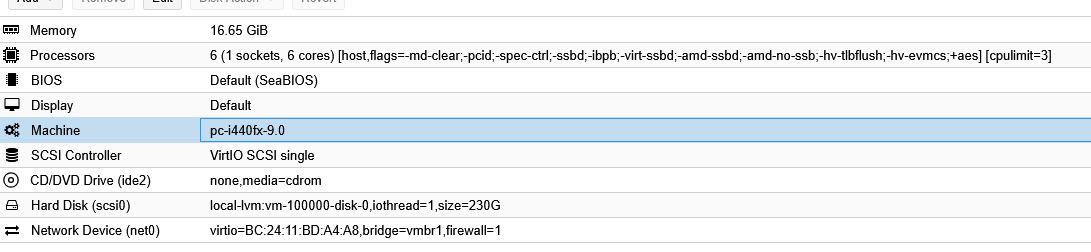
  • @host_c said: Emulation is Q35 or 440fx??

    Try q35, but sincerely that is interesting to see that it does not boot

    will try, right now i have set cpu to 6 cores and like 3, so it maxes out 50%

    the laoding symbol on windows 2022 is spinning

    fuck knows why it does not boot

    bitlocker (i always have to enter a key which is fine)? licenses?

    will give it an hour longer and then will try your q35

    you are a great help, thanks, i hope we can solve it (ok i beg at this point)

  • @DeadlyChemist
    So, the proxmox run on a Shared VPS
    Can you share yabs from the VPS itself?

  • enable BIOS VT-x VT-d, q35 platform, CPU at x86-v2-AES,if host harddrive is not SSD will very slow.

  • @DeadlyChemist said: will give it an hour longer and then will try your q35

    so, it loaded? and i ended up in a black screen with high cpu usage
    i can move and see my cursor, but it's black screen and RDP does not work

    tried your settings

    @host_c said: Try q35, but sincerely that is interesting to see that it does not boot

    does not boot :/ but cpu usage seems lower (weird, but not muvh, could be margin of error)


    @Patriarch said: Can you share yabs from the VPS itself?

    yes partial (check below)


    @w3e4r5 said: enable BIOS VT-x VT-d, q35 platform, CPU at x86-v2-AES,if host harddrive is not SSD will very slow.

    i dont have access to bios as it's shared
    x86-v2-AES is slow
    it's all SSD with good speed


    here is some info:

    root@hbrr-proxmox:~# lscpu
    Architecture:             x86_64
      CPU op-mode(s):         32-bit, 64-bit
      Address sizes:          40 bits physical, 48 bits virtual
      Byte Order:             Little Endian
    CPU(s):                   8
      On-line CPU(s) list:    0-7
    Vendor ID:                AuthenticAMD
      BIOS Vendor ID:         QEMU
      Model name:             AMD Ryzen 9 5950X 16-Core Processor
        BIOS Model name:      pc-i440fx-5.2  CPU @ 2.0GHz
        BIOS CPU family:      1
        CPU family:           25
        Model:                33
        Thread(s) per core:   1
        Core(s) per socket:   1
        Socket(s):            8
        Stepping:             2
        BogoMIPS:             6787.24
        Flags:                fpu vme de pse tsc msr pae mce cx8 apic sep mtrr pge mca cmov pat pse36 clflush mmx fxsr sse sse2 syscall nx mmxext fxsr_opt pdp
                              e1gb rdtscp lm rep_good nopl cpuid extd_apicid tsc_known_freq pni pclmulqdq ssse3 fma cx16 sse4_1 sse4_2 x2apic movbe popcnt tsc
                              _deadline_timer aes xsave avx f16c rdrand hypervisor lahf_lm cmp_legacy svm cr8_legacy abm sse4a misalignsse 3dnowprefetch osvw 
                              perfctr_core ssbd ibrs ibpb stibp vmmcall fsgsbase tsc_adjust bmi1 avx2 smep bmi2 erms invpcid rdseed adx smap clflushopt clwb s
                              ha_ni xsaveopt xsavec xgetbv1 xsaves clzero xsaveerptr wbnoinvd arat npt nrip_save umip pku ospke vaes vpclmulqdq rdpid fsrm arc
                              h_capabilities
    Virtualization features:  
      Virtualization:         AMD-V
      Hypervisor vendor:      KVM
      Virtualization type:    full
    Caches (sum of all):      
      L1d:                    256 KiB (8 instances)
      L1i:                    256 KiB (8 instances)
      L2:                     4 MiB (8 instances)
      L3:                     512 MiB (8 instances)
    NUMA:                     
      NUMA node(s):           1
      NUMA node0 CPU(s):      0-7
    Vulnerabilities:          
      Gather data sampling:   Not affected
      Itlb multihit:          Not affected
      L1tf:                   Not affected
      Mds:                    Not affected
      Meltdown:               Not affected
      Mmio stale data:        Not affected
      Reg file data sampling: Not affected
      Retbleed:               Not affected
      Spec rstack overflow:   Vulnerable: Safe RET, no microcode
      Spec store bypass:      Mitigation; Speculative Store Bypass disabled via prctl
      Spectre v1:             Mitigation; usercopy/swapgs barriers and __user pointer sanitization
      Spectre v2:             Mitigation; Retpolines; IBPB conditional; IBRS_FW; STIBP disabled; RSB filling; PBRSB-eIBRS Not affected; BHI Not affected
      Srbds:                  Not affected
      Tsx async abort:        Not affected
    root@hbrr-proxmox:~# 
    

    yabs:

    root@hbrr-proxmox:/etc/pve/qemu-server# curl -sL https://yabs.sh | bash
    # ## ## ## ## ## ## ## ## ## ## ## ## ## ## ## ## ## #
    #              Yet-Another-Bench-Script              #
    #                     v2025-01-01                    #
    # https://github.com/masonr/yet-another-bench-script #
    # ## ## ## ## ## ## ## ## ## ## ## ## ## ## ## ## ## #
    
    Mon Mar 10 04:58:45 PM CET 2025
    
    Basic System Information:
    ---------------------------------
    Uptime     : 0 days, 22 hours, 18 minutes
    Processor  : AMD Ryzen 9 5950X 16-Core Processor
    CPU cores  : 8 @ 3393.624 MHz
    AES-NI     : ✔ Enabled
    VM-x/AMD-V : ✔ Enabled
    RAM        : 19.5 GiB
    Swap       : 8.0 GiB
    Disk       : 34.1 GiB
    Distro     : Debian GNU/Linux 12 (bookworm)
    Kernel     : 6.8.12-8-pve
    VM Type    : KVM
    IPv4/IPv6  : ✔ Online / ❌ Offline
    
    IPv4 Network Information:
    ---------------------------------
    ISP        : Hetzner Online GmbH
    ASN        : AS24940 Hetzner Online GmbH
    Location   : Falkenstein, Saxony (SN)
    Country    : Germany
    
    Less than 2GB of space available. Skipping disk test...
    chmod: changing permissions of './2025-03-10T16_58_46+01_00/iperf/iperf3': Operation not permitted
    
    iperf3 Network Speed Tests (IPv4):
    ---------------------------------
    Provider        | Location (Link)           | Send Speed      | Recv Speed      | Ping           
    -----           | -----                     | ----            | ----            | ----           
    Clouvider       | London, UK (10G)          | busy            | busy            | 22.7 ms        
    Eranium         | Amsterdam, NL (100G)      | busy            | busy            | 10.3 ms        
    Uztelecom       | Tashkent, UZ (10G)        | busy            | busy            | 94.6 ms        
    Leaseweb        | Singapore, SG (10G)       | busy            | busy            | 176 ms         
    Clouvider       | Los Angeles, CA, US (10G) | busy            | busy            | 163 ms         
    Leaseweb        | NYC, NY, US (10G)         | busy            | busy            | 92.4 ms        
    Edgoo           | Sao Paulo, BR (1G)        | busy            | busy            | 200 ms         
    
    Geekbench 6 test failed. Run manually to determine cause.
    
    YABS completed in 1 min 44 sec
    

    storage:
    root@hbrr-proxmox:/etc/pve/qemu-server# df -h
    Filesystem Size Used Avail Use% Mounted on
    udev 9.8G 0 9.8G 0% /dev
    tmpfs 2.0G 1.5M 2.0G 1% /run
    /dev/mapper/pve-root 35G 3.8G 29G 12% /
    tmpfs 9.8G 43M 9.8G 1% /dev/shm
    tmpfs 5.0M 0 5.0M 0% /run/lock
    /dev/fuse 128M 16K 128M 1% /etc/pve
    tmpfs 2.0G 0 2.0G 0% /run/user/0
    root@hbrr-proxmox:/etc/pve/qemu-server# lsblk
    NAME MAJ:MIN RM SIZE RO TYPE MOUNTPOINTS
    sda 8:0 0 368K 1 disk
    sr0 11:0 1 2K 0 rom
    vda 253:0 0 300G 0 disk
    ├─vda1 253:1 0 1007K 0 part
    ├─vda2 253:2 0 1G 0 part
    └─vda3 253:3 0 299G 0 part
    ├─pve-swap 252:0 0 8G 0 lvm [SWAP]
    ├─pve-root 252:1 0 35G 0 lvm /
    ├─pve-data_tmeta 252:2 0 2.4G 0 lvm
    │ └─pve-data-tpool 252:4 0 235.2G 0 lvm
    │ ├─pve-data 252:5 0 235.2G 1 lvm
    │ └─pve-vm--100000--disk--0 252:6 0 230G 0 lvm
    └─pve-data_tdata 252:3 0 235.2G 0 lvm
    └─pve-data-tpool 252:4 0 235.2G 0 lvm
    ├─pve-data 252:5 0 235.2G 1 lvm
    └─pve-vm--100000--disk--0 252:6 0 230G 0 lvm
    root@hbrr-proxmox:/etc/pve/qemu-server#

  • Nice YABS, nothing worked, very helpful :-D

    Thanked by 2n1njax beanman109
  • @JabJab said:
    Nice YABS, nothing worked, very helpful

    Yabs please

    Yabs: no

  • host_chost_c Patron Provider, Top Host, Megathread Squad

    Try this:

    ACPI Support: YES ( windows needs this ) - by the way, without that it usually does not work at all.

  • @host_c said: ACPI Support: YES ( windows needs this ) - by the way, without that it usually does not work at all.

    already enabled...

  • host_chost_c Patron Provider, Top Host, Megathread Squad

    I have nothing,

    I can just best guess it has something to do with storage, and not CPU.

    Can you benchmark the LVM in that proxmox?

  • host_chost_c Patron Provider, Top Host, Megathread Squad

    and take off use tablet for pointer, tr to take off also hot plug for like disk, lan and usb.

  • To confirm, you're running a Hostbrr VPS, not a dedicated server, right?

Sign In or Register to comment.