
























New on LowEndTalk? Please Register and read our Community Rules.
All new Registrations are manually reviewed and approved, so a short delay after registration may occur before your account becomes active.
All new Registrations are manually reviewed and approved, so a short delay after registration may occur before your account becomes active.
ISP blocking access to my VPS server IP

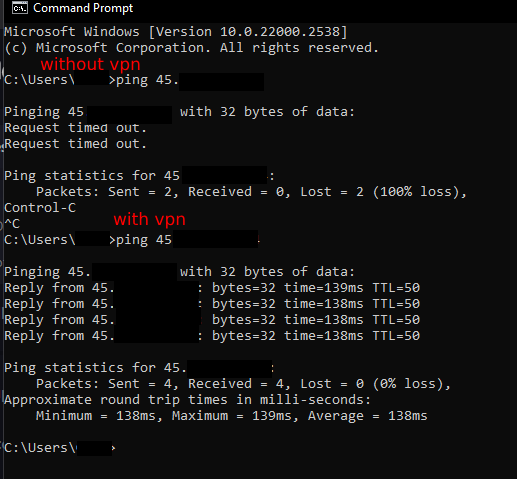
I'm curious as to whether any of you have experienced your ISP blocking access to your VPS server? I used to be able to access Plex on my wifi, but now it's completely blocked unless I use a VPN (I am not in an extreme censorship region like China). I honestly have no clue what to do from here....
I use Telus btw



Comments
Best bet, if you're not in a censorship region, is to simply call your ISP's technical support and ask them why they're blocking that IP
Man, that's gonna be so annoying to deal with. Last time I called, I was put on hold for over 2 hours before I could talk to someone. Thank you though, for your suggestion. If nobody else comments some other suggestion, or their suggestion doesn't work, i'll try yours.
maybe their upstream got BGP problem. just be patient. check back in few days ahead.
Can you ping other IPs from the same subnet that aren't yours or providers looking glass IP for the location of your server?
No, I cant ping the test IP or looking glass
traceroute / mtr?
You really sure it's your ISP?
Why not your VPS provider blocking your ISP?
Why not something in the middle?
Could be even some stupid "Safe-browsing" feature of your ISP/router thing and it dies there?
Isn't there some Windoze "make it work" tile thingy to click? Also, did you already try THE Windoze problem solving method of "close all windows and reboot"?
Yes, it's happened to me before.
My residential ISP's subnet ended up on a well known blocklist that I was applying to my VPS firewalls and I accidentally blocked access to all my servers from my home IP.
It's likely your Provider is doing something similar because it's common practice to proactively block known 'dirty' subnets with blocklists from reputable sources, so I'd start by opening a ticket with your IP and ask if they're inadvertently blocking you.
Which ISP?
Yes, I have experience with it, but my experience vs yours will be different if you live in another country than I do.
try traceroute (regular [based on ICMP] & tcp [it usually add destination port]) from both ends. See where it got terminated.
telus
Easy then...
CRTC says they are not allowed to..
At best they are allowed to put in an established/related firewall to block unsolicited traffic from an IP. In very exceptional situations they are allowed to block an IP, it isn't easy to meet..
This evening I'll send you a PM with what you need to file and where, I have it saved on another computer.
Network problem?
Looks like windows problem to me
Hello,
I wonder,
Is your ISP blocking your VPS IP or is it the other way around where your VPS Service provider is blocking your ISP IP?
I would simply email both party asking the same question as why I am blocked.
Lastly, why would you even consider using a service where you are afraid on asking for support?
Thanks.
same issue on all devices (tv, iphone, you name it)
I have made a ticket with HostHatch regarding this. The last thing I want to do is contact my ISP (they are annoying as fuck, sometimes they randomly increase my bill per month, and when I call them, i'm put on hold for hours before I can talk to a representative)
I have sent you a pm
running a traceroute to my vps from my home, it works but stops at 6 hops.
running a traceroute from my vps to my home (i think im supposed to do that?) immediately times out
from the vps you should check your public ip addr first, since commonly we're still behind isp cgnat
That sounds like vps blocks your isp ip. Or its simply firewall issue on vm.
Sounds like a block on the Provider side rather than your ISP. It's also unlikely the Provider is intentionally blocking a Residential IP so they're probably using a blocklist.
Have you retried it recently? Usually blocklists are updated regularly so it's likely your ISP will be removed from it at some point anyway, but if you can find out which list(s) the Provider is using them you should be able to find/remove your ISP from the list on the next update
Update on the situation:
I want to express my gratitude to HostHatch support. I reached out to their support team, and they kindly requested that I perform some MTRs. I performed them and submitted the results. HostHatch promptly responded informing me that they had rerouted the traffic over CDN77 instead of Quadranet. As a result, I can now access their looking glass and my VPS from my home wifi network. Even though lots of people say that HostHatch’s support can be quite slow for individuals with promotional plans, I was pleasantly surprised by their fast response time, even though I was also a promotional plan holder.
i would suggest get a Domain name,
and use Cloudflare CDN or Other Company CDN to connect to your VPS.
Not sure if this kind of solution is alright for you.
Also you may contact your provider and ask about it, maybe they are able to unblock the ip address of your server.
i have no reason to use cloudflare cdn, and thats not a permanent solution. also, routing plex traffic with cloudflare goes against their tos.
if it is so complicated for you, then my solutions are not the best choice,
i would buy a cheap vps for vpn only, or use Cloudflare GRPC (Unlimited Traffic) CDN to connect to the server but not on 443 port,
i would choose other ports. or Gcore CDN, however, you decide on your own how you are going to manage that, i just share my way of thinking.
Thank you.