



























All new Registrations are manually reviewed and approved, so a short delay after registration may occur before your account becomes active.
[Share] IP Quality Check Script # bash <(curl -sL IP.Check.Place) -l en

IP Quality Check Script
GitHub Repo: https://github.com/xykt/IPQuality
README in English / 中文
Supported OS/Platform: Ubuntu | Debian | Linux Mint | Fedora | Red Hat Enterprise Linux (RHEL) | CentOS | Arch Linux | Manjaro | Alpine Linux | AlmaLinux | Rocky Linux | macOS
- Bilingual support in English and Chinese
- Supports dual-stack queries for IPv4/IPv6
- Beautifully formatted, intuitive display, optimized for single-screen multi-terminal display, facilitating screenshot sharing
- Six modules: Basic Information, IP Type, Risk Score, Risk Factors, Streaming Media Unlocking, and Post Office Check
- Basic data sourced from the Maxmind database
- Risk information integrated from multiple databases: IPinfo / ipregistry / ipapi / AbuseIPDB / IP2LOCATION / IPQS / DB-IP / SCAMALYTICS / IPWHOIS
- Streaming and AI service providers' unlocking and type detection: TikTok / Disney+ / Netflix / Youtube / AmazonPrimeVideo / Spotify / ChatGPT
- Connectivity tests for multiple email providers: Gmail / Outlook / Yahoo / Apple / QQ / Mail.ru / AOL / GMX / Mail.com / 163 / Sohu / Sina
- Over 400 IP address blacklist database checks
Screenshots
| IPv4 Report | IPv6 Report |
|---|---|
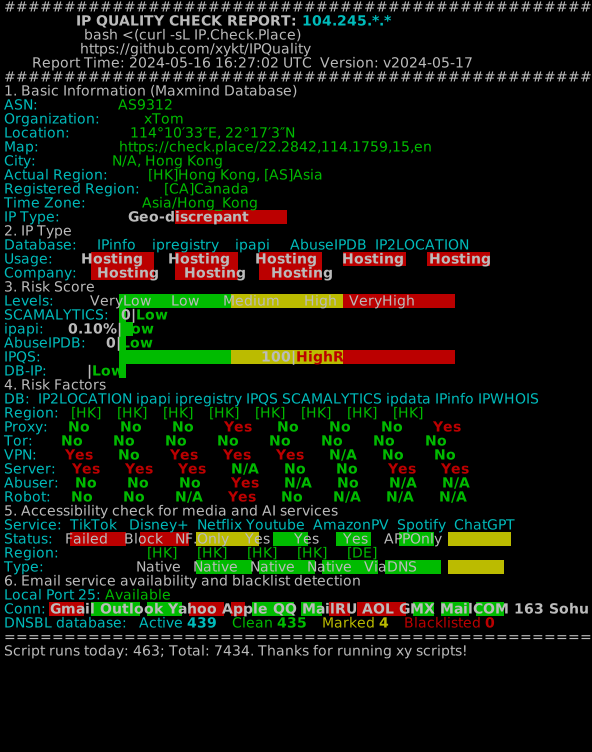 |
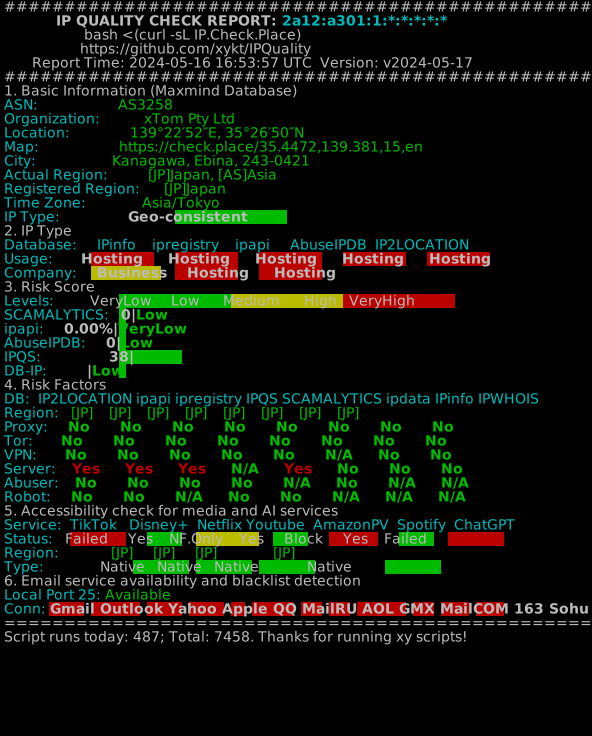 |
How to Use
English version of dual-stack test:
bash <(curl -Ls IP.Check.Place) -l en
IPv4 only test:
bash <(curl -Ls IP.Check.Place) -l en -4
IPv6 only test:
bash <(curl -Ls IP.Check.Place) -l en -6
Specify network interface:
bash <(curl -Ls IP.Check.Place) -l en -i eth0
Specify proxy server:
bash <(curl -Ls IP.Check.Place) -l en -x http://username:password@proxyserver:port
bash <(curl -Ls IP.Check.Place) -l en -x https://username:password@proxyserver:port
bash <(curl -Ls IP.Check.Place) -l en -x socks5://username:password@socksproxy:port
Basic information multi-language support:
bash <(curl -Ls IP.Check.Place) -l jp|es|de|fr|ru|pt
Script Updates
2024/05/30 01:15 Add macOS support
2024/05/28 18:00 Fixed bug where default IP was detected for specified network interface/proxy server
2024/05/17 00:45 Add report svg image sharing link and fix some layout problems
2024/05/11 23:20 Fixed mail detection taking too long due to gateway blocking port 25, fix inaccurate Tiktok IPv6 results
2024/05/10 17:50 Fix dependency installation issue with no sudo installed
2024/05/10 11:00 Added support for specified network interface and proxy server
2024/05/09 15:00 Corrected errors caused by non-standard private IP addresses, and fixed several other bugs
2024/05/08 23:00 Fixed a bug affecting incorrect detection results for Netflix Australia
2024/05/08 18:10 Updated the dependency checks and installation for the 'dig' program
2024/05/08 00:00 Script published
Script Contributions
Acknowledgments:
Thanks to lmc999 for portions of the original streaming media unlocking script referenced in this script.
Thanks to spiritLHLS for portions of the integration monster review script referenced in this script.
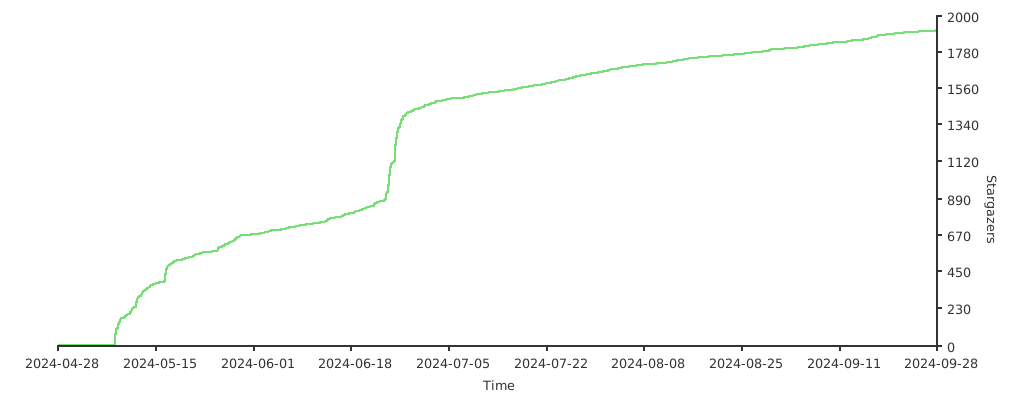
Stars History:



Comments
I sometimes wonder how many free VPS one would get by releasing such a curl https://foo.bar/baz.sh | sh script with a rootkit downloader included...
By the way your purposed execution syntax wont work on pretty much at least half the unixoid world. There's a couple shells that aren't bash and therefore don't support bash extensions...
ignore him. he's got an extra chromosome.
Yes, make it posix compliant or go home.
P.S. Make translation sourceable, that way users will be able to contribute easily. Because ~2000 lines of freaking bash spagheti is not sane to maintain, debug and extend.
Support Alpine Linux
Using Bash
I trully feel betrayed, how these going.
is good?
Will my VM be mining crypto or sending emails for Nigerian prince after running this script?
Dude, don't sudo install stuff for people...
Missing dependancies - quit with hints on what needs to be done.
At least this would be my preference, I don't want to see such script doing sudo apt -y install anything for me, without any warnings.
Look at the bright side: It could have added a bunch of unofficial repos first or upraded to testing (that would be some fun for the whole family).
have you also checked yabs and networkspeed.xyz for rootkit?
You are free to analyze every byte of codes bruh.
https://github.com/masonr/yet-another-bench-script/issues/42
not a rootkit but would have liked to have gotten more information on what is an executable stack.
It blew my mind when curl|bash|echo 'run as root' stuff started showing up
even this one went quiet as crickets over bring up root
https://lowendtalk.com/discussion/comment/3965301/#Comment_3965301
Chinese?
guess this falls under the unlocking service providers feature
https://raw.githubusercontent.com/xykt/IPQuality/main/ref/cookies.txt
I think yes,he/she first time send it at nodeseek and hostloc
That what everyone thinks until they realize that web content is dynamic and their browser sends a different agent than curl.
Besides who is going to realistically analyze such an all you can eat sized ration of spaghetti? ...
No but then i'm also not using any of those. The problem is not so much with these types of relatively trusted scripts anyways but rather people getting the impression that piping curl output to a shell is somehow normal (kinda like how an eerie amount of people thinks bash is some kind of gold standard for shell scripting...).
Sure it's handy but it's quite far off from a static script and using a browser to check the script doesn't even realistically check anything as one might be looking at something totally different than what curl would see. It's basically teaching people (which for the most part probably wouldn't realize that they've been rooted if it jumps in their face) bad habits.