Howdy, Stranger!

It looks like you're new here. If you want to get involved, click one of these buttons!


Shells Virtual Desktop
BMail.ag - Secure Email Service
Server.net
CPLicense.net
VPS Server
Buy VPN
Vultr
VMs for AI
HostDare
ReliableSite White-Label Dedicated Hosting for Resellers
InterServer VPS
BMail.ag - Secure Email Service
Best VPN
High-Performance Bare Metal Server Solutions
Karvl.com
Server Mania Cloud Hosting
DataWagon Hosting
AlphaVPS Hosting
Evoxt.com
Clouvider
VPS Hosting with NVMe
Residential IPs in the US & 4G Mobile Proxies in EU & US with Unlimited Bandwidth
ReliableSite White-Label Dedicated Hosting for Resellers
Rabisu - Hosting Solutions
Shells Virtual Desktop
New on LowEndTalk? Please Register and read our Community Rules.

All new Registrations are manually reviewed and approved, so a short delay after registration may occur before your account becomes active.

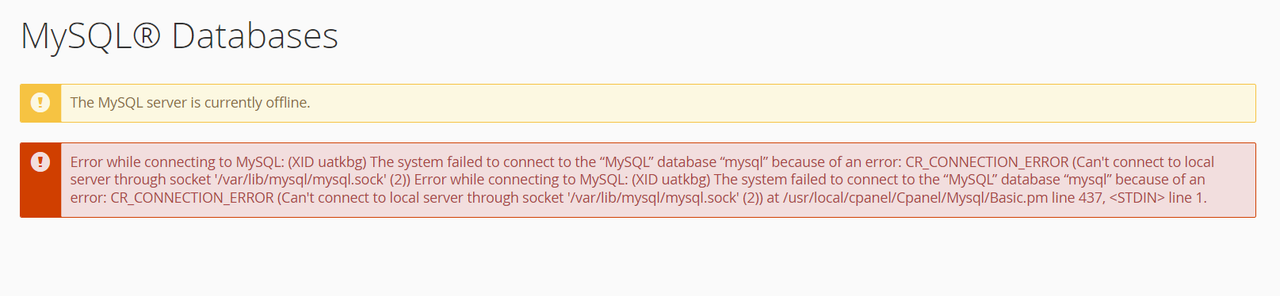
buyshared lu04 mysql down

BetaRacksBetaRacks Member
edited December 2023 in General

I just discovered that there are a lot of error logs on my website
When I checked the logs I found the following error message

[2023-12-16 21:28:42] local.ERROR: SQLSTATE[HY000] [2002] No such file or directory

Then I try to open phpmyadmin in cpanel
but got the same error

 mysqli_sql_exception: No such file or directory

Also, I tried reselecting mysqli and nd_mysqli from php selector
The problem is still not solved
@Francisco

Comments

  • Maybe open a ticket?...

  • @SwordfishBE said:
    Maybe open a ticket?...

    A ticket has been opened
    Haven't received a reply yet

    But my log file increases by 1M every second.

  • jarjar Patron Provider, Top Host, Veteran

    @BetaRacks said: But my log file increases by 1M every second

    while true; do rm -rf log && sleep 30; done

  • @jar said:
    while true; do rm -rf log && sleep 30; done

    Master of one-liners B)

    while :; do rm -rf log; sleep 30; done

    or

    while sleep 30; do rm -rf log; done

    Thanked by 3jar 0xC7 emgh
  • Thank you for contacting LowEndSupport, your waiting time has been doubled.

  • yoursunnyyoursunny Member, IPv6 Advocate

    @BetaRacks said:
    But my log file increases by 1M every second.

    https://linux.die.net/man/8/logrotate

    Thanked by 1emgh
  • BetaRacksBetaRacks Member
    edited December 2023

    mysql server restored
    After checking the logs, it was found that this problem began to appear on November 15th.
    Then it appears in the logs of November 15th, November 30th, December 08th, December 09th, December 14th, and December 16th.

  • @asthen said:
    Thank you for contacting LowEndSupport, your waiting time has been doubled.

  • 0xC70xC7 Member
    edited December 2023

    BetaRacks said:

    ssh brute-force? running out free space (or inodes) due log/temp files?
    edit: nvm ... too long for typing (somehow distracted with other work :s )

  • FranciscoFrancisco Top Host, Host Rep, Veteran

    Sorry about that.

    Mateus sorted it, but not sure why it didn’t auto restart. If it was down. I’ll have to check the cpanel logs since it should’ve caught that.

    Francisco

  • ...to check cpanel is always good, also regarding upgrades to the current version ;) @Francisco

    Thanked by 1COLBYLICIOUS
  • FranciscoFrancisco Top Host, Host Rep, Veteran

    @hyperblast said: ...to check cpanel is always good, also regarding upgrades to the current version @Francisco

    It was cPanel :) But not a version issue.

    We disabled MySQL monitoring on this node many many years ago it seems, back when cPanel was having ongoing issues with systemd. I never enabled it again after that and I guess its been fine since then. Really curious what the uptime on the process was.

    Anyway, that's re-enabled at this point.

    Francisco

    Thanked by 1hyperblast
  • raindog308raindog308 Administrator, Veteran

    tl;dr: frandammit

    Thanked by 1yoursunny
  • tentortentor Member, Host Rep

    @Francisco said:

    @hyperblast said: ...to check cpanel is always good, also regarding upgrades to the current version @Francisco

    It was cPanel :) But not a version issue.

    We disabled MySQL monitoring on this node many many years ago it seems, back when cPanel was having ongoing issues with systemd. I never enabled it again after that and I guess its been fine since then. Really curious what the uptime on the process was.

    Anyway, that's re-enabled at this point.

    Francisco

    Why would you disable monitoring? I don't know much about cPanel btw

  • FatGrizzlyFatGrizzly Member, Host Rep

    @tentor said:

    @Francisco said:

    @hyperblast said: ...to check cpanel is always good, also regarding upgrades to the current version @Francisco

    It was cPanel :) But not a version issue.

    We disabled MySQL monitoring on this node many many years ago it seems, back when cPanel was having ongoing issues with systemd. I never enabled it again after that and I guess its been fine since then. Really curious what the uptime on the process was.

    Anyway, that's re-enabled at this point.

    Francisco

    Why would you disable monitoring? I don't know much about cPanel btw

    its like 1000 different shit grouped up to make up 1 shit for grandpa's and grandma's to edit and host their sites.

    Whatcha expect?

    one time, my cpkeyclt failed, and somehow magically cpsrvd got corrupted during an update, and I had to do a reinstall (cP support couldnt figure it out either, luckily it wasn't hosting anything). It was back in 2020, stuff could've changed.

    Thanked by 2tentor 0xC7
  • FranciscoFrancisco Top Host, Host Rep, Veteran

    @tentor said: Why would you disable monitoring? I don't know much about cPanel btw

    cPanel had some nasty bugs in the move to CentOS 7 and systemd where it was constantly rebooting processes because it couldn't monitor them properly. It was doing it to Litespeed as well leading to quite a lot of long outages.

    I seem to recall talking about it way back in the day when it was happening.

    Disabling the auto restart addressed it at the time and it kinda fell to the wayside.

    Francisco

    Thanked by 2tentor 0xC7
  • @0xC7 said:

    BetaRacks said:

    ssh brute-forece? running out free space (or inodes) due log/temp files?

    @Francisco said:
    Sorry about that.

    Mateus sorted it, but not sure why it didn’t auto restart. If it was down. I’ll have to check the cpanel logs since it should’ve caught that.

    Francisco

    f you need, I can provide laravel's log before the 16th, which will contain the time when the error occurred.
    I have deleted the log on the 16th because it was too big.

  • FranciscoFrancisco Top Host, Host Rep, Veteran

    @BetaRacks said: f you need, I can provide laravel's log before the 16th, which will contain the time when the error occurred.

    I have deleted the log on the 16th because it was too big.

    Nope, no need at all suh :)

    MySQL crashed, and cPanel didn't restart it. The 'dont restart' was intentional on our part, but was to address a bug probably 4 years ago. We never re-enabled the process monitoring in all that time.

    Our fault, sorry about that.

    Francisco

    Thanked by 10xC7
  • emghemgh Member, Megathread Squad

    @Francisco said:

    @BetaRacks said: f you need, I can provide laravel's log before the 16th, which will contain the time when the error occurred.

    Our fault, sorry about that.

    Troubleshooting steps:
    1. Blame fran
    2. No need for a step 2

    Thanked by 2yoursunny Francisco
  • @emgh said:

    @Francisco said:

    @BetaRacks said: f you need, I can provide laravel's log before the 16th, which will contain the time when the error occurred.

    Our fault, sorry about that.

    Troubleshooting steps:
    1. Blame fran
    2. No need for a step 2

    1. Setup cronjob to blame Fran every day
    Thanked by 2emgh Francisco
  • emghemgh Member, Megathread Squad

    @Moopah said:

    @emgh said:

    @Francisco said:

    @BetaRacks said: f you need, I can provide laravel's log before the 16th, which will contain the time when the error occurred.

    Our fault, sorry about that.

    Troubleshooting steps:
    1. Blame fran
    2. No need for a step 2

    1. Setup cronjob to blame Fran every day

    I’ve started doing it soley by reflex

    Sometimes I realize ”wait, my oven not working simply can’t be Frans fault”

    But most of the time, it just is, no matter how unlikely

    Thanked by 1Francisco
Sign In or Register to comment.