

























Howdy, Stranger!

It looks like you're new here. If you want to get involved, click one of these buttons!


Shells Virtual Desktop
BMail.ag - Secure Email Service
Server.net
CPLicense.net
VPS Server
Buy VPN
Vultr
VMs for AI
HostDare
ReliableSite White-Label Dedicated Hosting for Resellers
InterServer VPS
BMail.ag - Secure Email Service
Best VPN
High-Performance Bare Metal Server Solutions
Karvl.com
Server Mania Cloud Hosting
DataWagon Hosting
AlphaVPS Hosting
Evoxt.com
Clouvider
VPS Hosting with NVMe
Residential IPs in the US & 4G Mobile Proxies in EU & US with Unlimited Bandwidth
ReliableSite White-Label Dedicated Hosting for Resellers
Rabisu - Hosting Solutions
Shells Virtual Desktop
New on LowEndTalk? Please Register and read our Community Rules.

All new Registrations are manually reviewed and approved, so a short delay after registration may occur before your account becomes active.

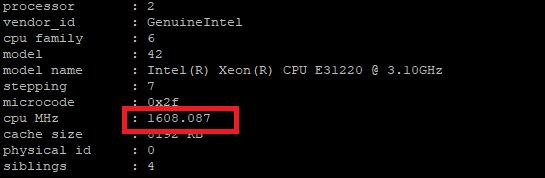
Oneprovider Dedicated Server - Capped CPU?

Hello,

I just got dedicated server from Oneprovider. It has Xeon E3 1220 3.10 GHZ cpu but I noticed it is capped at 1600mhz.

I didn't see any information about this on their website..

Should I contact them?

Comments

  • SpeedBusSpeedBus Member, Host Rep
    edited June 2023

    It's most likely not capped, but the CPU most likely is running on a dynamic scheduler that scales up or down the cpu MHz depending on the demand/load on the CPU :)

    You can grep the "cpu MHz" and see the CPU Freq change every few seconds or simply run a benchmark like geekbench and see if the CPU Mhz goes up.

    if it stays stuck at 1600~ Mhz even during the benchmark, have a look at sensors via the lm_sensors package to see the CPU temps, if the CPU is overheating or similar (though you'd also see warnings under dmesg), as that too can cause the CPU frequency to not scale up.

    Thanked by 1Void
  • webeastwebeast Member
    edited June 2023

    @SpeedBus said:
    It's most likely not capped, but the CPU most likely is running on a dynamic scheduler that scales up or down the cpu MHz depending on the demand/load on the CPU :)

    You can grep the "cpu MHz" and see the CPU Freq change every few seconds or simply run a benchmark like geekbench and see if the CPU Mhz goes up.

    if it stays stuck at 1600~ Mhz even during the benchmark, have a look at sensors via the lm_sensors package to see the CPU temps, if the CPU is overheating or similar (though you'd also see warnings under dmesg), as that too can cause the CPU frequency to not scale up.

    I think you're right. Thank you :)

    Thanked by 1SpeedBus
  • Maybe its on power saving mode. Check and try changing to Performance mode.

    Thanked by 1webeast
  • Shot2Shot2 Member
    edited June 2023

    Launch two shells
    Run a CPU-intensive task in one shell (e.g. install 7-zip, run 7zz b)
    Watch the CPU speed in another shell (e.g. watch -n1 "grep Hz /proc/cpuinfo")
    Delete your thread on LET (just kidding)

    Thanked by 1webeast
  • This is how you set it on performance mode (on archlinux):

    cpupower frequency-set -r -g performance

    Thanked by 1webeast
Sign In or Register to comment.
