



























New on LowEndTalk? Please Register and read our Community Rules.
All new Registrations are manually reviewed and approved, so a short delay after registration may occur before your account becomes active.
All new Registrations are manually reviewed and approved, so a short delay after registration may occur before your account becomes active.
★ VirMach ★ RYZEN ★ NVMe ★★ $8.88/YR- 384MB ★★ $21.85/YR- 2.5GB ★ Instant ★ Japan Pre-order ★ & More
This discussion has been closed.



Comments
So now we know that @JabJab is really @Google
Node Name: DALZ007
Main IP pings: false
Node Online: false
Service online: online
Operating System: linux-debian-9-x86_64-minimal-latest
Service Status:Active
Registration Date:2020-12-08
VNC:
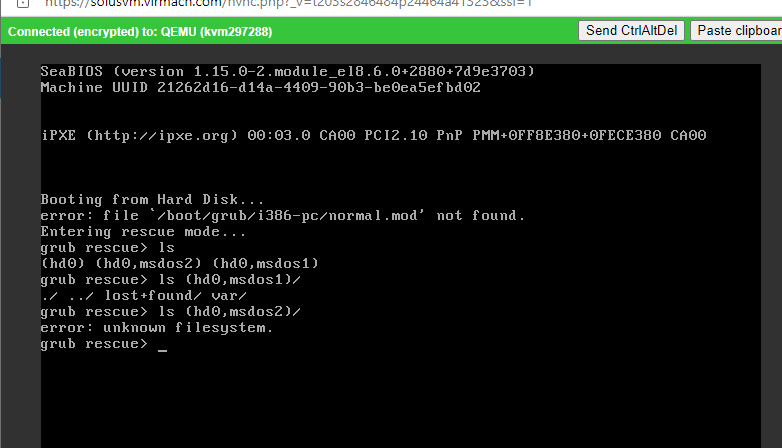
It's been 2 days and still showing that status.
Reinstall the OS can't solve the problem.
install debian 11 ryzen
Yes, seems to be steal.. email server CPU, sys,user,irq 1%, steal 25%.
Forgive me for doubting you, as I now see that VirMach assigned me on the 172.98.14.x subnet in Dallas.
Half a month has passed, and I cannot boot, reinstall the operating system, or enter vnc.
Thanks.
Installed other OS, still the same error.
I don't think the OS was successfully installed.
Reading other people's posts, I remembered that I can't access SolusVM panel for my vps on DALZ003, but it may have been inaccessible before the move to Ryzen too.
Edit:
I didn't realize it had migrated, but just turning it to Power On booted it up fine (Debian 11).
But it has 3 IP addresses, old Dallas IP, reserved JP IP, Ryzen Dallas IP 😆
Yes @FrankZ ,I could access via VNC but show network error. I'm aware that the IP has changed because it migrated to Ryzen node. And the new IP already shown in the CP. However, I could not ping the new IP.
Tried to manually change the IP address and gateway from windows network setting, but still no luck.
But from the troubleshooter status I posted earlier, I believe that DALZ009 node is still offline ?
****Node online : false****
If the node is offline, how is it possible the VM inside the node could be online ?
Any idea how to get past that error ?
wait a few more days/weeks and u will get help if u open a ticket
I couldn't find any email like
Your cloud service is almost ready (123.456.789.012)about that VPS, so I don't think there is any solution other than opening a ticket. However, I'm in no hurry and will not open a ticket.If he has time to check my ticket, he will be able to sleep for a few minutes...
Ticket is open since days anyway
There used to be some problems with reinstalling system on broken VPSes, Shutting down helped sometimes.
Login to VPS Control Panel aka SolusVM. Click
Power Off(notShutdown!), wait 5 minutes, clickReinstall, select[Ryzen Compatible] Debian 11 (64-Bit), give it few minutes to proceed - what does VNC shows?and it is working?
No, I did a paid migration from Buffalo and ended up with a "No bootable device" error. So O/S will not install. It's on node DALZ006 I wonder if it's the same one you are on?
I did this migration because I did not need any more NYC VMs, as I already have three there and figured Dallas was the safest place to go. I have been waiting to move this one to San Jose but it never opened back up for migrations. One plus is that I now have 3.48 PB of transfer
GG, it takes a little bit longer then usual but they help
According to the method you said, after reinstalling the OS, I still get the same error.
Binggooo!
Mine LAXA031 is in the same situation, still can't connect the internet for about 4 days.
Still no luck. No connection to the outside world from LAXA031.
Same here with LAXA031.
Reinstall does nothing (still boots to same OS before loss of network). Cannot boot into a live CD either.
hey guys i got an unrecognized disk now and it might be because ubuntu 16.04 (current os) isnt compatible with ryzen so i got a somewhat nooby question:
Does installing a different OS through the virmach vps control panel wipe the data (mysql db, mailbox contents) on the vps?
yes
For anyone having connectivity issues after IP migration, upon using "Reconfigure Networking", SolusVM was generating a /etc/network/interfaces file with eth0 instead of ens3 (shown via ip link show).
Changing eth0 back to ens3 still doesn't work, on LAXA031.
It's possible to get your old one back if it's still available but that may not be likely. We'd need to migrate you to the server using it.
We had to change them sooner with short notice (and some people didn't get the email because SolusVM was overloading) because many nodes were running out of IP addresses for migrated services. We previously had these nodes using a mix of multiple subnets and we have to move them back to one per server so we can improve network configuration at a later date, and we were originally going to only do it for that and with more notice and with the option to migrate and keep your IP. This didn't happen. Technically speaking, Tokyo didn't have to be done on all of them so soon but the person in charge of doing these did them with the assistance of a script and it was set up to do all of them so Tokyo was caught in the crossfire.
Outside of the reboot with short notice for power maintenance around 4 days ago, I don't see any glaring issues with this node so you should be good.
It all depends on if your package was set to have IPV6 yet or not and how you ended up there.
All of these are for the recent migrations only. I'm aware of a few dozen VMs on FFME and Tokyo over the previous weeks from using the Ryzen migrate button, this isn't what we're talking about.
Disk issue: Around 1% of customers had issue with data copying over, most of that is resolved and the rest completing now. There's also about 16 virtual servers (way less than like 1/10th of a percent of all virtual servers) left where there's some other weird issue and we're looking into them next if you were one of the unlucky 16.
Network issue: I forget the quantity for IP issues, but it was a few percent more, and all those got resolved mostly a few days ago, and double checking today, none found with problems so far. Reconfiguration script has been improved, it's going through all still not pinging and auto reconfiguring them but this is slow so your best bet is to still use the reconfigure button yourself.
Boot issue: Most were due to ISO being mounted, most of these have been unmounted and booted back up. Second most common reason is that the customer didn't even boot it up yet, these are mostly done as well. And final big reason is related to VNC port conflict, these have mostly been resolved.
CPU steal issue: Mostly affecting NYC, but a few others as well. These are mostly from VMs stuck in a boot loop, we're trying to clean these up today. This may also inadvertently negatively affect networking and cause higher interrupts in combination with ARP packets issue which was exasperated with additional servers being added and we already have a solution planned.
If your issue was already fixed, please consider closing your ticket so we can better assist others.
If you confirmed "ens3" is your actual interface in "ip link show",
did you try "sudo systemctl restart networking" or a restart?