


























New on LowEndTalk? Please Register and read our Community Rules.
All new Registrations are manually reviewed and approved, so a short delay after registration may occur before your account becomes active.
All new Registrations are manually reviewed and approved, so a short delay after registration may occur before your account becomes active.
★ VirMach ★ RYZEN ★ NVMe ★★ $8.88/YR- 384MB ★★ $21.85/YR- 2.5GB ★ Instant ★ Japan Pre-order ★ & More
This discussion has been closed.



Comments
The same abusers that are causing skyhigh steal time in Tokyo storage?
SSH is so choppy that I can't even type a single line command without few seconds of interrupts
@VirMach should kick all abusers out whether it's bandwidth abuser or CPU abusers
My VPS on TYOC026:
Operation Timed Out After 90001 Milliseconds With 0 Bytes Receivedafter a long delay2022/06/16 02:21:26 AM Hard Power Off ... CompleteUnknown Errorwith vnc remain the same as above.Is it only my vm or the node is acting up?
That's why I have been afraid to take the initiative to reply to the ticket
Hey ~ @VirMach
maybe you can take care of me. The last reply to my ticket was ten days ago.
Ticket # 571560
Can you cut a small piece of cake for me to taste
Maybe you can find a server with some remaining resources to migrate it?
It's really not easy to spend a lot of time dealing with tickets every day
The best way to reduce abuse is to increase the price, so that many people can be persuaded. Abuse requires script monitoring, but it cannot solve itself
The network is unstable as proxy by far with my subjective experience.
Below is ping from GreencloudVPS at the same data center.
PS: I will post the
tcpdumpdiagnosis later on.It is due to oversell rather than abuse I suppose. Since the BF specials have the same level of CPU steal time.
Network issue is the more severe problem for me
My vps has been down for 6 hours now..same node.
Not sure what you're saying we could be overselling here that would cause the problem, I guess CPU is always technically oversold? But compared to all our previous storage nodes and plans and based on the last usage levels when I checked, it's definitely really low CPU usage. Just spikes especially during Asia peak hours since everyone is trying to move data onto it at once. It's just not ideal how they are activating together, nothing that can really be done about it unless we stagger creations over several months.
We've been transparent about the exact node specifications, but I'll provide it here again and you can decide if you think it's oversold. I'm paraphrasing here so I apologize if a par is not exactly correct.
16 x 18TB Exos X18 Enterprise HDD
Broadcom 9460-16i RAID controller w/ CacheVault
Ryzen 5950X Processor
4 x 32GB DDR4 3200MHz ECC
ASRock X570D4U-2L2T Motherboard
2 x 2TB Gen4 Mushkin NVMe SSD
12 of the hard drives are on 3 x 4 port SATA to SFF-8643 backplanes, as provided by Silverstone (chassis manufacturer.) 4 of the hard drives are on another custom 4 port SATA to SFF-8643. Four SFF-8643 ports go into RAID controller.
Current usage levels, as of right now:
54% CPU by users directly
25% CPU by system/indirect (network, disk, etc.)
778Mbps network usage
56% Active memory usage (rest is buffered, cached, unused, etc.)
So again anything you're experience is most likely related to disk wait depending on when and what you're trying to do while other people are doing it. Even though it's RAID10, it's still HDD.
Network ends up getting affected negatively by the disk spikes too, and it's probably the cause of the CPU steal as well. Otherwise again users are only using 54% of the CPU directly. The 10Gbps NIC is much more capable in multiple ways other than just the throughput so once that's ready it should improve of course.
(edit) Oh and it's 173 services on here. Mostly 250GB and 500GB (quantity-wise.) Total 130TB~ disk assigned. Again, disk isn't oversold.
It's up, just overloading in a bad way. No emergency phone alert sent since it's been pinging on our end but I assume it's bad enough to where it's nearly unusable, I've been aware for a couple hours, trying to work in network status now since it got worse, I thought initially it would subside. And then taking another look.
(edit) Overloading isn't related to node being full or anything like that, it looks more like unrelated to direct abuse and potentially CPU software lockup related or zombie processes.
(edit) Something with the disk, but disk looks healthy from what I could see and none of them went away.
Yeah, can't find anything wrong at all. Little vague clues here and there but essentially it's what I described, some random hung task. No disk, RAM, or CPU hardware errors. Nothing else breaking afterward, just this one thing caused a runaway overloading.
I assume CPU soft lockup but no messages on that either. Logs didn't break either, it continued, just nothing abnormal logged.
Node looked perfect before this one event, which by itself also isn't that abnormal. I'll monitor the node throughout the day and ensure it's stable (hopefully.)
On TYOC029 right now, it was fine after the random reboot but gradually degraded ever since.
@VirMach Laxa005 is still in fault code?the migrated machine is always offline.
China mobile need help https://ping.pe/149.57.198.49
China Mobile connects all international traffic through Hong Kong.
Your best bet is getting a server in Singapore, which is well connected from China Mobile Hong Kong.
Japan and USA are not good for China Mobile.
Really? Why does another LA work fine?
I had no problem on the first day and it's becoming worse and worse after massive storage VPS deployment. SSH is choppy even in 2/3 AM JST which is the most off-peak hour in Asia.
Latency is not a problem for me it's just 4-5ms but the SSH lag is a huge issue.
Is it NVMe cached? from fio test result.
TYOC002S will receive 10Gbps upgrade after other storage node?
edit: I'm talking about my storage VPS of course. NVMe one is working fine.
I’ve been satisfied with the uptime and resource allocation of the VPS service from Virmach since 2019 but the way your organization handled a renewal/cancellation ticked me off enough to cancel all services with Virmach.
I wasn’t going to renew an unused VPS service that had a renewal date of 5/22. That date was listed in the Virmach billing portal. Without notice, it auto-renewed on 5/19. I submitted a ticket on 5/19 as soon as I saw the charge. No one responded and the ticket was closed. I submitted another ticket and it was marked rejected and no one responded.
I thought I had until 5/22 to cancel. I didn’t realize it was going to auto-renew 3 days early. I explained this in the tickets, asked for the service to be cancelled and for a refund of the recent charge. What did I get… A closed door in my face! That’s the reason for this public post. What an extremely poor manner in which to run a business.
TYOC030
Reposting this from a few pages back...
And I will add for monthly services:
1. You must cancel a monthly service in the billing panel more than 3 days before the due date, or else you will be invoiced, and the service will be automatically renewed for another month.
2. For a monthly service if you set it to cancel at the end of the billing period in the billing panel, you can remove the cancellation if you do so more than 3 days before the due date.
3. You will need to pay any invoices that you receive for monthly services before the due date to keep your account in good standing and avoid late fees.
4. If you have an auto payment method set up on your account, or have account credit and you receive an invoice for a service and it is automatically paid via the auto payment method or by account credit, there are no refunds solely for the reason that you did not cancel the service in the billing panel more than 3 days before the end of the billing period.
I personally do not care for #2. In my opinion if I have account credit it should be deducted on the due date. I keep account credit on there because sometimes things go wrong and I don't want drama but I'm not always thinking two months in advance if I want to keep a machine or not. Or more accurately, I'm thinking about it but I'm also thinking, "I've got two months until that renews," when I actually only have one.
This is just how WHMCS does it, we have no customizations on that nor do we agree with how they do their entire credit system, we just try our best to make our policies match the limitations of how the software works.
I have removed the WHMCS part of this post as VirMach beat me to it.
But...
Since I always deposit account credit in advance to pay for soon to renew services in case I have a snafu on my end. I do a #4 on yearly services I am not sure I want to keep. I normally can make that decision within 2 weeks of the due date and do a #5 to remove the cancellation if I decide to keep it. So it's all good. Of course I do understand that there is some risk involved in this practice.
EDIT: I have one provider that invoices me 45 days in advance of due date on yearly deals.
@VirMach pls see ticket #446493
Thanks for clarifying that. I'll have to pay attention to some of my other vendors. Maybe I'm the variable here...
Sorry for my harsh assumption.
I wonder the issue won't be solved until migrate to 10Gbps and the majority settles down.
The high packages loss, Waaagh!!! I will double my outgoing traffic on port 443.
https://github.com/SiyaChieng/packet-doubler
The credit system in WHMCS is not how any credit system would work - accounting wise the way it works is completely incorrect and this has been a known issue probably since WHMCS was launched.
You are right that the credit should be applied to invoices on the due date whereas WHMCS applies the credit on the day the invoice is created which means that if credit is added after that date for whatever reason the credit would never apply automatically to the invoice.
WHMCS only offers two options for applying credit, either automatically which works as I explained above or just not applying the credit automatically. Both options are useless IMO.
@VirMach Any updates to IPv6 and new PTR rollout?
I think people are going to hate me again for asking "unrelated" questions.. but here it come:
How well do you think that's performed for your machines?
I have one in my NAS and was debating between Exos X18 18TB or WD drives (for other NAS bay, and for camera) ...
Also, for port blocks... I'm not a big fan of blocking ports but I do understand it...
It always plagues me why people would still need port 25 though. You can almost always connect to other servers using Port 587 for outbound, and (I think) if you setup your SMTP-TLS correctly, other servers can also use Port 587 to send emails to your server.
@VirMach
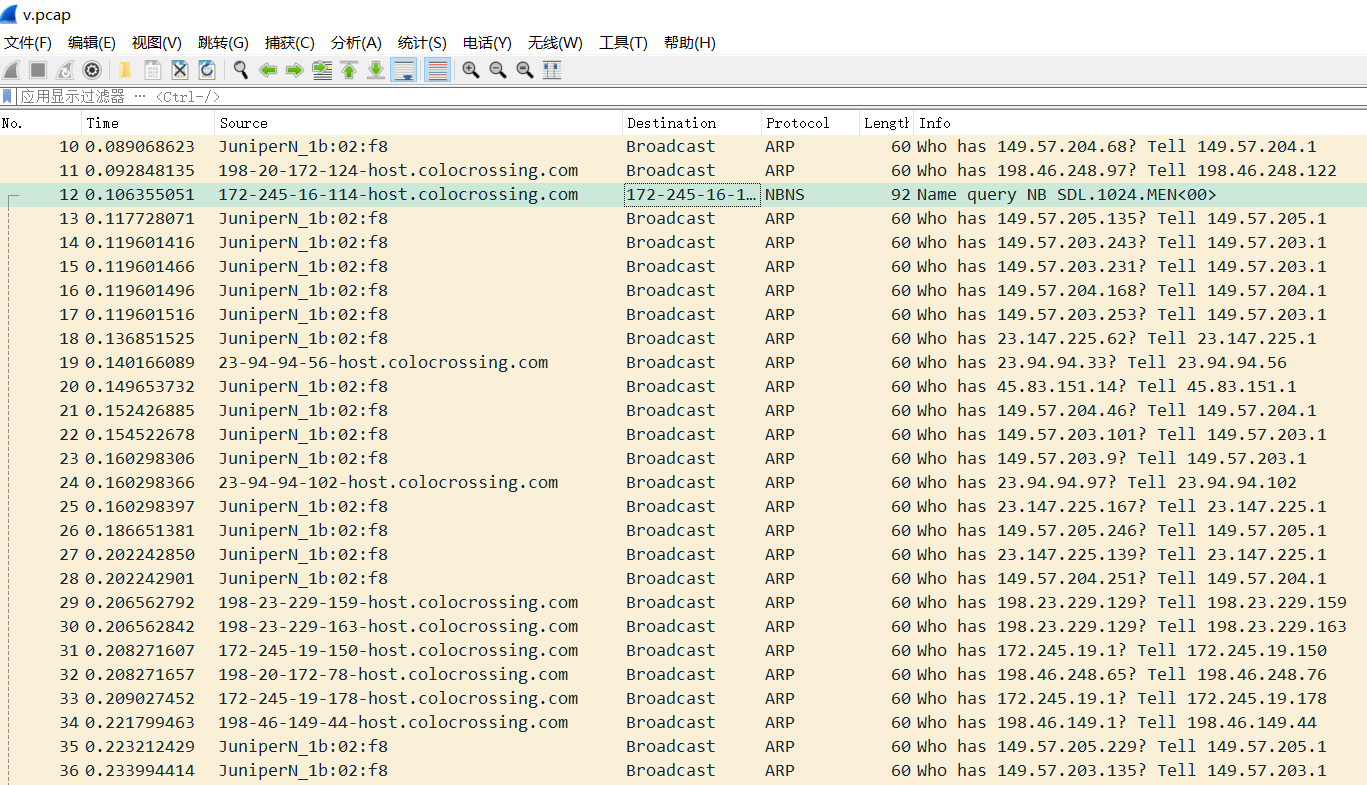
There are a lot of arp broadcasts. In the case of no operation, receiving data packets of about 100MiB per hour, there are 100MiB * 24 ≈ 2GiB in one hour, which greatly affects the network quality.
Not VirMach, but personally I don't buy Seagates anymore. I've had a mostly equal number of failures between WD and Seagate, maybe slightly higher Seagate, but what sealed it for me is the RMA process. The refurb drives that Seagate sends out as RMA replacements seem like they're all garbage, every single one failed in less than a year of use for me. The drives WD sends back haven't given me any more troubles than any other drive in my setup.
I paid for VPS 4 days ago, still hanging as "pending". Ticket also unanswered 4 days