




























All new Registrations are manually reviewed and approved, so a short delay after registration may occur before your account becomes active.
HostCrust by DigiRDP: CVE-Level Linux Patch Management (Free for 3 Servers)

We've been building HostCrust to make Linux server patching easier to understand and safer to carry out.
A small, outbound-only agent checks each connected server every day and runs Patch Proof against the security data for that server's distribution. When something needs attention, you can request a patch, reboot, or service restart through an approval-gated workflow. Each change is checked against your policy, approved by a person, executed, verified, and recorded in an exportable receipt.
The goal is straightforward: know which vulnerabilities actually affect a server, keep control over what gets changed, and have evidence of what happened afterwards.
The problem we're trying to solve
Keeping a fleet of Linux servers patched sounds simple until you need to work out what is genuinely vulnerable and prove that a fix was applied.
- apt list --upgradable tells you which packages have updates available. It does not tell you which CVEs are still open on that particular server.
- Debian and Ubuntu often backport security fixes without changing the upstream version number. Some scanners can therefore report a vulnerability even when the distribution has already shipped the fix.
- Manual patching, or a blanket cron job running apt upgrade, does not provide a clear approval trail or confirm that the change took effect.
Security frameworks and customer audits may require evidence that vulnerabilities were identified, addressed within defined timeframes, and verified. Shell history alone is not a useful change record.
HostCrust is built around three questions for every server: Which CVEs are actually unresolved? Who approved the remediation? And can you verify what happened?
Patch Proof: CVE status, not just available updates
HostCrust checks installed packages and the running kernel against the security data provided by the server's Linux distribution. It groups findings into four states:Open: A fix is available for the server's release, but the fixed package is not installed.
- Fixed by backport: The distribution has already included the security fix, even if the package version does not look newer in the way a generic scanner might expect.
- Not running: The fix is installed on disk, but the old kernel or service is still running. A reboot or service restart may be needed before the fix takes effect.
- No fix yet: The distribution has not published a fix for that issue, so there is nothing available to install yet.
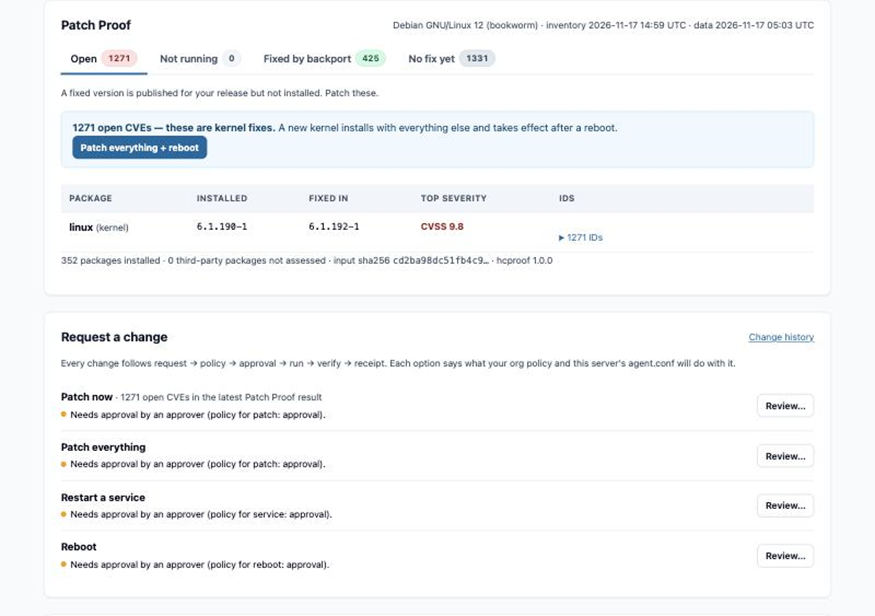
Changes require human approval
HostCrust does not treat finding an update as permission to install it.
Patches, reboots, and service restarts follow six steps:
1. Request the action.
2. Check policy to confirm the action is allowed.
3. Approve the exact action.
4. Run the approved action.
5. Verify that it took effect.
6. Record the result in a receipt.
Approval is tied to a hash of the action and its exact parameters. If the requested action changes, the existing approval no longer matches and the action will not run.
Automation and AI can request an action, but a person must approve it. You can configure this requirement by action class. After execution, HostCrust checks the result: for example, it re-runs Patch Proof after a patch and checks for a new boot ID after a reboot. It then creates a receipt.
The security model
An agent that can patch or restart services needs meaningful safeguards. Here is how HostCrust is designed today:
- Outbound-only connection: The agent does not listen for inbound connections or open a port. It connects to HostCrust over outbound HTTPS and pulls work when it checks in. HostCrust does not connect into your server.
- Server-side action allowlist: /etc/hostcrust/agent.conf controls which action classes the agent can run: read, patch, service, reboot, and shell. The agent checks this allowlist on the server before executing an action, including after approval.
- Approval is tied to the exact action: Each action is hashed with its parameters, and the approval applies to that hash. If the request changes, the approval is no longer valid.
- Shell access is disabled by default: Arbitrary command execution requires allow_shell = true in agent.conf, as well as an approval. If you leave it disabled, shell commands cannot be run through HostCrust.
- Verifiable change receipts: Each change produces a hash-chained receipt. The open-source hc-verify tool lets you verify the chain independently. Altering or removing a receipt causes verification to fail.
- Limited operator visibility: HostCrust operators can see account-level metadata and counts, but not your server list, inventories, job output, or receipts. This restriction is enforced in the product.
- Open-source guardrails: The agent-side guard (ssh-mcp-guard) and receipt verifier (hc-verify) are open source, so you can inspect the relevant components rather than relying only on our description.
Pricing
- Free for up to 3 connected servers, permanently.
- $5 per additional server per month. Billing is handled through Stripe. The first month and mid-month additions are prorated, and subscriptions renew on the 1st. There is no contract or minimum commitment.
What isn't available yet
Snapshots, rollback, backups, Slack approvals, and Windows support are on the roadmap. They are not part of the current product, and we don't want to imply otherwise.
Open source
The receipt verifier and guardrail tools are available under the Apache-2.0 licence on GitHub:
- patch-proof
- hc-verify
- ssh-mcp-guard
unattended-upgrades-check
In particular, hc-verify lets you verify a change-receipt chain without having to take our word for it.
Supported systemsUbuntu 20.04 and newer
- Debian 11 and newer
- AlmaLinux 8 and newer
- Rocky Linux 8 and newer
HostCrust can be used on cloud servers or your own hardware. The agent requires Python 3.6 or newer.
Website: https://hostcrust.com
Documentation: https://hostcrust.com/docs
Pricing: https://hostcrust.com/pricing
We'd value feedback on a few specific things
We're particularly interested in hearing from people who manage Debian or Ubuntu servers in production:
1. Patch Proof: Do these four CVE states give you the information you need to decide what to patch, or is there another state or piece of context you'd expect?
2. Approval workflow: Would tying approval to the exact action and its parameters give your team enough confidence? What would you need to see before allowing it on production servers?
3. Agent permissions: Does the per-server action allowlist make sense, or are there safeguards you'd want us to add?
4. Pricing: Is free for three servers and $5 per additional server/month useful for a small fleet? Where would the pricing stop making sense?
If you have a real-world patching or vulnerability-management workflow that you think HostCrust should handle better, we'd appreciate a concrete example. That's more useful to us than a general thumbs-up.
Thanks for taking a look. We'll be following the thread and answering questions.



