




























All new Registrations are manually reviewed and approved, so a short delay after registration may occur before your account becomes active.
DeluxHost: 90+ hours DOA, broken host storage array, locked SSH, and unresponsive support (Ticket #T

Hi LET community,
I am writing this post to share my unacceptable experience with DeluxHost.net and to warn fellow members about their Amsterdam node and support practices.
On September 16, I purchased a VPS from DeluxHost's promotion thread (Service: Z-3 #20887, IP: 162.141.92.3). From the very first minute of deployment, this server has been 100% DEAD ON ARRIVAL (DOA). As a paying customer, I have never been able to log in even once.
The Hard Evidence (Node Hardware Failure):
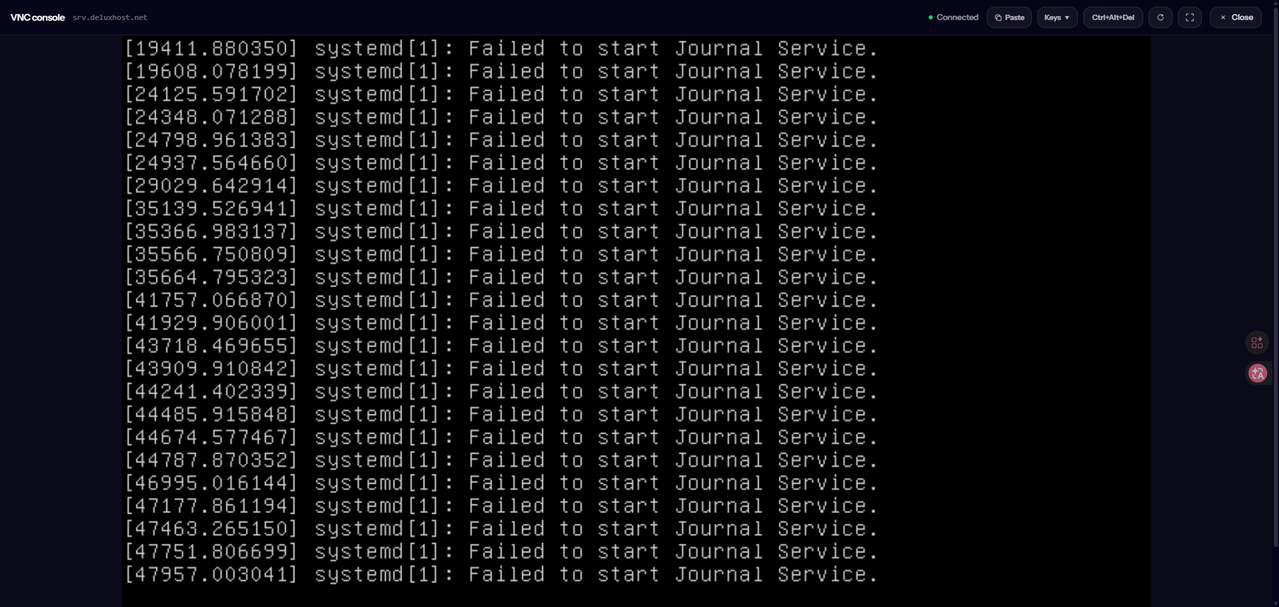
Right after provisioning, the VM failed to start properly. I performed a fresh OS reinstall directly from their control panel, opened the VNC console, and the VM immediately hung during initial boot with severe Linux kernel I/O deadlocks:
INFO: task jbd2/vda1-8 blocked for more than 241 secondssystemd[1]: Failed to start Journal Service(repeating failure looping for over 4300+ seconds)
The underlying physical host storage array / Ceph pool on this node is completely frozen. Reinstalling the OS obviously does not fix defective physical hardware.
90+ Hours of Ignored Support & Stall Tactics:
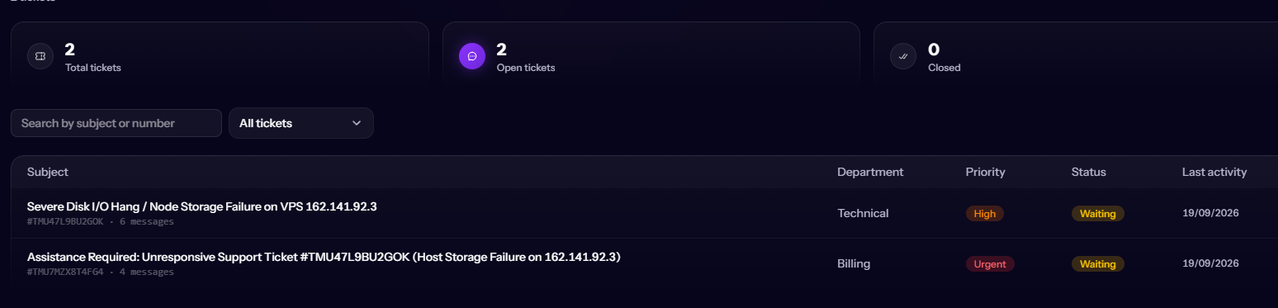
I opened Ticket #TMU47L9BU2GOK over 3 days ago:
1. Over 24 hours of complete silence.
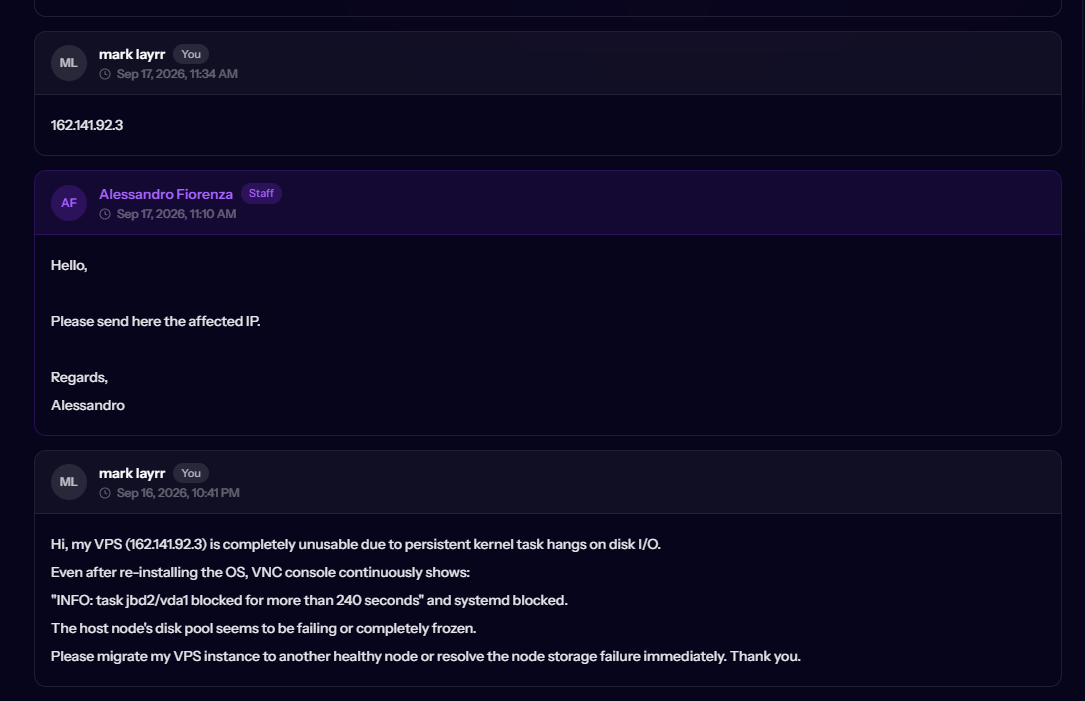
2. An agent ("Alessandro") finally asked for the IP (which was already in the ticket subject and body).
3. They modified the VM without notice, changing the SSH host key and locking root password authentication entirely ("Permission denied").
4. After another 24 hours of silence, the only response was: "Please check if the issue still persist now."
5. I immediately confirmed that the node is still deadlocked and SSH is still locked. Since then, total radio silence again.
Summary:
- Total downtime: 90+ hours (since day 1)
- Usable time: 0 minutes
- Support status: Unresponsive, brushing off severe hardware outages, refusing to migrate or communicate.
I noticed other members in their promo thread are also reporting issues with unusable nodes. I gave them ample time to either migrate my VM to a working physical host node or issue a refund, but they chose to ghost their customer.
I have full screenshots of the VNC console kernel crash, ticket history timestamps, and dmesg logs archived.
@DeluxHost Please address Ticket #TMU47L9BU2GOK publicly.



Comments
I observe over the 2 tickets a total of 10 messages
You do realise bumping a ticket moves it back to bottom of the queue, most providers tickets are looked at in order of longest since last reply added, bumping a ticket with more replies resets this which takes longer to get to you.
Yeah that's been happening with me recently as well.
Just turn it off and back on from the panel. Something is causing the virtual drive to become disconnected.
@xHosts I am well aware of ticket queue mechanics. However, you might have missed the timeline: I waited patiently for more than 24 hours between messages without bumping. The initial ticket was opened on the 16th and went completely unanswered for over a full day.
When an agent finally replied, they only asked for the IP (which was already in the ticket subject), modified the VM to a state where SSH password authentication failed entirely, and then went silent for another 24 hours. Waiting quietly for 90+ hours without a working server is not an acceptable solution for hardware that was dead on arrival.
@forest Thank you for confirming that this is indeed happening to other users as well!
Unfortunately, power cycling from the control panel did not fix it for me. I actually performed a completely fresh, clean OS reinstall directly from their panel. Right upon the first boot, before any user configuration, the VM immediately crashed on the VNC console with the exact same kernel deadlock:
task jbd2/vda1-8 blocked for more than 241 secondsandFailed to start Journal Service(looping for 4300+ seconds).The virtual disk appears to be completely unresponsive or permanently detached at the hypervisor/storage pool level. Reinstalling from scratch failed to get it working, which points directly to a broken host node.
Try powering it off from the dashboard then turning it back on.
@forest I already tried power cycling it from the dashboard multiple times, and as mentioned, I even performed a full clean OS reinstall from scratch. None of it helped.
The most frustrating part is that since the very day I purchased this server on September 16, I have NEVER been able to SSH into it even once. It has literally been 100% dead on arrival from minute one.
Power cycling cannot fix a hypervisor/Ceph storage array that is permanently dropping or locking the virtual drive.
Go to "advanced settings" and open the dashboard from there. It'll give you a VirtFusion console. Use the Poweroff option from that dashboard, not DeluxHost's vibe-coded dashboard.
Hi,
Try recreating the server no, that should resolve your issue.
And no, opening multiple tickets doesn't help, nor does replying with things like "either you help me or I'll post everything on LET," since that isn't a matter of technical interest to me.
You are right about the wait, though, we are expanding the technical team, because they took far too long to fix a problem that could have been resolved in seconds.
Let me know if it works.
@DeluxHost Thank you for stepping in and acknowledging the excessive delay.
I will try recreating the server from the panel as instructed right now.
To be fair, nobody wants to escalate issues to LET publicly. But when a paying customer receives zero communication for 90+ hours while a ticket could have been "resolved in seconds" as you acknowledged, public escalation becomes the only way to get basic attention.
I will test the recreation now and update the thread with the result.
@DeluxHost Update: Following the recreation/reinstall, the VM was assigned a new IP (migrated to a healthy host node).
I have just thoroughly tested it via SSH, and I can confirm that the server is now FINALLY working properly. There are no kernel I/O hangs, load average is normal (0.00), and access is fully restored. The issue is now resolved.
Thank you for acknowledging the delay and fixing the host assignment. I hope your support workflow improves so tickets can indeed be handled in seconds rather than days.
Marking this issue as resolved.
I’m glad to hear that, thank you for the collaboration, and apologies for the delay.
Support remains a critical issue that needs resolving, but I am doing my best to help within my capabilities.
@forest A huge shout-out and thank you to you, my friend!
I took your advice and went into the advanced settings to access the raw VirtFusion panel. After power cycling and triggering a fresh recreation from there, the VM was finally reprovisioned onto a brand new host node with a new IP.
I just tested it via SSH—it works flawlessly now! Zero I/O hangs, 0.00 load, and smooth access.
Your technical tip and confirmation that this wasn't an isolated issue made all the difference in getting this resolved. Truly appreciate your help and solidarity in the community! Cheers! 🍻
If it happens again, just do the same thing. You won't need to recreate a new VM. It should just start working again after the reboot. Not sure why, but it does.
Just today I woke up to a bunch of I/O errors on vda. I just powered off and on from VirtFusion and it was fine.