


























All new Registrations are manually reviewed and approved, so a short delay after registration may occur before your account becomes active.
InterServer adding their own SSH key to unmanaged dedicated servers?

I was auditing one of our unmanaged dedicated servers at InterServer today and found an SSH key in ~/.ssh/authorized_keys that none of us added.
The key comment is:
and the source IP is:
66.45.228.251
trouble-free.net redirects to InterServer.
So I opened a ticket asking why their SSH key exists on our unmanaged bare metal server.
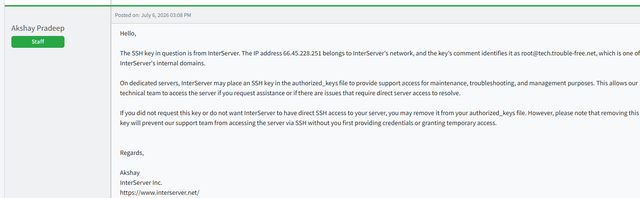
Their first reply was:
"On dedicated servers, InterServer may place an SSH key in the authorized_keys file to provide support access for maintenance, troubleshooting, and management purposes."
I then asked if this is documented anywhere because I couldn't find anything mentioning it.
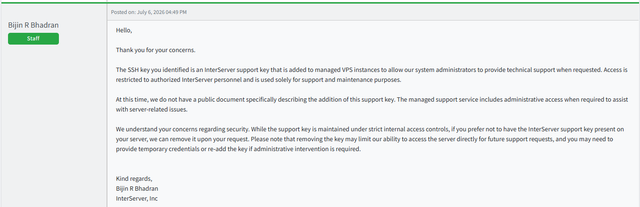
Later another staff member replied:
"The SSH key you identified is an InterServer support key that is added to managed VPS instances..."
The problem is... this isn't a managed VPS.
It's an unmanaged dedicated server.
So I pointed that out, and now I'm getting two different explanations:
One says they add it to dedicated servers.
Another says it's only for managed VPS.
Yet the key is sitting on my unmanaged dedicated server.
I also asked whether this practice is documented anywhere.
Their reply:
"At this time, we do not have a public document specifically describing the addition of this support key."
Personally, I don't think a provider should be placing permanent SSH keys on unmanaged dedicated servers without clearly disclosing it beforehand. If support access is needed, I'd expect temporary credentials or a temporary key that I explicitly authorize.
I'm not accusing InterServer of accessing my server or saying they've done anything malicious. My concern is simply that I wasn't aware they retained SSH access to an unmanaged dedicated server, and apparently there's no public documentation explaining this.
Has anyone else with an InterServer dedicated server checked their authorized_keys? I'm curious whether this is standard across all dedicated servers or if this is an exception.
Screenshots



Comments
My initial reaction: what the actual f?
Oof nasty.
I suspect they use the same install for vps and dedis
Is it like if you have nothing to hide, you have nothing to worry about the provider having backdoor access to your servers? @interservermike
sounds like they don't have it documented properly internally either, oversight i guess. maybe this is enough to nudge it in the right direction.
For a VPS I could ignore this given the virtualised access layer.
For a dedicated machine, 0 documentation. No.
It’s a Gray area for sure law wise, but as a US company i feel they would be most susceptible to a GDPR failure, or worse case a CFAA violation, although i’m not sure how this would work as they “own” the hardware, unless your contract was specific about soley your access.
I mean, depending on what you hosted e.g Health Care data, would make it 100% a crime for them to do this.
disable root logon in the sshd config and change the port, its my default setup.
remove the key...
Yeah, if i'm not completely mistaken this also has been the general default for quite some time now and the fact that templates tend to screw with this to avoid having to create a custom user account shouldn't stop people from putting it back. It's a very sane default. I mean, i guess with key auth only it might be ok-ish but in general you shouldn't just ssh into a server as root.
100% this. If this was my server the key would be gone the second i see it. Probably not due to being deleted but due to me doing a clean reinstall from ISO. Who knows what other surprises might be lurking there?
In the old days (circa 2012 or so), OVH also had its own SSH key added to dedicated servers.
Exact, first of all, do a clean install with ISO.
not just ovh, but there are many companies who still add their keys, or even secondary users for quick support, hardware debug & monitoring.
these low end vps providers will get your hardware fried with cheap vps plans used for all kind of weird stuff, and migrate away like nothing happened, provider is left to deal with all the costs.
wait... so they use the same key or all "(un)managed" dedis or am i misunderstanding this?
More likely ALL.
same here
I'm guessing they do a standard template for everything and adding the authorized key is part of it. Haven't they logged in since you got that box? I would personally delete/remove it it if I couldn't use ipmi/etc to manually clean install an OS and also verify every port that has a listener on it...
Good things to do if it's a provider image or manual install:
Do a clean reinstall from ISO and use some form of disk encryption so that they can't then add it later while doing "maintenance". That's crazy behavior, any provider who claims to need such a thing is grotesquely incompetent at best and actively malicious at worst.
Always install your servers directly from an ISO for any important use cases.
And if it doesn't support ISO, you can install fresh Debian anyway:
I also found this file on my InterServer server:
/root/.ssh/authorized_keys2
It contains the same content and source address:
from="66.45.228.251" ... [email protected]