



























New on LowEndTalk? Please Register and read our Community Rules.
All new Registrations are manually reviewed and approved, so a short delay after registration may occur before your account becomes active.
All new Registrations are manually reviewed and approved, so a short delay after registration may occur before your account becomes active.



Comments
And that's actually the case, our hard limits prior to kill are higher and should perfectly fine accommodate overheads. Installations via a template do work and do run well below the 512MB RAM ceiling. Once you hit an upgrade, things change, if you do not have any swap enabled. SWAP being enabled does fix upgrade issues.
Problem will be easily solved in full once we remove these plans and we'll avoid any other frustrated users. I am sure that users of our services will appreciate that for our 13 years of service, this is the first such thread, meaning that us "overselling RAM" on KVM machines and processes arbitrarily killed via OOM killer (which for some reason did not choose biggest consumer, but the literally smallest 512MB VM) is insane.
To give further context - we used to have a much more lenient policy - 14 days within the order. A certain type of users, very common in these forums - order and cancel on 13th day. We refund and cycle repeats. Having a strict TOS and making exceptions is easier than having no such policy and dealing with it post it happens.
Maybe one refund per account, regardless of whether it's first or fifth order?
So why was the machine turned off?
So why is it working everywhere else?
Regardless of how much RAM I'm using, I do not expect the VM to "just turn off". I'd expect the OOM killer in the VM to kill some stuff, if memory usage is really critical.
But for some reason the VM was turned off before that. On all other 512M instances I've tested, it worked with 512M (as the debian recommendations say). No OOM killer. It was not a memory problem "within the VM".
Also, swap is not a fix, it's a dirty workaround.
Anyways, as the problem is solved, I'm out here. Unfortunately I can't close the thread.
That AI Detection is useless af. Just typed normal Stuff, everytime it told me it's AI.
This does sound odd, like OOM killer on the host killing the process because it's too full. Definitely not a normal practice. The expectation with KVM is that you get 100% of that memory sold. It's not normally used in a balloon fashion. VNC should be showing OOM messages (of the guest) in this case, unless there's some type of stability issue crashing the guest.
I haven't had any issues with Debian on 768MB. I imagine it'd be okay even with 512MB, but haven't tested it. I am using the "nocloud" cloud image.
On the other hand, if you did have a swap file (preferably partition,) and swapped excessively, being booted off for that reason is common as well. But often that's for extended swapping and done by hand, so not automatic.
maybe you're a robot! do you have issues with captchas?
Perhaps you're so naive that you believe all the rubbish this AI detection claims about.
@patrick7
AlphaVPS / @AlexBarakov without any doubt is a top-class provider. Even better, if anyone of their team make a mistake, Alex Barakov openly and without hesitation admits it and apologizes. WTF more could one want?
IMO the true cause is you stubbornly insisting that some new-ish version of debian can be installed and flawlessly run within just 512 MB. If you really were professional you'd have installed Alpine or some other decent small distro.
Starting a bashing thread against a provider in order to either get refunded or at least get revenge is a despicable and nasty move. Sadly AlphaVPS highly likely will not put you on blacklists as they are truly friendly.
You'll be remembered.
A "professional person" checks the manual of the software that should be installed. You can find it here.
https://www.debian.org/releases/stable/amd64/ch02s05.en.html
And debian IS A DECENT DISTRO. Its the distro most servers are running with!
I tried it on the bilateral way, but unfortunately they refused both options: fix a) the problem or b) issue a refund. Their "solution" was to upgrade memory. I don't need 1GB just to run an empty debian with tailscale.
I'm not expecting wonders. I just expect that I can run the software that needs 512M on a server that has 512M. And it's a fact that an AlphaVPS server with 512M behaves different than a 512M VPS on almost every other provider.
Also this thread was not for "bashing or to get refunded". For the refund, I opened a paypal dispute (which was closed in my favor, btw).
I guess you aren't one as it specifically says:
You:
"We recommend at least 512MB of memory and 4GB of hard disk space to perform an installation"
And as I wrote previously the VM has no chance to swap since it was just plugged off before. Also there's no feature "do swap for the installation" in the installer. And also, it works at other providers WITHOUT any SWAP!
Memory in the VM was never a problem. It was the OOM killer on the host, which does not take the overhead in account. At least not enough overhead. If the problem was in the VM, the VM would not have been terminated, and OOM killer in the VM would have started to kill processes, showing it's output on the VNC console.
If the OOM killer in my VM would have shown up, there would be no thread on LET, and no PayPal dispute, because this whould have been normal behaviour. But just pulling the plug, is not normal behaviour.
@Obelous, as I previously mentioned, I'm happy with the refund. And yes, I'd have preferred a solution without paypal dispute.
I'm out here now. Please close.
Infested by systemd cancer, software packets way older than others, also had very nasty security problems, etc.
(a) there are way more creatures eating shit than there are humans, so shit is a "decent food"?
(b) because it happens to be the herd OS, for whatever reason, mainly "everybody uses it" and "easy to use" I guess are major ones
And well noted, we're not talking about Joe's and Jane's choice here but an OS for a tight VM!
I myself occasionally use a debian derivate, but on a modern multi-core, lots of RAM VM on a desktop.
(emphasis mine)
In other words, you triggered what's the kill switch in hosting and hence deserve to be on all black-lists. Despicable and nasty, as I said. And now fuck off!
Right now, we have not finished our own template filter as we are calling it, so we are just using the official distribution provided daily cloud images.
That means we have checked each one and put it out based on the minimum it will run on and also allow package manager use, we did a tiny bit of work within cloud init to allow alpine to run on 128mb but thats the exception.
The long term plan is to have all templates pulled and then rebuilt locally to strip all the extra stuff out that will never be needed on tierhive, realistically that will mean probably about half the ram use per deployment.
Debian 13 can run in 128mb fine with apt, I have a guide coming out soon on that, I have it down to I think 38mb from memory and I have it running nginx, mariadb and php/fpm and wordpress within 83mb https://pop2.me is the example
However, you did make an important point, installing from scratch, you will probably have issues, especially from ISO, probably more luck with chainloading netboot.xyz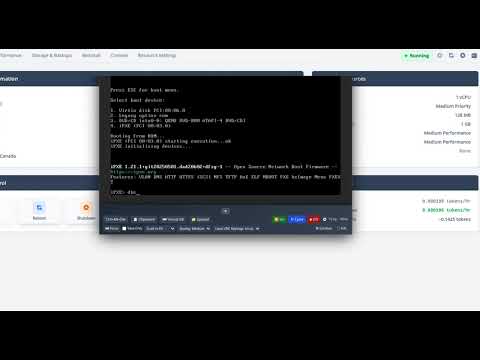 (TierHive video showing how)
You can always just boost the ram up, I imagine 384 would be enough, just for the first hour, then downgrade.
Hope that helps!
Ant.
Edit: just scanned this whole thread, probably should have done that before answering. @AlexBarakov is a solid provider who I have known off and on for maybe 10 years or more now from various angles, user error is real, lack of ability or ignorance of details can = abuse of service.
Shame to lose the smaller plans, but I understand the response.
I don't recommend anyone attempt to self-install Debian from an ISO on a VPS without 768 MB of RAM unless you really know what you are doing.
Sorry, I don't understand this. Why do you have ANY "hard limits prior to kill" for memory? You tell the VM how much RAM it has via QEMU and it can't exceed that. You don't need ANY kind of limits on that, it just works.
In the presence of such limits at all, I suspect you've done something stupid like set the limit to base-10 512MB rather than base-2 512MB.
As for @patrick7, you could maybe try editing the grub.cfg / interrupting it during boot and doing it one-off to change the boot command line to add
highmem=500Mormem=500Mor similar to test that theory (I've not done that myself, so maybe you need to google to get it right). Assuming of course that you do have some swap space activated.What docs?
Edit: I scrolled up and saw the Debian page. Did you do the low memory hacks needed?