



























All new Registrations are manually reviewed and approved, so a short delay after registration may occur before your account becomes active.
Servitro VPS (AMD EPYC 7443P, Frankfurt) has lost IPv4, anyone else?
 BuxtonTheRed
Member
BuxtonTheRed
Member
Since about 19:43 UTC, Wednesday 11 March (it is now about 23:33 UTC on same day), my VPS at Servitro (apparently in Frankfurt) has lost IPv4 routing to the internet. One of the $20 special offer ones as promoted by them on here.
I can get to it through Virtfusion's VNC console and my VPS appears to have IPv6 access, but IPv4 routing is failed entirely. Rebooting my VPS doesn't help at all, in case you were wondering.
No reply to support ticket yet, which is now about an hour old. I hope it doesn't get the same "ignored for several days and then closed with no response" fate of my previous ticket from about a week ago on a different (but also pretty terrible) issue. The UK phone number on their website goes straight to voicemail which barely works (hangs up after maybe 10 seconds of recording time).
I'm not unreasonable. Really I'm not. If it had been down for 30-90 minutes, rather than nearly 4 hours so far, I could cope. If the "Announcements" or "Network Status" pages in their main client portal displayed any information acknowledging a problem, I could cope.
If my VPS was just performing slower than expected for a while (on compute or connectivity), I could cope - because that would be "not entirely surprising" for a bargain bucket VPS offering like this.
Aah well, good thing it was only cheap - and that all of my notes and knowledge on what I had set up on it are stored locally.
I do not think the "444 Days of reliable service" claim on their website is appropriate for them to be making.



Comments
Traceroute.
$20/y or $20/m, because I have different expectations for both.
My $12/y from them is going up and down according to hetrixtools, but can't really complain at the low price point
Same - I have 3 VPS that are down.
Anybody have a datalix VPS? Is it working? Did Servitro forget to pay the VPS bill for their panel?
Sure, might as well.
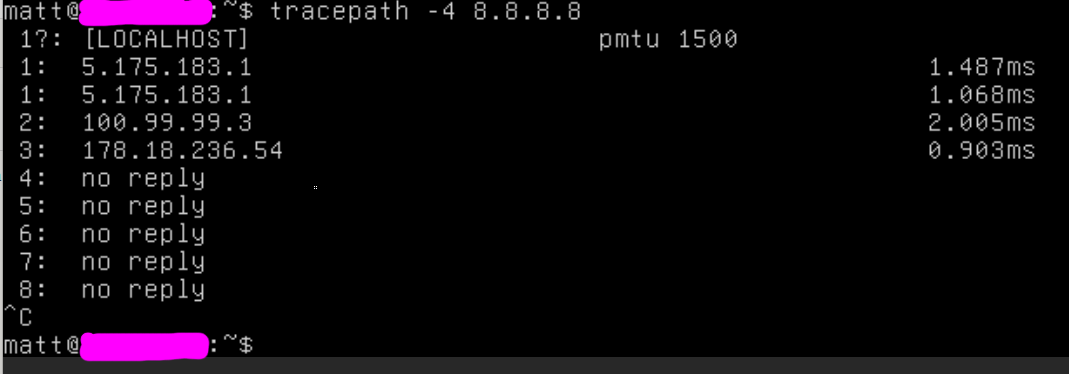
1: tracepath out from within server (as I was able to reach it by VNC last night):
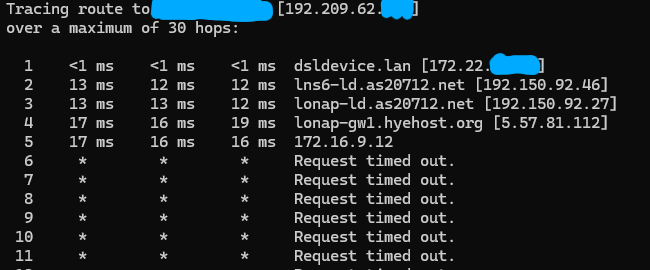
2: tracert from my home PC to server:
For what it's worth, I am able to reach my.servitro.com and platform.servitro.com (which is why I was able to get to the Virtfusion panel and use its VNC access to diagnose things a bit).
There are some signs of life from Servitro, as they sent this out by email at 10:30 UTC today:
For now I'll just periodically refresh my control panels until I see a new IP show up.
Panel is now working. It was not working a few hours ago. I have a VPS with a 5.231.X.X IP that I can access.
Had one VPS with a late payment that suspended. Paid that invoice and it still hasn't un-suspended, so cron must be messed up for WHMCS.
My VPS is now showing a new IPv4 address in an entirely different netblock, it is up and can be reached there. I've updated relevant DNS records and I've edited my hosts file in the interim.
Now, all I have to do is answer this question: am I more cheap, or am I more fussy? And that's something nobody else can possibly help me with
hmm my server works fine with no IP change.