

























Howdy, Stranger!

It looks like you're new here. If you want to get involved, click one of these buttons!


Shells Virtual Desktop
BMail.ag - Secure Email Service
Server.net
CPLicense.net
VPS Server
Buy VPN
Vultr
VMs for AI
HostDare
ReliableSite White-Label Dedicated Hosting for Resellers
InterServer VPS
BMail.ag - Secure Email Service
Best VPN
High-Performance Bare Metal Server Solutions
Karvl.com
Server Mania Cloud Hosting
DataWagon Hosting
AlphaVPS Hosting
Evoxt.com
Clouvider
VPS Hosting with NVMe
Residential IPs in the US & 4G Mobile Proxies in EU & US with Unlimited Bandwidth
ReliableSite White-Label Dedicated Hosting for Resellers
Rabisu - Hosting Solutions
Shells Virtual Desktop
New on LowEndTalk? Please Register and read our Community Rules.

All new Registrations are manually reviewed and approved, so a short delay after registration may occur before your account becomes active.

★ VirMach ★ RYZEN ★ NVMe ★★ $8.88/YR- 384MB ★★ $21.85/YR- 2.5GB ★ Instant ★ Japan Pre-order ★ & More

1127128130132133339

Comments

  • edited April 2022

    @Martachjbvguknv said:

    @VirMach said:

    @vhhjkgl said:

    @Martachjbvguknv said:
    The network of TYOC040 is broken again.
    I ping gateway from my server, and it return
    about 300±200ms.

    virmach checked the Node40 and still did not find the cause of the problem。

    The cause is already found.

    Now we're still working on the permanent fix. I'm trying to avoid doing what you or someone else previously suggested which is just abandoning the node. It's not that the node has any problems, but it's possible that the fix may take longer than just moving everyone to another node. I'm still evaluating.

    Now it down to 100±100ms, nice.

    now,most of the time, it's 50±50ms.

  • it seems like something wrong on node 35's network, extremely high latency.

  • @VirMach said: So with that said, I'm just wondering, and would like your feedback. How do you imagine this should have been done instead? Should we have only deployed Gen3 servers for Tokyo? The next batch will be Gen3, and if that's the case then we'll allow people to move to those free of charge. As for the issues we faced, do you really not believe they were handled to the best of our ability?

    Dude, you're probably overcomplicating things again. As a long-time user of Virmach since 2017, I'd say that's not the case. In fact, most of the people in this thread don't mean to question in any way that you're not doing everything you can to try to fix the problem, rather, I precisely sense that you're working very hard on this and recognize the effective measures all of you are taking to prevent further deterioration of the Tokyo area node, otherwise I don't think I would be here so much to say so much and just go ahead and request a refund.

    @VirMach said: What would be done in this case? We also quickly already located the interrupt issue and know how to fix it, we are just evaluating how we should proceed, if it would be faster to recreate all these and how we would plan that with customers to avoid any data loss and provide proper notice without further delays, or if it would be faster going through all existing services and mass powering down and contacting those virtual servers affecting the node. We've also offered to migrate these people to existing nodes in San Jose for the time being and this timeline has only been the last few days to a week. We have not added a significant amount of delay compared to the initial communication, and other locations were and still are available for people who do not want to participate in a pre-order product. Nodes in Phoenix were up for weeks to months. Nodes in Seattle, similar. Yet people did not pick these locations that were available and opted to wait for another knowing that it was a pre-order with a timeline in the weeks.

    I don't mean to accuse anyone here, but the lack of a good communication channel ealier (Now you have built a specific web page for updating the latest news. That's commendable.) and the fact that people's expectations for the Tokyo pre-sale were too far off from the reality did lead to what seemed to be a bit of an emotional and irrational pre-sale.

    I believe that people living in the Asia Pacific region should be quite interested in the Tokyo pre-sale, as few providers will be willing to offer products in this location on the lower end of the lineup, which is usually a high-end gamer's playground. Not to mention the fact that after the test IP was given in the back, the routing to China was the better IIJ [AS2497] instead of the usual NTT [AS2914], which is exciting and makes people have an unrealistic fantasy about this pre-sale - it seems that many have forgotten that the offer they paid could not afford their illusions and that everything was realistic.

    Another thing you are missing is that some people, as far as I know, will mistakenly believe that once all the equipment is successfully cleared somewhere, it will be ready to go live in the server room immediately.

    For many people, participating in this pre-sale is, in itself, a desire to buy a more affordable Tokyo-area VPS. I know a lot of friends who are not too interested in migrating because they have already purchased many San Jose, Los Angeles, and Seattle-area VPSs.

    Don't worry too much, you are doing just fine now aren't you? Everything is progressing in a good direction and I will wait patiently for all the VPS in Tokyo area to be up and running. If you are worried that the latest news update page due to the lack of Chinese version, Google translation will lead to some translation errors will result in disagreement, I may be able to help by providing you with the Chinese version of the translation. :wink:

  • triaqutriaqu Member
    edited April 2022

    @VirMach said:
    All broken disk services fixed on TYOC033. You just need to re-install the OS.

    There is an network problem of gateway now.

  • FrankZFrankZ Barred
    edited April 2022

    Just putting this out here ...

    ## add 512MB swap file ##

    dd if=/dev/zero of=/mnt/swapfile bs=1024 count=512k
    chmod 600 /mnt/swapfile
    mkswap /mnt/swapfile
    swapon /mnt/swapfile
    echo '/mnt/swapfile   swap    swap    defaults        0       0' >> /etc/fstab
    

    Or the one liner (same as above) ...

    dd if=/dev/zero of=/mnt/swapfile bs=1024 count=512k && chmod 600 /mnt/swapfile && mkswap /mnt/swapfile && swapon /mnt/swapfile && echo '/mnt/swapfile swap swap defaults 0 0' >> /etc/fstab

    Thanked by 1plumberg
  • VirMachVirMach Member, Patron Provider

    @skorous said:

    @VirMach said: It's the same issue I see with everyone else on Debian 10 + 384MB. It's crashing due to OOM.

    So it crashes due to OOM and then the automation shuts it down the way it would one of the invalid OS machine?

    libvirt killed the process because it crashed, since it ran out of memory.

  • Such a nice day.When I woke up, I was migrated out of the original node, but the new one started "boom boom ".

  • @VirMach Sleep, only a good state can deal with problems more efficiently!Good luck.

  • 34 node network problems

  • VirMachVirMach Member, Patron Provider

    @tototo said:
    This is just a report, but the upload speed now looks a bit slow.

    root@TYOC039:~# speedtest -L
    Closest servers:
    
        ID  Name                           Location             Country
    ==============================================================================
     20976  GLBB Japan                     Tokyo                Japan
     21569  i3D.net                        Tokyo                Japan
     38241  BudgetVM                       Tokyo                Japan
     28910  fdcservers.net                 Tokyo                Japan
     24333  Rakuten Mobile, Inc            Tokyo                Japan
     44988  Misaka Network, Inc.           Tokyo                Japan
     48463  IPA CyberLab 400G              Tokyo                Japan
     14623  IPA CyberLab                   Bunkyo               Japan
      8407  Allied Telesis Capital Corporation Sagamihara           Japan
      6087  Allied Telesis Capital Corporation Fussa-shi            Japan
    
    root@TYOC039:~# speedtest -s 38241
    
       Speedtest by Ookla
    
         Server: BudgetVM - Tokyo (id = 38241)
            ISP: Owl Limited
        Latency:     2.94 ms   (9.44 ms jitter)
       Download:   291.67 Mbps (data used: 346.0 MB )
         Upload:    17.36 Mbps (data used: 33.6 MB )
    Packet Loss:     0.0%
     Result URL: https://www.speedtest.net/result/c/4050527f-d83f-4c26-982f-dd1f6427d848
    
    
    root@TYOC039:~# speedtest -s 21569
    
       Speedtest by Ookla
    
         Server: i3D.net - Tokyo (id = 21569)
            ISP: Owl Limited
        Latency:     2.52 ms   (0.52 ms jitter)
       Download:   244.75 Mbps (data used: 445.8 MB )
         Upload:    26.42 Mbps (data used: 29.6 MB )
    Packet Loss:     1.0%
     Result URL: https://www.speedtest.net/result/c/dbe02969-5c69-4fb6-a36a-870f20d8faef
    
    root@TYOC039:~# speedtest -s 48463
    
       Speedtest by Ookla
    
         Server: IPA CyberLab 400G - Tokyo (id = 48463)
            ISP: Owl Limited
        Latency:     3.10 ms   (1.60 ms jitter)
       Download:   223.70 Mbps (data used: 334.8 MB )
         Upload:    21.10 Mbps (data used: 38.4 MB )
    Packet Loss:     1.8%
     Result URL: https://www.speedtest.net/result/c/accfedba-de0b-4efc-9088-9a910cd785fd
    

    @sour_lemon said:
    37 node network problems

    root@45:~# traceroute 45.149.159.1

    traceroute to 45.149.159.1 (45.149.159.1), 30 hops max, 46 byte packets
    1 45.66.128.1.static.xtom.com (45.66.128.1) 127.956 ms 172.714 ms 111.461 ms
    2 45.149.159.1 (45.149.159.1) 739.663 ms * *

    @passwa said:
    Sudden high latency on nodes 33 and 37

    @miau said:
    Node 39 suddenly under high steal again

    I dealt with IP stealing on all nodes, I had to re-arm the solution against this and reloaded ebtables. This caused most nodes to go into high interrupts.

    It looks like either some of these got hacked already from weak passwords or just some abusive customer(s) were taking advantage of that. Anyway, I've had this happen before in some rare cases in the past where someone was hosting a traffic relay service or perhaps a botnet, and when for example the VPS is suspended, there's either broadcast radiation or the thousands of IP addresses previously involved still try to make a connection with the VPS and it ends up essentially ending up similar to a denial of service attack, and we end up with a tight packet loop. Anyway, I'm sure I could try to fix it without a reboot but at this point a reboot would be best. It'll also help me identify problematic VMs on all nodes as the logs will be more tightly packed together.

    It'd be interesting if it's somehow more directly related to ebtables as I did technically reload that first on TYOC040 but at that point, I did everything first on TYOC040.

    Here's what I mean, here's an overlap graph, and the moment CPU and network shift is when high packets of traffic could no longer reach that virtual adapter.

    Thanked by 2FrankZ bulbasaur
  • VirMachVirMach Member, Patron Provider

    @VirMach said: It'd be interesting if it's somehow more directly related to ebtables as I did technically reload that first on TYOC040 but at that point, I did everything first on TYOC040.

    This might actually be it. I'm going to look into it further.

  • VirMachVirMach Member, Patron Provider

    If everyone's network just got better then I'm going to have to have a little talk with SolusVM. That was a rhetorical question. Oh wait it wasn't even a question.

    Okay, yea, it looks like this is some kind of conflict with SolusVM's ARP attack protection feature and whatever we're doing on our end. I have a headache, I'll check on that later and I'm probably leaving for a couple hours. I'm going to get more creations going now.

  • something is happening on node 40. network is coming back

  • Hey boss , my vps is still suspension. The reason is "OS is causing overloading. Contact Priority Support." , I have submitted a ticket yesterday.But I have received our "[Important][TYOC040] Your service may be recreated
    " email.So I cancel the ticket. what should I do now?

  • FrankZFrankZ Barred
    edited April 2022

    @VirMach - Just an FYI on Node 39 there was some jitter between ~1:20PM and ~4:20PM PDT, which has cleared up now. The time on the graph below is based on CDT (2 hours ahead of you)

    Larger image here

    Network graph
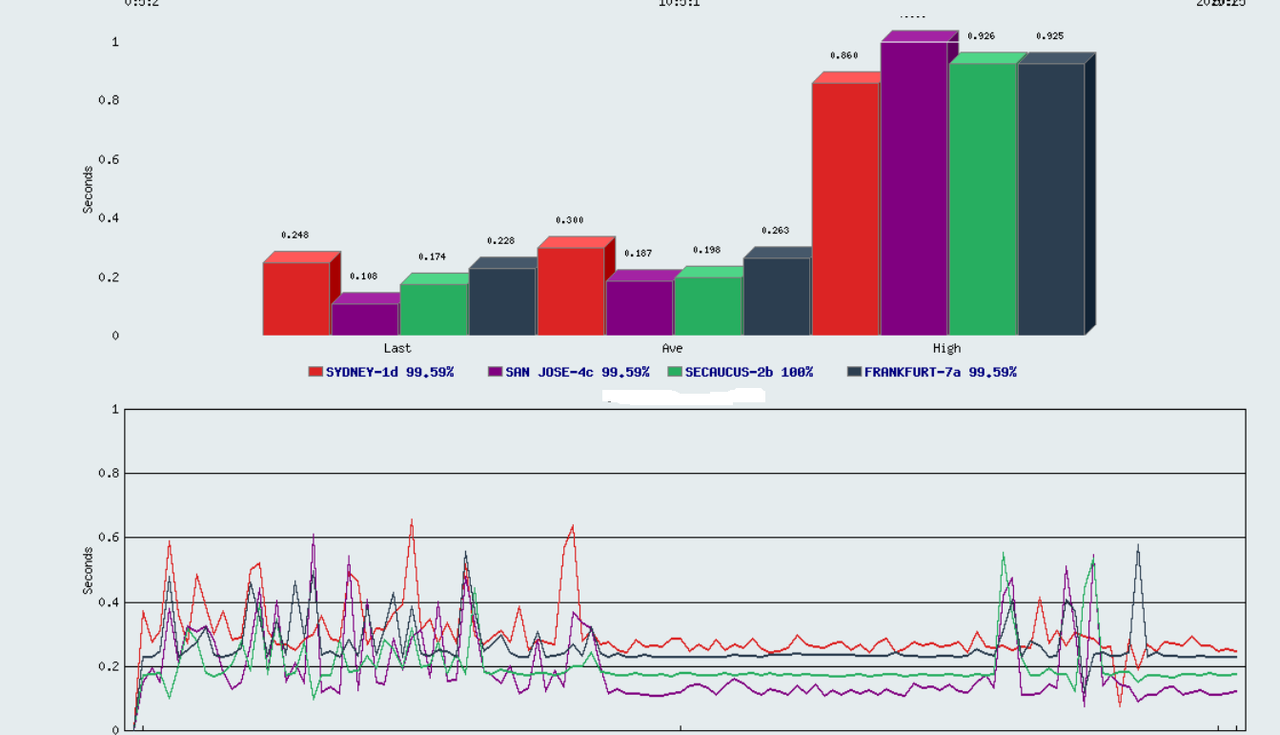
    Larger image here

    Thanked by 1ArcReactor
  • @VirMach said:
    If everyone's network just got better then I'm going to have to have a little talk with SolusVM. That was a rhetorical question. Oh wait it wasn't even a question.

    Okay, yea, it looks like this is some kind of conflict with SolusVM's ARP attack protection feature and whatever we're doing on our end. I have a headache, I'll check on that later and I'm probably leaving for a couple hours. I'm going to get more creations going now.

    yes,The network has been restored.

  • VirMachVirMach Member, Patron Provider

    @moehentai said:
    Hey boss , my vps is still suspension. The reason is "OS is causing overloading. Contact Priority Support." , I have submitted a ticket yesterday.But I have received our "[Important][TYOC040] Your service may be recreated
    " email.So I cancel the ticket. what should I do now?

    Sorry, these were going to be included in the recreations but I forgot to process them. I'm going to bring these back online now since they didn't get included in the recreations. Yours was suspended before the email.

  • @VirMach said:

    @qwerttaa said:
    ??????

    again...when i "apt-get autoclean"

    then...shutdown again...

    im off to bed

    good luck

    It's the same issue I see with everyone else on Debian 10 + 384MB. It's crashing due to OOM.

    before i reinstalled, i set up 2g swap

    same result

  • VirMachVirMach Member, Patron Provider
    edited April 2022

    @FrankZ said:
    @VirMach - Just an FYI on Node 39 there was some jitter between ~1:20PM and ~4:20PM PDT, which has cleared up now. The time on the graph below is based on CDT (2 hours ahead of you)


    Larger image here

    Yeah I saw the jitter on all nodes too. That timing is correlated with me enabling those options I think but I also noticed that it cleared up a little earlier than just now when I lifted all of them. Something else is probably going on too.

    Thanked by 1FrankZ
  • VirMachVirMach Member, Patron Provider

    @qwerttaa said:

    @VirMach said:

    @qwerttaa said:
    ??????

    again...when i "apt-get autoclean"

    then...shutdown again...

    im off to bed

    good luck

    It's the same issue I see with everyone else on Debian 10 + 384MB. It's crashing due to OOM.

    before i reinstalled, i set up 2g swap

    same result

    Yeah, from my experience if it goes OOM on apt-get stuff the swap won't help, you need more RAM. That's just a guess though, I'm not very experienced with running stuff on low RAM as I have access to a lot of free high RAM virtual servers due to my line of work.

  • @VirMach said:

    @qwerttaa said:

    @VirMach said:

    @qwerttaa said:
    ??????

    again...when i "apt-get autoclean"

    then...shutdown again...

    im off to bed

    good luck

    It's the same issue I see with everyone else on Debian 10 + 384MB. It's crashing due to OOM.

    before i reinstalled, i set up 2g swap

    same result

    Yeah, from my experience if it goes OOM on apt-get stuff the swap won't help, you need more RAM. That's just a guess though, I'm not very experienced with running stuff on low RAM as I have access to a lot of free high RAM virtual servers due to my line of work.

    upgraded from debian10 to debian11 with apt, not shutdown

    why?

  • VirMachVirMach Member, Patron Provider

    @qwerttaa said:

    @VirMach said:

    @qwerttaa said:

    @VirMach said:

    @qwerttaa said:
    ??????

    again...when i "apt-get autoclean"

    then...shutdown again...

    im off to bed

    good luck

    It's the same issue I see with everyone else on Debian 10 + 384MB. It's crashing due to OOM.

    before i reinstalled, i set up 2g swap

    same result

    Yeah, from my experience if it goes OOM on apt-get stuff the swap won't help, you need more RAM. That's just a guess though, I'm not very experienced with running stuff on low RAM as I have access to a lot of free high RAM virtual servers due to my line of work.

    upgraded from debian10 to debian11 with apt, not shutdown

    why?

    Probably because it didn't run out of memory then, but it runs out of memory now. I assume upgrading from Debian 10 to 11 means a lot of apps got updated too, and now those use more memory, so when you're now using Debian 11 and also trying to run whatever you're trying to run on top of that finally made it too much.

  • VirMachVirMach Member, Patron Provider
    edited April 2022

    @vhhjkgl said:
    @VirMach Sleep, only a good state can deal with problems more efficiently!Good luck.

    You're actually right today, but I just realized I haven't had my coffee today and that's the problem!

    Thanked by 2bdl ZA_capetown
  • VirMachVirMach Member, Patron Provider

    Okay guys, stagger creation script starting back up. I'll focus it on the two new nodes for now until they fill and then go over one more layer on all the nodes at the end.

    Thanked by 2FrankZ ZA_capetown
  • FrankZFrankZ Barred
    edited April 2022

    @VirMach said: but I just realized I haven't had my coffee today

    =

    @VirMach said: I have a headache,

    Thanked by 2bdl AlwaysSkint
  • VirMachVirMach Member, Patron Provider

    @FrankZ said:

    @VirMach said: but I just realized I haven't had my coffee today

    =

    @VirMach said: I have a headache,

    Maybe once or twice per week I get tired and can't think too well and I completely forget that I need coffee. I guess it reaches the point of being in such a bad state that I forget to even get coffee.

    I feel awful all day, and headache etc as you just mentioned nd for some reason I don't even remember the coffee. It's not like any other type of addiction (like cigarettes) where your body would remind you that you need to have it. Well at least not mine.

  • @VirMach said:

    @qwerttaa said:

    @VirMach said:

    @qwerttaa said:
    ??????

    again...when i "apt-get autoclean"

    then...shutdown again...

    im off to bed

    good luck

    It's the same issue I see with everyone else on Debian 10 + 384MB. It's crashing due to OOM.

    before i reinstalled, i set up 2g swap

    same result

    Yeah, from my experience if it goes OOM on apt-get stuff the swap won't help, you need more RAM. That's just a guess though, I'm not very experienced with running stuff on low RAM as I have access to a lot of free high RAM virtual servers due to my line of work.

    I don't think it's necessarily a OOM problem. I've been using a Virmach VPS with only 256MB RAM and 256MB swap on a KVM node for sometime now. It had Debian 9 initially installed through template and is running debian 11 installed via netboot.xyz. Never had any issue with apt or even aptitude although otherwise it's never heavily loaded either.
    Maybe it has something to do with the SSD still? Or the template from SolusVM?

  • VirMachVirMach Member, Patron Provider
    edited April 2022

    @lemoncube said: I don't think it's necessarily a OOM problem. I've been using a Virmach VPS with only 256MB RAM and 256MB swap on a KVM node for sometime now. It had Debian 9 initially installed through template and is running debian 11 installed via netboot.xyz. Never had any issue with apt or even aptitude although otherwise it's never heavily loaded either.
    Maybe it has something to do with the SSD still? Or the template from SolusVM?

    Well it's important to remember that "Debian 11" can mean a lot of different things. The other guy obviously isn't just running Debian 11 at its full minimalistic installation with absolutely nothing else, I assume? So it'd be Debian 10 + the upgrade of Debian 10 to Debian 11, maybe other things were added, and maybe something else is also running in the background.

    At least those are just my default assumptions, otherwise they're a true idler.

    (edit) Absolutely nothing to do with the SSD though, it's not that type of error and it's specifically OOM with the RAM amount as like 440MB or so which is what it gets cut off at for a 384MB plan.

  • @VirMach said:

    @qwerttaa said:

    @VirMach said:

    @qwerttaa said:

    @VirMach said:

    @qwerttaa said:
    ??????

    again...when i "apt-get autoclean"

    then...shutdown again...

    im off to bed

    good luck

    It's the same issue I see with everyone else on Debian 10 + 384MB. It's crashing due to OOM.

    before i reinstalled, i set up 2g swap

    same result

    Yeah, from my experience if it goes OOM on apt-get stuff the swap won't help, you need more RAM. That's just a guess though, I'm not very experienced with running stuff on low RAM as I have access to a lot of free high RAM virtual servers due to my line of work.

    upgraded from debian10 to debian11 with apt, not shutdown

    why?

    Probably because it didn't run out of memory then, but it runs out of memory now. I assume upgrading from Debian 10 to 11 means a lot of apps got updated too, and now those use more memory, so when you're now using Debian 11 and also trying to run whatever you're trying to run on top of that finally made it too much.

    root@AAA:~# apt update
    Hit:1 https://deb.debian.org/debian bullseye InRelease
    Get:2 https://deb.debian.org/debian bullseye-updates InRelease [39.4 kB]
    Hit:3 https://security.debian.org/debian-security bullseye-security InRelease
    Get:4 https://deb.debian.org/debian bullseye-backports InRelease [44.2 kB]
    Hit:5 http://nginx.org/packages/debian bullseye InRelease
    Get:6 https://deb.debian.org/debian bullseye-proposed-updates InRelease [44.6 kB]
    Fetched 128 kB in 1s (195 kB/s)
    Reading package lists... Done
    Building dependency tree... Done
    Reading state information... Done
    All packages are up to date.
    root@AAA:~# apt upgrade
    Reading package lists... Done
    Building dependency tree... Done
    Reading state information... Done
    Calculating upgrade... Done
    0 upgraded, 0 newly installed, 0 to remove and 0 not upgraded.
    root@AAA:~# apt autoclean
    Reading package lists... Done
    Building dependency tree... Done
    Reading state information... Done
    root@AAA:~# apt autoclean
    Reading package lists... Done
    Building dependency tree... Done
    Reading state information... Done
    root@AAA:~# apt autoclean
    Reading package lists... Done
    Building dependency tree... Done
    Reading state information... Done
    root@AAA:~# apt clean
    root@AAA:~# top
    top - 09:52:35 up 6:33, 1 user, load average: 0.00, 0.00, 0.00
    Tasks: 70 total, 2 running, 68 sleeping, 0 stopped, 0 zombie
    %Cpu(s): 0.0 us, 0.0 sy, 0.0 ni, 93.8 id, 0.3 wa, 0.0 hi, 2.9 si, 2.9 st
    MiB Mem : 348.5 total, 49.9 free, 55.3 used, 243.4 buff/cache
    MiB Swap: 256.0 total, 256.0 free, 0.0 used. 282.8 avail Mem

    i also have several vps, even 256 ovz
    same with debian11, no oom problems
    i can't understand...

  • VirMachVirMach Member, Patron Provider

    @qwerttaa said:

    @VirMach said:

    @qwerttaa said:

    @VirMach said:

    @qwerttaa said:

    @VirMach said:

    @qwerttaa said:
    ??????

    again...when i "apt-get autoclean"

    then...shutdown again...

    im off to bed

    good luck

    It's the same issue I see with everyone else on Debian 10 + 384MB. It's crashing due to OOM.

    before i reinstalled, i set up 2g swap

    same result

    Yeah, from my experience if it goes OOM on apt-get stuff the swap won't help, you need more RAM. That's just a guess though, I'm not very experienced with running stuff on low RAM as I have access to a lot of free high RAM virtual servers due to my line of work.

    upgraded from debian10 to debian11 with apt, not shutdown

    why?

    Probably because it didn't run out of memory then, but it runs out of memory now. I assume upgrading from Debian 10 to 11 means a lot of apps got updated too, and now those use more memory, so when you're now using Debian 11 and also trying to run whatever you're trying to run on top of that finally made it too much.

    root@AAA:~# apt update
    Hit:1 https://deb.debian.org/debian bullseye InRelease
    Get:2 https://deb.debian.org/debian bullseye-updates InRelease [39.4 kB]
    Hit:3 https://security.debian.org/debian-security bullseye-security InRelease
    Get:4 https://deb.debian.org/debian bullseye-backports InRelease [44.2 kB]
    Hit:5 http://nginx.org/packages/debian bullseye InRelease
    Get:6 https://deb.debian.org/debian bullseye-proposed-updates InRelease [44.6 kB]
    Fetched 128 kB in 1s (195 kB/s)
    Reading package lists... Done
    Building dependency tree... Done
    Reading state information... Done
    All packages are up to date.
    root@AAA:~# apt upgrade
    Reading package lists... Done
    Building dependency tree... Done
    Reading state information... Done
    Calculating upgrade... Done
    0 upgraded, 0 newly installed, 0 to remove and 0 not upgraded.
    root@AAA:~# apt autoclean
    Reading package lists... Done
    Building dependency tree... Done
    Reading state information... Done
    root@AAA:~# apt autoclean
    Reading package lists... Done
    Building dependency tree... Done
    Reading state information... Done
    root@AAA:~# apt autoclean
    Reading package lists... Done
    Building dependency tree... Done
    Reading state information... Done
    root@AAA:~# apt clean
    root@AAA:~# top
    top - 09:52:35 up 6:33, 1 user, load average: 0.00, 0.00, 0.00
    Tasks: 70 total, 2 running, 68 sleeping, 0 stopped, 0 zombie
    %Cpu(s): 0.0 us, 0.0 sy, 0.0 ni, 93.8 id, 0.3 wa, 0.0 hi, 2.9 si, 2.9 st
    MiB Mem : 348.5 total, 49.9 free, 55.3 used, 243.4 buff/cache
    MiB Swap: 256.0 total, 256.0 free, 0.0 used. 282.8 avail Mem

    i also have several vps, even 256 ovz
    same with debian11, no oom problems
    i can't understand...

    Let me get my coffee and I'll spin up Debian 10, upgrade it to 11, on the same node, using the same template, and see if I can reproduce that. If I do reproduce it I'll provide some feedback on what can maybe be done.

This discussion has been closed.
